Ryan Harrell

Ryan is a part-time DJ and full-time producer with over 15 years of experience. His interests span genres and includes everything from Classic Rock to EDM and Bollywood. He primarily works in Ableton, though he is also well-versed in Logic.

The Best Audio Interface for Beginners 2026: Our Top Picks

As a beginner, if there is a single “essential” piece of hardware in your studio, it’s an audio interface. Without one, you can’t practically produce any music. So to help you buy your first audio interface, we put together this guide to the best audio interface for beginners. You’ll learn what are some key features to look for in audio interfaces as a beginner, and what are the best options to choose from.

Best Overall

Focusrite Scarlett Solo

  • Easy to use
  • Well-priced
  • Compatible with all DAWs
Best Audio Quality

Audient iD4

  • Great mic preamps
  • Affordably priced
  • Distortion-free recording
Best for Beginners

Behringer UMC22

  • Highly affordable
  • Decent build quality
  • Good support & integration

I’ve long been a proponent of the minimalist home studio setup. Thanks to modern software, you can get 90-95% of the performance of a pro studio with little more than a DAW and some basic hardware.

One of these essential pieces of hardware is the audio interface.

As the name implies, an audio interface connects your computer to external hardware, i.e. it is an “interface” between the software (your DAW) and your hardware (mics, headphones, instruments). Without an interface, you are limited to the I/O capabilities and latency of your computer’s built-in sound card. In nearly every commercial computer, these are absolutely unfit for recording and producing music.

For example, without an audio interface, my current computer’s soundcard has a latency of nearly 100ms. This means that there is a very palpable lag between pressing a key and hearing it back. This makes real-time playback impossible.

Once I plug in my audio interface, however, this latency drops to 6ms each for input and output (for a total of 13ms latency). This is near instantaneous and allows me to play music in real-time – an absolute necessity for music production.

Besides latency, an audio interface also allows you to add multiple instruments as input. On my Focusrite Scarlett 2i2, for instance, I can plug in a microphone and electric guitar simultaneously. This makes it possible to record myself singing and playing guitar at the same time.

This is why I consider an audio interface to be the single most importance piece of hardware for any aspiring musician. Get a DAW, an audio interface, and a decent set of studio headphones and you’re on your way to start creating music.

Read on to discover the best audio interface for beginners you can buy right now.

We use rigorous research, reviews, and real-world performance when recommending products. Our reviewers include producers, performers, and active musicians. You can read more about our review process here. Be advised that MIDINation might earn referral commissions on purchases made through this website. This does not affect your final purchase price.
Note: As an Amazon Associate, MIDINation earns commissions for qualifying purchases made through Amazon links on this page.

About your reviewer
Ryan Harrell is the founder of MIDINation and an experienced producer/DJ. His first experience with electronic music production dates back to Cubase 3.0 in the summer of 1997, and he’s been a fan ever since. He prefers Ableton as his primary DAW these days, though he is still partial to Cubase and Pro Tools. He lives in San Diego and freelances as a producer and part-time DJ.

The 6 Best Audio Interfaces for Beginners

Let’s take a closer look at the best audio interfaces for FL Studio you can buy right now, starting with our favorite option in this category:

Focusrite Scarlett Solo 3rd Gen is the best audio interface for beginners

Focusrite Scarlett Solo 3rd Gen

This Focusrite unit has been at the top of the audio interface charts since it was launched. And for good reason. It offers everything a beginner would want – great integration with virtually every DAW. Two balanced inputs. Decent Scarlett mic preamps. And easy USB connectivity.

For all practical purposes, this is easily the best audio interface for beginners on the market right now.

Focusrite Scarlett Solo 3rd Gen audio interface makes music creation very easy. This device is suitable for singers and songwriters. Scarlett Solo features the renowned Focusrite preamp and a crystal-clear DI for the guitar, keys or bass. Its intuitive halo indicators make this audio interface not only unique, but also easy to watch on your levels. Additionally, it comes with a large volume dial, headphone jack, and Direct Monitor switch, which makes monitoring a simple task.

In this third-generation audio interface, Focusrite has improved the fading low latency feature, with 192kHz sample rates, boosted structure for preamp gain, as well as instrument input which handles sizzling hot pickups. Additionally, they also comprise of the much-admired Air circuit which models the ISA console transformer, thus giving your voice as well as the instrument recordings an open and brighter sound.

This Scarlett Solo 3rd Gen is the best audio interface for beginners for many reasons. First, it conveys a professional sound quality. It also comes with a plugin, exclusive software bundle. These and much more makes it a ready to rock devices for newbies.

What we don’t like:

Focusrite Scarlett Solo 3rd Gen switches to a USB C connector using lightning that requires a separate driver, and this causes the system not to boot when you plug in the device.

Recommended for:Ideal for professional-tier sound recording on a budget.

Pros

  • Low noise
  • Great sound
  • Sturdily built

Cons

  • Some operations can only be done using the software
Best Performance

Audient iD4

Audient iD4 is the best audio interface for beginners for serious producers

Key features:

  • Discrete JFET DI input
  • High-performance AD/DA converters
  • USB 2.0 bus power
  • iD ScrollControl Mode
  • Monitor control
  • Main speaker output

The new Audient iD4 is part of the Audient’s iD range of USB powered audio interfaces. It is suitable for solo musicians recording their music at home or on the go using iOS devices, Mac as well as Windows PC. The iD4 comes with two distinct inputs including one microphone and line input, a combination of XLR or jack connector and a switchable phantom power of 48V.

Other features that make the Audient iD4 unique include the J-FET DI input, with dedicated gain control. The remaining I/O include the headphone output on mini and quarter-inch TRS jacks as well as a pair of TRS jack loudspeaker outputs.

Apart from the input gains, all the front-panel functions are executed by the Monitor Mix knob which comprises of two push buttons that lighten when active, Input signals with DAW return, volume encoder which consists of a latching push-switch, and twin five-LED arched ladder meters.

What we don’t like

There is only one mic preamp, which is a dealbreaker if you want to record multiple instruments at the same time.

Recommended for: Best used by musicians who record their music at home or want something mobile for their work.

Pros

  • Console grade mic preamp
  • Portable
  • iD ScrollControl

Cons

  • Has only one mic preamp
Best for Budget Buyers

Behringer UMC22

Behringer UMC22 is the best audio interface for beginners for budget buyers

Key features:

  • Audiophile 48 kHz resolution
  • MIDAS design
  • +48V phantom power for mic preamps
  • Seamless Integration with Popular DAWs
  • Dedicated instrument-level input

Nothing beats the quality of sound recorded in Windows or Mac computers home studio with a Behringer UMC22. As the best audio interface for beginners, Behringer presents to you a piece of elegant equipment that captures ideas and liven your music career. Behringer UMC22 USB audio interface is easy to use and comes with all that you need to get started.

Additionally, the audio interface features a dedicated instrument input to enable recording of your voice while singing and playing the guitar or keyboard. Behringer UMC22 comes with a full version of a Tracktion, which means you can start recording your music from day one.

What makes Behringer UMC22 unique is the genuine MIDAS preamp technology. With this, you will get an ultra-clear sound and plenty of headroom.

What we don’t like

It works quite well, but there is no way to power mic without the inbuilt phantom power.

Recommended for: Budget buyers looking for an audio interface at near throwaway prices.

Pros

  • Great price
  • Surprisingly good build quality
  • Integrates easily with most DAWs

Cons

  • Mic preamps aren’t the best in class
  • Mild hiss when gain is set too high
  • No phantom power
Best for Mobile Recording

IK Multimedia iRig Pro Duo 2

IK Multimedia iRig Pro Duo is the the best audio interface for beginners if you want portability

Key features:

  • Universally compatible with Mac/Windows/iPhone/iPad/Android
  • Two balanced TRS outputs
  • MIDI I/O
  • Multi-color LED gain indicator
  • Lighting and USB cables
  • Highly portable

IK Multimedia iRig Pro Duo 2 is indeed the best audio interface for beginners. It syndicates the audio and MIDI interfaces that work great across various operating systems, counting iOS 5.1 and above for iPads, iPhones and iPods, Android devices that work with Samsung’s Professional Audio Technology, version 5 is a must, as well as Mac and Windows computers. Mac’s supported version is OS X 10.6 or later, and Windows XP and above and support for ASIO4ALL drivers.

If you love moving aound and want something mobile, then you will love this audio/midi interface because it features an ultra-compact design, lightweight and it’s easily portable. The iRig Pro Duo 2 is the smallest full-featured dual-channel audio/MIDI interface ever made on earth.

When using the iRig Pro Duo 2 with an iPad or iPhone, you are provided with either an optional DC input or 2 AA batteries to power the device. However, when it is connected to the Mac or PC, it is entirely bus-powered.

What we don’t like

The interface is made of plastic and isn’t the most durable, which belies its portable credentials.

Recommended for: Best for people who are mobile and want something lightweight and easily portable to record their voices.

Pros

  • Great sound for the size and price
  • Highly portable design

Cons

  • Fragile; can break over outdoor/touring use
Alternative to Focusrite Scarlett Solo

Steinberg UR12

Steinberg UR12 is one of the best alternatives to Focusrite Scarlett Solo

Key features:

  • USB 2.0 audio interface with 24-bit/192 kHz
  • USB-Powered by Mac or Windows
  • Rough Metal Exterior
  • Internet Live Broadcasting Loopback Function
  • CUBASE AI for Mac and Windows

Most artists think that any audio interface that has multiple I/O are overrated, but the reality is, these extra features bring about a more significant impression. For beginners or musicians who want to record their voice as well as guitar projects, Steinberg UR12 gives you more straightforward, and a better solution.

Steinberg UR12 audio interface features an essential I/O with a resolution of 24-bit/192kHz enclosed in a compacted metal frame. It also comes with one XLR microphone input, two input gain controls, instrument jack of high-impedance, one output level knob, a headphone jack, as well as a switch for direct monitoring that also helps to prevent latency issues.

The rear panel of Steinberg UR12 is simple, with a phantom power switch of +48V, one USB B connector, unbalanced RCA outputs, and power selector which is a standard USB bus power or micro USB. It is well-matched with various platforms since it is compatible with OS X, Windows, and iPad. To top it up, it comes with the Connection Kit for Apple iPad Camera and the Lightning to USB Camera Adapter.

What we don’t like

While this is the best audio interface for beginners, it comes with no MIDI I/O or the stereo input configuration.

Recommended for: It is ideal for beginners and musicians who want to record their voice and guitar projects.

Pros

  • Quality sound
  • Easy to use
  • Great performance

Cons

  • Set up process is not easy
  • The headphone jack requires a preamp
Also Consider

PreSonus AudioBox USB 96 2×2

Presonus Audio 96c 2x2

Key features:

  • MIDI I/O
  • Onboard +48 volts phantom power
  • Great compatibility with most DAWs
  • Portable USB bus power
  • Dual preamplifiers with combo inputs
  • Zero-latency monitoring

I recommend the PreSonus AudioBox USB 96 2×2 as the best audio interface for beginners because it caters for the needs of artists, producers, as well as podcaster among others. This audio recording interface is simple yet comprises of all the right features necessary for recording needs, thus allowing for recording up to 24-bit/96 kHz on the go. Besides, it is bus-powered and requires no extra supply.

This audio interface features two front-panel combos for microphone and instrument inputs, making it a perfect choice for musicians, singers, songwriters, as well as guitar or bass-guitar collaborations. It has a stereo system that allows you to connect several microphones, mix control that enables you to control input signal and computer playback level with no frustrating delays.

Even though the PreSonus AudioBox USB 96 audio interface is compatible with most audio recording software for Mac and Windows, it also comes with a free PreSonus Studio One Artist DAW software license, which gives you comprehensive recording solution.

What we don’t like

It looks good except that some of these products come without the studio one software as indicated.

Recommended for: Ideal for musicians, singers, songwriters, as well as guitar or bass-guitar collaborations.

Pros

  • Great price
  • Low latency
  • Lightweight and portable

Cons

  • Doesn’t work with iOS and iPad
  • No convincing reason to choose it over Scarlett Solo

Over to You

Audio interfaces are essential if you’re even remotely serious about producing music. From guaranteeing low latency and real-time playback to allowing you to attach mics and guitars to your computer, an interface makes music production possible.

If you’re new to production, choose from one of these options for the best audio interface for beginners. We’ve handpicked these to be affordable, reliable, and compatible with nearly every popular DAW.

For more recommendations and advice, don’t hesitate to reach out to me here.

Also read:

References:

Where to buy:

I recommend Amazon for their low prices and reliable delivery network. I also recommend that you check out Sweetwater for deals, or try Reverb for used equipment.

Changelog
  • March 20, 2020: Article first published
  • September 18, 2020: Article updated

The Best Audio Interface for Beginners 2026: Our Top Picks Read More »

The Best Audio Interface for Ableton 2026: 4 Favorite Picks

Every few weeks, we answer reader queries about gear, production, and promotion. This week, we’re answering your questions about the best audio interface for Ableton and what you should look for when buying one. Reach out to us on this page to get answers to your own gear and production-related queries.

It’s no secret that Ableton has absolutely blown up in the last five years. What used to be a distant competitor to Cubase/Nuendo, Logic and Pro Tools is now pretty much the first DAW beginners turn to when they start their production journey. It’s also my default DAW. Even though I use Pro Tools for mixing/mastering, I’ve found that Ableton’s ease of use and sessions workflow is far more suited to my production style.

So when I received this question from a reader about the best audio interface for Ableton, I wasn’t surprised. There are tons of new producers looking for advice and an audio interface is usually the first place they start considering its importance in any bedroom studio setup. And while we’ve talked about audio interfaces in the past, we haven’t tackled any that focus exclusively on Ableton.

That’s not to say that Ableton requires any special audio interfaces. Anything that works on Pro Tools, FL, Reason, Reaper, Logic and other DAWs, will work on Ableton as well. You can blindly pick any from our list of the best audio interfaces, plug it into Ableton and be happy.

Nonetheless, since this question has been asked, I figured I’d share my list of the best audio interfaces for Ableton.

But before that, there are a few things you should know about how audio interfaces and how Ableton works with them.

We use rigorous research, reviews, and real-world performance when recommending products. Our reviewers include producers, performers, and active musicians. You can read more about our review process here. Be advised that MIDINation might earn referral commissions on purchases made through this website. This does not affect your final purchase price.
Note: As an Amazon Associate, MIDINation earns commissions for qualifying purchases made through Amazon links on this page.

About your reviewer
Ryan Harrell is the founder of MIDINation and an experienced producer/DJ. His first experience with electronic music production dates back to Cubase 3.0 in the summer of 1997, and he’s been a fan ever since. He prefers Ableton as his primary DAW these days, though he is still partial to Cubase and Pro Tools. He lives in San Diego and freelances as a producer and part-time DJ.

Quick Buying Guide to Audio Interfaces

Before we look at the best audio interface for Ableton, there are a few things you should know about this product category.

You Don’t Really Need an Audio Interface

Blasphemy! How could a music production blog even advocate making music without an audio interface?

While I would never recommend any one to make music without an audio interface plugged into Ableton, objectively, you don’t need one. Ableton works perfectly well with your computer’s built-in audio drivers. In fact, if I pop into my Ableton right now, I can easily switch between the built-in audio driver (MME) or the external audio interface (ASIO).

[img]

Of course, the performance of the built-in audio driver (especially on Windows) is almost always horrible. The latency is completely out of sync and you will see a very noticeable delay between pressing a note and hearing it back. This makes built-in drivers redundant for any serious music making.

But there have been times when I’ve been on the road and wanted to make some changes to a track and didn’t have my Focusrite with me. At such times, I’ve plugged in my earphones (not even studio headphones!) directly into the laptop headphone port.

It’s not ideal, but do remember that it is possible. If you’re on an absolutely tiny budget and can afford either the DAW or an audio interface, I’d say buy the DAW first. You can still make music without an audio interface.


Why Audio Interfaces are Important

This brings us to the more important question: why should you even bother with an audio interface?

In any studio, an audio interface fulfils three roles:

  • Audio quality: Your computer’s on-board sound quality is typically mediocre at best. Even if your laptop boasts a fancy sound card like Creative Sound Blaster, it will never be able to compete with the audio quality offered by a dedicated external audio interface. If you’re producing music, being able to hear and export audio at the highest possible quality level is crucial.
  • Latency: This is the biggest reason to buy an audio interface: latency! For those unaware, latency defines the time it takes for a signal to move from the computer to an external device (and vice-versa). An input latency of 13 milliseconds, for instance, means that it takes 13ms for an input signal to reach the computer and be rendered into sound. The lower the latency, the more instantaneous the output and the smoother the experience. Built-in sound cards almost never offer decent latency, while an external audio interface will typically offer a low enough latency that audio production feels friction-free.
  • Connectivity: If you’re going to produce music, you’ll have to plug in external instruments into your DAW. You’ll need XLR, TS (line) inputs and line/RCA output. You can’t get that from your built-in sound card. To get all these connectivity options, you’ll need an external audio interface.

In simpler words: you can’t make serious music without an audio interface. Your onboard sound card might be enough for playing around, but it’s never going to be enough for anything more serious than a nursery rhyme.


The Latency vs Price Debate

As you go up the audio interface value chain, you’ll find two things occurring more and more:

  • The number of ports offered tends to increase with price (though not always)
  • The latency offered keeps getting lower with price (almost always)

As a producer, it is tempting to keep throwing money until you get an audio interface with the tiniest possible latency. It can even be a bragging right to say that you have <2ms latency.

But the truth is that beyond a certain point, lower latency won’t really make a big difference to your production capabilities. It is physically impossible for humans to detect latencies lower than 8ms. In fact, if you can get to even 25ms, you won’t be able to detect it.

Most entry-level interfaces will offer latencies as low as 13ms. That’s good enough for majority of applications. Splurge a bit more and you can get latencies as low as 9-10ms. That’s more than enough for virtually any producer.

(Do keep in mind that your latency also depends on your computer setup. Often, it’s better to upgrade your computer than to upgrade your audio interface for latency gains.)


The Port Question

The last thing you should know is the number of connections or ports.

After all, one of the key reasons to buy an audio interface is to increase the number of instruments you can connect simultaneously to your computer.

Most audio interfaces will offer the following input options:

  • Mic input (XLR)
  • Line input (TS/TRS)

As for output, you’ll usually have:

  • RCA output for connecting monitors
  • Headphone output for headphones
  • Line output for connecting monitors

Do keep in mind that you can use adapters to connect different ports. For instance, if your audio interface has only XLR input and no MIDI port, you can use an XLR to MIDI cable to connect the two.

I encourage you to evaluate your own production style and needs. If you’re a singer-songwriter, it’s better to get an audio interface like Scarlett Solo that has separate inputs for a mic + guitar. If, however, you want to record two mics simultaneously, something like Scarlett 2i2 with two XLR inputs will be better suited for your needs.

Look for more than 2 inputs only if you’re really going to use them (such as recording a band). For the vast majority of bedroom producers, 2 inputs is more than enough.


USB vs Thunderbolt

Until a few years ago, the connectivity question was easy to answer: just buy a USB audio interface. After all, every computer came equipped with one.

The problem is that more and more modern computers are ditching the standard USB port in favor of USB-C or Thunderbolt. My Macbook Air, for instance, just has two Thunderbolt 3 ports. This means that if I want to attach any USB audio interface to it, I have to first invest in a Thunderbolt to USB-A adapter.

Manufacturers have responded to this change by bringing out Thunderbolt interfaces. Focusrite, for instance, has a Thunderbolt-only line called ‘Clarett’.

But the product selection for Thunderbolt interfaces is still limited. More importantly, Thunderbolt interfaces are considerably more expensive. Focusrite’s Clarett line, for instance, costs almost four times its Scarlett line.

Sure, there is a considerable difference in performance as well, but for most beginners and intermediate level musicians, the difference is immaterial. Shaving a few milliseconds off the latency isn’t going to transform you into a better musician.

My opinion: if your computer has only Thunderbolt ports, buy a standard USB interface then connect via an adapter. You will have access to a wider range of products this way and won’t burn that deep hole in your pocket.


On that note, let’s answer the original question: what’s the best audio interface for Ableton?


The Best Audio Interface for Ableton: Top 4 Picks

The truth is that you can use virtually any modern audio interface with Ableton. The popularity of this DAW means that manufacturers can’t afford to not support it.

But if you want specific recommendations, here are our top five picks for the best audio interfaces for Ableton:

Best Overall: Focusrite Scarlett 2i2 (3rd Gen)

Focusrite Scarlett 2i2 remains the best audio interface for Ableton - or any other major DAW

Pop into any home studio and you’ll likely see this little red box sitting on the desk. Focusrite absolutely dominates the entry-level USB audio interface market, and rightly so. It’s affordable, easy to set up, and offers great performance right out of the box.

What makes the Scarlett 2i2 such a hit is its versatility and ease of use. You don’t need an external power source for this interface; it draws its power via USB. Simply plug it into your computer (the 3rd gen 2i2 comes with a USB-C cable) and you can start recording right away. Ableton recognizes it instantly as well.

The Scarlett 2i2 features two line/XLR inputs. You can plug in your mics and line-level instrument (such as an electric guitar) simultaneously. The 3rd generation variant also has an ‘Air’ mode that gives your vocal recordings a roomier, brighter tone.

Because of its ease of use and great price-performance ratio, the Focusrite Scarlett 2i2 is our most recommended audio interface for Ableton.

Buy from: Amazon


Best Thunderbolt Interface: Universal Audio Apollo Twin MKII Solo

If you use Thunderbolt, you'll love the supreme sound quality of the Apollo Twin

If you’re in the market for a Thunderbolt interface, be prepared to splurge – this segment, by default, is 3-4x more expensive than equivalent USB interfaces. This is partly because of the higher performance Thunderbolt affords you, and partly because the people buying Thunderbolt audio interfaces tend to be pros who don’t mind dropping $500+ on studio equipment.

For a home studio Thunderbolt interface, you can’t go wrong with the much loved Apollo Twin MK2. This beautiful little box with its green lights graces studio desks the world over and is widely praised for its exceptional audio quality.

While you get tons of I/O options and features – mic/line preamps, line inputs/outputs, HiZ input, talk button, etc. – the highlight of the Apollo Twin is its pre-amp. The quality of the signal is effortlessly balanced and drastically better than an entry-level Scarlett. When used along with the included plugins (which feed directly off the interface’s computer, not your DAW – saving you vital processing power), it’s as good of a studio setup you can get at home without spending thousands of dollars.

It’s not cheap, but the difference in audio quality is clear. If you have the money for it, this is easily the best Thunderbolt audio interface you can get in any home studio.

Buy from: Amazon


Best Entry-Level: Behringer UM2

Behringer UM-2 is a great entry-level audio interface for Ableton

The Behringer UM2 doesn’t have a lot to offer as far as performance goes. The sampling rate at just 48kHz is far from ideal. The built-in drivers have some balance and power issues. And with just one mic and one line input, your setup is severely constrained.

What the UM2 does have going in its favor, however, is the price. This is as cheap as audio interfaces can get. For a beginner just building his first studio, it’s hard to overlook the massive affordability factor.

This price might not fetch you great sounding, pro-grade drivers, but it will get you decently low latency. Hook up your MIDI keyboard to it and the playback will be near instantaneous. Plug in your mic and you’ll cut down the buzz drastically compared to your computer’s built-in microphone.

Buy this if you’re on a tiny budget and need something to connect your instruments at a low enough latency. It’s dirt cheap and at the very least, fulfils the basic functions of an audio interface.

Buy from: Amazon


Best for Pros: RME Babyface

If you care about sound quality, the RME Babyface is the audio interface for you.

There will come a point in your music production career when low-end audio interfaces won’t cut it anymore. Maybe they don’t have the power to delivery those thick vocals you want. Or maybe the limited clarity leaves a distracting buzz in your guitar recordings.

When that happens, you’ll want to turn to the RME Babyface.

The Babyface is a mainstay of studios because of its extremely low latency, well-balanced AD/DA drivers and analog I/O options. Plug in a keyboard into the device and the result is crystal clear, instantaneous sound. Add an SR58 and you’ll find that the vocals are fatter, clearer and crisper than anything a low-end audio interface can ever get you.

Sure, this performance comes at a price, but if you’re a pro who needs clarity, balance, and crispness, this is the best audio interface for Ableton you can buy. It has a small form factor, a useful built-in screen monitor, and a hugely useful volume dial right on top. Add it to your kit and it will transform your studio experience.

Buy from: Amazon


Over to You

Ableton remains my favorite DAW, simply because of its ease of use and widespread support. There are few brands that can afford to ignore this massively popular software (AutoTune is the only one I can think of). Consequently, you can pick up virtually any audio interface, plug it into Ableton, and get crystal clear performance.

For specific recommendations, choose from our list of the best audio interfaces for Ableton above. I’ve covered a range of prices and capabilities so you can find something that fits your needs perfectly.

For more recommendations and advice, don’t hesitate to reach out to me here.

The Best Audio Interface for Ableton 2026: 4 Favorite Picks Read More »
The Best Audio Interface for a Home Studio in 2026

It doesn’t matter what your budget or production style is, you need an audio interface to build a home studio. This guide looks at the best audio interface for a home studio available in the market right now, and how to decide what’s the right pick for you.

There are few “must-haves” in a home studio. An audio interface is one of them.

It doesn’t matter what genre or style of music you produce, you will need an audio interface to produce it. Without one, your latency and sound quality will be next to unusable, regardless of the quality of your computer’s sound card (though Mac fares better than PC on this count).

Further, if you want to connect any instrument to your computer – a mic, keyboard or MIDI controller – you will need the interface to act as a conduit. Most mics also need phantom power and preamps, which, again, needs the services of an audio interface.

Not to mention that both sound quality and volume go up dramatically when you use an audio interface. Plus, most interfaces will give you quick and easy access to key controls such as volume, input gain, etc.

All of this makes an audio interface one of the few absolute “must-haves” for any studio.

The question now is: what’s the best audio interface for a home studio?

I’ll share some answers below.

We use rigorous research, reviews, and real-world performance when recommending products. Our reviewers include producers, performers, and active musicians. You can read more about our review process here. Be advised that MIDINation might earn referral commissions on purchases made through this website. This does not affect your final purchase price.
Note: As an Amazon Associate, MIDINation earns commissions for qualifying purchases made through Amazon links on this page.

About your reviewer
Ryan Harrell is the founder of MIDINation and an experienced producer/DJ. His first experience with electronic music production dates back to Cubase 3.0 in the summer of 1997, and he’s been a fan ever since. He prefers Ableton as his primary DAW these days, though he is still partial to Cubase and Pro Tools. He lives in San Diego and freelances as a producer and part-time DJ.

Best Overall

Focusrite Scarlett 2i2 is the best audio interface for a home studio

Focusrite Scarlett 2i2 (3rd Gen)

Walk into any home studio and 8 times out of 10, you’ll find this familiar little red box sitting on the desk. Focusrite’s Scarlett series dominates the home studio market, and for good reason. These fantastically priced audio interfaces are highly capable, easy to use, and offer everything a home studio needs at an affordable price tag. Dual XLR/Line input, dedicated gain knobs, a large volume knob, USB-C connectivity, and multiple output options make it a top pick for any bedroom producer.

Little wonder that it also ranks as our pick for the best audio interface for a home studio.

The Focusrite Scarlett 2i2 is a classy looking audio interface that looks more expensive than it actually is. It comes with the complement of outputs and inputs that are found on the 2nd generation. It has a pair of Hybrid XLR ¼” TRS jack inputs on the front panel and at the rear, the audio interface has a pair of balanced monitor outputs.

The device utilizes phantom power, which is a great addition. Apart from the functionality, this offers, it also makes the audio interface useful when you face latency issues.

The 2i2 comes with onboard preamps that sound absolutely incredible. I loved the sound quality from them. They sound rich, warm, and not at all sensitive.

The 2i2 offers great performance overall, and this is further underlined by the gain control. With this feature, it is very easy to control gain levels. It has a Smart feature that notifies you whenever the gain is too high. It turns a luminous red that changes to green when the proper adjustments have been made.

Focusrite really went big with the preamps, and this is evident in the rich sounds produced. They are so good that no matter what sound system you connect them too, the sounds that emanate retain a certain class.

When using a Windows PC, you need to install a driver before enjoying the device. However, on Mac OS, you do not need to install any drivers. The 2i2 already uses Apple’s class-compliant driver.

The 2i2 is capable of recording in 24-bit resolution, and it features a sample rate of 96 kHz. I really enjoyed using this device. While playing a session from Logic, I did not notice any problems at all. No cracks, no pops, and no dropouts. The quality is crisp and pristine.

What we don’t like

It doesn’t come with MIDI I/O. While this is not a major flaw, I didn’t like the absence. What really irked me is that since the 2i2 has just 2 inputs, you cannot record from multiple audio sources at the same time.

Recommended for: If you are looking for an audio interface that doesn’t suffer from latency and that delivers excellent performance, look no further than this bad boy.

Pros

  • Solid, attractive, and durable build
  • Impressive preamps give great sound
  • Excellent value for money

Cons

  • Cannot record multiple audio sources at a time
  • Missing MIDI port

Alternative: PreSonus Studio 24c 2×2

PreSonus 24c is one of the best audio interfaces for a home studio if you're on a budget

Key features:

  • Kaspersky lock slot
  • +48V switch
  • 192 kHz sampling rate
  • Bus-powered audio interface

If for some reason, the Focusrite Scarlett isn’t for you, then you’ll love our favorite alternative: the PreSonus Studio 24c 2×2.

The PreSonus Studio 24c 2 x 2 is a compact, sturdy audio interface that comes highly recommended by many users. The design looks great, and it looks built to last. The buttons on the device are well-labeled, and it comes with a mix knob for monitoring while recording is going on.

It has a sample rate of 192 kHz, which makes it ideal for professional use.

What we don’t like

The placement of the knobs and the size make it bad for my large hands. Thus, it is easy to press a dial while aiming for that next to it.

Recommended for: If you do not mind the small size and are looking for an audio interface with very impressive performance and durability, you should go for it.

Pros

  • Great performance
  • Sleek, stylish design
  • Adhesive rubber feet make it firm on surfaces

Cons

  • Small size
  • Buttons are tricky to use

Best Entry-Level: Behringer UMC22

Behringer UMC-22 is the best entry-level audio interface for a home studio

Key features:

  • 48 kHz resolution
  • +48 V phantom power
  • Metal construction
  • Easy to set up

If you’re on a tiny budget and need a basic audio interface that punches above its weight, then you’ll want to check out the fantastically priced Behringer UMC22.

This audio interface is a rival to the 2i2 reviewed above. It comes with its own set of microphone preamps. That is to say; it comes with preamps found in more expensive audio interface models from Behringer.

It is a small, compact audio interface that despite the sturdy and serious look is light. Thus if you are a musician that hits the road often, it will fit you as a glove. Aside from the size and weight, the audio interface is USB-powered.

On the front panel, it comes with a pair of Combo XLR inputs. This is coupled with a pair of ¼” inputs too. The rear panel has MIDI inputs and output ports. Aside from the I/O ports, the front panel features the Mono/Stereo switch. With this switch, you can easily toggle between mono and stereo while mixing.

This budget-level audio interface has good features despite the modest price. For example, the Direct Monitoring feature ensures that you have latency-free input.

The performance, considering the price, is surprisingly good. It is safe to say that this relatively cheap audio interface punches well above its weight.

The microphone preamps found on the Behringer work very well. The sound is clean and crisp.

Set up was very easy. I simply downloaded the required driver, hooked it to my PC and audio workstation, and was good to go. No hassles at all.

What we don’t like

The audio interface doesn’t work with USB power; therefore, it cannot be used as a standalone device say, for example, with a microphone. You need to plug it into a PC before it works.

Recommended for: I recommend this audio interface for folks that want to record at home and want something cheap without compromising too heavily on performance.

Pros

  • Cheap
  • Delivers excellent value for price
  • Clean sound production

Cons

  • Can’t run on off-the-wall USB power
  • Makes a noise when microphone gain rises

Best Budget Pick: M-Audio M-Track 2×2

M-Audio M-Track is a budget priced audio interface for home studios

Key features:

  • 2 x 2 USB Audio interface
  • 24-bit resolution and 192 kHz sampling rate
  • Comes with Pro Tools software
  • USB Type-C

As soon as it was out of the box, I noticed the difference in design between this audio interface and the vast majority of audio interfaces on the market. Instead of the generic look that you find on most audio interfaces, even those on this list, M-Audio decided to follow a different track. All the controls are on the top panel. This is in contrast with the other interfaces that place the controls on the front panel.

The metal casing of the M-Track C-series is attractive. On the top is the large volume knob as the most distinguished control. All the I/O ports are located on the front and the rear panel.

I like the quality of the finish. The controls do not feel cheap. Each one feels solid and durable. Just south of each gain control, there is a quartet of LED meter to show input level. The top panel also has a balance control and headphone control knob.

Right on the front panel, there is an instrument jack input, a phantom power change switch, and a headphone input. At the rear, there is a USB port that serves the dual function of a power port and data transfer connector.

The performance from this audio interface is great. Just as the other audio interfaces earlier reviewed, the microphone preamp built into this interface punches above its weight. For a budget-level audio interface, the preamp sounds incredible. It offers a transparent sound, a sound that offers impressive clarity.

It comes with pre-installed Pro Tools First DAW and other software that beginners will find very useful.

Installation is no hassle. If you are using a MacBook, you do not require any driver software; the device is good to go. As for Windows, the drivers you need are readily available.

What we don’t like

The audio interface is simply not powerful enough for microphones that need phantom power.

Recommended for: If you want a cheap audio interface that looks different but still delivers great performance for the price, this is ideal for you.

Pros

  • Outstanding design
  • Solid construction
  • USB-C is compatible with new PCs

Cons

Best Rackmounted Interface: Tascam US-16×08

Tascam US-16x08 is the best rackmounted audio interface for home studios

Key features:

  • 16 microphone and line I/O
  • Mac and Windows OS support
  • 8 Balanced line outputs
  • 8 microphone preamps
  • 2 switchable line inputs

When unboxed, this audio interface looks really well made. The buttons and all the controls look ell-finished. I did not observe any wobbly or faulty knob, button, or control on the model I tested. The device slightly leans forward because of the way the sides are screwed to the frame. It comes with a universal AC adapter.

The TASCAM comes with 16 microphone and line inputs. On the front panel of the device, you have eight balanced line outputs while 2 of these line outputs come with a level control for monitoring. It has MIDI input and output available. This improves the functionality and versatility of the audio interface.

Installation is quite easy; at least it was easy for me. Other users report installation and driver issues, especially on Windows devices. On further inspection, I discovered a major reason why. Most folks who reported issues installed the driver after turning on the USB-connected device. If you do this, chances are that the PC won’t recognize all the peripherals. Aside from this small hiccup, the installation is not a problem.

The device is a 2-channel audio interface. On each channel, you will find 4-band equalizer, a compression button, a reverb knob, and so on. All of these are to ensure that you get quality performance from the audio interface.

The audio interface has a DSP Mixer to ensure low-latency. Unlike some other audio interfaces on this list, this audio interface can be used as a standalone microphone preamp. It does not require you plugging it into a laptop before it starts working. It is compatible with Windows and Mac OS. As I pointed out earlier, installing this audio interface on a Windows device requires some tweaks.

However, with iOS devices, the audio interface doesn’t require any special drivers or tweaks. This is because the audio interface is provided with USB Audi Compliance 2.0 drivers for Apple devices.

What we don’t like

The audio interface is great considering the price; however, the repeated issues with Windows OS is a major bummer.

Recommended for: If all you want to do is record while using a mixer to monitor via headphones, then this audio interface is right for you.

Pros

  • Easy to set up
  • Compatible with major DAWs

Cons

  • Windows connectivity issues

Best Performance Pick: NI Komplete Audio 6

NI Komplete Audio 6 - one of the best performance-focused audio interfaces for home studios

Key features:

  • 48V phantom power for microphones
  • 4 analogue inputs
  • MIDI I/O for controller
  • Comes with DAW and plugins

Native Instruments are known for the high quality of their products. The Komplete Audio 6 is a budget-level audio interface that proves that at times, price isn’t a determiner of quality.

This USB powered audio interface looks good right out of the box. Unlike the M-Audio M-Track 2 x 2 C- Series, this audio interface follows the traditional of having controls at the front panel of the audio interface. Nevertheless, it still has ideas of its own. Unlike its predecessors, it has moved a number of the controls, and some of the metering tools to the top of the unit, just like the M-Audio! It combines the generic look with something out of the box. This gives it an appealing design. No one familiar with audio interfaces will see this device and not look again.

It retains the strong, sturdy aluminum chassis and the overall effect is quite pleasing. The only downside with the design is the same I experienced with the M-Audio. If you are used to keeping your audio interface in a corner, or under your table, you might have to make adjustments. Since some of the controls are now on top of the audio interface, you have to use a space that will accommodate all controls. It features a quartet of analogue inputs and outputs, with 2 of the inputs with preamps, and 2 channels. The MIDI I/O and the oversized volume knob offer impressive value.

The audio interface ships with DAW and a host of plugins.

Moving on to the performance of the audio interface, the Audio 6 outstrips most of the competition at this price point. The preamps and converters on this baby sound impressive. They sound so much better than others at this price, and can even rival those on more expensive audio interfaces.

It comes at a sampling rate of 96 kHz, which might not sound like much, but believe me, you will be surprised at the quality it delivers.

The sound from this audio interface is clean, crisp, and there is low latency. Whether you are belting out tunes through a microphone, or you are using an instrument, the sound remains clean and pristine.

What we don’t like

The 2 channels on this audio interface are a bummer. I wish I could get more.

Recommended for: This audio interface is recommended for anyone looking for an absolutely impressive interface that delivers exceptional performance at a cheap price.

Pros

  • Sound quality is superb
  • Solid, durable build
  • Innovative design

Cons

  • Has just 2 channels

Over to You

That wraps up our roundup of the best audio interface for a home studio. While there are plenty of other options on the market, these options should be enough for nearly every use case.

For more recommendations and advice, don’t hesitate to reach out to me here.

Also read:

References:

Changelog
  • October 31, 2019: Article published with 6 reviewed audio interfaces
  • February 7, 2020: Article updated

The Best Audio Interface for a Home Studio in 2026 Read More »

The 7 Best Wireless Guitar Systems to Buy in 2026

Want to perform without being bound by wires? Then a wireless guitar system is for you. We take a look at the best wireless guitar systems on the market right now in this guide.

Cables are every guitarist’s least favorite thing about playing the guitar.

They come between your feet, they clutter the room, and they’re impossible to store without tangling.

But what if you could play the guitar without any cables? What if you could toss all those dangling wires aside, plug in a wireless receiver, and play unencumbered?

That’s where wireless guitar systems come into the picture. The best wireless guitar systems allow you to play cable-free over a large range. You can walk, dance, waltz – whatever – on a stage without being tied down by your cable. And the best ones even make sure that there is no loss of audio quality.

We’ll take a look at seven of the best wireless guitar systems below.

We use rigorous research, reviews, and real-world performance when recommending products. Our reviewers include producers, performers, and active musicians. You can read more about our review process here. Be advised that MIDINation might earn referral commissions on purchases made through this website. This does not affect your final purchase price.
Note: As an Amazon Associate, MIDINation earns commissions for qualifying purchases made through Amazon links on this page.

About your reviewer
Ryan Harrell is the founder of MIDINation and an experienced producer/DJ. His first experience with electronic music production dates back to Cubase 3.0 in the summer of 1997, and he’s been a fan ever since. He prefers Ableton as his primary DAW these days, though he is still partial to Cubase and Pro Tools. He lives in San Diego and freelances as a producer and part-time DJ.

Our 7 Best Wireless Guitar Systems

Here are our top picks for the best wireless guitar systems on the market right now:

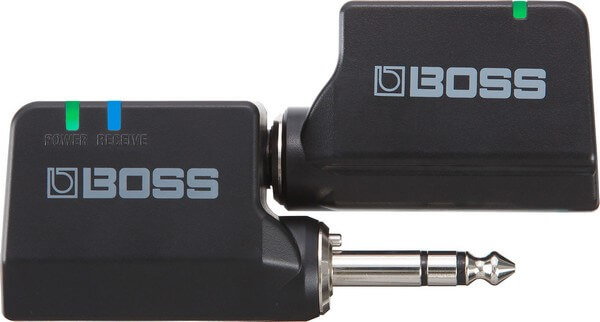
Best Overall: Boss WL-20

Boss WL-20 is the best wireless guitar system overall

Key features:

  • 50 feet operating range
  • USB-charging wireless guitar system
  • Plug and play wireless guitar system

The Boss WL-20 is BOSS’s foray into the wireless guitar system industry. The BOSS WL-20 offers great performance as is the standard with BOSS products.

Some noteworthy things:

  • It operates on a 2.4 GHz digital transmission.
  • It is plug and play, really easy to use and can be charged via USB. It comes with 10 hours of battery life. I played till my fingers hurt and still didn’t exhaust the juice on this wireless system.
  • It has really low latency too. While using it, I did not experience any interference from other sources. This is likely due to the auto encoded Digital channel lock employed by the system.
  • Pairing is very easy. Simply plug the units together, one into your guitar, and the other into the amplifier.
  • There were no popping sounds observed when I plugged the device in and out.

What we don’t like: When compared to some other more expensive wireless systems, it sounds a tad tiny.

Recommended for: Just like all wireless systems, it is perfect for live musicians who move around and do not want wires getting in the way.

Pros

  • Very small, portable, and easy to use
  • Plug and play wireless system

Cons

  • Sound is a tad tiny

Best Budget: Getaria 2.4Ghz Wireless Guitar System

Getaria WS-120 is the best wireless guitar system in the budget category

Key features:

  • 2.4 GHz wireless transmission
  • 1100mAh Lithium rechargeable battery
  • USB-charger

The Getaria 2.4 GHz wireless guitar system is one of the best wireless guitar systems available in the budget price range.

It has a 49 kHz sample rate. During use, I found the signal from the wireless system very crisp. The high-quality cable tone, coupled with the short delay makes it the wireless system of choice for folks looking for excellent performance at a great price point.

It has a line of sight of around 30 meters. As a wireless guitar system, it has full support for electric guitars and acoustic guitars.

I observed that my guitar, which had been previously paired with the wireless guitar system, easily connected. This cut down on time spent setting up any connections and simply made the entire process very easy.

It can be charged via USB. Furthermore, it can run on batteries. The AAA batteries it uses are very easy to find. Simply walk into the nearest retail store, and you can find them.

It sends uncompressed audio at 2.4 GHz. At the cheap price, this system is an absolute steal.

What we don’t like: Although the wireless system delivers overall impressive performance, I noticed some intermittent issues in the audio signal.

Recommended for: Folks looking for a wireless guitar system that has an above-average performance at a relatively cheap price.

Pros

  • Battery powered
  • Easy to install and use – plug and play

Cons

  • Audio signals flutter from time to time
  • Not ideal for stage performances

Best Performance: Shure PGXD14

Shure PGXD14 is the best wireless guitar system in the Performance category

Key features:

  • 20Hz – 20 kHz frequency range
  • 24-bit / 48 kHz sound
  • ¼ “line-level output
  • 10 hours of battery life

This wireless system comes in a case that is very durable, and that can take a beating.

I liked the controls on this wireless guitar system. The frequency of the system is set automatically. However, you can set the channel number by yourself.

The wireless guitar system has two units; the transmitter and the receiver. The receiver affords the user a recessed dial. This recessed dial has about 26 dB of adjustable gain. Furthermore, on the receiver, there are other indicators that show what is going on with the device. It has the power LED indicator, mute indicator, and battery status indicator.

The controls offered by the system are within reach and easy to adjust. All these ensure that you have a good experience while using this system.

The performance of this wireless guitar system is quite impressive.

While testing, I observed that the signal was strong and reliable. Although it is best not to have any obstacles that can block the signal, I found that even in the face of obstacles, the signal remained strong, reliable, and efficient. It has a range of about 200 feet, which is higher than any of the other wireless systems we have discussed so far.

The sound quality is very good. In fact, it rivals and even surpasses some cabled devices. When I tested it, I obtained sounds that sound even better than the sounds from a cabled guitar. There is zero compression here. The sound is so organic too! I was completely awed by the results of this system.

If you want to increase volume or you want to eliminate any unwanted feedback, the receiver’s gain control grants you the control you require.

What we don’t like

It was hard finding anything wrong with this system. However, the non-inclusion of batteries is a bummer. Although it is a wireless system, the included cable is quite short.

Recommended for: For everyone who needs a wireless guitar system, you simply can’t go wrong with this. Great for stage performances as well.

Pros

  • Beautiful sound quality
  • Durable design and build

Cons

  • No batteries are included

Other Recommended Wireless Guitar Systems

While the above covers our top 3 picks on price, performance, and overall, we also highly recommend these additional wireless systems:

4. Line 6 Relay G10

Line 6 Relay G10

Key features:

  • 24-bit digital sound
  • 2.4GHZ wireless connectivity
  • Plug and play wireless system
  • 8-hour playtime

The Line 6 Relay G10 is a solid unit that offers impressive performance in all categories. The build of the unit makes me believe it will last for a long time. When I plugged it into my instrument, I felt the sturdy feel and durable vibe. The wireless system is housed in a case that is made of metal and plastic.

I personally didn’t like the way the unit exposes all the connections. The input jack is located on the face of the system’s body. That means that if something were to drop on the system, it is likely to cause some serious damage. Nevertheless, as it is compact and out of the way, it is not likely to face such problems.

I found the G10 very easy to use. In fact, the ease of use is a big selling point of this device. You do not need to install any drivers or stuff like that before using the device. It is plug and play. Plug it into your electric guitar, connect the receiver to your amp, and you’re good to go.

Charging the battery is similarly a breeze. Talking about the battery, I found the whole power management system surprisingly effective. The G10 “sleeps” if after four minutes it doesn’t receive any transmission from your guitar.

Why do I like this? Unlike some other wireless systems that would continue eating through the available battery until it dies, this feature conserves the battery. If you leave the guitar for a while, you do not have to fear that your battery would be drained by the time you got back.

Some other noteworthy features:

  • It has close to 200 hours of battery life (on standby).
  • The system comes with clever indicators that show the average remaining time you have on the battery. Whenever the indicator glows green, it indicates the guitar is connected and that you have at least half an hour left of battery life.
  • The sound quality of the wireless system is quite impressive. Unlike the misconception that many have concerning wireless systems, it sounds warm, fertile, and original.
  • When testing this system, I couldn’t easily tell the difference between wireless playing and wired playing.
  • The latency of this system is not up to 2.9ms. This means that the latency is almost non-existent.
  • A performance feature I enjoyed is the auto-muting on the system. The usual popping and annoying noises you’d hear as you plug a cable in are practically unheard of with this system. There is literally no popping noise, whether you are plugging in or out.
  • The wireless system has a 50-foot range of sight. During testing, I observed the specified wireless range is roughly accurate.

What we don’t like

It uses a micro-USB. Yeah, I know it’s not a big deal, but I had to nit-pick.

One challenge that many face while using wireless systems is interference from different sources. Well, during testing, even when placed near my phone, my laptop, and even my Wi-Fi router, I didn’t notice any interference whatsoever.

Recommended for: A DJ who wants a physical controller that’s reasonably sized to pair with his/her mobile device running the DJay 2 app.

Pros

  • It is very easy to use
  • The sound quality is excellent
  • It has an excellent battery runtime

Cons

  • It uses a micro-USB charger

5. Donner DWS-3

Donner DWS-3

Key features:

  • 100 feet range
  • Has support for up to 4 devices
  • 6-hour battery life
  • 180-degree rotatable plug
  • Compatible with active pickups

The lovely features of this wireless guitar system make this device highly rated by all who have used it.

One reason why I like this wireless guitar system is the ability of the system to work with active pickups. The battery life is more impressive than previous versions, although it doesn’t match some of the other wireless systems on this list. It has a battery lifespan of up to 6 hours. It is powered by Li-ion batteries.

During use, I observed that the head of the transmitters can be rotated up to 180 degrees. Therefore, there is no “getting in the way” while you use these wireless guitar systems. It offers a quartet of channels you can choose from.

With a latency level of 2.5ms, the system has very little latency and will suit all your needs admirably. One issue that band members have with using wireless systems is that interference occurs when other members of the band also use the same channel. Since it offers 4 unique channels, this challenge is a thing of the past.

I loved the response time on this. The response time is similar to that on a guitar cable. With zero compression, no sound is lost, and lags are negligible.

What we don’t like

As much as I liked this wireless system, I did not like that I have to turn on the 2 units before I could play.

Recommended for: I recommend this wireless guitar system for home practice. If you need something to use for band practice, this is an ideal system.

Pros

  • It is compatible with active pickups
  • It is plug and play
  • It is USB chargeable

Cons

  • It takes time to reach full charge
  • Both units have to be switched on before playing

6. NUX B-2

NUX B-2

Key features:

  • 2.4 GHz range
  • 32-bit/48 kHz frequency
  • 110 dB dynamic range
  • 50 feet operation range

The NUX B-2 wireless guitar system is a portable, cheap, and wireless solution to every guitarist’s needs.

I liked the ergonomic design that this device features. It has a jack that is completely rotatable. This ensures that nothing gets in the way of your picking technique.

It is made of plastic. The build, while ergonomic doesn’t exactly make me confident. It seems fragile. If you opt for this system, I advise you to get yourself a pouch or case to keep it safe.
Aside from the durability issues, this device works superbly.

When I plugged it into my guitar, I received a pure guitar signal free of latency or interference. Voice amps and pickups are efficiently managed by this wireless system. It can be charged via USB.
Overall the performance is clean, pristine, and impressive.

What we don’t like:As pointed out earlier, the plastic build casts doubts on the durability of the receiver.

Recommended for: This is recommended for musicians that have live shows and will move around on stage.

Pros

  • Pristine, clear sound quality
  • Portable design
  • Over 6 hours of battery life

Cons

  • The build isn’t durable

7. Sennheiser XSW-D

Sennheiser XSW-D

Key features:

  • 2.4 GHz license-free frequency range
  • Automatic channels
  • 5-hour battery life

The wireless system comes in a compact and portable size. Nevertheless, do not let the small size fool you. It delivers excellent performance that easily rivals bigger systems.

It has a range of up to 250 feet, which outstrips all other wireless systems on this list of the best wireless guitar systems. You can use up to 5 systems in the same space.

The device is plug-and-play, thus very easy to use. To make it even easier to use, Sennheiser made a series of 5 videos that show you how to set it up and use it.

The 2.4 GHz frequency is license-free, therefore can be used anywhere on the globe. Sound quality is impressive on this device, as befits a product from Sennheiser.

What we don’t like

The ¼ jack on the transmitter only rotates in a 90-degree angle. This is a bummer considering that others can rotate 180 degrees.

Recommended for: If you need a portable wireless system for your next gig, this device will be an ideal wireless system.

Pros

  • Good sound quality
  • Portable, ergonomic design
  • Has a great range
  • There is no interference

Cons

  • ¼ Jack rotates a ”mere” 90 degrees
  • Mediocre battery life

Over to You

Buying the best wireless guitar systems isn’t easy. Hopefully this guide would have made things easier for you.

For more recommendations and advice, don’t hesitate to reach out to me here.

References:

Changelog
  • September 1, 2019: Article published with 7 reviewed products
  • February 12, 2020: Article updated

The 7 Best Wireless Guitar Systems to Buy in 2026 Read More »

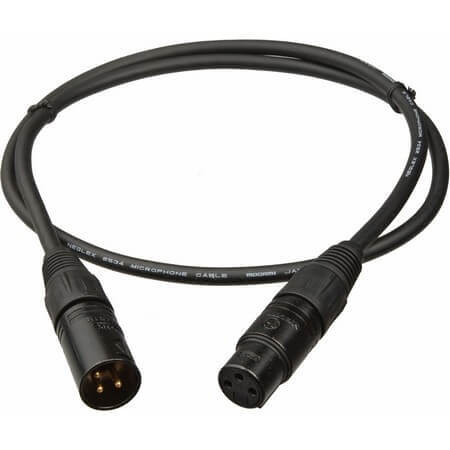
The 6 Best XLR Cables 2026 for Recording Right Now

Building a studio means buying a bunch of XLR cables. In this guide, we’ll look at the best XLR cables for recording you can buy right now. 

Do XLR cables really matter?

Yes and no.

XLR is a very old technology. Not much about it has changed in multiple decades. Technically, one XLR cable is just like another. You can buy any and it will serve its purpose – transfer analog signals from one instrument to another.

But there are differences in cable quality and construction.  Most of this is superficial – some cables are better built and more durable than others. What you buy for touring won’t be the same as the kind you need for a studio setup.

There are also minute differences in the internals. Better quality wires can have a small (and I stress on small) impact on recording quality. It’s not much, but if you’re running a high-end studio, the little differences matter, especially when recording sensitive signals such as vocals.

In this guide, I’ll share my picks of the best XLR cables for recording you can buy right now based on your use.

Read this before you buy.

Let me be clear about one thing: 99.99% of XLR cables are the same. There are small differences across brands but in general and for 99% of you reading this, buying a more expensive XLR cable won’t make a difference.

That’s not to say that better XLR cables aren’t technically better. All things being equal, an audio signal recorded through a $100 cable will sound slightly better than a $10 cable.

But the vast majority of users don’t have the studio setup to make out these minute differences. Moreover, outside of high-end studios, most users neither have the need nor the equipment to take full advantage of an expensive XLR cable. You can spend $100 on cables, but if you’re using a $50 mic and poor soundproofing, it’s not going to matter much.

So even though this is a list of the best XLR cables for recording, you can safely buy any cable from this list. Or anything that’s available in your local music store.

With that out of the way, let’s look at my picks for the best XLR cables in the market right now.

We use rigorous research, reviews, and real-world performance when recommending products. Our reviewers include producers, performers, and active musicians. You can read more about our review process here. Be advised that MIDINation might earn referral commissions on purchases made through this website. This does not affect your final purchase price.
Note: As an Amazon Associate, MIDINation earns commissions for qualifying purchases made through Amazon links on this page.

About your reviewer
Ryan Harrell is the founder of MIDINation and an experienced producer/DJ. His first experience with electronic music production dates back to Cubase 3.0 in the summer of 1997, and he’s been a fan ever since. He prefers Ableton as his primary DAW these days, though he is still partial to Cubase and Pro Tools. He lives in San Diego and freelances as a producer and part-time DJ.

Best XLR Cable for Recording (Overall)

Monoprice 104752 is the best XLR cable for recording

Monoprice 104752

Monoprice makes some of the better XLR cables around at affordable prices. There is nothing extraordinarily good about them – they look like any average XLR cable and their internals are “standard”. But they do everything good enough – durability, quality of materials , cost – that I’ve placed them at the top of my chart. Plus, they also cost low enough that you can buy a bunch of them without burning a hole in your pocket.

Monoprice cables will always find their way into my list of the best XLR cable for recording. This professional microphone cable is part of the premier series cables, designed to provide high performance at low cost. These interconnect cables are suitable for connection in broadcast equipment, high-end entertainment system or band instruments.

For more sound quality and clarity, it comes with a balanced audio cable that uses stable impedance lines to reduce the EM and RF noise, and extend the cable run effective range. It has male to female cables that make superior, thick, heavy-gauge cables, gold-coated connectors, and robust connector enclosures.

Unlike the standard unbalanced RCA connectors, Monoprice has a separate intertwined shield for extra strength against any likely interference without converting it into a signal. As a result, this prevents ground loop issues.

What we don’t like

Even though it is the best XLR cable for recording, this Monoprice cable is marked 16 AWG, but it should 24 AWG. This connector is assembled with fake wiring making them are worthless. It is also difficult to route onto a camera input which may affect the shotgun mic position by pushing it around the shock-mount.

Recommended for: Best for audio production in live, home or professional recording sessions.

Pros

  • Well-made heavy-duty connectors
  • High-quality and cost-effective
  • These cables are thicker than most cords

Cons

  • The wire is not 16 AWG but 24 AWG
  • Difficulty in plugging in and out
  • They are not durable.

Best Budget XLR Cable: AmazonBasics XLR

AmazonBasics XLR is the best XLR cable for recording on a budget

Key features:

  • Flexible PVC jacket
  • Durable design
  • High-quality sound
  • Protective metal housing
  • Shielded Cable

If you’re looking for something suitable for both studio and live sound recording, then perhaps, AmazonBasics XLR Male to Female XLR cable can help you. This microphone cable is reliable and an excellent choice for the production of quality audio. It also has unique XLRM and XLRF connectors.

As with the best XLR cable for recording, AmazonBasics XLR cable features a durable design that gives it a lifelong strength and brilliant performance. It has a zinc-alloy connector body with white-nickel coating and a protective metal enclosure.

AmazonBasics XLR cable is one of my favourites for many reasons. First, it has all-copper conductors with a spiral inner copper shielding, which reduces the electromagnetic interference (EMI) limit and excessive noise. Additionally, this cable enhances the sound quality and brings out the best of all instruments.

What we don’t like

This cable doesn’t fit perfectly on some sound gears. It has high-quality components but poorly assembled. AmazonBasics XLR cable is not as sturdy as other microphone cables and requires extra care when plugging it in or out.

Recommended for: Suitable for any home studio or producer working on a budget.

Pros

  • Designed for durability
  • High performance
  • Substantial strain relief at both ends

Cons

  • Not the best internal components

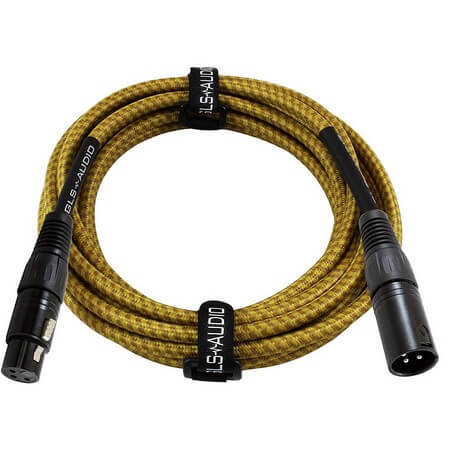
Best for Stage: GLS Audio 25 Foot XLR

GLS Audio 25 is the best XLR cable for stage use

Key features:

  • Heavy-duty, versatile rubber casing
  • True balanced lo-z shielded cable
  • Quality 21g dual-copper conductors and shield
  • Tri-grip and rubber booty strain relief
  • High-quality noise-free performance

The GLS Audio 25 Foot XLR cable is undoubtedly one of the best microphone cables for recording. It has the best quality parts and also features modern technology and innovations at the best price.

If you see this high-end microphone cable, you will undoubtedly break the bank for it. It has a heavy-duty rubber jacket, high-grade copper conductors, Tri-Grip and GLS’s Lo-Z shield. These are all meant to provide high-quality sound and lesser interference.

This GLS Audio microphone cable has a 3-pin connector on both ends with a twofold insulated conductor. Furthermore, this XLR cable is hand-wired and soldered to ensure excellent performance. It has a rubber grommet on the female end to enable long hours of work without loosening.

What we don’t like

This cable is not as thick as the other XLR cables. There are issues with the connector end cutting in and out. It’s also not sturdy enough to hold the microphone sufficient firm.

Recommended for: Low cost, durable built quality and 25’+ length makes it a good option for stage performance.

Pros

  • High-quality components
  • Lo-Z shield and Tri-Grip
  • Rubber grommet on the female end

Cons

  • Has poor shielding

Best for Home Studios: LyxPro Balanced XLR Cable

LyxPro Balanced is the best XLR cable for home studios

Key features:

  • Twin Conductive PVC Inner Shields
  • 98 percent braided Shield
  • 24-Gauge OFC Conductors
  • Cotton Yarn Wrap to reduce noise
  • Cable strain relief & Gold Plated Connectors
  • RoHS Compliant

Although LyxPro Balanced XLR Cable is not the most popular on the market, it is indeed the best XLR cable for recording. It has a 98 percent braided shield, a wrap for reducing noise, as well as a gold-plates contact point. With these features and much more, this XLR cable offers high performance and meets the required standard.

This microphone cable is utilized in many areas, including live gigs, studio, or home recordings. It has the power to handle any role thrown at it. Besides, if you love beautiful things, this cable comes in a wide range of colors to choose from.

LyxPro microphone cable is durable and can handle the longer usage time that comes with overnight gigs and traveling gigs. It features an oxygen-free copper in a braided shield, and gold-plated contact points to prevent corrosion or any other likely damage. The five-year warranty assures you of exceptional performance and guarantees a replacement if there is need.

What we don’t like

It does not hold up in professional use. Also, its connector tends to fall apart when in use.

Recommended for: Great mix of price-to-performance for home studios. Bedroom producers would love it.

Pros

  • Strong braided shield
  • Gold-plated contact points
  • Oxygen-free copper

Cons

  • Do not hold up in a professional studio setting
  • The connector loosens easily

Best for Professional Studios: Mogami GOLD Studio 06 XLR

Mogami Gold are the best XLR cables for studio recording

Key features:

  • Wired with Neglex Studio Quad
  • Has superior clarity, free of noise and RF interference
  • Finished with black body alongside 3-pin XLR connectors and gold contacts
  • Lifetime warranty
  • Gold-plated contacts

The Mogami Gold Studio 06 XLR is a high-grade 6 feet quad cable featuring a gold-plated XLR male to XLR female connectors.

It doesn’t matter whether you are recording at a live gig or in the studio, the Mogami Gold cables capture the whole full impact of the sound source. For years, Mogami GOLD Studio 06 XLR cabling has been the best XLR cable for recording because it produces superb and clear sound, with reduced noise, low loss signal transfer, and continuous manufacture of quality.

As one of the best microphone cable for recording brands, Mogami Gold utilizes the same instrument, microphone and multichannel interface cable which are only found in big studios. Besides, it is supported by the lifetime warranty, and since microphone cables are an essential part of a signal chain, you need the best, you need Mogami Gold.

What we don’t like

The cables don't perform well with ham radio EQ. It has a lot of RF interference. It is also considerably thinner with higher resistance and capacitance than the longer lengths.

Recommended for: The cable is suitable for use in serious studios, especially those with wiring and grounding problems.

Pros

  • Lifetime warranty
  • Great build quality improves audio quality

Cons

  • Has some RF interference
  • Higher capacitance and resistance

Best Patch Cables: Vitrius Cables – XLR Cable

Vitrius makes the best patch cables in the market

Key features:

  • Chuck-type strain relief
  • Premium quality
  • Affordable
  • Quality control
  • Noise-free signal quality

Vitrius Cables presents XLR cables which are not only reliable but can stand up to continual use irrespective of where they’re applied. They are some of the finest-quality microphone cables on the market and comes at an affordable price tag.

Vitrius Cables XLR Cable features a chuck type strain relief that stops the cable from pulling out from the connector. Additionally, they come with copper conductors to reduce the noise and allow for a clean signal.

The low cost and availability in 3' length (or lower) makes it great as a patch cable for connecting multiple mics or instruments together.

What we don’t like

Though it is an affordable microphone cable, it is likely to fall prey to quality issues. These cables fail prematurely, and sometimes do not work. Sometimes the connector does not hold up together.

Recommended for: Use as a patch cable in home studios.

Pros

  • Affordable
  • Available in a variety of lengths

Cons

  • Connector fails sometimes

Over to You

XLR cables don't matter nearly as much as you think. You can pick literally any cable and be happy with your purchase.

That said, if you're out to build the best possible home studio, choose from our list of cables above. From budget users to professional studios, there is an XLR cable for everyone.

For more recommendations and advice, don't hesitate to reach out to me here.

Also read:

References:

Changelog
  • October 18, 2019: Article published with 6 reviewed XLR cables
  • February 14, 2020: Article revised and updated
  • September 18, 2020: Minor changes to article structure

The 6 Best XLR Cables 2026 for Recording Right Now Read More »

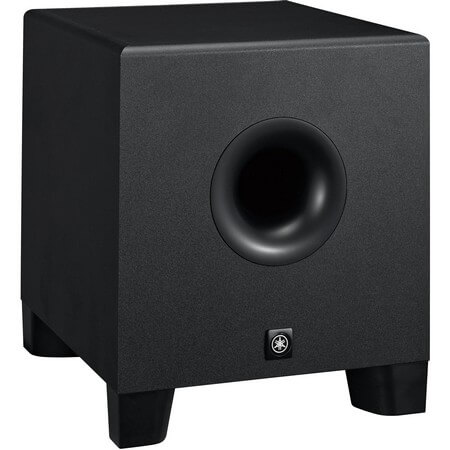
The 6 Best Studio Subwoofers 2026 to Add Thump to Your Studio

If you want to truly get a handle on your bass, you need a subwoofer for your studio. The best studio subwoofers amp up the low-end and help you figure out how your tracks sound in bass-heavy environments, such as theaters. If you’re producing music for movies or games, a subwoofer is a necessity. This guide will help you find the best studio subwoofer for your budget in 2020.

Subwoofers divide opinion greatly among producers. There are those who believe that you can’t build a studio without one. And there are those who believe that subwoofers crowd the lower end, especially in untreated rooms.

The truth, as with most things, is somewhere in between.

For most producers and most home studios, subwoofers are not necessary. In fact, I’d say that subwoofers can lead to poorer mixes since most bedroom producers don’t have well-treated rooms. The power wielded by a good subwoofer is far too much in such untreated environments, creating low-end reflections that don’t give you a fair idea of the mix.

Moreover, people will usually listen to your mixes on regular headphones or speakers. Most of these don’t have enough low-end to mix specifically for them.

On the other hand, if you’re producing music for movies, games, or anything that will be played on large speakers (such as a home theater system), then you absolutely need a subwoofer in your studio – with good acoustic treatment, of course. You need to be able to hear the low rumbling frequencies in order to mix for them, and that’s where a subwoofer comes in handy.

If this describes you, then this guide is for you. Below, I’ll look at the top subwoofers available in the market right now. I’ll share my list of the best studio subwoofers for every budget, from entry-level producers to professionals who need pristine low-end sound.

Use the table of contents below to jump to the right section.

We use rigorous research, reviews, and real-world performance when recommending products. Our reviewers include producers, performers, and active musicians. You can read more about our review process here. Be advised that MIDINation might earn referral commissions on purchases made through this website. This does not affect your final purchase price.
Note: As an Amazon Associate, MIDINation earns commissions for qualifying purchases made through Amazon links on this page.

About your reviewer
Ryan Harrell is the founder of MIDINation and an experienced producer/DJ. His first experience with electronic music production dates back to Cubase 3.0 in the summer of 1997, and he’s been a fan ever since. He prefers Ableton as his primary DAW these days, though he is still partial to Cubase and Pro Tools. He lives in San Diego and freelances as a producer and part-time DJ.

The Best Studio Subwoofer in 2020

When looking at the best studio subwoofers in 2020, I divided the range of selections by budget and need. I looked at the very low end of the market where entry level subwoofers help bedroom producers add some bass to their setup. Then I looked at mid-range subwoofers that would fit most production environments.

Finally, I looked at the mid-upper range that would be suited for majority of producers – barring ultra high-end movie studios.

Here are my top picks:

Yamaha HS8 is the best studio subwoofer in the market right now for every budget

Yamaha HS8 Subwoofer

The Yamaha HS8 studio monitors have truly deserved legendary status among producers. This is the subwoofer to complement these bestselling monitors. Impeccable low-end reproduction helps you get an accurate understanding of your bass. And it’s even priced to be affordable enough to most serious producers. If you want something time-tested, go with the Yamaha HS8 – blindly.

This excellent subwoofer has been around for a while; however, it stands the test of time and remains one of the best studio subwoofers you can find on the market right now. It offers audiophiles crystal clear sound and comes with several impressive features despite the age and relatively low price.

When buying a subwoofer, or any musical gear for that matter, it is wise to consider the design. Fortunately, the design of the Yamaha HS8 is one of the best looking I’ve seen. It looks stunning and will fit into any studio, even making the studio space looking better.

At first glance, you might notice that it features 14 bolts that have been placed in key areas on the body and that accentuate its physical appeal. While the overall design is simple, there is something about the minimalist appearance that draws you in. If you are looking for a classy yet simple design, then you will love this model.

The design isn’t just for show, though. I observed that the build of the cabinets results in a subwoofer that effectively eliminates unwanted resonance. The enclosed cabinets make it sound so much better than most options on the market. Upon in-depth research, I discovered that these cabinets are actually made from MDF which is known for its ability to dampen acoustic response.

There is a pair of connection options. These are TRS and XLR. The connection options lets you connect balanced and unbalanced signals to get the best sound quality.

Sound quality is the main reason why you will be looking to invest in this product. I have personally tested several models on the market, and I must say that the performance of this product is one of the best I have personally used. One of the most impressive things about the sound is the bass reproduction. It is simply incredible. Considering the relatively affordable cost of the Yamaha, it is truly impressive.

It comes with a bi-amp design that ensures that the tweeter and woofer sound separately. Therefore, it offers a noteworthy flat response.

To get the best performance from this speaker, Yamaha have made it with several tuning options. Hence you can adjust the output to get exactly what you want.

What I don’t like:

They are rather heavy. While I personally don’t plan on carrying it from place to place, folks that want something portable might balk at the weight. The HS8 might also be a little too overpowered if you’re using smaller studio monitors such as the PreSonus 4.5. I also wouldn’t recommend using them in smaller studios.

Recommended for: While this subwoofer is not a perfect model, it comes near enough. It is an excellent gear for beginners, and even professionals will find it to be an excellent backup to their main gear.

Pros

  • Built to last
  • Several tuning options
  • Incredibly accurate

Cons

  • Heavy
  • Can be overpowering in smaller rooms

Best Small Studio Subwoofer: BIC America F12

BIC America 12 is the best studio subwoofer for entry level studios

Key features:

  • Dolby Pro Logic and Digital inputs
  • 5-year warranty
  • 12” injection molded woofer

The BIC America Company has been making high-quality audio equipment for more than 40 years and this model is the company’s most popular budget option on the market right now. Aside from being a leading product in the manufacturer’s line of products, it also is one of the most impressive budget options that I tested. Most BIC speakers come with impressive bass, and I’m glad that this model does not disappoint.

It comes in a simple design. However, it still is very effective at what it does. The simple rectangular black box is somewhat generic. However, like our top choice discussed above, it comes with a cabinet made from MDF board. It also is coated with black laminate. All these features mean that it will produce really decent sounds. The base of the box features a quartet of rubber feet. These absorb vibrations and ensure that despite these vibrations, the box remains stable.

While design-wise there isn’t anything spectacular about the subwoofer, the minimalist design is oddly attractive. The cabinet is from very durable, and high-quality materials that will definitely last for a long time. The shiny metallic middle is exposed and adds a dash of style to the simple design.

Setting up the BIC America F12 is straightforward. I could set it up in a few minutes. Just plug in the power cable, connect the receiver via the sub input, choose the receiver type, and switch it on. As you do this, remember to consider placement. Choose a spot in the studio that will amplify the sound.

This excellent product produced some really rich sounds. In fact, I had to recheck the volume because the bass response seemed far louder than what it really was. Overall, the sound quality is excellent. Despite being a budget option, it delivers consistent volume, impactful bass response, and impressive frequency separation.

What I don’t like

Although it produces really great sound and comes with rubber feet to help with vibration, I found the vibration, especially at high volumes, to be nearly unbearable.

Recommended for: If you are a producer or audiophile looking for the best studio subwoofer for small rooms, then I believe that this model will be just right for you. It punches above its weight and won’t cost you the earth.

Pros

  • Comes with nice keys
  • Durable
  • Excellent wireless

Cons

  • Issues with automatic pairing
  • Keys are small

Best Professional Studio Subwoofer: ADAM Audio Sub8

Adam Studio Sub8 are the best studio subwoofers for professional producers looking for a top solution

Key features:

  • 8” woofer
  • 160w Amp
  • Dual motorized knobs
  • Remote controllable

The Adam Audio Sun8 is the next option on this roundup and comes with nice features that make it one of the best I have tested. From testing and reviews, it arguably offers the best audio quality from studio subwoofers on the market.

The design is very simple, and it wouldn’t likely catch your eye in a room full of subwoofer. At first glance, I feel that this is a perfect case of a company optimizing performance over aesthetics. Although it doesn’t, by any stretch of the imagination look like an awful product, it doesn’t stand out either. It looks basic; what really matters isn’t what it looks like but what it sounds like. The cabinet has a classy, black vinyl finish. Overall, it offers a neutral appearance and will not clash with the aesthetics of your studio.

The material is made with high-quality MDF. Aside from the MDF build, I like the different locations of the controls.

The subwoofer comes with excellent features that make up for the relatively muted design. At its core, it has an 8.5” woofer with a 1.5” coil. This is powered by the 160 Watt ICE amplifier. This build ensures that it delivers efficient performance. During testing, I observed that it used very little energy. Therefore, if you plan on mixing all day, this model can take the heat, so to speak.

As I pointed out earlier, I love the placement of the controls. The controls lie between the front and back panels. The rear panel features rarely used controls like polarity switches, while the front panel comes with regularly used controls like volume and crossover adjustment.

Performance is where this product really shines. It delivers optimal volume while being very clear. It can reach down to 28Hz without compromising on its linear response.

What I don’t like

The design is the only fault I have with this otherwise perfect subwoofer.

Recommended for: As it offers arguably the best audio quality, you will love this model if you are looking to do some serious studio work. It’s too expensive for casual producers but if you’re a professional, investing in the Adam Sub8 – and good sound treatment – is definitely worth it.

Pros

  • Works with nearly every system
  • Excellent sound
  • Durable build
  • Awesome performance

Cons

  • Not the best looking subwoofer
  • Pricey

Best for Small Home Theaters: Polk Audio PSW10

Polk Audio PSW10 is the best studio subwoofer if you're building a cheap home theater

Key features:

  • 10” dynamic balance woofer
  • 50 Watt RMS Amp
  • 80-160 Hz crossover
  • 40-160 Hz frequency response

The Polk PSW10 won’t knock your socks off but it’s entirely serviceable as a home theater or mini studio subwoofer. The small size and robust performance is ideal for small to medium-sized rooms. It is available in a pair of colors: black and cherry vinyl. With its 14.5” by 14” dimensions, it is a compact subwoofer that will fit into most studios easily.

As with many top-quality options, it is made with MDF; hence, it is fairly durable.

It is a 10” woofer that features a 50 Watt amplifier. While it isn’t the most powerful option on this roundup, in fact, it is the weakest; it is still better than several budget options you can find on the market. The power rating was originally a cause for scepticism, but after testing, I was convinced by its performance and will recommend it as a budget addition to a studio.

It comes with nice connectivity features. You will get a speaker level I/Os and RCA line-level inputs as well. However, it doesn’t have a direct input. I personally prefer my subwoofers to have a direct input because it makes blending sound much easier. Nevertheless, I must admit that I didn’t have any issues pairing it with other speakers.

Performance is the main reason to get the Polk Audio PSW10. Due to its small size and price, I did not expect much from the woofer. However, tests proved me quite wrong and hasty in my judgment. It comes with impressive bass output which sounded clear and detailed without being overwhelming.

It was also more than adequate for audio playback as it sounded precise and offered a great low-end.

Set up is quite straightforward as it can be connected to devices easily.

What I don’t like

The PSW10 can be a bit moody. Some users report that the unit fails to fire up randomly without any explanation. However, these complaints are rare.

Recommended for: Anyone who wants the best studio subwoofer for a casual studio setup. It also works great as a home theater woofer.

Pros

  • Clear, unique sound
  • Cheap
  • Decent performance

Cons

  • Inconsistent build quality across units
  • Poor sound projection in large rooms

Best for Serious Home Theaters: Yamaha NS-SW300PN

The Yamaha NS-SW300PN are the best home theater subwoofers for performance enthusiasts

Key features:

  • 20 to 160 Hz frequency
  • 250W output power
  • 10” woofer
  • Dual feedback circuit

The Polk PSW10 is too underpowered and muddy for serious home theaters. And the Yamaha HS8 is too dry for home theaters – it’s best reserved for studio settings.

So if you’re looking to build a serious home theater, what subwoofer should you go for?

Enter: the Yamaha NS-SW300PN.

First of all, this subwoofer comes with Yamaha’s Active Servo Circuitry. While this technology isn’t new, it is quite impressive when used in a subwoofer. Another feature that it comes with is the twister bass reflex port, which is definitely new and ground-breaking in subwoofer design.

It looks really good as it comes with a high-gloss finish.

It comes in a compact form, measuring just 350×366×420mm. With this compact design, it might somewhat be disconcerting that such a small product delivers such excellent sound quality. Something I found quite surprising is that Yamaha claims that it has a frequency response as low as 20Hz, a feature which is found only in larger models. The front panel on this model features a power button and a volume knob. Therefore, I love it because you don’t have to stretch to the back to switch it on or adjust the volume. While this might not seem like a very impressive feature, the ability to quickly adjust the volume will definitely come in handy over time.

The rear panel comes with several connection ports. You will find an LFE input and RCA inputs. You will also find speaker-level I/O. It will snugly fit any room regardless of size, and it can even complement an existing speaker system.

Well, the answer to this is that the manufacturer has incorporated the earlier mentioned Active Servo Circuitry. This technology has greatly improved the capabilities of the subwoofer, making it even better than more expensive models.

It comes with a side-firing port; which is rare on a subwoofer of this size and price.

What I don’t like

Well, the ON switch and volume controls on the front panel are great, but their presence means that you cannot remove the grille cloth. Another drawback is that it comes with a fixed 240V cable. Furthermore, the high gloss finish might look great, but it is a fingerprint magnet.

Recommended for: People building a serious home theater setup who want movie theater-like sound. It adds too much color for studio use, but works tremendously well in a home theater setup.

Pros

  • Excellent sound quality
  • Good bass considering the size
  • Comes with front controls

Cons

  • Comes with fixed 240V cable
  • Grille cloth cannot be removed

Best for Bedroom Studios: Rockville APM10C

Key features:

  • 10” subwoofer
  • 400 Watt Active Studio Subwoofer
  • 200 Watt RMS
  • Class D Amplifier Circuitry

The Rockville APM10C 10 is proof that you don’t have to spend a fortune before you can get a high-quality subwoofer. It comes with several features found on more expensive models.

In terms of design, this is one of the most distinctive options on the market. Although it comes in 3 different finishes, we found each one to be quite nice to look at. For instance, the model I tested comes with a wood finish with vinyl front board. The speaker lies by the side of the unit. One unique design feature is the placement of the bass reflex port.

The features make this a good option in the studio. It comes with a 10” low-frequency driver which is coupled with a powerful Class D amplifier. This isn’t just powerful on paper, but it is also quite impressive in real-time use. One reason for the impressive power is the 200 Watts of RMS power at your disposal.

Due to the placement of the bass reflex port, you will not get the poor and chaotic booming sound that exists in many low-priced options on the market.

The rear panel of the unit comes with a unique I/O combination. These ports include the RCA ports, ¼” TRS ports, and XLR I/Os.

In terms of performance, it is surprisingly impressive; considering that it is a budget option. I love the saturation it delivers at the low end and the plenty of headroom it leaves. Furthermore, the response is really flat. Therefore, you can rest assured that you will not have jerking, accentuated frequencies.

Due to the placement of the firing slotted port, you are spoiled for choice when it comes to its closeness to other objects in the studio.

What I don’t like

Despite the overall good performance, it still has its flaws. I observed that it produces a noise similar to white noise. It isn’t very evident during practice or mixing, but it can be heard at lower levels.

Recommended for: A cheap, entry-level subwoofer that’s perfect for bedroom producers. It’s not the best studio subwoofer around, but its price-to-performance mix is great for beginners and intermediate producers.

Pros

  • Decent build quality for the price
  • Accurate sound
  • Affordably priced

Cons

  • There’s a static, hissing noise when the unit is switched on

Over to You

Buying the best studio subwoofers isn’t easy. You need to find the subwoofer that works for your room size and use case. You also need to make sure that you buy studio subwoofers, and not the ones meant for home studios.

Hopefully, this article would have helped you find the right subwoofer for your needs.

For more recommendations and advice, don’t hesitate to reach out to me here.

Also read:

References:

Changelog
  • June 10, 2020: Article first published
  • September 18, 2020: Minor article updates

The 6 Best Studio Subwoofers 2026 to Add Thump to Your Studio Read More »

Picking the Best Audio Interface for FL Studio 2026: 6 Top Options

Finding FL Studio-specific gear can be tough. Despite its popularity, this DAW is often not taken seriously by equipment manufacturers. However, this is slowly changing and more and more brands are making FL-specific gear. In this guide, we look at the best audio interface for FL Studio to help you make the right purchase decision.

Best Overall

Focusrite Scarlett 2i2

  • Great FL integration
  • Well-priced
  • Solid feature mix
Best Audio Quality

UA Apollo Twin Duo

  • Exceptional preamps
  • Bomb-proof build quality
  • Solid support
Best for Beginners

Behringer UMC22

  • Highly affordable
  • Decent build quality
  • Good support & integration

I remember when FL Studio was first launched (and it was still called Fruity Loops). Serious producers I know dismissed it as mostly a toy. A basic tool to help beginners make simple beats. This was a time when producers masochistically took pride in the complexity of their tools. Cubase and Nuendo ruled the roost and Ableton 8.0 was still a few years off.

That, of course, has changed drastically in the recent few years. Fruity Loops matured into FL Studio and became a favorite tool for even serious producers.

While personal preferences will vary, FL Studio can today hold its own against the most advanced DAWs. It is powerful, robust, and fast. And it has enough built-in tools to help anyone produce killer tracks without resorting to outside plugins.

But before you can start producing, you need an audio interface. This little piece of equipment is necessary if you want to connect your headphones, MIDI keyboard, guitar, or microphone to your computer. It’s also necessary for ensuring low latency.

To help you choose the right option, we’ve put together this detailed guide to the best audio interface for FL Studio. Choose from these options to find the perfect interface for your needs.

We use rigorous research, reviews, and real-world performance when recommending products. Our reviewers include producers, performers, and active musicians. You can read more about our review process here. Be advised that MIDINation might earn referral commissions on purchases made through this website. This does not affect your final purchase price.
Note: As an Amazon Associate, MIDINation earns commissions for qualifying purchases made through Amazon links on this page.

About your reviewer
Ryan Harrell is the founder of MIDINation and an experienced producer/DJ. His first experience with electronic music production dates back to Cubase 3.0 in the summer of 1997, and he’s been a fan ever since. He prefers Ableton as his primary DAW these days, though he is still partial to Cubase and Pro Tools. He lives in San Diego and freelances as a producer and part-time DJ.

5 Best Audio Interfaces for FL Studio

Let’s take a closer look at the best audio interfaces for FL Studio you can buy right now, starting with our favorite option in this category:

Focusrite Scarlett 2i2 is the best audio interface for FL Studio

Focusrite Scarlett 2i2

This Focusrite interface is our top recommendation for every beginner starting their production journey. It’s also easily the largest selling interface on the planet. The Scarlett 2i2 has just enough I/O options to keep most producers happy, great compatibility with most DAWs (including FL Studio), plug-and-play operation, and of course, a great price.

Focusrite Scarlett 2i2 is simple yet a powerful USB audio interface ever made by Focusrite. It’s not only the best audio interface for fl studio; this third-generation scarlet solo provides the best way to create studio-quality recordings.

This device comes with a whole range of features that sets it apart from the rest. It has two mic preamps, with switchable air mode that helps to brighten your recordings and gives a more open sound. Additionally, it comes with two high-headroom instrument inputs for plugging in the guitar or bass, with two balanced line inputs ideal for connecting line-level sources. Other features include high-performance converters that enhance recording and mixing at up to 24-bit/ 192 kHz and a quick start tool to get you started quickly.

This audio interface is an ideal choice, mainly when working with more than one artist or singer. It is easy to set up and can record up to two sets of vocals concurrently. The Focusrite Scarlett 2i2 also comes with a Focusrite Plug-in Collective suite software which includes features such as Pro Tools, Ableton Live Lite, Focusrite Creative Pack, among other tools you need to get started.

What we don’t like:

The Focusrite Plug-in Collective suite is cumbersome, requiring more time to set up. Additionally, you have to create several accounts on different platforms for digital licensing and downloads, especially if you’re not set up already.

Recommended for: Starting producers or anyone looking for an affordable entry-level audio interface without any compromises.

Pros

  • Sound quality
  • Compatible with Mac and Windows
  • Great price

Cons

  • The included software is cumbersome
  • No Thunderbolt
Best Sound Quality

UA Apollo Twin MK2 Duo

Universal Audio Apollo Twin MK2 Duo is the best audio interface for FL Studio if you want top notch sound quality

Key features:

  • DAW compatibility
  • Compatible with Mac OS and Windows
  • Thunderbolt device connectivity
  • Console 2.0 software
  • Ultralight and portable

If you want sheer sound quality without any compromises, look no further than Universal Audio’s offerings, especially the Apollo line.

The Universal Audio Apollo Twin MK2 Duo is a ground-up restructure of a renowned specialized desktop recording interface for Windows and Mac devices, which produces better-quality audio conversion using analog recording feel, tone, and flow.

While it is the best audio interface for fl studio, Universal Audio Apollo Twin MK2 Duo is also EDM industry’s favorite. It comes in a sturdy structure and unique design that lightweight and easily portable. Apollo Twin MK2 Solo is a unique interface and different from the rest because it comes with thunderbolt device connection functionality that makes it easy to use with the computer.

Dating back to the UA’s 60-year legacy of audio artistry, this audio interface is built with two Unison-enabled mic preamps as well as stellar next-generation A/D and D/A conversion which is derived from the UA’s leading Apollo 8p, 8, and 16. With the built-in UAD analog emulation plug-ins bundle, you can track through in real-time using DUO, QUAD Core or UAD-2 SOLO processing.

What we don’t like

Pricey. And there are too few I/O options. At this price point, you can get some very competent rackmounted interfaces with far more input/output options.

Recommended for: Best for quality desktop audio conversion with classic analog sound. Recommended for serious producers and small studios.

Pros

  • Exceptional sound quality
  • Durable construction – will last a lifetime

Cons

  • Expensive!
Best for Budget Buyers

Behringer UMC22

Behringer UMC22 is the best audio interface for FL Studio for budget buyers

Key features:

  • Low latency levels
  • MIDAS mic preamp
  • Vocal and direct instrument input through XLR/TRS
  • Seamless integration with common DAWs
  • 48 kHz precision audio quality

If you want a cheap audio interface to start off your production journey, look no further than the UMC22. This ultra affordable interface is dirt cheap but does enough to satisfy starting producers.

I can attest without any doubt that Behringer UMC22 is the best audio interface to choose if you want to make your recording experience a memorable one – without burning a hole in your pocket. Some of its low cost features include an ultra-compact 2×2, 48 kHz precision, USB audio interface with high-quality MIDAS Mic Preamp. It also comes with a fusion of XLR/TRS input for vocal as well as direct instrument and another quarter-inch input for an instrument.

The Behringer UMC22 is compatible with some of the most popular recording software, including FL Studio.. It features two inputs and outputs with extremely low latency to the PC. Besides, it is compatible with Mac OS X and Windows devices.

What sets this audio interface apart from the rest? It boasts of a critical phone output to enable direct monitoring of your sessions, USB powered and additional two outputs. These and many more make UMC22 the most-portable and best audio interface for fl studio and recording interface.

What we don’t like

It works quite well, but there is no way to power mic without the inbuilt phantom power.

Recommended for: Budget buyers and starting producers looking for an affordable interface to start their production journey.

Pros

  • Great price
  • Surprisingly good build quality
  • Easy compatibility

Cons

  • Mic preamps aren’t the best in class
  • Mild hiss when gain is set too high
Best Internal Interface

Creative Sound Blaster Audigy PCIe RX

Creative Sound Blaster Audigy PCIe RX

Key features:

  • Dual Microphone Inputs
  • Super Low-Latency Audio Recordings
  • E-MU Chipset for Advanced Effects Processing
  • Dedicated High-Quality Headphone Amp
  • Bundled Creative recording software

You don’t always need a dedicated external audio interface to start producing. A good sound card, such as this Audigy, can double up as a competent enough audio interface for starting producers.

This PCIe interface is particularly good if you want to create podcasts and enjoy multi-channel surround sound without buying additional equipment. The Creative Sound Blaster Audigy PCIe RX allows for easy integration of many sound effects. This audio interface comes with SNR of 106dB, a 600-ohm headphone amp ideal for studio monitoring, as well as software collection that enables full customization of audio sounds.

Creative Sound Blaster Audigy PCIe RX is the best audio interface for fl studio for many reasons. This advanced audio interface represents engaging cinematic surround sound, unlike the ordinary motherboard audio. It also has an improvised chipset designed to process the legendary EAX reverb engine to produce enhanced audio.

The EAX Studio software suite makes this audio interface best for entertainment enthusiasts. It adds some other hardware-accelerated eco-friendly effects to your music, games, movies as well as communications and voice input.

What we don’t like

The software provided has compatibility issues with Windows 10.

Recommended for: Anyone looking for an internal soundcard that can plug into their desktop’s PCIe slot and pull double duty as an audio interface.

Pros

  • Quality sound
  • Easy to install
  • Fairly priced

Cons

  • Compatibility issues with some Windows 10 builds
Best I/O Options

PreSonus Studio 68c 6×6

PreSonus Studio 68c 6x6 - great for I/O options

Key features:

  • Direct monitoring
  • USB 2.0 Recording System
  • Four XMAX-L Solid-State Mic Preamps
  • 24-Bit/192 kHz
  • MIDI I/O
  • +48V phantom power (global)

PreSonus Studio 68 6x audio interface is the best choice for small bands, small studios, and intermediate producers. It is designed to record at up to 192 kHz, and it comes with two front-panel combo microphone, line and instrument inputs as well as two rear-panel microphone and line inputs, all with max preamps. Other than the L/R main outputs, you also get two balanced line outputs for monitor mixing, alongside MIDI and s/PDIF I/O.

This audio interface features robust onboard converters that support digital resolution of 24-bit/192kHz. Other features include LED metering, low latency monitoring, and a cue mix A/B function that enables control with headphones as well as toggling between two mixes which is suitable for listening in on the performer monitor mix.

The PreSonus Studio 68 6x is a one-stop recording solution that incorporates most of the hardware and software needs, including the Artist DAW software and Studio Magic Plug-in Suite in one place. It also comes with USB-C to USB-A as well as Usb-c to USB-C cables for compatibility with most PC.

What we don’t like

Regrettably, finding reliable technical support regarding its real test/trial is very difficult.

Recommended for: PreSonus Studio 68 6x audio interface is the best choice for small bands, small studios, and producers.

Pros

  • Well-priced for what it offers
  • Multiple I/O options
  • Good alternative to larger rackmounted interfaces

Cons

  • Poor support from PreSonus
  • No direct stereo monitoring

Over to You

Your audio interface has a big impact on how you perform and produce music. Without one, you’re essentially limited to the I/O capabilities and latency of your computer’s built-in sound card. For 99% of computers, this isn’t enough to produce music.

This is why I recommend every new producer to invest in a quality audio interface. If that describes you, pick from one of these options to find the best audio interface for FL Studio.

For more recommendations and advice, don’t hesitate to reach out to me here.

Also read:

References:

Where to buy:

I recommend Amazon for their low prices and reliable delivery network. I also recommend that you check out Sweetwater for deals, or try Reverb for used equipment.

Changelog
  • March 18, 2020: Article first published
  • September 18, 2020: Minor updates to article structure.

Picking the Best Audio Interface for FL Studio 2026: 6 Top Options Read More »

Our Pick of the 6 Best Pro Tools Control Surfaces in 2026

Get complete control over your studio with these best Pro Tools control surfaces.

Our Top Picks

Best overall: Avid S1 Control Surface
“Avid’s own control surface is exceptionally well integrated with Pro Tools”

Best single fader: Avid Pro Tools Dock
“Though limited in features, great integration makes this a preferred unit for small studios”

Best multi-fader controler: Avid Artist Mix Surface
“A great multi-fader mixer/controller with tight Pro Tools integration”

Best budget: PreSonus FaderPort
“Though the integration isn’t as tight, the low price and decent build quality make this a good buy”

A control surface isn’t an absolute necessity for most producers.

But if you’re using Pro Tools, there’s a strong chance you’re running at least a semi-professional studio.

So while a full-fledged control surface is an overkill for a beginner experimenting with FL Studio in his bedroom, it is almost a necessity for Pro Tools users. After all, you’re most likely a power user; getting access to your DAW from a hardware interface makes the all the difference in your workflow.

When choosing the best control surfaces, your first priority should be tight integration with your DAW. Above all else, the control surface is meant to help you take control of your DAW’s key features. You shouldn’t have to spend hours configuring controls; the control surface should be plug-and-play – as much as possible.

Luckily, Avid has made the job easy for you. The company makes its own line of Avid control surfaces that, as expected, integrate exceptionally well with Pro Tools. You don’t have to worry about configuring anything – just plug in the control surface and you’ll get total control over the DAW.

These Avid control surfaces top our charts. But there are also other control surfaces that are worthy alternatives, especially if you’re on a budget or work with multiple DAWs.

Below, I’ll look at all the best Pro Tools control surfaces in more detail.

We use rigorous research, reviews, and real-world performance when recommending products. Our reviewers include producers, performers, and active musicians. You can read more about our review process here. Be advised that MIDINation might earn referral commissions on purchases made through this website. This does not affect your final purchase price.
Note: As an Amazon Associate, MIDINation earns commissions for qualifying purchases made through Amazon links on this page.

The 6 Best Pro Tools Control Surfaces

Here are my picks for the best control surfaces for Pro Tools you can buy right now:

Avid S1 Control Surface

Avid’s own control surfaces are, as you can imagine, fantastically well-integrated with Pro Tools. The S1 is one of the best in the range, packing in fantastically well-built motorized faders into a tiny, easy to use unit. Integration is fantastic and you can plug in an iPad to get even more control over your DAW. Ideal for most small studios.

Connect up to four S1s to create an extended integrated surface. The S1 is the latest EUCON-compatible control surface from Avid. Being EUCON-compatible means that the Avid S1 is supported by Pro Tools, by media composer Cubase, Logic Pro, Digital Performer, and many other audio and video applications. The S1 allows you to take hands-on physical control over what’s happening inside your computer and with Pro Tools. For example, you have extremely deep integration. Around a thousand different parameters and functions are supported.

This one is an 8 channel controller, meaning that it has 8 channel strips on the front panel. The strips consist of controls like the moving faders, touch-sensitive encoder knobs. We have a solo and mute button and also a select button on each channel strip. The record button records the corresponding tracks. When you hold shift and press the button, it moves you through the different automation modes. At the top of the channel strip, we have an OLED display, and this will give us feedback on what’s happening with the controller as well as what it’s controlling inside your DAW.

You have a select button that corresponds with the rotary encoder and the OLED. At the bottom, you also have four modifier keys. The first of those is the second shift key. Then we have the control, the option, and command alt. These correspond to the modifier keys and your computer keyboard. We also have four user-assignable buttons at the bottom, and those can be assigned to a wide variety of different tasks and functions.

Working with the S1 is very simple. You can use an app running in your computer called EuControl, and this is where you set up the controller and setup the workstation you’re using. You can connect this to two different computers simultaneously and switch between them. We have general commands here that allow you to set up how the S1 is functioning.

We can build layouts and also soft keys, which allow us to have user assignable control. Once you have your S1 set up, simply open your DAW and the tracks that you’ve created along with all the processing, and everything else will automatically show up on the screens.

What I don’t like

One downside of the Avid S1 control surface is that it doesn’t work with the Avid S3 so you can’t daisy chain these together. Of course, compatibility with other DAWs is also absent – not a great choice if you want to switch between DAWs.

Recommended for: I recommend the S1 for sound engineers, engineers, and producers. It has everything needed to speed up your workflow, delivering better mixes quickly and easier. If not the best, it is definitely one of the best Pro Tools control surfaces you can buy right now.

Best Control Unit: Avid Pro Tools Dock

The Avid Pro Tools Dock DAW Controller is a portable EUCON control surface that works in tandem with an iPad. This lets you to be able to control various parameters of the DAW and plugins while having the transport control under control.

Avid Pro Tools Dock Users of Pro Tools and other DAWs who own an iPad should be able to edit and mix their projects faster with this docking station. The workflow is based on that of the Avid S6 and the DAW controller Artist Control. Finally, the device forms an attractive symbiosis with the in-house S3, both functionally and aesthetically.

Large projects can be traversed quickly, and each track can be specifically selected using the iPad’s touchscreen. All DAWs and video editing programs that support the EUCON protocol work with the Avid Pro Tools Dock – above all Pro Tools, but also Media Composer, Logic Pro X, Cubase, and Premiere Pro. This device extends the functionality of the free app Pro Tools | Control” for iOS through hardware controls.

The Avid Dock lets you mix and edit tasks in the most creatively new ways. Dock provides you with an intelligent studio control board in an economical, affordable, and portable surface. When used with an iPad, you can have a quick access as well as tactile precision handling through the touchscreen. When you choose the Pro Tools S3, you get time-saving custom controls and touch workflows.

Thanks to the combo of the touchscreen, switch control, fader, and knob, you can have an impressive navigational speed as well as precision that lets you make better and faster sound mixing tasks. The Dock surface is Eucon-supportive. It thus automatically switches between controls to applications of focus on your computer.

What I don’t like

Wouldn’t I be asking too much if I am complaining that it doesn’t come with a tablet or screen? That aside, not all sizes of tablets can fit the orientation of the unit. It will also take an ample space on your desk. Moreover, it takes time to learn and get adapted to the workflow.

Recommended for: The Avid Pro Tools Dock is for anyone who needs a versatile and ergonomic surface. It allows you to mix and edit a lot of songs while not even using the mouse. Great for small studios or home producers looking to speed up their workflow.

Best Multi-Fader Control Surface: Avid Artist Mix Surface

With the Avid Artist Mix, Avid is continuing a classic that previously sailed under the Euphonix flag until Avid took over Euphonix. Only the name and the color have changed. Instead of the classic silver aluminum surface, which seamlessly adapts to the look of an Apple keyboard, Avid has now introduced an elegant black.

The hardware has otherwise remained the same since 2008 – and thanks to ongoing updates, it has developed into a reliable partner in large and small studios to this day.

More and more studios are doing without analog consoles and are working completely digitally. AVID also offers the Artist series a professional solution for smaller studios. The three products, Artist Mix, Artist Control, and Artist Transport, received the RedDot Design Award and were showered with advance praise even before they were launched. While Artist Control houses four motorized faders, a touchscreen, and a transport section, the Artist Mix proves itself with eight motorized faders, eight rotary encoders, and a strong OLED display.

In addition to the captivating look in elegant black, the very flat design of the Artist Mix has been cleverly chosen. With a width of 42 cm and a depth of almost 23 cm, the device fits perfectly between the display and keyboard without losing valuable workspace. If you don’t like the flat design, you can fold out the slightly wobbly, small feet on the underside or mount the stilts included. Installing it is quick and easy.

With the Artist Mix, Euphonix, now flying the Avid flag, has achieved a great success. In terms of design, you immediately notice the proximity to Apple, and that’s a good thing. It makes your workplace look so chic and uniform, it just looks like it is all of a piece. In terms of processing, small items such as the folding feet on the bottom are improved.

Overall, however, the controller looks very robust and durable. Even without a long training phase, the excellent cooperation between DAW and EuCon client makes it possible to optimize your workflow and use the Avid Artist Mix sensibly.

No missing functions were noticed in everyday work; all work steps that were sometimes carried out with the mouse and shortcut could be carried out ergonomically with the Artist Mix.
All functions are immediately available without further configuration, and the DAW (here Logic Pro X) automatically recognizes the controller and can be operated remotely and immediately. It couldn’t be easier.

By the way, it doesn’t matter whether the Avid Artist Mix is connected to a Windows or an Apple computer.

What I don’t like

The only drawback is the transport functions that can only be accessed via secondary buttons. If you value this more than four additional faders, you might be better off with the Artist Control, or you can also buy the little Avid Artist Transport. There is no USB or FIREWIRE.

Recommended for: The Avid Artist Mix is perfect for small project studios. It allows you to customize setups of anything you want. As one of the best Pro Tools control surfaces, it’s suitable for artists who own a home studio or semi-pro engineers.

Best Budget (Single Fader): PreSonus FaderPort

The PreSonus FaderPort is unique in its design. With the control surface, you can have window selections which come with the record, stop, and play functions. The surface is reasonably priced. A great upside of the product, which makes it a popular control surface, is because it features almost most DAW programs. It can also write from one channel or from grouped channels of volume and pan automation at the click of a button.

The FaderPort 16 lets you take control of your mixes like never before while using your computer’s mouse and keyboard. It is a viable option for in-the-box mixing. The FaderPort allows you fast and precise access to everything that you need, making your workflow swifter and more efficient than ever. Featuring motorized touch-sensitive faders, you’ll be automating and tweaking your mix instantly without having to click through multiple windows. You can scroll through tabs on your screen. With 89 buttons controlling 104 different functions, you’ll be working faster and smarter than ever. What’s great about the FaderPort series is that it works with your existing mouse and keyboard setup.

How you use it is up to you and your workflow. The FaderPort session navigator gives you quick access to each function. You can scroll through your session, zoom in and out. Basically, all of the things that would leave you clicking away on your mouse are now conveniently placed at your fingertips.

Thanks to the support of the Mackie control and HUI protocols, you can use the FaderPort with just about any DAW. No fuss, just powerful instant control! It’s just plug and play. Are you the type of person who loves to record and mix in the box but want near unlimited control over all of your mixes’ parameters without constantly having to be clicking through windows or dragging faders with your mouse? Then you owe it to yourself to check out the PreSonus FaderPort.

What I don’t like

When you compare this with the Avid models, you’ll see it doesn’t offer much functionality. Meanwhile, it lets you work more accurately, faster, and even longer.

Recommended for: The FaderPort is for any user who needs flexibility, and ultimate control surface, and any type of on-the-go controller. I recommend it for people with home studios that work with any DAW – including Pro Tools. You should definitely check out if you’re on a budget and want cross-DAW compatibility.

Alternative to FaderPort: Behringer XTOUCH ONE

Believe it or not, the Behringer is finally here, and I consider it an ideal FaderPort alternative. The model from the DAW controller series has eight complete channel strips with motorized faders and eight additional rotary controls with LED rings.

Here we have a MIDI controller for controlling DAWs and is equipped with eight-channel strips (fader + potentiometer + 4 buttons) and a master fader. There is more choice in the DAW controller with motor faders, which are still to be described as affordable.

The Behringer X-Touch One also offers eight additional endless rotary controls (practical for controlling synthesizer plugins, for example) and a section with transport controls. The integration into DAWs and other music software takes place via Mackie Control, the configuration with a free downloadable editor.

It supports Mackie and HUI and Mackie protocols. These help for seamless integration into music production programs that are compatible with it. It also includes an LCD Scribble Strip. This helps for instantly viewing the track names as well as parameters.

What I don’t like

You have to plug it into your computer directly as it doesn’t include a power switch. Also, there is no information on setting the device up.

Recommended for: I recommend the Behringer for artistes who have small recording studios at home. It might not be the best Pro Tools control surface, but it is ideal for anyone just tinkering with DAW.

Most Mid-Range Control Surface: Icon Pro QCon Pro G2

The controls of the Icon QCon Pro G2 are consistently good for the price range. With a display, time display (Beats or SMPTE), fully illuminated buttons, and LEDs for level and panning, it comes in a complete set. The device can control 13 DAWs via MCU, HUI and Logic Control, and own mappings are also possible.

The Icon QCon Pro G2 is a DAW controller for eight individual channels. All of these and the additional master channel are equipped with a motorized fader. There are buttons for mute, solo, record, and select, as well as panning controls. Transport controls, a jog wheel for navigation, and numerous buttons for extended functions are also integrated into the DAW software. An angled, illuminated display at the head end of the device provides information about the channel names, the currently adjustable parameters, and more.

Finally, there is a segment display for the song position and two pedal inputs. It includes 13 templates for DAWs with corresponding labels for the buttons over which they can be placed. Another template with fields that can be freely labeled is included. The DAW connection is via the Mackie Control Universal (MCU), HUI, Logic Control, or user-definable MCU protocols.

The almost six and a half kilos heavy aluminum housing of the Icon QCon Pro G2 stands as if rooted to its four screwed-on rubber feet. In terms of design, it should cut a good figure in almost any studio environment. Visually and haptically pleasant, it has a roughened user interface. The quality, feel, and legibility in terms of processing, is flawless in the price range.

All housing parts and the angled display sit tightly together, and the fader modules can also be unscrewed individually. The feel of the controls is convincing for a moderately priced DAW controller.

For a device of this class, the faders are good, no ifs or buts – they respond instantly and accurately with moderate noise, while the caps don’t wobble a millimeter back and forth.

What I don’t like

The downsides with the Icon Pro G2 include LEDs that are difficult to see or a few gaps in the mapping. Still, no other competitor offers that much for its price.

Recommended for: Bargain hunters in the studio who are looking for a universal DAW controller will love this Icon control surface. It’s not just one of the best Pro Tools control surface in the mid-range, it is also great for any DAW – Ableton, FL, or Logic.

Over to You

As a serious Pro Tools user, you need a control surface that frees you from the tyranny of the keyboard/mouse combo. Tight integration and plenty of control options should be your top priority. Hopefully, this guide will help you zero-in on the best Pro Tools control surface on the market right now.

For more recommendations and advice, don’t hesitate to reach out to me here.

Check our Pro Tools recommendations:

References:

Changelog
  • October 4, 2020: Article first published

Our Pick of the 6 Best Pro Tools Control Surfaces in 2026 Read More »

Discovering the Best Vocal Preamps for Every Budget in 2026

Get better vocals with the best vocal preamps money can buy right now

Our Top Picks

Best for home studios: Focusrite ISA One
“The transformer-based ISA One isn’t cheap, but for the price, you can’t get warmer, richer audio than this”

Best for pro studios: RME OCTAMICXTC
“For serious producers and engineers, this RME preamp is one of the best preamps money can buy”

Most affordable: ART TubeMPSTV3
“While the performance is average, the exceptionally low price makes this a handy choice for beginners”

Best preamp + FX unit: BOSS VE-8
“Less a preamp and more a FX unit, the VE-8 is a great pick for live performers”

How do you get better vocals?

The first step would be to get a better vocalist. But that’s not always feasible. In that case, the next step would be to get a better mic. A good vocal mic can add breadth and thickness to vocals that a cheap $50 mic can never capture.

If that doesn’t work either, you need a better vocal preamp.

A “preamp” essentially boosts any audio signal before it’s fed into an audio processing unit (such as an audio interface). In most studio setups, the processing path looks like this:

Nearly every audio interface already has a preamp built-in. This is what allows the interface to capture mic input. However, the quality of the preamp can vary greatly. After all, the job of the audio interface is to, well, create an interface between your computer and outside audio sources.

This is why in any semi-serious setup, you’ll find that the vocal amplification job is offloaded to a dedicated preamp. This unit sits outside the audio interface and usually has dedicated circuitry (analog or digital) to process audio better.

A good, dedicated preamp has a marked improvement on audio quality. If you’ve ever thought that your vocals lack space or warmth or clarity, you can usually blame the preamp (provided the mic is good enough).

Picking the best vocal preamps isn’t easy. Which is why I put together this detailed guide to help you choose the preamp that works for your needs. Below, I’ll look at different preamps for home and pro studios, as well as dediated/mixed units with built-in effects and audio interfaces.

We use rigorous research, reviews, and real-world performance when recommending products. Our reviewers include producers, performers, and active musicians. You can read more about our review process here. Be advised that MIDINation might earn referral commissions on purchases made through this website. This does not affect your final purchase price.
Note: As an Amazon Associate, MIDINation earns commissions for qualifying purchases made through Amazon links on this page.

The Best Vocal Preamps for Every Need

Let’s take a closer look at our favorite vocal preamps for different budgets and needs:

Focusrite ISA One

The ISA One isn’t cheap, but for the price, it offers one of the best transformer-based preamps. Throw it onto your audio interface and you’ll see a marked improvement in overall audio quality and clarity. For small studios or hobby producers, the ISA One is easily one of the best vocal preamps around.

Some will think of the Focusrite ISA One as “just” another PreAmp. Meanwhile, a few others know which production legends are hidden behind the abbreviation, ISA. Because what the Beetle is to Volkswagen, ISA is to Focusrite. Without it, it will only be half as famous.

As the smallest offshoot of the series, Focusrite offers the ISA One. With a rather modest retail price – for a preamp – , the ISA model is suddenly affordable.

Instead of an inconspicuous cardboard box as is usual, the Focusrite ISA One is delivered in a blue flight case with solid metal edges and corners. It even has two locks.

With a size of around 38 x 32 x 15 cm, you don’t really need a hand truck for transport.

The ISA One is not a rack device. It’s a table-top device with a beveled front panel. With its sober technical design, at first glance, it looks more like a physical measuring device. The central, large-format VU advertisement, in particular, contributes to this impression. This is supported by two six-stage peak LED meters. These show the level of the main input and that of the instrument input. They also show the external mono signal that is fed in for monitoring or conversion to digital.

In addition to microphone recordings, instrument recordings are of course also possible. The guitar signal can also be forwarded to an external recorder or an audio interface via the DI OUT on the back. You can even make two-channel recordings with a microphone and guitar: the microphone is plugged into the XLR input on the back and led to the main output, the guitar goes to the DI output via the DI input.

What I don’t like

Two-channel recordings are unfortunately not via normal line-in.

Recommended for: Small studio owners and serious home producers. It’s a great pick if you record your vocals at home. It’s also ideal for a small studio that wants competent and consistently warm recordings without spending thousands on tube preamps.

Best for Pro Studios: RME OCTAMICXTC

RME Octamic XTC is an eight-fold mic preamp with a wealth of digital connection options. First of all, the analog preamps in the RME Octamic XTC are the same as in the Octamic II. Eight analog sources can also be recorded simultaneously. And this is where the similarities almost stop because not even the AES/EBU interface is assigned the same.

So to what circumstances does the Octamic owe the name XTC? What is so exciting that the interface got that nickname? As a first impression, one can say that the RME Octamic XTC makes all settings digitally and can therefore also save them.

But that also means the hands-on controls for each channel are gone. Instead, a channel pair (1/2, 3/4, 5/6, and 7/8) is selected and the settings are made using the two-click encoders on the color display.

The outputs can be used as headphone outputs as well as line outputs, but then only with a Y-cable.

Another possibility that digital control of the device opens up is the AutoSet Gain. As the name suggests, the RME Octamic XTC can independently control the gain of a channel. The device tries to set a headroom of at least 6 dBFs. For example, if the recording is at the clip limit with a gain of 30 dB, AutoSet Gain will reset the gain to around 24 dB. And although digital overload actually occurs at first, this gain monitor is more than suitable in practice. Better a little clip than messing up the whole recording.

Of course, there is also a PAD switch (-20 dB) and one for the 48-volt phantom power for each channel. All settings can then be saved in one of the six device-internal presets.

The analog technology, eight preamps, the possibilities of digital assignments, its storability, remote control, and especially the 24-channel connection to a computer make the RME Octamic XTC a completely different beast. For that, the surcharge when compared to the other Octamic is absolutely justified.

What I don’t like

The MIDI remote software is not scalable. It only shows input channels. The outputs are not balanced. Finally, Y-cable for line outputs is not included.

Recommended for: The price of this RME makes it prohibitively expensive for all but the most serious of producers. If this describes you (or if you run a studio), the RME Octamix is one of the best preamps around – and certainly one of our favorite picks.

Most Affordable Preamp: ART TubeMPSTV3

The ART Tube MP Studio Version 3 can be called a real classic. Coming at around the same cost as a smartwatch, it costs a real bargain, I think.

The inputs are both balanced as XLR and unbalanced with jack connections. There is also the mini-jack for the external power supply.

You can primarily use it to amplify microphone signals. That is why it has a switchable phantom power supply of 48 volts for condenser microphones.

With the additional controller, the functionality has been expanded to include different sound variants and can also serve as a limiter. Using the controller to the right of the VU meter, various presets can now be called up. According to the manufacturer, they have been optimized for recordings of certain instruments.

You can choose from acoustic or electric guitar, but also keyboard, bass, or vocals. The middle position down is called FLAT and dispenses with any pre-programmed sound setting.

The Art TUBE MP Studio V3, when compared to the Art Tube MP, is an “I’ll try my luck” thing. Above all, there is not the slightest description in the manual what exactly the 15 presets actually do. The only thing that helps is to open your ears and listen.

What I don’t like

The use of the ART Tube MP Studio V3 did not really convince me. Presets are nice, but in this case not having to readjust anything is too rudimentary for me.

Recommended for: The low price makes the MP Studio the preferred preamp for home recordings. It won’t dramatically improve your recordings, but it will add a distinct warmth that home audio interfaces can’t offer. For beginners and budget buyers, the MP Studio V3 is one of the best vocal preamps on the market.

Best Rackmounted Preamp: dbx 286s

The entry-level market for studio equipment is highly competitive and with the dbx 286s, dbx has a single-channel preamp/processor in its range. The dbx brand is from the audio and pro audio sector, which belongs to HARMAN, which in turn belongs to Samsung. In times of globalization, there is often a larger brand behind a brand. The customer advantage is obvious. This means that production and supply can be carried out cheaply.

The device, manufactured as a single-channel design, specifies the processing of a mono signal. This can be a microphone signal, an instrument line signal, or a signal that has already been recorded and passes through the dbx 286s preamp/processor.

The dbx 286s preamp can process signals from the condenser or dynamic microphones. The XLR input feeds the former with 48 V phantom power. The gain control, to which an LED level display is assigned, ensures that the input is adjusted accordingly. Also, a high-pass filter can be activated by pressing a button, which means that bass frequencies are reduced. This is best equated with an impact sound filter.

That was it for the first task the dbx 286s was supposed to perform. The processor series, which consists of four different components, can be switched to active or passive via a push button. When the red light is on, this unit is off.

Recordings, mixes, and mastering are possible without compression. The dbx 286s offers 2 controllers and the associated LED display. The drive control determines the degree of compression, and the density control, the release time. Short, hard signal sources such as a kick drum or snare are compressed differently than soft signals such as vocals or bass.

If you would like to incorporate other effects into the dxb 286s, you can do this via an insert. A Y-cable is required for this. A stereo jack in the 286s sends the signal out and receives the signal back. At the other end of the cable, you logically have to use two mono jacks. A reverberation device could be looped in here, for example.

I can’t complain about the sound. Of course, more expensive equipment sounds better and shows more details and depth. But you always have to consider budget and area of application.

What I don’t like

The lack of an on/off switch is really a shame. If you want to use the dbx 286s in the live area, you are limited to just one signal source. The Chanel strip is mono, regardless of whether vocals or an instrument are connected.

Recommended for: Anyone who has set up their home studio and records to an SD card with a computer or portable recording device must inevitably convert the AD (analog-digital) signal. This is where the 286s comes in. With a round sound, the single-channel preamp is a much better choice than relying directly on a mediocre preamp in the interface. Get it if you want the best vocal preamp that can also be mounted on a rack.

[/su_column]

Best Preamp + Audio Interface: Apogee ELEMENT 88

Apogee is known for its stylish, high-quality solutions for audio interfaces on the Mac. The portable Duet and Quartet systems are still very popular, as are the flagships Ensemble and Symphony. But they are not all cheap.

This is where the new Element series with new control software comes in. This means that all interfaces can be combined and used together. The highlight: the hardware is reduced to the bare essentials and does not need any operating elements.

This not only makes the whole thing cheaper, but it can also be used remotely. The roughly comparable element 88 costs around a third less than the quartet and is operated on the computer using the software. The device can be controlled with remote control, directly from the Logic channel strips or wirelessly via iPad and iPhone.

First things first: Apogee remains “Mac only”. The new, hardware-reduced, and Thunderbolt-based Element series includes our current review candidate, the large Element 88. In this series are also included the smaller versions: the Element 46 and the Element 24 as well as the remote control called Element Control Remote. The numbers in the product names refer to the number of inputs and outputs. The element 46 thus has four inputs and six outputs. While element 88 has 16 optical/ADAT inputs and outputs.

Also, you have four inputs with microphone preamps. The four preamplifiers have combo jacks for mic, instrument, and line signals as well as line outs. The outputs are divided into a balanced XLR main-out (2×1) and two independent headphone outputs (2×2). There is also an optical I/O for ADAT, S/PDIF, and SMUX as well as a BNC word clock I/O.

In the typical Apogee tradition, the preamps are extremely potent and deliver plenty of amplification power with up to 75 dB gain. The gain can be set precisely and digitally. The preamps also offer a low-cut, phase reversal, 48V phantom power, impedance adjustment for instruments, and a stereo link (G) as well as the well-known Apogee soft limiter.

The whole thing is fired by a supplied 100 V to 240 V power supply, which, however, has no locking. The connection to the computer is via Thunderbolt 2 and with a maximum resolution of 24 bits and 192 kHz.

What I don’t like

The Apogee Element 88 only works for Macs and it has no power supply latch.

Recommended for: If you want one of the best vocal preamps and audio interfaces built into a single combo unit, look no further than the Apogee Element. It’s expensive, but the combo unit excels at everything from latency and I/O options to preamp and build quality.

Best Preamp + FX Unit: BOSS VE-8

Externally, the VE8 is rock solid and looks extremely robust after unpacking. The three unmistakable foot switches underline this impression again.

If you look at the vocal preamp, you can intuitively recognize the logically designed structure of the sound-shaping modules. The guitar area on the left, vocals in the middle, and the mix and preset area on the right. All controls and buttons are labeled and you can get started without instructions.

Depending on the function, the buttons are multi-colored in red, yellow, and green. However, there is also a lot to discover under the hood of the Boss VE8. For example, you can fine-tune the effects or adjust the two 3-band equalizers for guitar and vocals. This is usually done by holding the relevant button for a longer period of time.

Most acoustic guitars in the live segment are now equipped with piezo pickups. The advantage is obvious, relatively high, constant volumes can be achieved without a microphone and thus position-related. The disadvantage, depending on the instrument, is sometimes the somewhat harsh, cold piezo sound. In the VE8, the “Acoustic resonance” control tastefully counteracts this behavior. For me, this is actually the most important parameter for transmitting an acoustic guitar on stage.

The VE8’s guitar effects are divided into two sections. On the one hand, there are modulation or delay effects and then a dedicated reverb unit. Both effect chains are of very high quality. Already, BOSS has a long history of guitar effects. Also, many so-called “sub-parameters” can be accessed and changed by holding down various keys.

As a bonus, there is the “slow gear” effect, which changes the transient response of the strings, and an “octaver”.

Conclusively, the Boss VE8 convinces me all along the line. It is by no means a “niche product” for singers/songwriters who play guitar. What I liked best was the guitar preamp with its qualities for enhancing the “naked” piezo signal and the really useful and melodious effects. Plug and play is not just a phrase here, it is implemented in a practical manner for the needs of the stage. The vocal effects as well as looper and built-in tuner do the rest.

On the connection side, nothing is left to be desired. Even if you don’t need the vocal effects, the purchase is worthwhile for the practicing “only” acoustic guitarist. If you were to buy the components individually plus the power supply, the price of the VE8 can only be classified as extremely attractive.

What I don’t like

What I don’t like is the looper. With it, there’s no way you can undo the last loop you had. You can only start over again.

Recommended for:The Boss VE8 is aimed at acoustic guitarists and singer-songwriters. Think of it as less of a preamp and more of a performance tool that has preamp + basic effects built into the same unit. For performers, especially singer-songwriters, it’s easily one of the best vocal preamps around.

Over to You

The best vocal preamps can add a whole new dimension to your vocals. If you want clarity, depth, and breadth in your vocals, choose one of the preamps listed above.

For more suggestions and recommendations, email us using this contact form.

Check our other recommendations

References:

Changelog
  • November 7, 2020: Article first published

Discovering the Best Vocal Preamps for Every Budget in 2026 Read More »

Choosing the Best MIDI Guitar Controller 2026: 6 Top Options

Turn your guitar into a MIDI instrument with our pick of the best MIDI guitar controller on the market.

Our Top Picks

Best MIDI tracking: Roland GK-3
“The best MIDI guitar controller on the market, hands down”

Best guitar processor: Boss GP10-GK
“Full-fledged guitar processor that also does a relatively good job of MIDI tracking”

Best budget: Sonuus i2M Musicport
“Despite the choppy tracking, the low price makes this a competitive offering”

Best MIDI guitar: JAMMY MIDI Guitar
“Choose this if you want to ditch your regular guitar for a MIDI version”

Before we dive into the details, let me be very clear:

MIDI tracking on a guitar is usually average to poor. It doesn’t matter what MIDI controller you buy, the fact remains that guitar is an acoustic instrument, one that has far too many acoustic-complexities to be fully tracked.

Consider the simple challenge in converting a guitar chord into a MIDI track. The MIDI controller has to:

  • Extract each individual note from the chord strum
  • Figure out the timing of each note
  • Gauge the velocity of each note based on how hard you strummed the guitar
  • Figure out whether you’ve strummed the chord once, twice, or several times

While a good guitar MIDI controller can usually figure out individual notes in, say, a solo, arpeggio, or slow chord strum, our current technology can’t do a good job of tracking complex strum patterns and solos.

As you go through this list of the best MIDI guitar controllers, keep this in mind. If you’re expect the same accuracy as a regular MIDI keyboard, you will be disappointed.

With that said, there is certainly some utility from a MIDI guitar controller. It makes it much easier to bring your practice sessions and solos into your DAW or music notation tool. Unless you’re trying to track complex rhythm sections, the MIDI tracking is even acceptable, if not 100% accurate. A MIDI controller is certainly something I’d recommend any serious guitarist have in his arsenal. It’s not a “make or break it” tool, but it can speed up a lot of workflows.

Which brings us to the most important question: what’s the right MIDI guitar controller for you?

Frankly, your options are limited. You will have to shell out a few hundred dollars to get anything that’s competitive. For a bit more, you can get entire guitar effects processors that also include MIDI tracking capabilities.

On that note, let’s dive into the best MIDI guitar controllers you can buy right now.

We use rigorous research, reviews, and real-world performance when recommending products. Our reviewers include producers, performers, and active musicians. You can read more about our review process here. Be advised that MIDINation might earn referral commissions on purchases made through this website. This does not affect your final purchase price.
Note: As an Amazon Associate, MIDINation earns commissions for qualifying purchases made through Amazon links on this page.

The 6 Best MIDI Guitar Controllers

Here are my picks for the best  guitar MIDI controllers on the market:

Roland GK-3 Pickup

Roland is the only big name around in guitar MIDI tracking and the GK-3 has been the best of the lot for years. It’s not a complete MIDI controller – you’ll have to plug it into a guitar processor with a MIDI out. But in terms of the actual tracking, the GK-3 remains the best MIDI guitar controller on the market.

The Roland GK-3 is a hugely popular MIDI guitar controller that comes with several settings and features that make it one of the best overall options on the market. Scrolling through reviews of the best MIDI guitar controllers usually yields up the Roland GK-3 as one of the best models.

It comes as a unit with a divided pickup and is compatible with almost every standard guitar one the market. One of the favorite features of the Roland GK-3 is the ease of set up. When it is installed, it will work near-perfectly and pick up all the vibrations from individual guitar strings. These vibrations are then transmitted to the compatible amplifiers, and effects added.

Right from the packaging, it is quite clear that this isn’t your average device. It has a lot of effort and thought put into the creation and packaging. For example, the model we reviewed even came with tape for attaching it to your guitar.

Among the several useful features is the selector switch. This switch allows you to change your playing from the regular guitar sound to a synth and so on. There is a large, easy to reach knob that works in tandem with the switch. This knob makes changing moves so much faster and accurate.

For most standard guitars, a ¼” input is sufficient, and that is what you find on the Roland GK-3. To make it even easier to use, the model has an adjustable curvature that can be adjusted to whatever will suit the strings of your instrument.

Performance is excellent on this model. It sends individual signals from any string and device. Whether electric or acoustic, this is an easy to use pickup. During testing, we also discovered that it has no latency at all. Therefore, it deals with all your MIDI requirements without plenty of fuss. Since it is designed to be clipped on, you do not require to drill the guitar for installation.

What I don’t like

Well, as we said earlier, one advantage of the Roland GK-3 is that you can set it up without drilling it. However, while that is awesome, it can still be difficult to install on your guitar. In our testing, it took multiple tries and watching several tutorial videos to get it right. And of course, there’s the simple fact that this is just a pickup, not a complete unit – you need something like the Roland GR55 to actually get MIDI out.

Recommended for: I recommend this MIDI guitar controller for anyone looking to improve their overall guitar performance. It is very versatile and is compatible with electric and acoustic guitars of all kinds. The tracking is excellent and sensitive enough even for complex instrumentals. 

Best Standalone Unit: Fishman TriplePlay

For folks looking for an affordable and easy to use guitar synth system, they can’t do much better than the Fishman TriplePlay. This excellent system might be just what might convince even the most hardened skeptics to finally use the MIDI guitar controller.

Guitars are beautiful instruments, and a device like the Fishman TriplePlay can make it even better by opening you to the big world of sounds that are beyond the six strings on the guitar. Lets’ consider some of the features of this excellent device.

First, the Fishman TriplePlay comprises of a hexaphonic pickup and mounting brackets made from high-grade materials. You also get the TriplePlay Connect app for free. The pickup is an excellent accessory that is small but mighty. It is fixed to a simple controller that is very easy to use and control.

While this Fishman TriplePlay is not wireless, you can connect it to a different mobile device through the USB cables that are included in the package. I observed that the mounting brackets here do not disrupt your playing and are completely non-invasive.

The app itself is intuitive and easy to navigate. Just like some of the best MIDI guitar controllers on the market, this model is a plug and play option. The app gives you all the instruments available for you to play with.

Impressively, each of the sounds can be customized. You can also put different effects on each sound.

Performance-wise, this is one of the easiest and fastest that I have used. Once it is fixed, you can easily tune it via the app.

Overall, this device does exactly what it claims to do for you. It is an excellent way for any computer user to explore the world of the MIDI guitar.

What I don’t like

The tracking is far from accurate. Be prepared for missing notes and odd timing. Since this is a wireless unit, there’s also some latency – you’ll need to make sure you have a fast computer.

Recommended for: If you are a guitarist looking to explore the control of new sounds with the guitar and found the traditional guitar synth system hard to use or understand, then the Fishman TriplePlay is the best MIDI guitar controller on the market right now.

Best Guitar MIDI Processor: Roland GR-55GK

The Roland GR-55GK offers a veritable concoction of synthesis and modeling that is super impressive and comes in a simple package that will immensely expand your ability to make different sounds from your simple guitar. The Roland GR-55GK is the second product from Roland on this list, which goes on to show that the brand is one of the best brands on the market.

The Roland GR-55GK offers you not just the internal synthesizer but also gives you COSM guitar modeling technology to take your playing up another level. Throw in MIDI outputs, a simple looper, USB to an audio interface, and audio file playback, among other features, and you have one of the most powerful packages on the market. Furthermore, despite all the firepower it packs, Roland has made this unit simple to use and accessible to all types of guitar players.

The Roland GR-55GK has a pair of PCM synthesizer sound engines that have over 900 sounds – each! These sounds range from regular instruments like pianos and strings to modern synth sounds. As if that isn’t powerful enough, it has another engine for modeling and emulating acoustic and electric guitars.

To get the best value, you can combine the three sound engines to give you sounds that you have never heard before.

Additionally, the preset sounds are on the memory and can be used at a moment’s notice.

Another notable feature of the Roland GR-55GK is the industry-standard 13-pin cable that connects you to the guitar and takes signals from the output.

With a pair of USB ports, you have a highly versatile MIDI guitar controller. One of these ports is made to allow the Roland GR-55GK acts as a MIDI interface while the other port can allow you to enjoy real-time playback of WAV audio files.

In use, all the functions of the Roland GR-55GK fit seamlessly and work just fine. To enjoy the best performance, it is important that you visit the Roland website and install the drivers that you need. An interesting feature I observed is that you can use the Audio player to record audio and play around with it as much as you want.

Overall, this is a hugely appealing model that combined playability and an impressive range of sounds.

What I don’t like

Well, the Roland GR-55GK lacks editing software. Aside from that, it is an almost perfect device – as perfect as a guitar MIDI controller can be.

Recommended for: If you want to expand the sounds that you can get from any guitar, then you should strongly consider the Roland GR-55GK. It pairs perfectly with the GK-3 pickup and the combo is easily the best MIDI guitar controller you can buy right now.

Best Budget MIDI Processor: Boss GP10-GK

While many brands have arrived on the scene and left, the Roland brand remains ever strong and present. This company make the popular Boss guitar effects and has always churned out high-quality guitar synthesizer products for more than four decades. The GP–10 model is the company’s first foray into the guitar-synth market and has unsurprisingly proved to be the best guitar processor among its peers.

This unit comes with a mustard-yellow plastic body that proves to be quite durable. What really matters here, though, is what lies under the hood of the device. It comes with a high-grade polyphonic processing system that needs a hex pickup for guitar installation. The Hex pickup installation is important because it allows each string to be processed on its own. Due to this design, you have a device that gives you an incredible range of effects that you’ll certainly enjoy.

Once the hex is set up in your guitar, you are good to go. With this installed, you have a wide door of opportunities opened up to you. It can do so much for. For instance, through modeling, you can transform your guitar into different types of guitars. Additionally, the GP–10 lets you enjoy polyphonic effects. One such effect is the polyphonic distortion that creates a singing distortion that you can maneuver into playing complex intervals on the guitar without the resultant audio hash common to other interfaces.

An already rich device builds on the embarrassment of riches by offering you dual-mode footswitches and an assignable pedal. The device also comes with Tone Studio software for editing sounds. The drivers give you several modes of USB routing, which comes in handy when you are working on your DAW.

The COSM sounds also are improved over what you’d obtain in earlier versions.

There are several advantages and features of this excellent device that cannot all be mentioned here. Overall, rest assured that this is a powerful model that comes as the best in its category.

What I don’t like

While the COSM synth voices sound great, we were somewhat disappointed by the rigid editing ability.

Recommended for: If you want the best-in-class guitar processor, then you would do well to buy the GP–10. It’s slightly laggier and more inaccurate than the Roland, but the lower price and ease of use makes it one of the best MIDI guitar controllers on the market.

Best Budget Controller: Sonuus i2M Musicport

The Sonuus i2M Musicport is one of the cheapest and best MIDI guitar controllers on the market. It comes with a good combination of price and functionality that you will not find in other options at this price range.

UK-based developers Sonuus has created a name that is synonymous with high-quality devices that can make your musical instruments sound better. I was pleased to find the Sonuus i2M Musicport on this list after much extensive review and research.

The Sonuus i2M Musicport comes in two appliances – the G2M and the i2M. The i2M is the focus of this review and comes as a budget option. In fact, it is the best budget option for any music producer or amateur looking to alter the sound of their guitar. This cheap product will allow you to use not only your guitar but almost every other musical instrument as a solo MIDI instrument. Additionally, it doubles as an audio interface. The result? Well, this means that you can record your guitar as you play.

The Sonuus i2M Musicport helps you to combine impressive hardware and software with some of the best features, thus giving you a quality MIDI performance as promised by the manufacturer.

Design-wise, it isn’t much to talk about. It comes in a very compact, sturdy size that is almost the same as the guitar jack. There aren’t many design features except for the mesmerizing LED glow that lights up the logo when you plug it into the guitar.

In terms of performance, you can’t find a model simpler to use. It is purely plug and play. So, just plug the guitar on one side and the MIDI on the other.

With the Sonuus i2M Musicport, you can look forward to playing high-quality sounds and impressive pitch conversion in different modes. Another impressive thing that I fund about this model is the single note tracking. It is simply impressive and one of the best on the market. Overall, it is the best budget option available.

What I don’t like

There are some flaws in this otherwise perfect MIDI controller. For one, you can play monophonically and monophonically alone. There is simply no room to play more than a note at a go. Additionally, the Sonuus i2M Musicport cannot chart out chords for you. It’s as “no frills” as you can get.

Recommended for: This is a device I’d recommend for any guitarist that wants an affordable, simple audio to MIDI converter. It’s not the best MIDI guitar controller, but it does enable you to enter MIDI notes directly from your guitar with little to no tinkering. It won’t change your world, but it will speed up some workflows.

Best MIDI Guitar: JAMMY MIDI Guitar

The JAMMY MIDI Guitar is one of the first of its kind. It is a completely digital instrument that gives you impressive portability. And when it is paired with an app, you can connect it to your phone or device and your headphones.

It is a MIDI guitar that you can fit in your bag and is aimed at expert and amateur guitarists. You can use it as a standard MIDI controller or as a basic guitar using the USB or guitar jack output. The JAMMY MIDI Guitar comes deconstructed, and you’ll have to put all the parts together yourself. While many have complained about the tricky assembly, we found it quite easy to put together once looking over the instructions provided in the package.

It is made from plastic, which makes it very lightweight and easy to move around. One notable aspect of the JAMMY MIDI Guitar is the steel strings. Although other parts of the MIDI controller/guitar are made of plastic, these give an authentic feel and are fun to use.

As a MIDI controller, the JAMMY MIDI Guitar offers some nice features. It comes with built-in sounds that are decent, although we must admit that they sounded a bit off at times.

What I don’t like

Although the idea of the JAMMY MIDI Guitar is cool, it still runs into several problems. For one, tracking isn’t really impressive, and if you are an expert player, you’ll likely be frustrated by this device. Sounds are also not very natural and sound off most times.

Recommended for: If you simply cannot leave your guitar at home and need something to feel the void, the lightweight and portable build of the JAMMY MIDI Guitar will be ideal for you. It’s great for traveling and gives guitarists the experience of playing the guitar while producing. As far as standalone instruments go, this is easily the best MIDI guitar controller you can buy currently.

Over to You

As a guitarist, it’s difficult to translate your audio to MIDI notes. Hopefully, these best MIDI guitar controllers will make your job a tad bit easier.

For more recommendations and advice, don’t hesitate to reach out to me here.

Check our other guitar recommendations:

References:

Changelog
  • October 5, 2020: Article first published

Choosing the Best MIDI Guitar Controller 2026: 6 Top Options Read More »