Ryan Harrell

Ryan is a part-time DJ and full-time producer with over 15 years of experience. His interests span genres and includes everything from Classic Rock to EDM and Bollywood. He primarily works in Ableton, though he is also well-versed in Logic.

The Best 49 Key MIDI Controller 2026 for Every Budget & DAW

49 key keyboards are usually the most popular among producers since they offer a good compromise between portability and performance. In this detailed guide, we’ll look at the best 49 key MIDI controller available in the market right now as well as the key features you should consider while buying.

Our Top Picks

Best overall: Akai MPK249
“Supremely confident and competent despite the years. A dream keyboard for every producer”

Best mid-range: Arturia Keylab Essential
“Packed with features in a delightfully beautiful package”

Best all-purpose: M-Audio Keystation 49 MK3
“Decent keys and tons of features make this a budget winner”

Best for Ableton: Novation Launchkey 49 MK2
“Perfectly integrated with Ableton”

We’ve covered keyboards extensively on these pages, from looking at the best MIDI keyboards to covering the best 88-key keyboards on the market.

What we haven’t covered so far is the best 49 key MIDI controller you can buy right now.

MIDI controllers are distinct from “keyboards” in that they serve a niche purpose – to assist in music production. They’re primarily studio instruments; you’re less likely to drag them to a live performance. Their features and requirements, therefore, need to be tailored for the studio, not the road.

49-keys is the ideal number for studio MIDI controllers. They’re not as unwieldy as their 88-key counterparts. Nor are they pruned and hard to use like their 25-key counterparts. They give you a full four octave range, which is more than enough to play complex melodies without shifting up/down octaves.

So what is the best 49-key MIDI controller on the market right now? And what should you look for when buying them?

In the next section, I’ll look at my top 10 picks for the best 49 key MIDI controllers that you can buy.

We use rigorous research, reviews, and real-world performance when recommending products. Our reviewers include producers, performers, and active musicians. You can read more about our review process here. Be advised that MIDINation might earn referral commissions on purchases made through this website. This does not affect your final purchase price.
Note: As an Amazon Associate, MIDINation earns commissions for qualifying purchases made through Amazon links on this page.

About your reviewer
Ryan Harrell is the founder of MIDINation and an experienced producer/DJ. His first experience with electronic music production dates back to Cubase 3.0 in the summer of 1997, and he’s been a fan ever since. He prefers Ableton as his primary DAW these days, though he is still partial to Cubase and Pro Tools. He lives in San Diego and freelances as a producer and part-time DJ.

The 10 Best 49 Key MIDI Controllers in 2020

Before I can share my pick for the best 49 key MIDI controller, I want to clarify a few doubts you might have about MIDI controllers and MIDI keyboards.

MIDI Controllers and MIDI Keyboards

“MIDI controller” is an umbrella term for any instrument with MIDI capabilities that lets you control a DAW or synth. MIDI controllers may or may not include keyboards. Ableton Push, which has only pads, knobs, and sliders, is a MIDI controller. Akai MPK261, which has keys, is also a MIDI controller.

“MIDI keyboard” is a type of MIDI controller that has a built-in keyboard. The number of keys can range from 25 to 88, though 49-key models tend to be most popular among intermediate and advanced musicians.

MIDI controllers is the parent category. MIDI keyboards is the child category.

Which is to say, all MIDI keyboards are MIDI controllers, but all controllers aren’t keyboards.

Diving straight into the action, here’s a look at my pick for the 10 best 49 key MIDI controllers you can buy right now:

Best Overall: Akai Professional MPK249
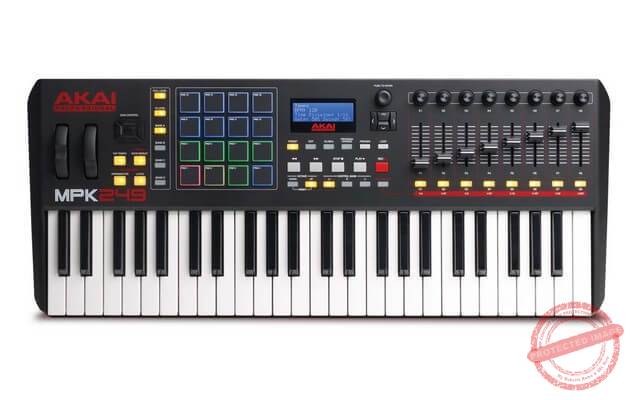
Key features:

  • Full-size, semi-weighted keyboard
  • Aftertouch equipped keys for dynamic play
  • 16 RGB LED backlit trigger pads
  • Fast LCD screen
  • 8 faders and control knobs
  • USB-MIDI
  • Pitch bend and mod wheels, octave control
  • Ships with Hybrid 3.0 virtual synth, Ableton Live Lite, Sonivox Twist 2.0

When it comes to MIDI controllers, Akai rules the roost. You’ll find an Akai in every serious producer’s gear rack somewhere. From their MPCs to the tiny LPK25, Akai outsells and out-innovates nearly every other MIDI equipment manufacturer.

The Akai Professional MPK249 is the company’s flagship 49-key MIDI controller. Boasting a full-size keyboard with semi-weighted keys, the MPK249 feels much better to play than cheaper synth-action keys. They’re also lighter than fully-weighted keys, making them easier to play for longer hours and by inexperienced musicians.

You get the full range of controller options – 8 faders, 8 knobs, 8 switches and 16 pads. The pads are RGB backlit which is useful for identifying sounds. The faders and knobs have 3 banks, so you can actually assign 24 functions to them.

Additional features include a refreshed LCD screen that shows some vital information from your DAW. Integrations are also much better. WIth USB-MIDI, you can start using the MPK249 immediately after plugging in.

While a lot of MIDI controllers boast similar features, where the Akai MPK249 stands out is in the quality and finesse of each feature. The pads are borrowed from Akai’s legendary MPC drum machine. The knobs have a nice resistance. And the faders feel hefty and robust.

The standout feature is the keys. They’re not as light and springy as cheap synth-action keys. Nor are they as heavy and cumbersome as conventional fully-weighted keys. They’re somewhere right in the middle between “authentic” and “easy”.

The semi-weighted keys also have aftertouch (i.e. “polyphonic pressure”) which makes playing much more dynamic.

The overall build quality is exceptional. This newer professional model, which was refreshed in 2015, is also slimmer than its earlier counterpart. This added portability is a nice bonus.

Overall, if you’re looking for the best 49-key MIDI controller that will last you for years, you can’t go wrong with the Akai Professional MPK249.

Pros

  • Exceptional build quality
  • Keys feel nice to touch and play
  • MPC-like pads and close DAW integrations

Cons

  • Pad quality isn’t as nice as Akai’s MPX16 sample recorder
  • Pricey

Best Mid-Range MIDI Controller: Arturia Keylab Essential 49

Key features:

  • Full-size 49 key keyboard
  • 8 pads, 8+1 faders, 9 knobs
  • Dedicated pitch, mod wheels
  • Analog Lab sample library turns it into a synth
  • 5000 built-in sounds in Analog Lab
  • Synth-action keys

Long before there was Akai’s dominance in the controller market, there was Arturia with its Factory and Experience controllers. These were among the first controllers to realize the full potential of a hardware controller + software synth/DAW. So many of the design cues and features we now take as standard emerged from Arturia’s early experimentation.

The Arturia Keylab Essential essentially condenses all of Arturia’s learning into an affordable, well-built package. Light, portable, yet solid, this is the quintessential mid-range MIDI controller: good enough for advanced players, yet cheap enough for beginners.

The first thing you’ll notice is the color. In a sea of all-black controllers, the Keylab stands out with its all-white color scheme. The pastel shades used in the pads only add to the classy feel. Though as a negative, if you like to work in the dark, as I do, the white color does come across as a bit jarring.

The keyboard uses synth-action. As I noted earlier, this is lighter and faster than fully or semi-weighted keys. If you have any piano experience, you won’t enjoy this. But if you don’t, you’ll appreciate its speed and playability.

One of the standout features is Arturia Labs. This is a library of around 5,000 samples that can be selected with the giant knob in the center of the controller. Select your sample and you can essentially turn the Keylab into a synth. Just plug into a PA system and you’re ready to make music – no DAW necessary.

The other buttons – faders, knobs, pads – feel good, though it’s obviously not to the standard of MPK249 (especially the faders). The knobs are endlessly turning (i.e. they are encoders) which might or might not be a positive feature, depending on your playing style.

However, they get the job done which is more than you can say for a lot of mid-range offerings.

Integration with Ableton Live is smooth. Plug it in and Ableton will automatically recognize the device and shift key mappings. Using Logic, however, requires a longer manual process.

Overall, the Keylab Essential is one of the best 49-key MIDI controllers you can buy in the mid-range. It looks good, plays well, and has enough features to justify the prices.

Pros

  • Good looking design
  • Arturia Labs turns controller into a synth quickly

Cons

  • Poor integration with Logic and Pro Tools
  • Keys feel a little wobbly

Best Budget MIDI Controller: M-Audio Keystation 49 MK3

Key features:

  • Full-size 49 key keyboard
  • Synth action velocity sensitive keys
  • Dedicated pitch and mod wheels
  • Integrations with Ableton Live and Pro Tools
  • Ships with education software and several virtual instruments

The budget end of the 49-key controller market is usually quite sparse. Most decent offerings in this range tend to have at most 25 keys. It’s rare to find a 49 key controller that has a full-size keyboard or a complete range of pads and buttons.

Essentially, if you’re going to pick a budget MIDI controller, you’ll have to compromise. You can either have a full-size keyboard. Or you can have a full-range of pads, buttons and sliders.

For this list, I chose to go with a full-size keyboard. Hence my pick, the M-Audio Keystation 49 MK3.

The third iteration of the Keystation 49 series improves on the keyboard slightly. It still has barebones features. There are no pads, faders or knobs. But you do get a dedicated pitch/mod wheel as well as buttons for DAW control (start, stop, record, etc.).

The highlight of the package is the keyboard. You get full-size keys (most keyboards in this range have mini keys) that use synth action. The keys are velocity sensitive. For people who want to replicate the feel of a piano, there is even an option to plug in a sustain pedal sold separately.

Sure, you’re not going to replace a full-fledged digital piano or even a high-end MIDI keyboard with this, but for the price, the keyboard is remarkably nice and well-built.

Users who are not looking to play/perform, however, might be disappointed by the sparse features and lack of additional controls. This is strictly for people who want a good keyboard over everything else.

One positive is the close integration with Ableton and Pro Tools (no Logic or FL Studio – though there are scripts for that).

On the whole, the M-Audio Keystation 49 is a decent pick in the budget range, especially for those looking for full-size keyboards

Pros

  • Decent full-size keyboard for the price
  • Well-integrated with Ableton and Pro Tools

Cons

  • No pads, faders or buttons

Best Ableton MIDI Controller: Novation Launchkey 49 MK2

With its bright orange or teal underbelly, Novation Launchkey 49 MK2 almost feels like it’s hiding a secret. That there’s something more to it than meets the eye.

You wouldn’t be wrong for thinking so; the Launchkey looks like a typical MIDI controller, but packs in so much more inside.

The first thing that catches your eye is the row of 16 colorful pads. From bright purple to green, the colors of these pads is arresting and extremely useful for identifying tracks. They’re also pressure sensitive, making them a decent replacement for a basic drum machine.

You also get the standard MIDI controller fare of 8+1 faders and 8 knobs. Plus, there are dedicated pitch and mod wheels.

The keys are fast but not the most satisfying to use. Unlike the MPK249, they use synth-action which doesn’t offer much resistance. The low weight is good for studio use, but if you want to take this live, you’ll be underwhelmed.

Where the Launchkey truly shines is in its close integration with Ableton Live. In fact, Novation clearly states that this controller is “designed for Ableton” (not that you can’t use it with Logic or FL Studio). Plug the controller in (it only offers USB; no MIDI) and the pads will spring to life. Every control is already assigned in Ableton, so you can start playing within seconds without worrying about key mappings.

This close integration might leave other DAW users out in the cold, but it will put a smile on your face if you use Ableton (though there are scripts available for using it with Logic and Reason).

Overall, Novation Launchkey MK2 is a solid performer but works exceptionally well with Ableton. If you’re looking for an Ableton-specific MIDI controller, you can’t go wrong with this one.

Pros

  • Close Ableton integration
  • Pressure-sensitive RGB pads look and play well

Cons

  • Non-assignable controls
  • No 5-pin MIDI out

Best High-End MIDI Controller: Nektar Panorama P4

Key features:

  • Full-size semi-weighted keyboard
  • Velocity sensitive keys
  • 12 pads, 16 encoders, 9 faders, 10 buttons
  • 1 Motorized fader
  • 4 keyboard zones
  • Integrated with Logic Pro, Reason, Cubase
  • 20 preset locations
  • 3.5″ TFT screen

When it was first released in 2012, the Nektar Panorama was a revelation. It was the first product by Nektar Technology (which would go on to release the highly respected LX88+ and GX61). With its white base and black control keys, it was striking. A gorgeous, well-built piece of technology that seemed worth its outrageous price tag.

Fast forward to 2018 and the Panorama P4 still stands out in a crowded market. It is as beautiful to look at as it was in 2012. In fact, I’d even say the army of low-end, crummy looking MIDI controllers has made it even better looking with time.

Of course, looks are only one aspect. The Nektar Panorama P4 also boasts a seriously long list of features.

Let’s start with the keyboard itself. Like its competitor, the Akai MPK249, the P4 has semi-weighted, velocity sensitive keys with aftertouch. Aside from buying a fully-weighted digital piano, this is as good a playing experience as you can get in the MIDI controller range.

The list of controls is also extensive. 12 pads, 9 faders, 10 buttons, 16 encoders (not knobs – these have boundless movement), and a 3.5″ screen that integrates well with most DAWs. You also get a motorized fader which is great for lugging it around to gigs. Dedicated pitch and mod controls are, of course, standard.

The standout feature of the P4 is its close integration with several DAWs, notably Reason, Cubase, and Logic Pro. The integration is truly plug-and-play. Every control is already carefully mapped. And should you change it in the computer, it will update in real-time on the P4’s built-in screen. This turns the P4 into much more than a random controller; it’s a veritable different way to control music.

One negative is the lack of clear integration with Ableton Live (though you can download scripts for it). The P4 was released at a time when Ableton wasn’t the mega popular beast it is today. Though the P4 works well with Cubase and Reason, these DAWs have mostly fallen out of favor today.

The build quality is exceptional, as befitting an instrument of this price. If there is one niggle I can pinpoint, it’s the variability of the aftertouch on black and white keys. The black keys feel different than the white ones which can impact playing styles.

Overall, if you have the cash for it and need something with a bit more visual oomph, more controls, and a motorized fader, choose the Nektar Panorama P4 over the Akai MPK249.

Pros

  • Great build quality
  • Lots of controls
  • Exceptional integration with Logic Pro, Cubase, Reason

Cons

  • Poor integration with Ableton Live
  • Would be better with 16 drum pads

Best Keyboard: Roland A-500 Pro

Key features:

  • Velocity sensitive 49-key keyboard
  • 9 faders, 9 knobs, 8 pads, 12 buttons (total 45)
  • Durable build quality
  • Low weight and small form factor

Roland is one of the most constantly under-appreciated brands in the keyboard space. They have exceptional prestige among serious musicians, but as far as dominating social media conversations go, they’re hardly as talked about as their flashier counterparts.

The Roland A-500 Pro is no different. It boasts one of the best keyboards in this category and the legendary Roland build quality. Yet, few people know about the A-500 Pro. Even fewer choose it.

Part of the reason for this lack of interest is Roland’s focus on the keyboard instead of the pads, buttons, or faders. While you do get 45 assignable controls, they are secondary. The star of the show is the keyboard…

…and what a keyboard it is. Unlike the plasticky, cheap keys that dominate the best 49 key MIDI controller market, the Roland A-500 feels truly premium. The keys have a soft, ivory-like feel. Touch them and you’ll be reminded of $1,000 Yamaha digital pianos.

But they don’t just feel good; the keyboard is also extremely durable. From the keys to the buttons and pads, there are no unexpected wobbles and kinks. Everything feels well put together and sturdy. This is clearly a MIDI controller that will last your round the world tour, and then some more.

Speaking of additional controls, you get only 8 tiny pads and a handful of buttons. The knobs and faders have some decent resistance but nothing that instantly “clicks” as it does on the Akai MPK249. Roland is focused in its approach – it wants to sell you a keyboard, not a controller.

Integrations are a hit and miss. There are no dedicated mappings for Ableton/Logic/Pro Tools. You get some standard mappings (such as play, pause, etc.) but for the rest, you’ll have to do the key assignments yourself. If you’re looking for a plug-and-play MIDI controller, this isn’t for you.

On the whole, the Roland A-500 Pro is one of the best keyboards on the market. The keys feel good to touch and the build quality is exceptional. The rest of the package, however, is muted.

Grab this if you want a rock solid keyboard over everything else.

Pros

  • Exceptional build quality
  • Great keyboard

Cons

  • Tiny pads aren’t very intuitive
  • Limited integrations

Best for Portability: Alesis Q49

Key features:

  • Full-size velocity-sensitive keys
  • Synth action
  • Dedicated pitch and mod controls
  • Supports external sustain pedal

The Alesis Q49 won’t thrill you with its key quality, nor will it sweep you away with its long list of features.

What it will do, however, is give you a seriously useful keyboard at a seriously affordable price tag.

The Q49 joins the Q25 and Q61 as some of the best beginner-friendly MIDI keyboards around. Unlike some of the competitors, the Q49 is built on the “less is more” philosophy. Instead of loading up the controller with pads, buttons, knobs and faders – and doing a poor job with it – Alesis decided to focus exclusively on one thing: the keyboard.

The keys are synth action and velocity sensitive. Alesis designed them for responsiveness. Tap them gently and you’ll hear a soft murmur. Slam them in and you’ll hear a loud roar. The keyboard responds exceptionally well to your playing style, which will be a big hit with piano players.

The pitch wheel is also well put together. There is just enough heft and resistance to achieve realistic-sounding bends.

Another benefit of a small keyboard is portability. The entire keyboard weighs under 5lbs and is barely wider than half a foot. You can easily lug it around to gigs and practice sessions.

There are tons of missing features, of course. Integrations with Reason, Cubase, Logic and Pro Tool are iffy (though it works wonderfully well with Ableton). Pads and controls are obviously missed as well.

But on the whole, if you’re looking for a good no-fuss keyboard that you can carry around anywhere, the Q49 would be a great buy, particularly at its price.

Pros

  • Great keyboard quality; responsive keys
  • Mod/pitch wheel works great
  • Low weight and small dimensions
  • Great Ableton integrations

Cons

  • Limited integration with most DAWs
  • No pads, knobs, faders, or controls

Novation Impulse 49

Key features:

  • Full-size 49 key keyboard
  • Semi-weighted, velocity sensitive keys with aftertouch
  • 8 backlit pads, 8 knobs, 9 faders, 9 buttons
  • Dedicated mod and pitch wheels
  • USB + MIDI
  • Software included (Ableton Live Lite, Bass Station Synth, Addictive Keys)
  • Automap software for quick mapping + close DAW integration

The Novation Impulse range of MIDI controllers is almost a throwback to the ’80s era of chunky, plasticky synths that could be found in every teenage musician’s bedroom. The aesthetics are delightfully ’80s synth pop-ish – a black, white, and bordered by a wing of red. It feels tough, well-built, and slightly retro.

The design isn’t just for aesthetics; it also props up a clear and easy to access layout. The pads and knobs are on one side. The faders and buttons on the other. In between, there’s tiny screen and your primary play/pause/record controls. The bifurcated layout adds clarity that’s often missing from similar MIDI controllers.

This is one of the rare keyboards with a $300 MSRP that ships with semi-weighted, velocity-sensitive keys. As I mentioned in the Akai MPK249 review, semi-weighted keys add much needed resistance to the keys to mimic the action of a piano. They’re not quite as smooth as an expensive Yamaha, but they’re still better than the springy, unresponsive feel of synth-action keys.

The drum pads, despite being limited in number, work really well. They’re aftertouch and velocity sensitive so you can use them to bang out some nice finger-drumming patterns.

The rest of the controls – the 9 faders, buttons, and knobs – are trademark Novation – good and acceptable, not exceptional.

One of the better features is Novation’s Automap. A lot of MIDI controller software ends up being too clunky to use. Automap actually makes it a breeze to map controls for major DAWs. There’s a new “walkthrough” feature that makes setting up easier than ever.

You don’t have to go through the pain of control mappings, of course; Novation Impulse ships with built-in controls for most popular DAWs and software synths. In fact, 14 of the 20 template slots in Automap are already pre-configured for these DAWs (though you can overwrite them).

On the whole, the Novation Impulse is the perfect as the middle-of-the-road, good-but-not-great controller. It’s not the best 49 key MIDI controller around, but it does more than a decent job with great keys, good layout, and quick setup. If it only had better (and more) pads, the Impulse would be a top 5 MIDI controller easily.

Pros

  • Quality keyboard with semi-weighted keys
  • Good layout and build-quality
  • Easy to use with good integrations

Cons

  • Limited pads
  • Pad action isn’t as responsive as it could be

Monoprice 606607

Key features:

  • 49 velocity sensitive keys
  • Dedicated pitch, mod wheels
  • 4 built-in rotary encoder knobs
  • 1 fader
  • Room for external sustain and expression pedals

Keyboards in this range are usually guilty of doing too much (and failing) or offering too little to be worth it for even beginners.

This offering from Monoprice, thankfully, makes the smart choice of focusing mostly on the keyboard.

And I daresay the choice pays pays off.

The 49 keys are slightly shorter than a conventional 49-key keyboard, but they’re wide enough for accommodate thick fingers. The keys are synth action and velocity sensitive. It’s not the best keyboard you can buy, but for beginners, it’s a good, responsive pick.

There are four rotary knobs and a fader. The fader works well as a master slider. You can program the rotary knobs to control pitch, volume, etc.

Since there are so few controls, there are few things to map. This makes it easy to plug in and start playing on virtually any DAW.

Despite the small dimensions, the Monoprice 606607 is slightly on the heavier side (compared to the equally small Alesis Q49). It’s not a dealbreaker, but with a little lower weight, the small footprint would have made the 606607 a serious contender for the ‘most portable’ title.

There is little else to write about this; the keys work well, the small size makes it quite portable, and the pitch/mod wheels work well enough. The killer feature is the price tag which, at a MSRP just above $100, is hard to beat.

Overall, go for the Monoprice 606607 if you’re looking for a budget 49-key MIDI controller with responsive, lightweight keys.

Pros

  • Great value for money
  • Keys are light and responsive
  • Small form factor

Cons

  • Slightly heavy
  • Limited controls

Roland A-49

Key features:

  • 49 keys with synth action
  • Slim keys for enhanced portability
  • Includes two programmable knobs and buttons
  • Built-in pitch wheel
  • Innovative D-BEAM controller built-in

One of the biggest problems with portable keyboards is that the keyboard itself tends to be awful. Too many manufacturers ship sub-par keyboards just to get the weight below a certain “portable” threshold.

The Roland A-49 is one of the few MIDI controllers I’ve seen that doesn’t fall into this trap. At under 6 lbs and just over a foot, this is one of the most portable 49-key MIDI controllers around. Yet, it also boasts trademark Roland keys with exceptional build-quality and durability.

The keyboard is the star of the show. The 49 keys are slimmer than a standard keyboard (warning to those with thicker fingers) which helps the portability. But they’re as smooth and responsive as the keys on Roland’s higher grade models such as the A-500 Pro. There is little of the plasticky feel you usually associate with portable keyboards in this range.

There is little to write about besides the keyboard. You get two knobs and two buttons, but you’re unlikely to get much use out of them (except for maybe controlling volume, play/pause). There is also an innovative D-BEAM controller which basically helps you make music by waving your hand over it. In practice, it’s usually too sensitive (or not sensitive) enough to do anything actually useful. Consider it a gimmick and ignore it for the most part.

There is a chunky pitch wheel which feels great to use. And since there are so few controls, playing the Roland A-49 is as easy as plugging it into a computer.

The primary selling point is the portability. At just 6 lbs and 33″ in length, 7″ in width, this is one of the smaller MIDI controllers you can buy. It’s small enough that it can fit into a large backpack. Great if you want to carry around your gear on gigs.

On the whole, get the Roland A-49 if you want a great quality keyboard in portable package. The price is aggressive and trademark Roland durability will last you for years.

Pros

  • Great build quality
  • Fast, responsive keys
  • Highly portable

Cons

  • Keys are too slim for thick fingered players
  • Limited controls

So that covers the top 10 best 49 key MIDI controllers on the market right now.

This still leaves one more question to be answered: what should you look for in a MIDI controller?

I’ll share some answers below.

How to Buy the Best 49 Key MIDI Controllers


Buying a MIDI controller can be a big challenge. Should you focus on a nice keyboard? Or should you focus on lots of controls? How important are integrations?

As with most things in music, the answers to these questions are entirely subjective. What kind of controller you choose to buy will depend entirely on the kind of music you like to make.

Having said that, there are a few things every musician should consider before jumping into the market to buy the best 49 key MIDI controller.

Let’s look at these questions in more detail.


Do You Really Need a MIDI Controller?

One of the most common questions I see in my inbox is: “what should I buy for a home studio setup?

For beginners, my shopping list is usually the following, based on priority:

  1. Laptop or desktop for music production
  2. DAW, like Ableton or Logic
  3. Studio headphones
  4. Audio interface
  5. A good sample pack
  6. Studio monitors

Notice how I don’t even include a MIDI controller in my list?

That’s because for beginners, a MIDI controller is usually overkill. If you’re working with a limited budget, you’ll do far better to invest it in a quality DAW + studio headphones + audio interface.

To understand why, you have to go back to the reason we use MIDI controllers.

As the name implies, this device is used as to control other equipment, such as a hardware synth of a DAW software. That’s it. All the bells and whistles you see listed in any MIDI controller’s marketing brochures is just trying to say the same thing in different words: “our device will help you control your DAW better”.

So what exactly do you need to control in a DAW?

The first and obvious candidate is entering MIDI notes. Using the mouse works fine, but it usually ends up making music too perfect. If you want something organic, you want notes to be slightly mistimed (as a real player would). Doing that with a mouse takes effort and fiddling around with quantization settings. Playing the same part via a keyboard means you get the natural groove (and tiny mistakes) of a real musician.

Another reason to own a MIDI controller is to experiment. It’s no fun entering notes with your mouse, hitting play, then realizing they don’t fit. It’s much more natural to just bang out a few notes on a controller and see if they fit.

That’s not the only thing you need to control. Maybe you want to bang out a drum pattern. Or maybe you want a fade-in effect. Or maybe you want to launch clips and audio effect with a tap of the button.

A MIDI controller will let you do all this, and more.

But the fact is, you don’t need a MIDI controller to do all the above. You can point and click to draw notes. Use automation to create fade-ins and build-ups. A MIDI controller makes things easier, but you don’t need it.
In fact, for the first two years of my musical life, I didn’t own a MIDI controller.

So before you splurge $300 on a MIDI controller, ask yourself: do I really need it? What do I currently do with my keyboard/mouse that I can do better with a dedicated controller?

You’ll find that buying a MIDI controller only makes sense if:

  • You’ve been playing for a while and have advanced beyond the ‘beginner’ stage
  • You have budget to spare
  • You actually know how to play the keyboard
  • You want something that’s more intuitive than software controls

For the rest of you, I’d say focus on improving your skills instead of buying a MIDI controller.


Should You Buy a Pad Controller or a Keyboard Controller?

To those of you who are unaware, controllers broadly come in two flavors: pad controllers and keyboard controllers.

Keyboard controllers are like the options you saw above. Their primary focus is a keyboard with anywhere from 25 to 88 keys. They might or might not have pads, knobs, faders, and extra buttons.

An example of a standard keyboard controller. This one has limited controls

Pad controllers, on the other hand, don’t have a keyboard. Instead, they include an array of pads (usually 64) and a set of knobs, faders, and buttons. Ableton Push is a perfect example of a pad controller:

The popular Ableton Push 2, a great example of a pad MIDI controller (Image source)

Whether you choose a pad or a keyboard controller will depend entirely on what you intend to do with your controller.

  • Choose a pad controller if you want to launch audio clips, trigger audio effects, and bang out drum patterns. If you make music primarily in Ableton’s Session view, you’ll find pad controllers to be extremely intuitive.
  • Choose a keyboard controller if you intend to compose tracks by playing MIDI notes. If you work primarily in Ableton’s Arrangement view, you’ll find keyboard controllers to be more intuitive.

Keyboard controllers are the more “traditional” form of MIDI controllers. They have a form that musicians understand – piano keys. They might or might not include additional controls (knobs, buttons, faders), but if they do, it just makes the controller more useful.

Pad controllers are focused more on giving you an intuitive interface to access your clips and sounds. They’re meant more for modern DJs and producers who want to bang out beats and experiment with sounds, not for composing tracks note by note. If that’s your playing style, you’ll find a lot of utility from pad controllers.

Ideally, you should have both. But I recommend that most musicians prioritize a keyboard controller first.

Do You Need Controls?

Even though this article is about MIDI controllers, you don’t necessarily need controls with your keyboard.

(By controls, I mean pads, knobs, faders, and buttons that ship with a lot of MIDI controllers).

It all depends on what you intend to do with your controller. If you want to play and make music note by note and chord by chord, you can do with a keyboard alone.

But if you want more flexibility in terms of launching clips, changing EQ settings on the fly, and turning up/down volume, pan, etc, you’ll want some form of controls built-in.

An ideal MIDI controller should have both a keyboard and controls (such as our top rated Akai MPK249. But if your pick doesn’t have built-in controls, it’s not really a deal breaker, provided it adheres to your playing style.

That is to say, controls are good to have, but not a must have. A decent keyboard should be a far higher priority.


What Kind of Keyboard Should You Buy?

Broadly speaking, MIDI controller keyboards fall into one of three categories:

  • Fully-weighted: Fully-weighted keyboards mimic the action of acoustic pianos. Hence, they are heavier and have variable resistance (lower octaves have higher resistance). This makes them great for people coming from a piano background. It is extremely rare to find MIDI controllers with fully-weighted keys. They’re much more common in digital pianos.
  • Semi-weighted: Semi-weighted keyboards are halfway between the full weight of piano keys and the low resistance, springy action of synthesizers. They offer a decent compromise between authenticity and comfort. Many MIDI controllers in the $300+ range have semi-weighted keys.
  • Synth-action: Synth-action keys are light, responsive and have little resistance. The keys don’t mimic piano action. That is, there is no variable weight or resistance. Pressing a key gives you immediate access to the sound, without any feedback. Synth action keys are common in low and mid-range MIDI controllers.

What kind of keyboard you buy will depend on your budget and playing style.

If you have a low budget (under $200), you will have to make do with synth-action keyboards. For semi-weighted keyboards, you’ll have to increase your budget to $200+ (preferably, $300+). Fully-weighted keyboards are extremely rare. If you want one, I suggest buying a digital piano and using it as a MIDI instrument.

Your playing style and experience will also impact your choice. Semi-weighted and fully-weighted keyboards are better suited for people with prior piano experience. Synth-action keyboards, however, are much more forgiving to beginners.

Unweighted or synth-action keys (Image source: Dummies.com)

If you know how to play the piano, go for semi-weighted keyboards. If not, pick synth-action keyboards instead.


What Should Be Your Budget for a MIDI Controller?

MIDI controllers aren’t very expensive as far as musical instruments go. If you’re used to $500 guitars and $1,000 digital pianos, you’ll be pleased to know that you can buy very competent MIDI controllers for under $200.

As a general rule, your budget will impact your choices as follows (with respect to 49 key controllers):

  • Under $100: In this range, you’ll mostly find mini keyboards with a handful of controls. Nearly all keyboards in this budget are synth-action. Portability is a big focus and most offerings clock in at 5-8lbs.
  • $100-$200: Keyboards in this range tend to be mostly synth-action. Some offerings at the top of this range ($200) will have semi-weighted keys. Most will have a mix of keyboard and controls. Most beginners and intermediate players should have a budget between $150-$200 to get a decent MIDI controller.
  • $200-$300: MIDI controllers in this range generally boast extensive controls (8-16 pads, 9 faders, 9 knobs, 8+ buttons are common). At the far end of this range, you’ll also find semi-weighted keyboards. The build quality of gear at this budget is generally very good.
  • $300+: The top end of the MIDI controller budget range boasts premium offerings from the likes of Akai and Roland. Their keyboards are usually semi-weighted and you get a full range of built-in controls. The build-quality of gear in this range tends to be exceptional. It’s not unusual to find a 15 year old $400 Akai working perfectly even today.

You’ll be hard-pressed to find a great MIDI controller under $100. Go for this range only if you want a secondary controller that emphasizes portability.

Most beginners and intermediate players should aim for a budget between $100-$200. You’ll get a good mix of build-quality, key-quality, and controls.

Most beginners and intermediate players should aim for a budget between $100-$200

If you’ve been playing for a while, think of splurging on a premium MIDI controller. Look for semi-weighted keys since this will improve the playing experience substantially. A $300 budget is great for finding some great picks.


What Should You Look for in Built-in Controls?

If your MIDI controller has built-in controls, here’s what you should look for in them:

Pads

If the MIDI controller has built-in pads, consider the following:

  • Number of pads: 16 is ideal, 8 should be minimum
  • Pad size: Larger is better. Smaller pads make finger drumming difficult
  • Pad responsiveness: Fast, responsive pads are ideal. A slow pad that offers too much resistance makes finger drumming difficult.
  • Pad illumination: Backlit or RGB pads are ideal since you can assign different colors to different sounds. They also look better than plain black pads.


Knobs

Most controllers have at least a few knobs. These are useful for fade-ins, controlling volume, pan, etc. Here’s what you should consider when selecting knobs:

  • Number of knobs: Usually, the number of knobs will correspond to the number of faders (9). At the very least, you want two knobs to control volume and panning.
  • Knob resistance: A good quality knob should have some resistance when you turn it. If it is too loose, you might increase/decrease it too much. Look for some tightness and heft while turning.
  • Rotation freedom: Better-quality knobs have complete 360 degree freedom of movement (i.e. you can go from 0 and come back to 0 after a complete rotation).


Faders

Faders are common in MIDI controllers, usually used for handling EQ. Here’s what you should consider when selecting faders:

  • Number of faders: The most common layout for faders is 8+1. Here, you have 8 faders for EQ and the final 1 for the master control. Some MIDI controllers have just a single fader for controlling the master channel.
  • Movement resistance: As with knobs, a good fader should have some resistance when you move it. This increases the amount of fine control you have over the faders.
  • Mechanization: Some high-end MIDI controllers have mechanized faders (usually only one – the master channel). This lets you automate the fader action without touching it. You don’t need it, but it’s a great value-add.


Buttons

Besides faders, pads, and knobs, most MIDI controllers also have an assortment of buttons. You can program these to launch clips, effects, and perform different functions within the DAW.

The number of buttons in the MIDI controller varies a lot, but 2-16 is common. Since these are mostly just used as shortcuts, you don’t have to worry too much about their resistance or build-quality. As long as they work when you press them, you should be fine.


What Else Should You Consider in MIDI Controllers?

Apart from the things we’ve already discussed, there are a few more considerations when buying MIDI controllers, such as:

1. Layout

The layout of the MIDI controller is often overlooked, even though it impacts every aspect of the device. You want a controller that gives you easy access to all the controls while putting the keyboard front and center.

Most well-designed MIDI controllers follow a logical layout with pads on one side, faders and knobs on the other. For example, the popular Akai MPK249 keeps all buttons in the center while the knobs and faders occupy the right half:

Stay away from controllers that follow no clear and discernible layout pattern. If the knobs and faders are placed separately on either half of the controller, stay away – it’s not going to be very intuitive to use.


2. Screen

Most mid-range and up MIDI controllers have a built-in screen. This is useful for showing information from the DAW or giving you customization options and key mappings.

The screen is usually tiny. It’s rare to find a MIDI controller with a full color screen. The LCD screen on Akai MPK249 is pretty much the standard fare:

The lack of a screen isn’t a deal breaker. In fact, some very well-respected controllers, such as the Roland A-500 Pro, don’t have screens. You’ll have your laptop screen with the DAW anyway.

Consider this a “nice to have”, not a “must have”.


3. Integrations

Integrations are crucial for MIDI controllers. The better integrated the controller is with your DAW, the easier it will be to use.

Most modern controllers are well-integrated with the three most popular DAWs right now – Ableton, Logic, and Pro Tools. Ableton integrations tend to be particularly common. If your controller isn’t integrated out of the box with your DAW, be prepared to spend a decent amount of time mapping different controls to the controller.

Consider the kind of mapping software the controller ships with. Some software, such as Novation’s Automap, is a breeze to use. Other, such as M-Audio’s, can be cumbersome.

Fortunately, most mapping software will let you add your own scripts for quick integrations. You can easily find free downloadable scripts for most DAWs online. Check this before you make a purchase decision.


4. Included Software

It’s common for controllers in the mid-range and up to ship with free versions of DAWs, some software synths, and a few sample packs.

Novation’s Impulse range of controllers, for instance, ships with the following software:

  • Ableton Live Lite
  • Novation Bass Station synth
  • XLN Audio Addictive Keys
  • Loopmaster’s Sample Pack

It’s nice to have this free software but it isn’t a deal breaker. Most likely, this software can’t compete with any paid plugins or synths (Bass Station is nice, but it’s no Serum). Sample packs are also a dime-a-dozen.

Manufacturers usually use this software as a value-add to stand out from competitors. But don’t let it sway your decision; it’s much more important to get a controller that works well than one that gives you a lot of freebies.


5. Portability

Whether you prioritize portability or not will depend entirely on what you intend to do with your MIDI controller. If you plan to place it front and center in your home studio, it’s likely at the low-end of your priority list. However, if you plan on dragging your controller to your gigs, you’ll want a lightweight option.

At 49 keys, MIDI controllers in this category are perfectly placed for portability. They’re not as large as 88 or 61 key controllers to be difficult to carry around. Some of the lower-end models without built-in controls are even small enough to carry around in a backpack.

Image source: YouTube

If portability is a priority, look for MIDI controllers that weigh under 10 lbs (5-6 lbs is ideal). The size shouldn’t exceed 36” (the most portable options are around 33” mark).


6. Ports and Power Supply

Finally, consider the number and type of ports the MIDI controller has, and how it draws power.
For power, controllers usually have two options:

  • External power supply by a 9-12V adapter
  • USB power

USB power is ideal if you’re going to plug the controller into a computer. If you plan to plug it into a hardware synth, look for external power supply.

MIDI and USB ports are standard. Some controllers also have ports to attach external piano sustain and expression pedals. These are nice to have only if you plan on playing piano-style.


Final Words

With that, we come to a close in this extended guide to buying the best 49 key MIDI controller. We’ve covered everything from the factors that should impact your purchase decision to a comprehensive list of the best controllers on the market right now.

Just to recap, here is our list of the best 49 key MIDI controllers, sorted by category:

Questions, suggestions, or doubts?

Leave your comments below or send us an email.

References:

Changelog
  • October 4, 2018: Article first published
  • August 6, 2019: List re-evaluated and updated.
  • February 6, 2020: List re-evaluated
  • January 7, 2021: Videos added

The Best 49 Key MIDI Controller 2026 for Every Budget & DAW Read More »

The 6 Best MIDI Controllers for Logic Pro X in 2026

As one of the best DAWs around, Logic Pro X enjoys widespread compatibility with most hardware. Some of the best MIDI controllers plug effortlessly into Logic Pro X, allowing you instant control over your DAW. This guide will take a detailed look at the best MIDI controllers for Logic Pro X, how to buy them, and the top picks as chosen by our experts.

If you’re in a hurry, these are my picks for the best MIDI controller for Logic Pro X:

We’ve looked at controllers for Ableton, so it’s only natural that we answer a question so many of you have been asking: what’s the best MIDI controller for Logic Pro X?

Despite the rumble of Ableton and the murmurs of FL Studio, Logic Pro retains a top spot in the DAW market alongside Pro Tools. Part of this has to do with history – Logic Pro was one of the first fully-fleshed out DAWs.

But a more important reason for Logic’s enduring popularity (besides the features, of course) is its Apple support, and the integrations that earns you. When you’re owned by the biggest company in the world, you can bet that manufacturers and software developers alike will bend over backwards to supporft you.

All this means that as a musician, you’re spoiled for choice as far as picking the best MIDI controller for Logic Pro X goes. From pad controllers to keyboard controllers, there are options to fit every budget and need.

I’ll share my list of the best MIDI controllers for Logic Pro below. We’ll start with a quick overview of my review methodology before sharing my list of the top ten picks. I’ll end the roundup with a short guide to buying the best MIDI keyboard for Logic Pro.

We use rigorous research, reviews, and real-world performance when recommending products. Our reviewers include producers, performers, and active musicians. You can read more about our review process here. Be advised that MIDINation might earn referral commissions on purchases made through this website. This does not affect your final purchase price.

About your reviewer
Ryan Harrell is the founder of MIDINation and an experienced producer/DJ. His first experience with electronic music production dates back to Cubase 3.0 in the summer of 1997, and he’s been a fan ever since. He prefers Ableton as his primary DAW these days, though he is still partial to Cubase and Pro Tools. He lives in San Diego and freelances as a producer and part-time DJ.

My Review Approach

Those of you who’ve been following this blog for a while know that I usually test products either in mine or friends’ studios. Much of the insight comes from experience using different keyboards and pads and controllers over time.

In case I’m not able to test a product personally, I rely on a meta analysis of reviews online or insight from friends in the industry. It’s not ideal but it at least gives me a fair idea of what to expect.

For putting together a list of the best Logic Pro X controllers, I had a few requirements:

  • The controller must integrate easily with Logic Pro X. Controllers built for other DAWs (such as Ableton Push) were thus removed from consideration.
  • The controller can be either a keyboard controller or a pad controller. The ratings for both are organized separately.
  • The controller must be a commercially available production model, not an obscure custom brand.

I shortlisted 18 of the best MIDI controllers for Logic Pro X based on these requirements. Of these 6 were pad controllers and the rest were keyboard controllers. I had first-hand experience of 13 of these controllers.

I evaluated these controllers based on the following metrics:

  • Build quality and design
  • Key quality (for keyboard controllers), and pad quality (for pad controllers)
  • Features
  • Value for money
  • Logic Pro X integration

Based on these metrics, I assigned a score to each controller like this:

I divided this further into sub-categories (best for beginners, best for professionals, etc.) to help you make the right decision.

I’ll share the complete list and my top picks for the best MIDI controllers for Logic Pro X below.

The 6 Best MIDI Controllers for Logic Pro X

Barring a few Ableton specific controllers, you’ll find that my list of the top Logic Pro MIDI controllers is the same as the rest of my list of the best MIDI keyboards.

This shouldn’t be surprising, of course. A keyboard that works with Ableton or Pro Tools is also going to work with Logic Pro X. The MIDI interface is, after all, about interoperability.

So keep this in mind when you’re in the market for a Logic Pro controller. Any controller will do the job, even if it doesn’t have clear integration with the DAW.

Pad vs Keyboard Controllers

MIDI controllers come in basically two broad variants: pad controllers or keyboard controllers.

  • Pad controllers have a range of large drum pads (anywhere from 8 to 128) instead of standard black and white piano keys. Pad controllers let you launch clips and control the DAW with ease. They’re perfect for a more intuitive and hands-on creation experience, though they’re less useful for actually sequencing tracks.
  • Keyboard controllers have your standard set of piano keys. MIDI keyboard controllers are usually sold in 25-key, 49-key, 61-key, and 88-key variants. The 25-key variant is often classified as “mini”, while the 88-key variant is “full-sized” and has the same octave range as a conventional piano. MIDI keyboard controllers frequently have a small number of pads built in as well.

Both pad and keyboard controllers usually have additional control options such as dials, faders, etc.

I’ll look at the differences between pad and keyboard controllers later. For now, you should know that this list includes both controller types.

Note: You don’t have to buy a Logic Pro-specific MIDI controller. Any keyboard with a MIDI out will work with Logic. If you have a Yamaha digital piano lying about that supports MIDI, you can hook it up and start jamming.

The best MIDI controllers for Logic Pro X make a greater number of control options available to you, but they’re not necessary. If you’re on a budget and already have access to a device with a MIDI port, consider using that instead of buying a new controller for Logic pro.

With these caveats out of the way, let’s look at my top picks for the best MIDI controllers for Logic Pro X:

Best Overall: Akai MPK249

Price: $$$$

Key features:

  • 49 semi-weighted keys
  • 16 RGB-illuminated MPC pads
  • 24 assignable Q-Link controllers include knobs, faders, and switches (8 of each)
  • iOS compatibility
  • MPC Note Repeat, MPC Swing, and arpeggiator for advanced rhythmic and melodic manipulation
  • Pitch bend, modulation, and octave controls for expressive recording and performing
  • Includes VIP 3.0 and MPC Essentials

It’s a rare best-of list that doesn’t have the ever-popular Akai MPK249 (compare price Sweetwater, Guitar Center, Amazon) right at the very top. This powerful, splendidly built keyboard has been my favorite ever since the launch of the revamped MK2 version.

It ticks all the right boxes: classic retro design, 49 keys, 16 responsive pads, plus a whole range of faders, knobs, and buttons. Throw in a sharp LCD screen and semi-weighted keys and you can see why it tops the popularity charts.

But the hardware isn’t the only place where the Akai MPK249 shines. It also boasts some great software features. The standout among these is Akai’s MPC Essentials software. This brings MPC-like workflows to your device – MPC swing, note repeat, etc. These features turn the MPK249’s 16 pads into much more than clip launching buttons. Rather, you can create complex grooves with them.

Another favorite software feature is Akai VIP 3.0. This tool lets you club together up to 8 virtual instruments + effects into a digital “performance” rig. Switching between VSTs, especially in live settings, is never easier.

The only complaint I have is the price. Otherwise this is as good as any MIDI controller can get.

One of my favorite features – and a rarity among MIDI controllers – is the semi-weighted keybed. Most Logic Pro MIDI keyboards tend to have synth action keys. While these are light and springy, they don’t offer the resistance and feedback serious players need. You can enter notes and play basic chords on synth-action keys, but if you want to play complex passages, you’ll be disappointed.

The MPK249’s semi-weighted keys offer the same “weight” and resistance of mid-tier digital pianos. The keys don’t come back up instantly (like in synth-action keys) after you press them. Instead, the weight of the keys – depending on the octave you’re in – affects how quickly they spring back up. This leads to a much more authentic and enjoyable keyboard experience. This easily makes the Akai MPK249 one of the best MIDI keyboards for Logic Pro X, beaten only by Roland’s offerings.

Another plus is the MPC-like pads. In fact, I’m tempted to dub this the best MPC for Logic Pro X as well unless you truly need a dedicated MPC. You get great pads and great keys in the same unit – you can’t ask for more.

For a more detailed explanation of Akai MPK and our impressions, check out the review below:

Read full review

Pros

  • Exceptional build quality and classic retro design
  • Best-in-class semi-weighted keys
  • Great software bundle – MPC Essentials and VIP3.0 in particular
  • Tons of control options + highly responsive pads

Cons

  • Pricey, near the top end of the MIDI controller range
  • Pads are slightly small

Best Value for Money: Nektar Impact LX49+

Price: $$

Key features:

  • 49 expressive synth-action keys
  • On-board pitch/mod wheels
  • 8 hyper-sensitive backlit pads
  • Mac, PC and iOS compatible
  • Software instruments automatically mapped to controls
  • Includes Bitwig 8-Track DAW

49 full-sized keys, 9 faders, 8 backlit pads, 8 knobs, 9 buttons, DAW controls, a LCD information screen, and a price tag that’s surprisingly affordable.

What more could you ask for in a MIDI controller?

The Nektar Impact LX49+ (compare price Sweetwater, Guitar Center, Amazon) isn’t the best MIDI keyboard controller on the market. Heck, it isn’t even the best on this list. But it does everything that you ask of it, and it won’t burn a hole in your pocket.

I like to think of the LX49+ as the perfect intermediate-level MIDI controller. If you’re at this level, your needs aren’t basic enough to be fulfilled by a mini controller. Nor do you know enough to make full use of an expensive Akai or Nektar Panorama. You know full-sized keys and JUST enough controls to make making music more intuitive.

The LX49+ delivers on all counts.

The keyboard is synth-action and velocity sensitive. It doesn’t have the feedback of semi-weighted keys, but for intermediate level players, the keys are sensitive and springy enough.

The 8 backlit pads are small but highly responsive. Despite the limited soundbanks and small size, they make finger drumming possible.

The faders and knobs don’t have the chunky resistance of higher-end controllers, but they get the job done. The faders are also auto-assigned to the mixer by hitting the ‘mixer’ button.

Built-in integration with most common DAW – including Logic Pro – free you from the tyranny of the keyboard + mouse.

The LCD screen displays basic information such as track BPM. Not a killer feature but useful (and missing from several competitors in this range).

It’s not all perfect, of course. The build quality is nothing to write home about. The key action will disappoint serious piano players. And durability remains questionable.

But for the price, this is one of the best “functional” MIDI controllers for Logic pro you can buy right now.

Pros

  • Great value for money
  • Lots of control options; decent keyboard
  • Good integration out of the box with Logic Pro X

Cons

  • Durability and build quality are questionable
  • Small buttons and pads
  • Synth-action keys feel too light and springy

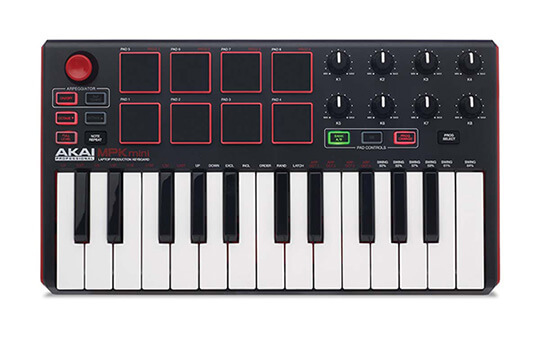
Best Budget Controller for Logic Pro X: Akai MPK Mini MK2

Price: $

Key features:

  • 25 synth-action mini keys
  • 4-way thumbstick for dynamic pitch and modulation control
  • 8 backlit velocity-sensitive MPC-style pads
  • 8 assignable Q-Link knobs
  • Built-in arpeggiator
  • Dedicated Octave Up and Octave Down buttons

I have a long love affair with the Akai MPK Mini MK2 (compare price Sweetwater, Amazon). The MK1 version was one of the first MIDI controllers I ever purchased. Despite its flaws, it worked wonderfully well for my needs at the time.

The MK2 improves on every aspect of its earlier iteration. The end result is a astonishingly well-built and capable controller at a price tag that’s affordable for virtually every musician.

Let’s start with the keyboard. The keys are “mini” in keeping with the portability theme. Yet, they are quite comfortable. You don’t get aftertouch but you do get three touch sensitivity settings. You won’t enjoy playing Chopin on it, but for studio production, the keyboard works perfectly well.

The baby MPK comes with 8 rubbery, velocity sensitive pads. They’re not as large and sensitive as Akai’s APC controllers but they get the job done.

Apart from the pads, you also get 8 programmable knobs. You can also choose between two sound banks.

A clever innovation is the joystick which replaces the pitch/mod wheels. You get the same functionality while saving space.

Akai essentially packs in a huge number of features into a tiny device. Its dimensions are smaller than a laptop’s and it weighs just about the same as an iPad Pro.

Then there are the software features. The MPK Mini MK2 is VIP3.0 compatible, which really opens up live performance options. It also comes with an optional upgrade for MPC Essentials, which brings MPC workflows to the MPK Mini.

There are plenty of flaws – the keys aren’t great for playing and the pads could do with an upgrade. But for a beginner or someone looking for their first device, this is one of the best MIDI controllers for Logic Pro X on the market.

Read full review

Pros

  • Excellent portability and low weight
  • Akai build quality and classic retro design
  • Good all-around pads and keys
  • Great value for money

Cons

  • 8 pads limit usability
  • Knobs are lightweight and “loose”
  • Joystick isn’t as satisfying as dedicated pitch/mod wheels

So that takes care of my roundup of the best MIDI controllers for Logic Pro X on the market. In the next section, I’ll share a quick buying guide to help you make better decisions.

Best Pad Controller for Logic Pro X: Akai Professional APC40 MKII

Price: $$$

Key features:

  • 8×5 pads, 8+1 faders, 16 knobs
  • Pads are RGB backlit for color coded clips
  • Complete DAW control without using keyboard/mouse
  • Assignable A/B crossfader for mixing on the fly
  • Shift button expands grid capabilities

If you’ve used Logic Pro for any length of time, you would know that it is primarily a sequencing tool. You can’t use it to launch clips the same way you can use Ableton’s session view.

This essentially reduces the impact a pad controller can have in your studio or live performance environment.

This is the reason why top pad controllers support Ableton out of the box. You can remap them to support Logic Pro, but it requires a bit of effort. And even then, you’re unlikely to get the same utility out of them as you would on Ableton.

Keeping this in mind, I don’t recommend buying only a pad controller for Logic Pro X. You’ll see better mileage from a mixed controller that combines both a keyboard and a decent number of pads.

If you did have to buy a pad controller, however, I would recommend nothing but the best of the best – Akai APC40 MK2 (compare price Sweetwater, Guitar Center, Amazon).

Akai’s pad controllers have legendary standing among musicians. The company’s MPC controllers revolutionized music production in the late 80s and 90s. It’s not an exaggeration to say that there would be no hip-hop if the MPC didn’t make production-grade drumming and sampling available to the masses.

The APC40 continues on that robust tradition with one of the best designed and best-built pad controllers on the market. Everything about this unit screams quality. The pads have a MPC-like responsiveness. The faders have a heft that’s missing from cheaper alternatives. And the knobs have a clickiness that makes using them a delight.

Compared to the original MK1, the APC40 MK2 is sleekier and stealthier. This has also led to a reduction in pad size, which are now RGB backlit (i.e. they will show the colors of your clips). The unit retains the 8+1 fader layout, as well as the 16 knobs. There is a huge array of buttons below the pads, plus a set of directional arrows to control the DAW.

The major issue (which is true for most pad controllers) is poor Logic Pro integration. The APC40 integrates right out of the box with Ableton, but to get it work with Logic, you’ll have to switch things around in smart controls (here’s a guide).

On the whole, I wouldn’t recommend you get a pad-only controller, but if you do want one, Akai MPK APC is easily the best pad controller for Logic Pro X on the market right now.

Pros

  • Excellent build quality
  • Tons of control options – 40 pads, 8+1 faders, 16 knobs
  • Compact size and high portability

Cons

  • Poor Logic Pro integration out of the box
  • Pricey
  • Buttons are not velocity sensitive

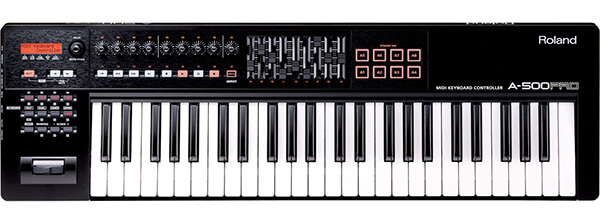
Best MIDI Keyboard for Logic Pro X: Roland A-500PRO-R

Price: $$$

Key features:

  • Velocity-sensitive 49 keys with channel after touch
  • 45 assignable controls: knobs, sliders, buttons, transport and more
  • USB Bus Powered – no AC adapter required
  • 8 Dynamic Pads for finger drumming and MIDI triggering
  • Sure-grip Pitch Bend/Modulation Stick
  • Sustain and expression pedal ports

There are few brands I trust more to make high-quality keyboards than Roland. Their controllers are never quite as jazzy as the latest Nektars, nor quite as hyped as Akais, but they always deliver where it matters the most: key quality and playability.

The 49-key version of Roland’s mid-range controller, the A-500Pro (compare price Amazon, Guitar Center) – is no different.

49 fully-sized velocity sensitive keys with aftertouch feel better than most keyboards on the market. Instead of the clickety plastic found on so many cheap MIDI controllers, the A-500PRO uses ivory-like plastic found on concert pianos. This not only feels better, but also has a non-slippery surface – great when you’re sweating after a long jamming session.

That’s not all. The keyboard has custom velocity settings. You can adjust the velocity curve to match your playing style. Turn it high if you really like a fast, responsive keyboard. Turn it low if you like to dig your fingers in and belt tracks out.

The keyboard isn’t the only thing on offer, of course. The Roland A-500PRO also boasts 8 faders, 8+1 knobs, 8 dynamic pads, and an array of buttons. Plus, you get dedicated DAW controls and a tiny LCD screen to give you track and MIDI information.

Not everything is perfect. The dynamic pads are tiny, and the knobs move a little too freely. The faders also don’t have the mechanical heft of the keys. But if you’re willing to overlook them for the fantastic keys, you’ll love this Roland.

For the price, this is one of the best MIDI keyboards for Logic Pro X you can find on the market right now.

Pros

  • High-quality keys with aftertouch and custom velocity sensitivity
  • Decent number of control options
  • Roland’s famed build quality

Cons

  • Small pads and lower quality knobs
  • Pricey
  • No Logic Pro-specific integrations

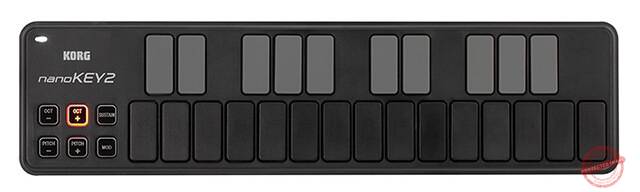
Most Portable Controller for Logic Pro X: Korg Nanokey 2

Price: $

Key features:

  • Small footprint and low weight
  • Configuration options: 25 keys, 8 faders, or 16 pads
  • 25-key variant has sustain button for piano parts
  • Pad controller includes X-Y touchpad

There are times when you need a 3′ long MIDI controller dominating your desk.

And then there are times when you’d rather have something tiny that can squirrel away in a corner of your desk.

The Korg Nanonkey2 is for those times.

The Nanokey2 is one of the smallest MIDI controllers on the market. It’s just about a foot long and is so light that its official weight is in ounces, not pounds (FYI, it’s about 0.9 lbs).

You can buy the Nanonkey2 in three variants, depending on your needs:

  • Slim-line USB keyboard, which includes a set of 25 “keys” (more like elongated pads) and octave, mod buttons.
  • Slim-line drum pad controller, which includes 16 pads and an X-Y touchpad.
  • Slim-line USB controller which has 8 faders and DAW control buttons.

Which variant you buy and how you use it will vary a lot. A lot of producers I know use the 8 fader variant as a makeshift mixer. Others use the key variant as a highly portable keyboard. Given the price, you can even buy all three and change them around based on what you need at the moment.

There some obvious flaws on the Nanokey. The silicone buttons tend to get stuck. The “keys” are glorified buttons and can’t be used for anything other than entering notes in a piano roll. And the faders are plasticky.

The Nanokey won’t replace a full-fledged MIDI controller for Logic Pro. But it will complement one nicely. But it if you want something highly portable, or if you already have a full-sized keyboard and want something to complement it.

Pros

  • Extremely lightweight and portable
  • Cheap; the lowest variant is barely the cost of two movie tickets and a large popcorn
  • Build quality is much better than you’d expect

Cons

  • Silicon buttons tend to get stuck
  • Pads aren’t sensitive enough to trigger samples on the fly
  • Can’t “play” anything on the keys; only useful for entering MIDI notes

Buying Guide

The criteria for buying a Logic Pro MIDI controller is the same as buying any MIDI controller. Namely, have good (and the right number) of keys, have plenty of controls, and integrate well with Logic Pro.

Beyond that, it all comes down to individual preferences.

If you’re in the market for a Logic Pro controller, here are a few questions you should answer first:

How do you plan to use the controller?

As I mentioned earlier, MIDI controllers come in three flavors:

  • Pad controllers, which have large drum pads, faders, knobs and buttons.
  • Keyboard controllers, which have traditional piano keys.
  • Hybrid controllers, which have both traditional piano keys and a set of drum pads, faders, and knobs.

Most MIDI controllers on the market fall into the third category, such as the Akai MPK249.

What kind of controller you choose will depend on how you plan to use it.

Keyboard controllers are great for composition. You get full-sized piano keys that makes it easy to play chords and melodies. If you have piano playing experience and don’t care much about launching clips, this should be your first choice.

Pad controllers are great for launching clips and creating spontaneous compositions. If you want to hammer out a few drum patterns or take control of your music on the fly, you should choose this option.

Having said that, Logic Pro X isn’t particularly conducive to spontaneous composition. There is no sessions view like in Ableton, which limits what you can do with pad controllers.

Ableton’s sessions view facilitates the kind of clip-focused music production that’s possible with pad controllers

Hybrid controllers offer the best compromise between controls and composition. A good hybrid controller would give you between 8-16 pads as well as full-sized keyboards. This way, you can launch clips, hammer out drum patterns, and compose entire tracks – all from the same controller.

Unless you have extensive piano playing experience, I would recommend that you stick to hybrid controllers.

Another option – which a lot of pro producers follow – is to get a regular keyboard controller and pair it up with a dedicated pad controller. Think of a setup like this:

A pad controller and keyboard controller combo gives you the best of both worlds

This would give you the best of both worlds – a full-sized keyboard for composition, and a pad controller for controlling your DAW.

What kind of keys should you get?

If the controller you’re buying has a keyboard, you have another thing to worry about – what kind of keys should you get?

Keyboards come in three varieties:

  • Fully-weighted: Fully-weighted keys mimic the action of a traditional piano. That is, they have a built-in weight that gives significant resistance when you press the keys. The weight is also variable – lower octaves are heavier while higher octaves feel lighter. This makes them harder for beginners but very satisfying for experienced piano players.
  • Semi-weighted: A popular option in high-end MIDI keyboards and mid-range digital pianos, semi-weighted keys have a combination of synth-action (see below) and fully-weighted keys. This creates significant resistance – the keys don’t spring “up” as quickly as they would on synth-action keys. A great option if you like to play the piano but don’t want the weighty resistance of fully-weighted keys.
  • Synth-action: Synth-action keys are common in most budget MIDI controllers. These keys use springs instead of weights to move the keys back into position after being pressed. Since the springs don’t have variable resistance, the keys immediately move “up” after being pressed. This makes them easier to use since there is very little resistance. On the downside, the keys feel cheap and don’t offer the natural movement of piano keys.

You’ll be hard-pressed to find fully-weighted keys in MIDI controllers. Even if you do find them, I don’t recommend buying them, unless you explicitly need the performance of a piano (in which case, you’re better off buying a digital piano).

Your best option is to spring for semi-weighted keys. These tend to be on the expensive side but offer better playability and comfort. If you have even a few months of piano playing experience, you’ll enjoy semi-weighted keyboards far more.

Both Roland and Akai offer great semi-weighted keyboards such as Akai MPK249 and Roland A500-Pro.

Synth-action keys aren’t nearly as fun to play but have a lot more functionality. If your goal is to just enter MIDI notes and play out a few chords or melodies, synth-action keyboards will work perfectly fine.

To sum it up:

  • Choose fully-weighted keyboards if you want a piano-like playing experience
  • Buy synth-action keyboards if you want a functional MIDI controller and don’t have much piano playing experience.
  • Buy semi-weighted keyboards for a good combination of playability and functionality

How many keys should you get?

MIDI keyboards come in a range of key sizes, going all the way from 25 keys to full-sized 88-key keyboards. Even within the same model, you’ll have size variants, such as the Akai MPK249 (with 49 keys) and MPK261 (with 61 keys).

To figure out how many keys you should get, first answer the following:

How important is portability to you?

It’s simple: the smaller the keyboard, the more portable it is. Anything beyond 32 keys makes it difficult to keep the keyboard size and weight low enough for lugging around.

But portability comes with its own compromise – smaller keys. Most portable keyboards reduce the width and length of keys to fit them into a small form factor. This greatly impacts their playability, especially if you have fat fingers as I do.

I usually recommend people to get a regular 49 or 61-key keyboard for their main studio use, and buy an additional mini keyboard for carrying around.

Some great portable MIDI controllers are:

How much desk space do you have?

The more keys the keyboard has, the more desk space it will occupy.

The Akai MPK249 (with 49 keys), for instance, is less than 30” in length.

In contrast, the Roland FP-30 (with 88 keys) comes in at over 55” in length.

That’s more than two feet of additional space.

Typically, 49-key keyboards top out at 3” or 3 feet wide. 61-key keyboards come in around 3.5’ to 4’ in width. And 88-key keyboards are typically over 4’ wide.

At over 4’, an 88-key keyboard requires substantial desk space. If you have a smaller desk, it could completely ruin your setup.

So before you spring for a larger keyboard, measure out your desk. You should at least have 3 feet of extra space before you even think of getting anything beyond 49 keys.

How much piano playing experience do you have?

As much as the idea of a full-size 88-key keyboard is appealing, it is just plain overkill for most musicians.

Let’s be honest, most bedroom producers don’t have the piano skills to make full use of an 88-key keyboard. Nor will the EDM or hip-hop pieces they produce ever involve complex melodies that require simultaneous bass and tenor keys.

Plus, larger keyboards are plain intimidating. It’s easy to lose track of note positions and scales when you’re confronted with 7-octaves of black-white keys.

On the flip side, anything below 49-keys also impacts playability. It’s difficult to compose complex melodies on a 25-key keyboard – you’ll end up hitting the octave up/down keys constantly.

For most people, 49-keys represents the ideal size. It gives you access to four octaves of range. If you need more, there are handy octave up/down keys on virtually every keyboard on the market.

If you plan on playing slightly more complex pieces, you can upgrade to a 61-key keyboard. But otherwise, 49 keys is more than enough.

What about control options?

What kind, and how many control options you need will depend entirely on your production style.

In my case, I rely minimally on keyboard controls. I use my desktop keyboard shortcuts for most things. The keyboard is used mostly for entering notes, practicing melodies, and playing chords. A MIDI controller with more than a handful of control options is just overkill for my taste.

However, if your production style is more hands-on, you’ll have substantial control options. With 8-16 pads, 8+8 fader/knob combos, assignable buttons, and DAW controls, you can essentially free yourself from the desktop keyboard + mouse combo. Great for people who like a more intuitive approach to their music production.

But production styles evolve. You might think that your style requires minimal use of controls, but that might change a year down the line. If you chose a controller with limited control options, you’ll feel straitjacketed.

My recommendation: get a MIDI controller with at least 8 pads, and at least 8+8 faders/knobs combo. If it has DAW control options built in, even better. This will give you enough room to adapt new playing styles.

What should be your budget for the best MIDI controller for Logic Pro X?

MIDI controllers aren’t very expensive as far as musical instruments go. If you’re used to $500 guitars and $1,000 digital pianos, you’ll be pleased to know that you can buy very competent MIDI controllers for Logic Pro X for under $200.

As a general rule, your budget will impact your choices as follows (with respect to 49 key controllers):

  • Under $100: In this range, you’ll mostly find mini keyboards with a handful of controls. Nearly all keyboards in this budget are synth-action. Portability is a big focus and most offerings clock in at 5-8lbs.
  • $100-$200: Keyboards in this range tend to be mostly synth-action. Some offerings at the top of this range ($200) will have semi-weighted keys. Most will have a mix of keyboard and controls. Most beginners and intermediate players should have a budget between $150-$200 to get a decent MIDI controller.
  • $200-$300: MIDI controllers in this range generally boast extensive controls (8-16 pads, 9 faders, 9 knobs, 8+ buttons are common). At the far end of this range, you’ll also find semi-weighted keyboards. The build quality of gear at this budget is generally very good.
  • $300+: The top end of the MIDI controller budget range boasts premium offerings from the likes of Akai and Roland. Their keyboards are usually semi-weighted and you get a full range of built-in controls. The build-quality of gear in this range tends to be exceptional. It’s not unusual to find a 15 year old $400 Akai working perfectly even today.

You’ll be hard-pressed to find a great MIDI controller under $100. Go for this range only if you want a secondary controller that emphasizes portability.

Most beginners and intermediate players should aim for a budget between $100-$200. You’ll get a good mix of build-quality, key-quality, and controls.

Most beginners and intermediate players should aim for a budget between $100-$200

If you’ve been playing for a while, think of splurging on a premium MIDI controller. Look for semi-weighted keys since this will improve the playing experience substantially. A $300 budget is great for finding some great picks.

A word about integrations with Logic Pro X

As one of the most popular DAWs, Logic Pro X is usually well-supported by virtually every manufacturer. And if your controller isn’t, there are usually scripts available only to easily map the controller to the software.

So as such, you don’t have to worry much about Logic Pro X integrations.

That said, there are some controllers that are designed for specific DAWs (such as Ableton Push – designed for Ableton). These controllers can be tuned to work with other DAWs, but they’ll work better with their assigned DAW out of the box.

Just keep this in mind when you make a purchase. If the controller specifically says that it supports a specific DAW, it might be a good idea to pick something else. Integrations won’t be a problem but will require more effort.

General FAQ for Buying MIDI Controllers

Here at MIDINation, I get a ton of emails from readers new to the entire music production world who want to know more about MIDI keyboards and controllers.

I can understand the confusion – MIDI isn’t a specification you’re likely to encounter if you’re new to music. It doesn’t help that musicians use terms like “keyboards”, “controllers” and “synths” often interchangeably.

I’ll answer some brief questions about MIDI controllers and keyboards below to help you figure out this product category better.

What is a MIDI Controller?

The early 1980s was exciting time for electronic music. The big names you know and recognize today – Roland, Akai, etc. – were just coming into being. The major synths and devices that shaped music in the 80s and 90s were invented around this time, including the Roland TR-909 drum machine, the Juno-06 synth, etc.

But there was a problem: all these devices used differernt proprietory connections sucha s CV/gate. Each connection was owned and controlled by each manufacturer, making it incredibly difficult for devices to “talk” to each other.

Think of the way Apple creates its proprietory connections and imagine an industry filled with dozens of such companies.

The founder of Roland, Ikutaro Kakehashi, knew that for electronic music to advance, there was a need for devices to talk to each other. So working with other manfuacturers, including Yamaha, Korg, etc., Kakehashi came up with a universal specification for connecting electronic instruments together.

This specification was originally called “Universal Musical Interface”, but was later renamed to MIDI – Musical Instrument Digital Interface. MIDI was first introduced in Keyboard magazine (which still lives on today as KeyboardMag.com) in 1982. At the NAMM show in 1983, the MIDI interface was officially demonstrated on stage. And by the end of 1983, there were multiple devices using the MIDI protocol, including the legendary Roland TR-909 drum kit.

The Roland TR-909 was one of the first drum machines with MIDI ports (Image credit: RetroGearShop)

MIDI has been unchanged since its 1983 inception until this year when the MIDI 2.0 protocol was officially adopted. MIDI 2.0 enables a whole new level of interactivity between devices, but we’ll leave that for later.

What you should know is that MIDI is essentially a protocol for transferring information between MIDI-capable devices – like USB or Bluetooth. MIDI allows any two devices with MIDI ports to “talk” to each other.

For instance, you might have a MOOG synth. If you want to play music using this synth, you need to connect it to a keyboard.

MIDI makes it possible for the two devices to talk to each other. A key pressed on your MIDI capable keyboard will tell your MIDI capable synth what sound to create corresponding to the key.

This is what a MIDI controller essentially is – a device with a MIDI port.

MIDI controllers can be in any shape or form. They can be in the form of a guitar, a wind instrument, a drumpad, or most popularly, in the form of a keyboard. While each form might be designed to replicate a particular instrument, they all do the same job: pass MIDI instructions from one device to another.

That’s all there is to it – any controller with MIDI capability is called a MIDI controller.

What is the Difference Between a MIDI Controller and a MIDI Keyboard?

A MIDI keyboard is simply a MIDI controller shaped like a piano keyboard.

Which is to say – every MIDI keyboard is also a MIDI controller.

As I mentioned above, MIDI is just a specification. Just as you have everything from computer mice and keyboards to speakers and fans powered by USB, you also have a range of instruments that use the MIDI protocol to pass instructions from one device to another.

Any MIDI instrument (or controller) that uses the keyboard form would thus, be called a MIDI keyboard.

What Does a MIDI Controller Do?

A MIDI controller essentially does two things:

  • Connect two devices via the MIDI port
  • Transfer raw music note information

For instance, if you wanted to play the C chord, you would play the notes C E G on your piano.

If you use a MIDI keyboard to play these notes, the keyboard will record these as “raw” note information as shown below:

This information only tells the device (in our case, a computer running a DAW like Ableton) what notes it has to play, and how long it has to play them. There is no audio information yet – that has to be supplied by the other device.

This essentially means that your C chord can take on any sound the other device is capable of. It can sound like a guitar, a piano chord, an electronic synth, a ukulele, etc. – all without changing the underlying note information.

It gives a great deal of flexibility and power to musicians. In a DAW, for instance, you might have two tracks. One has a bass MIDI device, the other a piano MIDI device. You can then copy-paste the note information created by your MIDI keyboard on both tracks. This will instantly give you a bass track and piano track.

Do You Need a MIDI Keyboard?

You don’t really need a MIDI keyboard to make music.

In fact, most of the time, I’m making music on the go (my day job involves a lot of traveling). I don’t have any hardware with my except for a pair of headphones. I enter notes manually in Ableton.

That said, a MIDI keyboard makes the entire music production process way more intuitive.

There is one aspect of it where entering notes and playing musical passages becomes easier. Instead of using the mouse and adding/removing notes, you can play them via your keyboard and instantly hear what you want to play.

The other aspect is easier access to different parameters. Say, you want to change your piano sound’s pitch. Without a MIDI keyboard, you have to open the DAW, drag the mouse over to the pitch/octave parameter, then drag it up/down.

But with a MIDI keyboard, you just have to press the dedicated “Octave up/down” button and access these settings instantly.

That’s just the tip of the iceberg – depending on the keyboard, you can change everything from the track EQ to the depth, bend, volume, etc. of any instrument – all without opening the DAW.

This makes the entire music production process far more intuitive and “natural”.

So while you don’t really need a MIDI keyboard, if you’re serious about music production, you should definitely put it on top of your priority list.

Final Words

This has been a long article and I’ve covered a number of MIDI keyboards and pad controllers. You’ve also learned about the key issues to watch out for when buying the best MIDI controller for Logic Pro X.

To recap, here are my top picks for Logic Pro X MIDI controllers:

For recommendations, questions, or doubts, drop me an email. I usually respond to queries within 48 hours.

Changelog
  • November 16, 2018: Article first published
  • October 22, 2019: Article updated with new information
  • January 30, 2020: Article title updated, formatting updated
  • September 18, 2020: Article updated

Complete Your Logic Pro X Studio Setup

Check out our best Logic Pro X content to build out your studio – including headphones, audio interfaces, and control surfaces selected specifically for Logic Pro X:

Control Surfaces

Our best control surfaces for Logic Pro X

Audio Interfaces

A close look at the best audio interfaces for Logic

Studio Headphones

Our top-rated studio headphones for Logic Pro X

The 6 Best MIDI Controllers for Logic Pro X in 2026 Read More »

The 6 Best Arranger Keyboards for Every Composer in 2026

Create stunning compositions – without a DAW – with our selection of the best arranger keyboards

Our Top Picks

Best for beginners: Casio CT-X5000
“Affordable and friendly arranger keyboard that’s ideal for beginners”

Best mid-range: Roland E-A7
“Powerful effects and expressive sound make this the perfect mid-range pick”

Most portable: Korg PA600
“Stunning built-in sounds and relatively low weight make this a portable rockstar”

Best for serious musicians: Korg PA4X76
“Best-in-class sounds, powerful workstation capabilities, and excellent keys”

Best DAW replacement: Yamaha Genos
“Feature-rich workstation that does everything a DAW can do – sometimes, even better”

In a world of $200 DAWs, why would anyone buy an arranger keyboard?

Good question.

Arranger keyboards are designed to create entire arrangements, i.e. multi-instrument musical sections (or even entire songs). In that way, they’re just like DAWs, but usually lack the power and flexibility of massive sound and plugin libraries.

But there are still plenty of serious musicians buying them.

The reason why is easy: spontaneity. Music is a “felt” thing. Great guitar solos aren’t made by stringing together note after note. They’re usually made in fits of inspiration during lengthy practice sessions.

For all their power, DAWs are woefully non-intuitive. A mouse is not a musical device. Even when you throw in a solid DAW controller, the workflow is tangential to the idea of spontaneous creation that so many musicians swear by.

Arranger keyboards bring back that spontaneity and instantaneous creation that musicians want. You don’t have to dig through your library to find the right patch. There is no frantic searching on Splice for a good sound. Your entire production “studio” is localized to the arranger keyboard. Working with these limitations, you can sometimes create sections that are far more inspired than what you would get from a DAW.

Of course, arranger keyboards are not for everyone. If you have no piano-playing background, you’ll find them to be a tad too much. If you’re already used to DAWs, the workflows might not fit your habits.

But if you like a localized, standalone production center – one you can use without ever looking at a computer screen – then arranger keyboards would be the heart of your studio.

In this guide, we’ll dig deeper into the best arranger keyboards you can buy right now. I’ll cover most common use cases and suggest the best keyboard for difference price brackets.

We use rigorous research, reviews, and real-world performance when recommending products. Our reviewers include producers, performers, and active musicians. You can read more about our review process here. Be advised that MIDINation might earn referral commissions on purchases made through this website. This does not affect your final purchase price.

We use rigorous research, reviews, and real-world performance when recommending products. Our reviewers include producers, performers, and active musicians. You can read more about our review process here. Be advised that MIDINation might earn referral commissions on purchases made through this website. This does not affect your final purchase price.

Note: As an Amazon Associate, MIDINation earns commissions for qualifying purchases made through Amazon links on this page.

About your reviewer
Ryan Harrell is the founder of MIDINation and an experienced producer/DJ. His first experience with electronic music production dates back to Cubase 3.0 in the summer of 1997, and he’s been a fan ever since. He prefers Ableton as his primary DAW these days, though he is still partial to Cubase and Pro Tools. He lives in San Diego and freelances as a producer and part-time DJ.

The Best Arranger Keyboards

Based on their price and real-world performance, these are the best arranger keybards to buy right now:

Korg PA4X76 is the best arraner keyboard on the market for serious musicians

Korg PA4X76

The Korg PA4x has been a favorite among serious musicians for years thanks to the sheer quality of its keys and onboard sounds and effects. There are keyboards with better arrangement capabilities (Yamaha Genos), but the sheer combination of flexibility and power make the Korg the best arranger keyboard you can buy in 2020.

If you are a professional player, then you simply cannot go wrong with the Korg PA4X76. This model is a complete powerhouse that comes with almost every feature that you’d love in an arranger keyboard. The Korg PA4X76 comes with 76 semi-weighted keys that offer aftertouch. It also has more than 1500 sounds, and at last count, we noticed up to 1900 sounds in the arranger keyboard, including GM and XG sets.

As if that weren’t cool enough, Korg has also included DNC to improve the quality of the sounds. With a trio of assignable switches, you can change note articulations. Ease of use is also improved with the joystick and ribbon controller.

As a result of the digital drawbar sound engine, this arranger keyboard offers some of the most impressive sounds that we have heard.

Additionally, you enjoy more than 580 in-built styles here, including a Chord Sequencer that lets you save your chord progressions.

One notable feature of this model is the MIDI to Style conversion. So far, this Korg PA4X76 offers the best we have had the pleasure of hearing on an arrange keyboard.

With the KAOSS function, you can remix songs in real-time and have plenty of fun as you play. The onboard effects here are also some of the best available right now across categories. The unit offers you up to 148 effect types. And vocal effects are handled by the impressive TC Helicon Vocal Processor.

With a relatively large 7″ display, you can see all the arrangements of the keyboard. It makes it super easy to use and customize.

What I don’t like:

In terms of specifications and functions, there is almost nothing to complain about. If we have any problem with the Korg PA4X76, it would be because of the price. It is the most expensive on this list, and not everyone can afford it.

Recommended for: If you make money with your music (producer, composer, professional musician), then you can’t go wrong with the Korg PA4X. In terms of sheer sound quality and technical capabilities, it remains peerless – easily one of the best arranger keyboards ever made.

Pros

  • Extensive search function
  • High quality effects
  • Plenty of sounds and styles
  • Intuitive design

Cons

  • Prohibitively expensive for 95% of musicians

Best Arranger Keyboard for Beginners: Casio CT-X5000

As a beginner, you need a keyboard that is easy to use and comes with plenty of useful sounds to fiddle with and learn. Well, the Casio CT-X5000 fits the bill in this regard. It is a portable arranger keyboard that works perfectly as the best arranger keyboard for beginners.

Casio is a popular manufacturer that is known for making stunning and versatile keyboards.

It comes in a compact and lightweight design, which makes it easy to handle.

It has the popular AiX Sound Source technology. Therefore, you have a keyboard with a rich library of sounds. This includes more than 800 instrument sounds and 235 rhythms.

The design of the keyboard itself is suited to help beginners get the hang of the instrument. It has a 61 key touch-sensitive keyboard that has impressive responsiveness, and that allows you to layout chords without fuss. Additionally, for your benefit, there is a 17 track MIDI data recorder and 42 part mixer. All these combined results in a keyboard that lets you create songs and sequences effortlessly.

The CT-X5000 comes with customizable pedal inputs as well to give you external control of the instrument. With a clear, large LCD screen, you can easily control your keyboard.

When you consider that this is one of the most affordable on this list, you will wonder at the impressive performance. The synth sounds on this keyboard are better than what you’ll get in even more expensive keyboard. With over 260 accompaniment styles, Casio has given users plenty of room to play with. Despite the number, I observed that all these styles sound great and are customizable.

Overall, this is a versatile option that is useful, whether in concerts, studio, or professional situations. While it does less than most of the others on this list, that isn’t because of the poor quality. Instead, that is a reflection of the budget price. The sheer number of features makes it a good pick, whether you are a beginner or an expert player. Coming at an affordable price, it offers excellent value for money and is the best arranger keyboard for beginners.

What I don’t like

While the AiX technology gives DSP effects to your sound and makes it sound incredible, you do not really get control over the effects. There is also a lack of aftertouch. However, seeing as this is a budget option focused on beginners, these downsides aren’t too bad.

Recommended for: Given its price, this is a nice option for anyone on a budget. The nice features that make it easy to use also make it the best arranger keyboard for anyone just starting to get into standalone arrangement and composition, minus the DAW.

Pros

  • Affordable
  • Easy to use
  • Compact and lightweight

Cons

  • Lacks editing effects
  • No aftertouch

Best Mid-Range Arranger Keyboard: Roland E-A7

The Roland E-A7 is the best arranger keyboard from Roland, and that is saying a lot about the quality of this model. Roland makes some of the best keyboards and musical instruments on the market, and this model is a near-perfect option that gives the best mid-range performance of all the arranger keyboards that I have tested.

It comes with plenty of impressive features, including 61 velocity-sensitive keys. It is simple to use and has a 4 part split functionality, which is impressive at this price.

In making this model, Roland took a step back to look at what many people on the market wants. The result is an astounding piece of equipment that you’ll surely fall in love with. Showing just how much went into making this instrument, all the sounds on it, all 1500 of them, was made together with expert musicians from a wide variety of backgrounds, cultures, genres, and spots around the world.

Hence, if you are looking for an arranger keyboard that gives you unique and diverse sounds, you’ll be pleased by the Roland E-A7. Additionally, the keyboard lets you import your own sounds. Thus, the opportunities to make different sounds are nearly endless.

Aside from the useful features above, this model also has more than 600 preset styles and limitless storage for different user styles. You can access these on the internal memory or a USB stick. The good thing about these preset styles is that it offers different variations. And you can add up to four different registrations on each style! While most of the style content is somewhat partial to western music, you will still find different styles from different parts of the world.

Roland has improved on many features and added some notable features as well. For instance, there is instrument oriented editing. The benefit of this feature is that you can change the styles’ instrumental functions.

Another nice feature I noticed is that while there are no lyrics for SMF files, you get chord detection for it as well as MP3, SMF, and KAR files.

One downside of this model is the few numbers of effects. You get the basic reverb and chorus effects, but these are not really customizable. Nevertheless, the variety you have is all high quality options.

There is a Master EQ with six presets and input effects as well. To improve your playing, the model comes with six different pads for tones and a one-stop pad.

With up to 156 dedicated buttons, there is a lot to play with. One unique feature found here is the dual display. Overall, it is an excellent model that gives high sound quality and luxurious sounds. It is one of the most versatile options on the market too.

What I don’t like

Well, the few effects are a bummer. I wish that there was more space for effects and not just the limited number on the keyboard.

Recommended for: I recommend this model for anyone looking for a keyboard with diverse sounds. It is very versatile and an overall one of the best arranger keyboard in the mid range.

Pros

  • Has a dual display
  • Great quality on-board effects
  • Expressive sounds

Cons

  • Limited variety of effects
  • Build quality is below expectations

Most Portable Arranger Keyboard: Korg PA600

The next option on this roundup is the keyboard from Korg. Korg makes several models, and this is one of the best that we tested. It is the best option if you want a portable keyboard. It comes with several useful accessories as well, including a padded piano bench, large headphones, a sustain pedal, and a stand.

Additionally, the sound engine is quite impressive as it features RX and DNC sound. Therefore, sounds come off richer and more vivid. It is so good that listeners might assume you were playing on a grand piano.

In terms of sound, this model offers you up to 950 sounds, as well as 64 drum kits, all in a high quality release via the PCM. The styles might be numerous, but the quality unmatched as each one comes expressive and will fit different users. The styles are also very easy to use because the keyboard is designed in a simple layout. If you are stuck or cannot find a style, the search function on the interface is readily available to help you.

Another notable feature of this model is the chord sequencer. Due to this function, you can store any chord progression in a jiffy. It will record the sounds that you produce with the keyboard. The sounds produced are also highly customizable and controllable. As we earlier pointed out, this is made possible via the DNC and RX engines.

The sounds are also delivered richly and as good as anything you might have heard. The device comes with four Stereo Master Effect processors to aid the sound, and this processor gives you up to 125 effects ranging from reverb to guitar-driven options.

As the description claims, this is the best option for portability. The arranger keyboard weighs just 30 pounds, so it is one of the easiest to carry around on this list.

What I don’t like

Well, although this is an excellent overall option, it comes with certain flaws. For one, the keys are non-weighted. It, therefore, loses the feel of an authentic keyboard. It also comes with a style that an expert player might find too simple.

Recommended for: “Portable” arranger keyboard sounds like a misnomer, but there are situations where you’ll want to carry your keyboard around to gigs and studios. If that describes you, you’ll find that the Korg PA600 to be among the most portable options on the market. It’s not something you can drop in your backpack, but it is lighter than a lot of competitors.

Pros

  • Useful touch screen
  • Comes with useful accessories
  • Impressive detailing
  • Excellent for new players

Cons

  • Non-weighted keys
  • Expert players might find it too simple

Best DAW Replacement: Yamaha Genos

If you thought the Korg PA4x above is costly, wait till you meet the Yamaha Genos. Yamaha makes some great musical instruments and has hit the ball out of the park with the Yamaha Genos. This excellent arrange keyboard is for those that don’t mind spending a fair bit of money on quality.

It does deliver on this count. First, the model is driven by the AWM Stereo Sampling Engine from Yamaha. This engine is one of the most powerful that you will find on an arrange keyboard. Therefore, it gives you plenty of voices, over 1600, with each of these voices sounding unique and realistic. You will certainly be awed by the realistic sounds. The Yamaha Genosa also has up to nine assignable sliders for playing sound or controlling effects in a jiffy.

In addition, the Yamaha Genos gives you up to 550 accompaniment styles with different variations. They are easy to use, and when you use the Expansion Manager, they become even expandable. As with the best arranger keyboards, you can make recordings of your songs. This function is simple and quick to use on this model.

With up to 59 reverb presets and 30 user settings, the effects on the Yamaha Genos are pretty deep, and you can tweak them as much as you like to your delight.

The Yamaha Genos also excels in the vocal effect category, blowing other models right out of the water. The 9″ color touchscreen is the biggest on this roundup, and the most impressive. It makes it a joy to use the Yamaha Genos and is easy to navigate.

What I don’t like

Although the Yamaha Genos has many useful features and is one of the best arranger keyboards on the market, the increased quality doesn’t justify the high price.

Recommended for: Professionals and amateurs (who can afford it) will find this to be an excellent companion. Ideal if you’re sick of producing on your DAW and need something that’s fast and spontaneous.

Pros

  • Incredible synth vocoder
  • Highly customizable
  • Compact

Cons

  • Massively expensive!

Cheaper Alternative to Korg PA4X: Yamaha PSRSX900

It’s a rare keyboard category that doesn’t find a Yamaha at the top of the charts.

So I had to mention the PSRSX900 as an alternative to the monstrous Korg PA4x.

It’s not quite as capable, but at nearly half the price, you can’t complain much either.

This is a 61-key arranger keyboard that comes with several useful features that amateurs and professionals alike will delight in. Some of the best features include a touchscreen that makes it pretty easy to see the voice and style arrangements. This color screen also allows you to customize the settings easily.

With the Yamaha PSRSX900, you get access to many combinations of pitch and modulation. And the styles here are not only numerous but also diverse. They cut across genres. All of these can be easily accessed through the joystick controller.

The sheer versatility of the Yamaha PSRSX900 is something to behold. It comes with 986 voices, 41 drum kits, and has 480 XG voices. As if that wasn’t enough, it also comes with up to 487 preset effects. Therefore, you can rest assured that you will enjoy the sound created. With the effects, you can create and store up to 150 new presets to play with.

Ease of use is one of the best things about this model. It comes with useful control knobs that are clearly designated and can be customized for your comfort. Another interesting feature is that you can save chord progressions, and the style engine will form these into a loop. Thus, you can play with two-hands without worrying about playing chord changes.

Connectivity and exportation are also pretty good on the Yamaha PSRSX900.

What I don’t like

If you are a new player, you might find the sheer number of features and controls intimidating. I also did not like that the pitchbend is tricky to master.

Recommended for: Weighing just 23.37 pounds, this is even lighter than the Korg model we reviewed above. It is also arguably more intuitive than the Korg PA4X. One of the best arranger keyboards for a serious musician.

Pros

  • Impressive connectivity
  • Can use two pedals at once
  • Good sound quality

Cons

  • New users might be intimidated by the breadth of features

Over to You

It’s not always easy to zero-in on the best arranger keyboards for your needs. Hopefully, this guide will help you zero-in on the right option.

For more recommendations and advice, don’t hesitate to reach out to me here.

Also Read:

References:

Changelog

  • Sep 14, 2020: Article first published

The 6 Best Arranger Keyboards for Every Composer in 2026 Read More »

5 Best MIDI Keyboards for Garageband 2026

Garageband might not have the power and flexibility of a professional DAW, but for many musicians, it’s the perfect – and often the first – introduction to music production. The easiest way to get more out of Garageband is to hook up a MIDI keyboard to it. As you’ll see below, the best MIDI keyboard for Garageband will give you fine control over your production and open up new avenues in performance. 

If you’re in a rush, here are my choices for the best MIDI controller for Garageband:

Garageband doesn’t get enough credit among producers. Sure, it’s underpowered and limited in flexibility. Sure, it suffers from a lack of features and you’re constrained by the limitations of iOS devices. But for a new producer, it’s a fantastic – and fun – tool to get into music.

That doesn’t mean Garageband is strictly for beginners – I know quite a few serious producers who use it as a mobile “idea studio”. They’ll use it to jot down ideas and jam out tunes on the go. An iPad Pro even has enough power to accommodate multiple plugins and dozens of tracks.

What stops Garageband from becoming a more full-fledged production studio (not that Apple would ever want it to replace its cash cow, Logic Pro) is the lack of hardware. Most music production hardware is aimed at full-fledged computers. Until recently, you couldn’t even find gear with USB-C ports, leaving one to juggle around multiple USB converters.

Thankfully, the stable of hardware compatible with mobile devices – and by proxy, Garageband – is on the rise. More and more big name manufacturers are offering Garageband-compatible MIDI keyboards and even audio interfaces. Combined with the better processing power of modern iPads, this makes Garageband a surprisingly capable mobile production studio.

We’ll look at the best MIDI keyboards for Garageband in this guide. I’ll share my top picks and what makes them suitable for production on the go. I’ll also share a few buying tips for buying the best MIDI keyboard for your needs.

But first, our top pick:

We use rigorous research, reviews, and real-world performance when recommending products. Our reviewers include producers, performers, and active musicians. You can read more about our review process here. Be advised that MIDINation might earn referral commissions on purchases made through this website. This does not affect your final purchase price.

Note: As an Amazon Associate, MIDINation earns commissions for qualifying purchases made through Amazon links on this page.

About your reviewer
Ryan Harrell is the founder of MIDINation and an experienced producer/DJ. His first experience with electronic music production dates back to Cubase 3.0 in the summer of 1997, and he’s been a fan ever since. He prefers Ableton as his primary DAW these days, though he is still partial to Cubase and Pro Tools. He lives in San Diego and freelances as a producer and part-time DJ.

The Best MIDI Controller for Garageband

When dealing with Garageband keyboards, there are two things that sit at the top of our priority list:

  • Instant compatibility with mobile devices and Garageband
  • Portability, since you’ll most likely use the keyboard on the move

Because of this, we’ve prioritized Bluetooth keyboards since they are instantly compatible with mobile devices, including iPad and iPhones.

Little wonder that our top pick is a Bluetooth MIDI keyboard as well:

CME Xkey Air

The XKey Air was one of the first Bluetooth MIDI controllers on the scene and it’s still arguably the best one around. While the keybed isn’t as good as some of the premium wired offerings, the Bluetooth implementation remains top notch. Compatibility with Garageband is top-notch and the latency is low enough, even on older iOS devices.

Our first option on this roundup is the truly excellent CME Xkey MIDI controller. It comes with several features that make it very playable and suited for some really intense music production.

We love the sheer simplicity of this option. While others come fitted with bells and whistles, the CME Xkey Air 25 does away with all that. Instead of features that do not really add any value, this model focuses more on practical features that elevate its playability.

The design is one of the reasons we are in love with this product. It comes in a modern-looking design. It doesn’t come with fancy design but looks ready for serious use. It comes in a slim and lightweight profile; a deviation from what is usually found on the market. Due to this profile, it looks elegant and sleek without overdoing it. It is one of the most portable MIDI controllers you can find.

When paired with your devices (laptops, tablets, etc.), it makes for a really appealing sight. From my experience, it comes in a design that makes you feel like you are holding a premium product from Apple. It looks great and is made from brushed aluminium. Considering the relatively high price, it isn’t really surprising that this product looks so good.

Aside from looking great, this model is very durable. We don’t recommend that you drop it, but in case it falls, you can rest assured that it will not get damaged easily.

The keys are impressive. These full-sized keys come with a twang that feels great and imitates perfectly typical MIDI controllers.

However, the portability means that it doesn’t feel exactly like what you will find on a piano. It features polyphonic after touch, which we found to be a really interesting addition.

Performance-wise, there is hardly a keyboard MIDI controller that can compete with this option. CME has seemed to perfect Bluetooth functionality. Hence, it connects seamlessly with Bluetooth enabled devices and delivers impressive overall performance. Throughout the testing period, I did not experience any Bluetooth connectivity issues with the product. It works without any latency at all.

What I don’t like:

Price wise, this is quite an investment. Therefore if you are looking for a cheap option, you will definitely have to look away from this model. Furthermore, this model doesn’t come with a sustain pedal port which I found to be quite disappointing.

Recommended for: I highly recommend this product for any advanced producers as it comes with so many excellent features and will be an excellent addition. Furthermore, it is simple enough to be used by beginners as well. With its sleek, portable size, it is a powerful option that can be used on the road.

Pros

  • Sleek, elegant build
  • Durable construction
  • Great connectivity

Cons

  • Expensive
  • Keybed is average at best

Best Budget Keyboard for Garageband: Korg MKEYAIR25

Key features:

  • Bluetooth connectivity
  • USB connectivity
  • Music software bundle included
  • 25-key MIDI controller

While our top pick above comes at a high price, the Korg MKEYAIR25 is one of the cheapest options in the market right now. However, do not let the low price fool you; it is still a nice MIDI controller that offers decent overall performance.

The design of this controller focuses on only the basics. Since it is a budget option, focusing only on important stuff is the way to go to cut down production costs. As such, it doesn’t come made from aluminium or other expensive materials. Instead, it features a plastic body. It is one of the simpler units in the market today; coming with a minimalist theme.

If you compare this product to others in its range, it comes in a compact, relatively lightweight form. It is a compact keyboard as it comes with just 25 keys. Therefore, it is a good option to have if you are usually on the go. Build quality doesn’t blow us out of our minds; however, the thin and lightweight product is made to last and wouldn’t suddenly let you down as you use it.

The features of this model are quite impressive; especially considering the price. The way to get the most out of it is to view it as a mobile tool for making music. That way, you won’t be too disappointed with the scanty features. The lack of touchpads is a bummer, but you will still enjoy some other features like the 25 velocity-sensitive keys and the mod wheels. Furthermore, it comes with a pair of USB ports that allow you to connect your external devices.

Now, aside from the ports, which are great, one feature that is really impressive is the Bluetooth connectivity that the device boasts of. It can be truly wireless; hence you can connect it to Bluetooth enabled devices.

Bluetooth uses quite a large amount of power, so we are pleased that the device comes with a great battery. During our testing, and from reviews from users, these batteries can last for several months before they get depleted.

It is an easy to use device and is compatible with Windows and Mac computers.

Performance wise, especially when the price and minimalist features are considered, it is the best budget option you can buy. It is especially good on the road as nobody wants to carry bulky equipment around.

I liked the XY joystick on this model that let me control pitch and modulation. If you plan on playing live with it, you will find the arpeggiator to be a really handy feature.

What I don’t like

Well, if you are going to be doing production work, the arpeggiator doesn’t really come in useful since it doesn’t sync to a BPM. It will require you to tap in the tempo, which can be stressful. Bluetooth is cool, but I observed that you have to keep the device connected to your computer at all times. If the connection breaks, you have to remove and reconnect, which can be annoying.

Recommended for: With its portable size and affordable price, I recommend this model for music makers that need a MIDI controller on the go at a cheap price. It will definitely help you to get the job done even in tight areas.

Pros

  • Comes with nice keys
  • Durable
  • Excellent wireless

Cons

  • Issues with automatic pairing
  • Keys are small

Best Keybed: M-Audio Keystation 49

Key features:

  • Premium software suite
  • Mac and Windows compatibility
  • 49 full size keys
  • Compact design

It might not look it, but this budget-friendly MIDI keyboard controller is one of the best options on the market right now. It isn’t expensive, but it comes with features that rival even more expensive models.

Whether you are a beginner or you are an expert, chances are pretty high that you will fall in love with this product.

The M-Audio Keystation comes with a trio of supplementary software that includes the popular Ableton Live Lite, Xpand!, and SONIVOX.

Traditional options were made to ensure that beginners have an easy time mastering the keyboard. They came with features that were easy to learn, but rather limited in scope. Therefore, the market has become filled with mediocre keyboards for beginners. When beginners become better, they find such keyboards to be useless.

If you are just starting out, you should get a keyboard that will last throughout your learning period, and that is what this model gives you. It is a wonderful option for all folks regardless of the level of expertise.

The design is simple and straightforward. It is compact and relatively lightweight as it weighs about 17 pounds. It comes with 49 full sized velocity sensitive keys that are semi-weighted. I love these keys as they feel cool and quite natural.

To make it easier to learn, it does away with complicated buttons and pads that might complicate the learning process.

The features of this keyboard are quite robust. The keys feel great whether you have been playing for a long time, or you are a novice.

It comes with a sustain pedal input that works with different control pedals on the market. Furthermore, it is compatible with Mac, Windows, and USB-MIDI.

The USB compatibility means that you will not need to have so many wires in your studio. The DAW compatibility means that you have near-endless compatibility with other devices.
The software that is bundled in the device makes it a really versatile option. For example, Ableton Live Lite, lets you record, mix, and edit your music very quickly and easily.

Another reason why I rate this so highly is that it comes with FM synthesis and wavetables sampling abilities; remarkable for a keyboard in this price range.

What I don’t like

While this is an excellent option, it comes with its fair share of flaws. For instance, it is quite noisy. The springs under the keys are responsible for this. Additionally, the USB cable that comes with the keyboard is rather short.

Recommended for: If you move between Garageband and other full-featured DAWs, you will likely enjoy using this product. It is one of the best MIDI keyboards for Garageband on the market and has the best keys within this roundup.

Pros

  • Solid, robust construction
  • USB charging
  • Relatively lightweight for its size

Cons

  • Keys are noisy
  • Short USB cord

Best MIDI Keyboard for Garageband (Portability): Arturia MiniLab MkII

Key features:

  • 21 keyboard instruments
  • 16 assignable encoders
  • Fully mapped

The Arturia MiniLab MKII is a leader in a world of low-priced MIDI keyboard controllers. The original model, the Arturia MiniLab, when it was first introduced back in 2013, made quite the impression on users around the world. It came with impressive drum pads, plenty of knobs, and other features. This latest model, the MKII, builds on those impressive features to deliver an even better model.

Right out of the box, the first thing you will notice about this model is that it is very compact; at least more compact than its predecessor. Therefore, although the Arturia MiniLab was quite portable and easy to carry around, this model is even more so.

One reason for the compact design is that the manufacturer has changed the position of the mod and pitch-bend touch strips. While some prefer these to be on the left, I was comfortable with the new position at the upper panel.

Therefore, if you are looking for a model that will fit your backpack quite snugly, you will likely love this option.

Plastic controllers might be lighter, but they aren’t as lightweight as aluminum or metal options. This model comes with a metal chassis, and while this isn’t the lightest option, it is very durable and will serve you for a long time.

Keyboard action is one of the most important considerations in a MIDI controller, and I am pleased that this model does not disappoint. In fact, it beats several of the competition in this regard. It feels so good to play, and that is saying something considering that I have played several controllers.

Other controllers on the market offer you 8 rotary controls, but this model offers even more. It has 16 different rotary controls which is great. Even better is that two of them can be clicked.
Aside from these, the keys and buttons offer velocity behavior, and the keyboard even comes with a footswitch jack!

The drum pads on the MKII feel really nice and do more than just controlling drim velocity and percussion. When used properly, these drums can be used as preset selectors.

Connections are nice and straightforward. You will find one USB connection port as the device is USB powered. It can also be powered using phones and laptops.

What I don’t like

Installing software on this product is quite tedious, to be honest. It takes time to organize, and it takes several attempts to get the software running.

Another minor negative is the poor availability. Half the time, you won’t find it in stock at most retailers.

Recommended for: If you seek a versatile controller for the studio that is quite affordable and that can be carried with you to gigs, then the MiniLab MKII might just be what you need.

Pros

  • Reliable performance
  • Excellent plug-ins included
  • Good quality at an affordable price

Cons

  • Keys might be too small for you
  • Software installation is cumbersome

Best Mixed-Use MIDI Keyboard: Novation Launchkey Mini [MK3]

Key features:

  • Creative Arpeggiator
  • Fixed Chord Mode
  • 16 velocity-sensitive RGB pads

Do not judge a book by its cover. This saying is applicable to Novation Launch key Mini. It comes in a compact design (the most compact on this roundup), but it packs quite a punch. It offers more than you’d think it can and comes with several creative features.

Just like the models that came before it, the MK3 is a keyboard and pad device. It is very easy to use.

The design is very neat and high quality, as is expected from a product from Novation. The size is one of the main reasons people love it. It has a width around that of your MacBook, and it is very lightweight. Therefore, you can throw it in a bag and carry it around without noticing the weight. Additionally, it is a durable model that can take the punishment of going on the road often. It comes with a well-designed layout that makes using it very comfortable. For instance, the 16 velocity sensitive pads are evenly spread, giving you plenty of room to play on the interface. While not all the buttons and knobs are this great (the rotaries feel weird), overall it is a joy to use.

This model isn’t as versatile as some of the other options that we have reviewed so far since it is made to be mostly compatible with Ableton Live. Nevertheless, Ableton Live is very useful, and you will get plenty of control over the software’s features. This includes the ability to play Drum Racks on the pads, and adjust other parameters. Aside from Ableton Live, you will also be able to control DAWs compatible with HUI, and your IOS devices.

The hardware is one point where this model really shines. Using the onboard arp, you will enjoy several modes, including a four-octave range and timing divisions.

The MIDI output port lets the model work in standalone mode, which I found to be awesome.

Set up is really straightforward on this model; all you need to do is plug it in, load up Ableton Live, and you are good to go.

What I don’t like

Despite the ability to use the Novation in standalone mode, I didn’t like that the adapter for the MIDI output port isn’t provided in the package.

Recommended for: This excellent MIDI controller is great for beginner producers and experienced hands alike. If you want to use your MIDI keyboard on Garageband as well as other DAWs, this is the right option for you.

Pros

  • It is very compact and lightweight
  • Comes with excellent chord modes
  • Easy to configure

Cons

  • Doesn’t come with a MIDI adapter

Top MIDI Keyboards for Garageband, Over to You

Buying the best MIDI keyboard can be challenging. Your options are limited because of compatibility issues with Garageband and the lack of Bluetooth MIDI keyboards.

Hopefully, this list will help you make the right decision.

For more recommendations and advice, don’t hesitate to reach out to me here.

Also read:

  • Our guide to MIDI keyboards and controllers for other DAWs: Logic Pro X, Ableton, FL Studio, and Pro Tools
  • Need a portable option? Check out our favorite portable MIDI keyboards here

References:

Changelog

  • May 20, 2020: Article first published
  • September 18, 2020: Article updated

5 Best MIDI Keyboards for Garageband 2026 Read More »

Lightweight Champs: The Best Portable MIDI Keyboard 2026

A keyboard doesn’t have to be large and imposing to be good – as our picks for the ‘best portable MIDI keyboard’ category shows. This guide will help you buy the tiniest, lightest, most portable MIDI keyboards to make music wherever, whenever. Use these in your dorm, your study room, the park, or even a cafe – they’re lightweight, and small enough to fit into any backpack.

MIDI keyboards, by default, are among the lightest musical gear on the market (barring your ukuleles and harmonicas, of course). The lack of internal sound systems means that MIDI keyboards have little to no “entrails”. Where you will be hard pressed to find a digital piano that weighs less than 20 lbs, under 5 lbs is the norm for MIDI keyboards.

Which is a roundabout way of saying that nearly all MIDI keyboards are “portable” to some extent.

Of course, some keyboards are more portable than others. They either offer low weight or small dimensions that makes them easy to carry around. If you want to carry your keyboard to a live gig, jamming sessions, or even to the local park to play some tunes on a weekend picnic, this portability is a massive advantage.

What exactly should you look for in a portable MIDI keyboard? What should be the bare minimum considerations when it comes to size, weight, and features? And what sort of price range, brands, and integrations should you consider?

Find the right answers and more in our guide to the best portable MIDI keyboard you can buy.

[/su_column]

[/su_row]

We use rigorous research, reviews, and real-world performance when recommending products. Our reviewers include producers, performers, and active musicians. You can read more about our review process here. Be advised that MIDINation might earn referral commissions on purchases made through this website. This does not affect your final purchase price.
Note: As an Amazon Associate, MIDINation earns commissions for qualifying purchases made through Amazon links on this page.

About your reviewerRyan Harrell is the founder of MIDINation and an experienced producer/DJ. His first experience with electronic music production dates back to Cubase 3.0 in the summer of 1997, and he’s been a fan ever since. He prefers Ableton as his primary DAW these days, though he is still partial to Cubase and Pro Tools. He lives in San Diego and freelances as a producer and part-time DJ.

Overview: The Best Portable MIDI Keyboards

MIDI keyboards are just an interface to help you control your DAW. They lack the internals necessary to produce sound on their own (unlike digital pianos or synthesizers).

In other words, a MIDI keyboard is just a shell to control your software. In principle, they aren’t any different from a computer keyboard or mouse – simple equipment meant to help you control something more complex, such as an operating system, a DAW, or an analog/digital synthesizer.

This lack of internal features makes all MIDI keyboards “portable” to some degree. Even if they are large and unwieldy – such as any 88-key keyboard – they are almost always substantially lighter than similar-sized digital pianos or synthesizers.

Case in point: the ever popular Yamaha DGX-660 is nearly 50 lbs. You’ll be hard pressed to find any MIDI instrument that comes anywhere close.

Full size digital pianos can be prohibitively expensive

Of course, portability is much more than just weight; it’s also a function of size, shape, and onboard features. I’ll discuss each of these features in the next section and help you understand how to choose the right gear for your needs.

What Features to Look for in Portable Keyboards?

There is a laundry list of features to look for in any MIDI keyboard. I’ve covered this extensively in our guide to MIDI keyboards. From the number (and quality) of pads to integrations and control options, a lot goes into making a great MIDI keyboard.

But with portable keyboards, your priorities are different. You of course need a good keyboard and lots of control options, but your top priority is portability – that is, low size, low weight, and features designed for easier use on the go.

Given the focus on portability, here are some of the top features you need to look for in any MIDI keyboard:

Number of keys

25, 37, 49, 61, 88 – MIDI keyboards are usually sold in configurations of 2 to 7 octaves. The bare minimum is 2 octaves, i.e. 25 keys. The largest you can get (or “full-size”) is 88 keys, which is the same as a traditional piano and gives you 7 octaves of range.

This image shows the relative size of different MIDI keyboards

If your focus is on portability, you can’t really get a full-size keyboard, of course. An 88-key keyboard is just way too large to carry around anywhere. Even a small, portability-focused 88-key keyboard such as the Roland FP-30 is nearly 5′ long. That’s wider than most desks. You’re not going to be able to drop it into a backpack and take it easily to gigs.

So for the most part, buying the best portable MIDI keyboard means that you restrict yourself 25 or 37 keys. This gives you 2-3 octaves of range which, for most producers, is enough to create music.

personally recommend getting a 25-key keyboard. This gives you 2 octaves of range which is enough to access bass, mids, or highs. At 25 keys, you can make the keyboard as small as possible while still being usable. 37-keys is in a weird 3-octaves range that is neither large enough (like 61-keys) nor small and portable enough.


Size and shape

Size, of course, is a big feature of portability. It’s hard to carry around a keyboard that’s longer than 2′. I generally recommend getting the smallest size that’s still usable, but that’s not a very useful guide.

A better visual guide is to think of your backpack and buy a keyboard that could – at least vertically – fit inside it.

A standard laptop backpack is between 16-20″ in height. This fits within the average length for most portable MIDI keyboards with 25 keys. Provided the keyboard is narrow enough, you could, technically, fit it inside your laptop (of course, I recommend buying a keyboard case and using that instead).

Look for keyboards that can fit inside a standard laptop backpack

A more important – and often overlooked – consideration is the keyboard’s shape or form factor. The standard key-only layout means that your keyboard is going to be long and narrow. Add some control options to it and it will add to the keyboard’s height.

Now height affects not just portability, but how and where you can use the keyboard. If the keyboard is overly tall, you’ll have difficulty fitting a laptop/monitor on top of it. You’ll need a deep desk that’s at least 3′ deep to use both your laptop and keyboard next to each other. If you’re in a small studio, this might not be possible.

This picture shows a workstation with a laptop and MIDI keyboard next to each other
A laptop + keyboard setup can take over 2 feet of desk space, so make sure that you have an adequately large work surface

A good rule of thumb is to pick a keyboard that’s roughly the same size as a laptop. The ever-popular Akai MPK Mini, for instance, has the same rectangular shape as any 13″ laptop. Not only does this make carrying the keyboard around easier, it also means that you don’t have to buy a dedicated bag for it – you can just drop it into your laptop bag.

Akai Mini Play has the same dimensions as a laptop
The MPK Mini has nearly the same dimensions as a standard laptop


Weight

I don’t have to tell you that weight is important as far as portability goes. The heavier the keyboard, the harder it is to carry.

Fortunately, MIDI keyboards, as a product category, are already lightweight enough. You won’t find a lot of keyboards that are over 10 lbs, even for large 61 key keyboards. In fact, a vast majority will be under 3 lbs.

In fact, 3 lbs is a good threshold for any portable MIDI keyboard. That’s roughly the same weight as a Macbook Air. Some portability-focused keyboards, such as the Akai LPK25, weigh even lower – around 1 lbs, which is the same as an iPad.

I usually recommend that your weight threshold should be the same as the system you’re going to use with it. That is:

  • If you’re going to use a Macbook Pro, keep 3-4 lbs as your weight threshold
  • If you’re going to use an iPad, keep 1-2 lbs as your weight threshold

Altogether, you can put together a competent iPad/Macbook + MIDI keyboard setup for under 5 lbs. That’s nothing short of remarkable.


Key size

If you’ve ever looked at the market for portable MIDI keyboards, you might have noticed that most keyboards either offer mini or full-size keys.

This is nothing but a descriptor of the length of the keys (not their width). Mini keys are shorter, full-size keys are the same size as a standard piano’s. The iRig is a great example of the difference (mini keys to the left, full-size to the right):

Full-size keys are longer than mini keys

Another you might have heard for keys is their width. Keyboard keys are frequently described as slim or narrow. As you might expect, these keys are thinner, which reduces the overall size of the keyboard.

Obviously, you want smaller keys if you’re looking for the best portable MIDI keyboard. But there is an argument to be made in favor of full-size keys, especially if you’re someone who plays the piano. Larger, longer keys are simply more comfortable to play. You’re also less likely to make mistakes on them.

Instead of choosing the smallest, narrowest keys by default, evaluate how you will use the keyboard and make a decision. Keep the following in mind:

  • Choose narrow, mini keys if you need the keyboard just to enter some notes and you’ll be using it primarily as a DAW controller. In such a case, keyboard size and portability are obviously more important considerations than playability.
  • Choose full-size keys if you need the keyboard to play complex melodies. This is particularly true for keyboards that don’t have any pads, knobs, or other control options. If you want it primarily to play the piano, it doesn’t make sense to constrain your performance by using smaller keys.


Other considerations

While the above are important factors in deciding which portable MIDI keyboard to buy, you should also consider the following:

  • Built-in sounds: MIDI keyboards are not digital pianos or synthesizers; they don’t have speakers or the capability to create sound on their own. You have to plug them into a DAW + speakers to get sound output. However, a few MIDI keyboards, such as the Akai MPK Mini Play, have small libraries of built-in sounds and small speakers. This is mostly to help you jam out simple melodies when you get an idea. While not necessary (this is about MIDI keyboards, after all, not synthesizers), this can be a handy feature.
  • Build quality: If you’re going to carry the keyboard around, you obviously want it to be sturdy enough. However, pick something too sturdy and you’ll add to the weight, affecting portability. While I don’t recommend it for higher end gear, plastic chassis can actually offer decent trade-off between portability and build quality.
  • Thickness: Thickness isn’t as important a consideration as overall size and weight but it should definitely be on your radar. Thinner keyboards are more portable but also have lesser key travel. This can affect playability. I don’t recommend going for anything under 1.5″ as that won’t give you enough depth for comfortable playing. Ideally, your MIDI keyboard should be as thick as 2-3 of your laptops stacked on top of each other. The Akai MPK Mini, for instance, is 1.8″ thick – approximately the same as 3 Macbook Airs.

Of course, you should keep the normal things about MIDI keyboards in mind as well – integration with your DAW, quality of keys (semi-weighted is best, synth-action is fine), features such as Aftertouch, control options (knobs, pads, sliders, etc.), and quality of pads.

But if you’re in the market for the best portable MIDI keyboard, the above should be your top purchase factors.


To Wireless or Not to Wireless?

Before we look at the best portable MIDI keyboards in more detail, I want to answer a question so many of you have asked of me over email:

Should you buy a wireless MIDI keyboard?

As tempted as I am to take a diplomatic “it depends” stance, I will go out on a limb and say that you shouldn’t buy a wireless MIDI keyboard.

Three reasons why:

  • Latency: Despite advancements in Bluetooth, wireless keyboards still underperform wired keyboards in terms of latency. For the same hardware, a wireless variant will underperform its wired counterpart by 2-4x. Even if you get the latency down to the point where its not immediately noticeable (under 30ms), it will still be below a wired keyboard.
  • Battery: A wireless keyboard comes with yet another issue you have to deal with: battery life. Most wireless keyboards tap out at about 8-10 hours of battery life. For me, that’s about 2-3 jamming sessions. While it’s not a huge problem, keeping the keyboard charged is one more thing you have to worry about. And I’d rather just focus on making music than making sure that my keyboard is charged.
  • Price: Wireless MIDI keyboards are almost always 1.5-2x pricier than their wired counterparts. I don’t know about you, but I don’t hate USB cables enough to spend an extra $100 to get rid of them for a slower keyboard.

Moreover, there aren’t a lot of great MIDI keyboard options on the market right now. And let’s not forget that if you get rid of the USB cable, you will still have to carry around the charging cable. Essentially, you’re replacing one cable with another.

All of this makes me reluctant to recommend wireless MIDI keyboards wholeheartedly. The technology is just not mature enough yet. Maybe in three years they’ll get the latency down to 10ms and the battery life up to 20 hours. But until then, stick to your boring standard wired MIDI keyboards.

With this out of the way, let’s look at our top picks for the best portable MIDI keyboards in more detail below.

The Best MIDI Portable Keyboard

Of the hundreds of MIDI keyboards available on the market at the moment, the following are my most recommended portable options. I’ve shown the length and height of each keyboard in the product image below so you get a better idea of their size/shape.

Here’s my list in detail below:

Best Overall: Akai Professional MPK Mini Play

Akai Pro Mini MK2 is the best portable MIDI keyboard right now

Key features:

  • 25 synth-action velocity responsive mini keys
  • 8 large pads
  • 6 knobs
  • OLED info display
  • 128 built-in sounds
  • Built-in speaker
  • Thumbstick for pitch/mod controls

In design, features, build quality, and control options, the Akai MPK Mini Play is exactly the same as the Akai MPK Mini (which ranks as our top 25-key MIDI controller). Akai doesn’t have much reason to change things – the MPK Mini is the bestselling mini MIDI keyboard by a large margin.

What separates the MPK Mini Play from the Mini MK2 are two things:

  • 128 built in sounds
  • A tiny speaker built-in

This essentially transforms the Mini Play into a standalone audio device, and not just another controller. As far as portability goes, this is a game changer. You don’t have to connect it to a DAW or a computer; you can whip it out and start jamming out ideas right away.

Bear in mind that the Mini Play isn’t a synthesizer or a digital piano. You can’t create new sounds from it. Nor are the speakers or the built-in sounds anything remotely similar to what, say, a Yamaha digital piano can offer. You’re not going to compose symphonies with it.

But you can use the Mini Play to translate ideas into actual melodies. It’s also great for practicing your keyboard skills and scales, especially with the handy headphone jack.

To make the keyboard more portable, the Mini Play is powered by 3 x AAA batteries. Normally, I prefer rechargeable power but in this case, the AAA batteries work perfectly. You will use the Mini Play predominantly on your desktop anyway. The few times that you do take it with you on the go, the AAA battery power works great.

Besides this, you get the standard MPK Mini control options. The pads are large and comfortable to use. The knobs have the right amount of tightness. And the keys, while not being stellar, are usable enough. The size and shape are roughly the same as a 13″ laptop and the entire unit weighs barely over 2 lbs.

If there is anything I could change, it would be the quality of the speakers. The tiny speaker sounds very tinny and can be hard to hear in open or crowded spaces.

Another negative is the thumbstick and its placement. As I’ve mentioned earlier, I’m not a big fan of the four way thumbstick vs the conventional pitch/mod wheels. The placement in the upper left corner can also be hard to access if you’re playing the lower notes.

But these are minor quibbles. As far as the overall performance and portability goes, the Akai MPK Mini Play is easily an astonishingly light, small, and portable MIDI keyboard.

Recommended for: Anyone who wants an affordable, lightweight keyboard with onboard sounds for making music on the go. The small size, built-in sounds and AAA battery power make this one of the most portable keyboards on this list.

Pros

  • Built-in speakers and sounds turn this into a complete standalone keyboard
  • Proven Akai pads and control options
  • Portability-focused shape, size and weight

Cons

  • Integration with some lesser known DAWs can be iffy
  • Onboard speaker is very weak
  • Thumbstick is a poor replacement for standard pitch/mod wheels

Best Mid-Range Keyboard: Alesis VI25

Alesis VI25 is the best portable MIDI keyboard for mid-range buyers

Key features:

  • 25-full sized keys
  • Keys are semi-weighted
  • 16 backlit pads
  • 8 knobs and 24 buttons
  • DAW controls and LCD info screen

Want a portable keyboard but need something that’s more capable than an Akai MPK Mini? Willing to compromise on portability in favor of better features?

Then the Alesis VI25 might be for you.

The elder sibling of the Alesis V25 eschews portability in favor of better performance. You get a far better keyboard, more pads, more control options, and better integration. In exchange, you have to make do with slightly larger dimensions and heavier weight.

Let’s focus on the positives first:

  • Semi-weighted keys which mimic the action of acoustic pianos and are way more fun to use then synth-action keys found on most cheaper keyboards
  • 16 large, responsive pads feel great and integrate seamlessly with most DAWs. Innovative features such as the “roll” function (which triggers a pad automatically at fixed intervals based on current tempo) enhance the usability even further.
  • Lots of control options including 8 knobs (with 1 sound bank for a total of 16 knobs) and 24 buttons. You can trigger virtually anything you want right from the keyboard – no need to look at the screen.
  • Built-in DAW controls make it possible to record, play, and transport the track right from the keyboard without using the mouse.

In terms of performance, the Alesis VI25 is as competitive as the higher priced Akai MPK2xx series. To this author at least, the VI25 also looks better.

There are some downsides as well, of course. The biggest one is the square front keys. While not a dealbreaker, the square keys dig into your wrists and can make extended use uncomfortable.

The biggest negative is the size and weight. At nearly 25″ in length, this is one of the largest keyboards on this list. The 6+ lbs of weight doesn’t help the portability either.

If you’re willing to compromise on the portability, however, the Alesis VI25 offers fantastic performance wrapped in an affordable, beautiful bundle.

Recommended for: Intermediate users who want better quality keyboards and more control options. Get this if portability is a second priority for you.

Pros

  • Semi-weighted keys play way better than synth-action keys
  • Tons of control options – 16 pads, 24 buttons, 16 knobs
  • Affordably priced

Cons

  • Heavy and unwieldy dimensions; not very portable
  • Square front keys dig into wrists

Best for Professionals: Akai Professional MPK225

Akai Pro MPK225 is the best portable MIDI keyboard for performance-focused buyers

Key features:

  • 25 semi-weighted, full-sized keys
  • 8 backlit pads with 4 assignable sound banks
  • 8 control knobs with 3 banks
  • 4 switches/buttons with 3 banks
  • Detailed LCD info display
  • 4 way navigational buttons for LCD screen

The Akai MPK2xx series has been a favorite of mine - and countless other professionals - for years. The combination of better quality keys, pads, and tons of control options makes this ideal for serious players who want proven performance.

As the smallest of the MPK2xx line, the MPK225 ranks as our best portable MIDI keyboard for professionals. It offers everything serious musicians would want and it comes at a price tag that isn't absurdly expensive.

Talking about the positives, here's what you'll particularly enjoy about the MPK225:

  • Semi-weighted keys are much more responsive than synth-action keys
  • MPC-like pads are a delight to use
  • Tons of control options via assignable banks
  • Info-rich LCD screen paired with 4-way navigational buttons means you can use the keyboard without using the mouse
  • Stellar build quality with a sturdy aluminum chassis and tactile keys/control knobs

If you're a professional, these features should be a bare minimum. You can't show up to a gig with a keyboard that doesn't work or has broken pads.

Now for the negatives, the biggest one of which is the size and shape.

The MPK225 is not a light keyboard. The entire unit weighs nearly 7 lbs. While its dimensions aren't huge - it's under 20" long - it is considerably thick at nearly 4" in thickness. This can make the keyboard difficult to carry around to casual jamming sessions. I know a lot of musicians who just opt for a cheaper keyboard if they have to go to a friend's place than carry this little beast everywhere.

Apart from the portability (which is a big factor given that this article is titled the best portable MIDI keyboard), there is little to fault the MPK225. Maybe the price could have been a little lower. Maybe the pads could have been a little looser for beginners. But for serious musicians, this remains the gold standard as far as mini MIDI keyboards go.

Recommended for: Serious producers who need a reliable, powerful and proven MIDI keyboard for live gigs. Buy it if you care more about performance than portability and price isn’t a concern for you.

Pros

  • Stellar semi-weighted keys are a delight to use
  • Lots and lots of control options
  • Touring-friendly build quality

Cons

  • 8 pads are too few; 16 would have been better
  • Heavy and thick; portability is a secondary consideration

Lightest: IK Multimedia iRig Keys Mini 25

iRig Mini is a tiny portable keyboard with 2 octaves of range

Key features:

  • 25 mini keys
  • Assignable octave up/down buttons
  • Ultraportable dimensions and weight

IK Multimedia's iRig Mini is an ultraportable keyboard that also ranks as one of the lightest and smallest keyboards in the world. This thing is so ridiculously light that you sometimes forget that you're even carrying it.

So while the iRig Mini might not score much on the features or performance scale, it scores a 10/10 in portability.

Let's step back and look at this keyboard in more detail.

You don't get much in terms of control options or features. There are 25 mini keys, assignable octave up/down and volume buttons, and that's about it. Connectivity is via USB. The keyboard also ships with lightning and microUSB cables so you can hook it up to your iPad.

What sets the iRig apart from the competitors is its size and weight. At just 0.9 lbs, this thing weighs less than an iPad Air. The size is tiny - it's just 12.2" in length, which is less than the 2017 Macbook Air.

I used this keyboard with an iPad and it was so light that I didn't even notice it in my backpack. The combined weight of my production "setup" was under 2.5 lbs, which, when you think about it, is absurdly low.

Extreme portability comes with its cons, of course. The keys are clicky and feel spongy at the bottom of the key travel. It's not the most fun to play keyboard on the market. There are no control options either; you just get a keyboard and that's it.

But if you're after performance, this isn't the keyboard for you. It's portability first and everything else a distant second.

Recommended for: Anyone who wants an extremely portable keyboard and is comfortable with sub par performance. Great for travelers or people who make music on the iPad.

Pros

  • Extremely portable – weighs just about 450g
  • Tiny dimensions are smaller than a Macbook Air

Cons

  • Low quality, spongy keys
  • No control options

Most Affordable: midiplus AKM230

midiplus AKM320 is one of the smallest portable MIDI keyboards around

Key features:

  • 32 synth-action keys
  • Dedicated pitch and modulation wheels
  • Dedicated octave up/down buttons

Clunky keys that become loose after extended use. No control options. Loose pitch/mod wheels.

This doesn't sound like the resume of one of the best portable MIDI keyboard you can buy.

Yet, the midiplus AKM320 consistently finds a spot in our guides on account of a single thing: price.

The AKM320 is one of the cheapest MIDI keyboards on the planet. How midiplus managed to get the price to this level is beyond me; it shouldn't be possible to offer users 2.5 octaves of range and dedicated pitch/mod wheels for this low a price tag.

Somehow, midiplus manages to do both.

The lack of features also means that you get exceptionally low weight and size. The entire unit weighs just about 1.5 lbs and is barely 18" long and 5" wide. You can throw this into a backpack and take it wherever you want.

Sure, there's a laundry list of complaints. The keys tend to get loose over time and are audibly clicky. The volume control is loose and slides back by itself sometimes. The pitch/mod wheels have none of the rubbery tightness found in better keyboards.

But all of these complaints are made redundant by the tiny price tag and portability-friendly dimensions. There might be cheaper keyboards on the market, but they're not from a decently respected manufacturer like midiplus.

Recommended for: Buyers who are on a tiny budget and need a keyboard for casual use they can carry around. Get this if you prioritize cost and portability over performance and features.

Pros

  • 2.5 octaves of key range
  • Extremely low weight and portability-friendly dimensions
  • Low price

Cons

  • Low quality keys
  • Poor build quality
  • No features to speak of

Smallest (and Most Versatile): ROLI Seaboard Block

Roli Seaboard Block is a tiny keyboard with a ton of versatility

Key features:

  • 24 "key waves"
  • 5D touch technology
  • Wireless performance
  • Powerful production software included

Is it a keyboard? Is it a drum machine? Or is it a MIDI strings controller?

In truth, the ROLI Seaboard Block is all of the above, and so much more.

To call this a "MIDI keyboard" would be to grossly undersell it. ROLI's Seaboard series is literally a paradigm shift in keyboard technology.

Take the "key waves" as a start. The 24 waves roughly correspond to the piano keys you find in conventional keyboards. However, while conventional keys have to be pressed to play, ROLI's key waves offer a whole range of motion. You can press them, slide your fingers down or across them to create a glide effect, or tap/release them to vary the velocity of the sound.

This "5D touch" is a groundbreaking innovation and opens up a whole new range of playing experiences. The black keyboard top is soft and squishy, like a rubberised skin. Press a note, drag a finger to the bottom or top of the keyboard, and you can slide up/down notes - something you can't do with regular keyboards (and which works great for guitar).

The squishy key waves also means that the ROLI Seaboard easily doubles up as a drum pad. Load up your clips and tap any key to use them ad pads, not keys. This turns the Seaboard into a far more versatile production tool than anything else on the market.

Since we're looking for the best portable MIDI keyboard, I have to mention these three features as well:

  • The Seaboard is wireless and connects via Bluetooth
  • At just 11" long and 1" thick, this is one of the smallest keyboards you can buy
  • ROLI's mobile apps give you access to a large library of sounds that you can play wirelessly

All of these combine to make the Seaboard one of the most portable keyboards you can buy right now.

That's not all. The Seaboard Block is actually just one part of a series of modular wireless controllers from ROLI. You can connect multiple Blocks together to expand the key count. Or you can connect it to the Lightpad Block M to tap out beats and draw melodies on the fly. Throw in any one of the three Control Blocks to get immediate access to production/performance/expression controls.

It's one of the most innovative products in the music industry at the moment and if you have the money for it, I can't recommend it enough.

Recommended for: Musicians who want a powerful, innovative keyboard that makes a whole range of expression options available to them. It’s pricey, but it is also tiny, powerful and extremely fun to use.

Pros

  • Wildly innovative “key waves” with 5D touch technology
  • Allows for a range of expression options
  • Wireless, light weight and tiny in size – great for portability

Cons

  • Expensive
  • Need to attach additional control blocks to unleash full capabilities

Final Words

This brings our guide to buying the best portable MIDI keyboard. You can pick any of the options on this list based on your priorities and not be disappointed.

Just to recap, here's the complete list  again:

  1. Akai MPK Mini Play (best overall)
  2. Alesis VI25 (best mid-range)
  3. Akai MPK225 (best professional)
  4. iRig Keys Mini 25 (lightest)
  5. midiplus AKM320 (most affordable)
  6. ROLI Seaboard block (smallest)

Questions, suggestions, or doubts? Send us an email!

Experts referenced for this article:

The following writers, DJs, producers, and audio engineers contributed their suggestions for this post:

Ryan HarrellProducer, Founder – MIDINation

Henry HuffAudio engineer

Jack DresslerProducer, Owner – Thumbtack Studios

Lightweight Champs: The Best Portable MIDI Keyboard 2026 Read More »

Best 25 Key MIDI Controllers 2026

We’ve discussed 49, 61, and 88-key keyboards, so naturally, it makes sense to talk about the best 25 key MIDI controller on the market right now. Sometimes called “mini” keyboards, 25 key keyboards are ideal for beginners looking for their first controller. They are also perfect for advanced players who prioritize portability over playability. Below, we’ll look at the best 25 key keyboards you can buy i.

The first keyboard I ever bought had 25 keys. It just made sense to me back then. I wasn’t really sure how serious I was about this music thing (hint: I was). And since I came from a guitar background (and not a piano background), the 25 key configuration didn’t intimidate me as much.

Years later, I realize that these are precisely the reasons why 25 key MIDI controllers are the bestselling variants on the market.

25 key keyboards offer a mix of three things: price, portability, and ease of use. A huge 88-key keyboard can be intimidating, especially if you don’t have any piano playing experience (which describes most amateur producers). Since they have limited keys and features, 25 key controllers are also cheap, often coming in at under $100.

And finally, the limited feature set makes them easy to use. There are no two dozen buttons and knobs and automation controls getting in your way. You usually get a bunch of keys, a few pads, and a handful of knobs.

If you’re a beginner, I highly recommend that you start with one of these keyboards. Play around with them and see if music production is right for you. Once you get the hang of things, you can upgrade to a larger keyboard.

Below, I’ll share our list of the best 25 key MIDI controllers on the market right now.

We use rigorous research, reviews, and real-world performance when recommending products. Our reviewers include producers, performers, and active musicians. You can read more about our review process here. Be advised that MIDINation might earn referral commissions on purchases made through this website. This does not affect your final purchase price.

Note: As an Amazon Associate, MIDINation earns commissions for qualifying purchases made through Amazon links on this page.

About your reviewer
Ryan Harrell is the founder of MIDINation and an experienced producer/DJ. His first experience with electronic music production dates back to Cubase 3.0 in the summer of 1997, and he’s been a fan ever since. He prefers Ableton as his primary DAW these days, though he is still partial to Cubase and Pro Tools. He lives in San Diego and freelances as a producer and part-time DJ.

The 7 Best MIDI Keyboard Controllers Right Now

A 25-key keyboard is almost always the smallest keyboard size you can buy. It gives you two complete octaves of range. Go any smaller than this and you’re basically looking at novelty builds.

Because of their size, 25-key MIDI controllers tend to attract two kinds of musicians:

  • Budget conscious beginners
  • Experienced players looking for a portable controller

These two markets are diametrically opposite. One prioritizes price and has little to no experience. The other is experienced, but demands portability mixed with performance.

Consequently, the best 25-key MIDI controllers typically tend to fall into two buckets:

  • Performance-focused, but expensive
  • Utility-focused, but affordable

Mostly, it comes down to build quality. The former uses premium-quality keys and pads. The latter uses keys/pads that are just good enough to be effective.

Keeping this in mind, let’s look at the best 25 key MIDI controllers across all categories:

Best Overall: Nektar Impact LX25+

Nektar Impact LX25+ is one of the best 25 key MIDI controllers you can buy right now

Key features:

  • 25 narrow synth-style keys
  • 8 pads, 8 knobs, 1 slider
  • Built-in DAW controls
  • Built-in integration with most DAWs
  • Hyper-sensitive pads
  • Large pitch/mod wheels
  • Small information LCD screen

I usually rank the Akai MPK Mini at the top of the pile when it comes to mini keyboards, but for this list, I revisited the LX25+ and was surprised by its much improved build quality and integrations. It has the same form factor and feature set as the Akai, but the quality of the keys and pads is perhaps even better.

Let’s back up a second though.

The Nektar Impact LX25+ features 8 pads, 25 keys, 8 knobs and even one slider. You get DAW controls and two chunky pitch/mod wheels that feel great to work with. The LX25+ integrates with most DAWs right out of the box. Plug it in and you’ll have immediate control over the DAW’s key functions.

The synth-style keys are decidedly narrow, though not so much as to make playing impossible. This is mostly done to accommodate the pitch/mod wheels. Since I use them a lot in my music, I appreciate the layout. However, if you’re someone who doesn’t use the pitch/mod feature much, you’ll find the compromise to the key width a waste.

The pads feel great. They respond to the lightest of touches and are also backlit for good measure. I also prefer their location on the right side of the keyboard (unlike the Akai MPK Mini’s center mounted pads). They are, however, on the smaller side. If you hope to use them as a makeshift drum pad, be prepared for mishits.

What really makes this one of the best 25 key MIDI controllers on the market is the DAW controls and integrations. You get complete transport controls front and center of the unit. There are also dedicated buttons to change the patch, open the mixer, and choose presets – something the Akai MPK sorely lacks. Throw in great DAW integration (tested on Pro Tools and Ableton) and you have a complete package.

All of this bundled up at a great price makes this one of the best 25 key MIDI keyboards you can buy right now.

Pros

  • Good build quality
  • Great DAW integration, built-in DAW controls
  • Value for money pricing

Cons

  • Narrow keys can be cumbersome for piano playing
  • Small pad size makes mishits common

Best Overall (2nd Pick): Akai MPK Mini MKII

Akai MPK Mini MK2 comes highly recommended as one of the best 25 key MIDI keyboards

Key features:

  • 25 synth-style narrow keys
  • 8 velocity sensitive backlit pads
  • 8 rotary knobs
  • 4-way thumbstick for pitch/mod controls
  • Compact size

The Akai MPK Mini MKII regularly ends up at the top of these “best of” lists, and for good reason. It’s just a fantastically well-made product that ticks all the boxes you’d want from a MIDI keyboard. It’s portable, affordable, and most importantly, endlessly useful.

The MPK Mini prioritizes portability above all else. The dimensions are about the same size as a conventional 13″ laptop. As such, the keys are narrow. Not great for playing the piano, but great if you want to just enter notes and play simple melodies.

Unlike the Nektar Impact LX25+, the MPK Mini doesn’t get dedicated pitch/mod wheels. Instead, it gets a unique 4-way thumbstick that does the same job. The location of the thumbstick isn’t ideal, however. You’ll have to awkwardly stretch the left hand over the right one, especially if you’re playing notes on the lower octave. This compromise was necessary to keep the footprint small.

The pads are large and backlit – larger than the LX25+. This unit also ships with the MPC Essentials software that basically turns the controller into a full-fledged MPC-like drum machine. I haven’t found much use for it in my workflow, but if you’ve used Akai’s older MPC machines, you’ll appreciate it.

In addition to these, you also get 8 rotary knobs. The build quality is good (not great) with some substantial resistance. The same goes for much of the rest of the controller. It’s well-built, but no so much that it will last you for a generation.

My chief complaints with this controller have to do with the layout and the lack of dedicated DAW controls. The LX25+ gets complete transport controls, while this only gets a couple of buttons to change patches. I would have also preferred a dedicated pitch wheel next to the keyboard.

But these are minor complaints. For most people looking for an affordable, highly portable keyboard, this is arguably the best 25 key MIDI controller you can buy right now.

You can read a full review of this keyboard here.

Pros

  • Tiny footprint – barely the size of a laptop
  • Large, responsive pads are great fun to play
  • Innovative thumbstick offers great functionality

Cons

  • No dedicated DAW controls
  • Awkwardly located thumbstick

Best Performance: Akai Professional MPK225

Akai MPK225 is the best 25 key MIDI keyboard for performanace users

Key features:

  • 25 semi-weighted keys
  • 8 MPC-style pads with 4 soundbanks
  • 8 rotary knobs with 4 switches
  • DAW controls and transport controls
  • Bright LCD info screen
  • Dedicated pitch/mod wheels

The Akai MPK225 takes all the complaints I had about the MPK Mini and rectifies them.

Nay, it makes everything 5x better.

Let’s start with the keys. Unlike the synth-style keys in most 25 key MIDI controllers, the MPK225 gets full-size, semi-weighted keys. This semi-weighted action is much more fun to play, especially if you have piano playing experience.

Instead of the thumbstick, you get two chunky and robust pitch/mod wheels, located perfectly next to the keys. This increases the size of the unit, but again, this is targeted for performers, not amateurs lugging the unit around the dorm.

The 8 MPC-style pads are substantially better in responsiveness. You also get 4 soundbanks which give you theoretically 32 pads.

The rotary knobs are much more tactile and offer satisfying resistance. Plus, you get 4 switches which theoretically give you a 24 knobs.

The MPK225 also solves one of my pet peeves about the MPK Mini – DAW controls. You can control pause/play/record as well as the arpeggiator, note repeat, and loops right from the unit.

Another new feature is a LCD screen that displays patch information, along with 4-way navigational controls and a dial. I find this screen extremely useful. It liberates you from the DAW and makes it possible to play the instrument without ever looking at your computer screen. Combine this with a full-fledged DAW controller like Ableton Push and you’ll have a perfect live performance setup.

Wrapping up the feature set is Akai’s VIP Essentials software. This little tool gives you access to all your VSTs from a single window. Useful if, like me, you have half a dozen synths.

Of course, all these features come at a price. The Akai MPK225 is substantially more expensive than most of its competitors. I wouldn’t recommend this for anyone new to music production.

Another sore point is the size. Even though it has only 25 keys, the unit is substantially large, especially in overall height. It is also heavy, weighing in at over 6 lbs. Forget about dropping it into your backpack; you’ll need a dedicated gig bag for this.

Pros

  • Semi-weighted keys are great to use
  • MPC-style pads feel fantastic
  • Dedicated DAW and transport controls
  • Useful LCD screen

Cons

  • Expensive; more than twice the price of a standard MPK Mini
  • Heavy; difficult to carry around
  • Large size requires more desk space

Best for Portability: Korg Nanokey 2

Korg Nanokey2 is a highly portable 25 key MIDI keyboard

Key features:

  • 25 button-like keys
  • Dedicated sustain button
  • Dedicated octave up/down buttons
  • Dedicated pitch up/down and mod buttons

The Korg Nanokey won’t blow you away with a long feature list or piano-style key performance.

It will, however, blow you away with its size and portability.

The Nanokey2 is ridiculously tiny, even when compared to the smallest keyboard in my collection, the Akai LPK25. It weighs in at an enormous 12.8 ounces. For those of you who speak metric, that’s a little over .35 kilos. Or less than the weight of a 355ml of coke.

Besides the low weight, the dimensions are also tiny. It’s less than 15″ in width and 2″ in height. You can drop it into a backpack and not even notice that it exists.

Obviously, a keyboard that prioritizes portability as much is going to compromise on performance. The Nanokey2 doesn’t offer traditional piano keys. Instead, it gives you large pad-like buttons.

Even though these buttons are nicely clickable, they lack the intuitiveness and familiarity of traditional piano keys. They’re good for entering notes and not much else.

There are few features to write about besides the above. You get a mod button and two dedicated pitch buttons. There are also two octave up/down buttons along with a “sustain” button for piano parts (though it’s a rare musician who’ll jam out complex piano parts on this instrument).

Compability is great, mostly because there are so few controls to manage. You can plug it in with any DAW and start playing instantly.

The price, as befitting the portability, is also low. In fact, I’d say this is one of the cheapest MIDI keyboards around from a respected manufacturer (most cheaper offerings are from knockoff Chinese brands).

On the whole, a great keyboard for entering notes and playing simple melodies on the go. It has few features, but the low weight and small dimensions make up for it.

Pros

  • Extremely low weight – just 0.8 lbs
  • Small dimensions with a height of just 1.6″
  • Affordably priced

Cons

  • Buttons don’t play as intuitively as traditional piano keys
  • Almost no other features to speak of

Best Wireless Controller: CME Xkey Air 25

CME Xkey Air 25 is the best MIDI keyboard for wireless performance

Key features:

  • 25 touch-sensitive keys
  • Slim profile
  • Bluetooth connectivity
  • 10 hours battery life
  • Ultra slim design
  • Low weight – just 610 grams

Wireless controllers are a controversial subject among musicians. One camp (that I used to belong to) contests that wireless controllers can never give you the latency of a traditional wired keyboard. The other camp says that the portability and ease of use of wireless controllers trumps any loss in latency. And the latency itself has been improving anyway.

The truth is that wireless controllers do suffer from latency issues, but the issues are greatly exaggerated. For the kind of people it targets, wireless keyboards are often a better alternative to traditional controllers. Here’s why:

  • Bluetooth technology has been steadily improving, reducing latency
  • Most people who use wireless keyboards use simpler DAWs like Garageband, which don’t demand the near-immediate playback of a more professional setup

If you’re the kind of person who wants to jam out in public on his iPad running Garageband, it’s better to get a wireless controller than deal with a handful of USB cables and connectors.

If this describes you, the best wireless keyboard you can buy at the moment is CME Xkey Air 25. The smaller sibling of the Air 37, the Air 25 boasts a tiny profile, incredibly low weight – just 610 grams – and superbly low latency. In fact, on Garageband, the latency performance is at par if not better than using USB cables.

XKey Air 25’s wireless connectivity is through Bluetooth, which makes it compatible with every phone and tablet, whether Android or iOS. It is powered by a rechargeable Lithium-ion battery that purportedly gives you 10 hours of playing time. In real-world tests, you usually get around 8 hours at most, which is decent enough for the size.

Integration with Garageband is rock solid. Connect it via Bluetooth and it will automatically recognize the keyboard.

As for the keyboard itself, you get slim velocity-sensitive keys married to a slim profile. The lack of a lip beneath the keys can be a little uncomfortable for long sessions, and the keys are a little too slim for my fat-fingered self, but you can’t complain about the overall key quality.

There’s not much in terms of other features. You get dedicated octave up/down buttons but that’s about it. There are no pads, knobs or sliders in keeping with the portable nature of this keyboard.

This is not the best 25 key MIDI controller, but it is definitely the best wireless controller you can buy right now. Pair it up with your iPad and you can have an entire music station that weighs in under 3lbs. Just a testament to how far technology has come in the last 10 years.

Pros

  • Extremely low weight and tiny footprint
  • Soft touch velocity-sensitive keys are fun to play
  • Low latency and close integration with Garageband

Cons

  • Uncomfortable design for long sessions
  • Lack of controls
  • Slightly expensive

Best for Beginners: Akai Professional LPK25

Akai LPK25 is the best 25 key MIDI keyboard for beginners

Key features:

  • 25 keys
  • Dedicated octave up/down buttons
  • Dedicated arpeggio button
  • Dedicated sustain button
  • Plug-and-play integration with most DAWs

When you’re just starting out as a beginner, you really don’t want half a dozen pads and knobs and sliders in your MIDI controller. You just want a set of keys to help you play your melodies, and you want them to just work.

Which is why I’ve picked the Akai Professional LPK25 as my choice for the best 25 key MIDI controller for beginners. This super simple, easy to use controller is designed for absolute beginners – the people picking up a DAW for the first time and have never owned a keyboard before. It is dead simple to use and offers just enough performance that you can start making some tunes with it.

In terms of features, you get 25 velocity-sensitive mini keys. I say “mini keys” but they are broad enough for all but the most fat-fingered of folks. The synth-action isn’t as intuitive as some of Akai’s more expensive offerings and you will struggle to play this keyboard like a piano. However, if you do know how to play the piano, you’re not a beginner in the first place.

Using the LPK25 is easy as a pie. Pop in the USB cable and most DAWs will recognize it instantly. There are no controls to worry about so there is no setup needed (though you can assign some of the keys to different functions).

Portability is obviously great – it is a low-feature beginner-friendly mini keyboard after all. The entire package weighs in at under 1 lbs and is barely 3.5″ wide. You can drop it into your backpack and carry it around to your friends place (though I’m yet to see anyone bring one to a gig).

There are complaints, of course. The velocity-sensitivity on the keys can be inconsistent. Press the keys lightly once and you get a soft nibble of a sound. Press them lightly again and you might hear a full-throated punch. This isn’t a huge problem when you’re recording but I wouldn’t want these performance artifacts in a live gig.

Another concern is the price. While the LPK25 is obviously cheap, Akai’s own MPK Mini is barely a few dollars costlier and offers way more. Unless portability is a huge concern for you, I would advise that you spring for the MPK Mini. The expanded feature set might be intimidating at first glance, but it will pay off once you upgrade your skills.

On the whole, the Akai LPK25 is a great first MIDI controller for someone who just started producing music. It is cheap, easy to use, and works well enough with nearly every DAW on the planet. You can always upgrade to a new controller as you learn more.

Pros

  • Easy to use plug-and-play performance
  • Affordable and highly portable

Cons

  • Inconsistent key performance
  • No features; slightly overpriced for what it offers

Best for Ableton: Novation Launchkey 25

Novation Launchkey 25 is a great MIDI keyboard for Ableton

Key features:

  • Velocity sensitive narrow keys
  • 16 touch-sensitive RGB pads
  • 8 knobs, 1 slider
  • Dedicated DAW control buttons
  • Dedicated navigational control buttons
  • Built for Ableton

As you might know, my daily driver DAW is Ableton. And judging by the comments I get, it’s the same for many of you reading this.

If you’re an Ableton user, one of the best 25 key MIDI controllers you can buy right now is the Novation Launchkey 25. Built from scratch specifically for Ableton, the Launchkey 25 has everything you’d want: velocity-sensitive backlit pads, programmable knobs, dedicated DAW controls, and of course, 25 keys. It integrates beautifully with Ableton and gives you complete control over the DAW right out of the box, no fiddling around with software necessary.

All of this comes in at a price point that is attractively affordable, making it an easy pick for this list.

Let’s back up a second and talk about the keyboard itself. The Launchkey 25 uses synth-action, velocity-sensitive minikeys. It’s not the same action as a full-fledged piano, but it is good enough that you won’t have any complaints.

Complementing the keys is a set of 16 backlit pads. The pads are on the smaller side but respond wonderfully well to the lightest of finger taps. Great for triggering clips or jamming out drum patterns.

Personally, my favorite feature is the built-in DAW controls. You can pause, play, record, etc. right from the controller. This frees you up from the computer keyboard and makes for a far more intuitive playing experience.

A tiny LCD screen showing track and clip information completes the package. You also get dedicated directional keys to navigate between effects and clips. You also get two chunky pitch/mod wheels.

It’s not all 10/10 though. The narrow keys won’t make the fat-fingered among us happy. I would have also been happier with fewer but larger pads – too easy to tap the wrong button with the current setup. The build quality for the keys is also questionable – it might not survive lots of heavy jamming sessions.

Overall, this is a great midi controller if you use Ableton exclusively. It works well enough with other DAWs, but the built-in integration with Ableton makes it extremely easy to use.

Pros

  • Fast, responsive RGB pads play great
  • Built-in DAW controls make for more intuitive performance
  • Works extremely well with Ableton out of the box

Cons

  • Doesn’t integrate as well with other DAWs
  • Smaller pads can lead to mistakes
  • Narrow, clunky keys

So that covers our picks for the best 25-key MIDI controllers you can buy.

That still leaves us with a question – what should you look for in a MIDI controller?

We’re currently working on detailed buying guides for MIDI keyboards and controllers. But if you’re looking for quick answers, we’ll share some insight in the next section.

FAQs for Buying 25 Key MIDI Controllers

Most people who are in the market for a 25 key MIDI controller can be corralled into two camps:

  • Beginners who just started music production and are buying their first MIDI keyboard
  • Experienced players who want a portable option for carrying around on the road

From the kind of keys to the kind of features, everything will depend on which of these two groups you fall into. Beginners will want ease of use; experienced players will want features and customizability.

With this premise, let’s look at some of the top questions you should ask before you decide on the best 25 key MIDI controller to buy:

How much do you understand the basic jargon?

If you’re going to spring $100+ on a controller, it helps to be familiar with the technical terms you routinely encounter in controller spec sheets.

This isn’t just a matter of the beginner-experienced musician divide. I know plenty of producers who can create fantastic tracks from start to finish in Ableton but don’t know the first thing about CV/gates.

So regardless of how much experience you have with music production, there are a few terms you should be familiar with before you jump into the market for a MIDI controller (regardless of number of keys):

  • DAW integration: Your DAW (Digital Audio Workstation), as you would know, is the software you use to produce music. The most popular ones are Avid Pro (top choice for professional studios), Apple’s Logic Pro, Ableton, and FL Studio. Other popular options include PreSonus’ Studio One, Steinberg Nuendo, and Reaper. DAW Integration, thus, defines how easily the MIDI controller works with the DAW. Technically, every controller works with every DAW; you’ll just have to fiddle around with customization settings to access all the features. However, home controllers, such as Novation Launchkey 25, are made from scratch to work particularly well with a specific DAW (Ableton, in Launchkey 25’s case). If you have a specific DAW you use, pay special attention to this feature – it is always better to get a controller that was built for your DAW than to reconfigure one to work with yours.
  • Velocity/pressure sensitivity: Velocity-sensitivity means that keys respond differently based on how fast you press them. Pressure-sensitivity means that key response depends on the heaviness of your touch. Both these features combined make for a more intuitive and piano-like playing experience. If keys aren’t pressure and velocity sensitive, every note will have the same loudness, creating a jarring, toy piano-like sound. Fortunately, nearly every modern MIDI controller offers velocity and pressure sensitive keys.
  • Touch-sensitive pads: The pads on a MIDI controller can also be pressure-sensitive. That is, how loud a note plays will depend on how heavily you tap the pad. This is crucial for creating drum patterns, especially hi-hats. A MIDI controller that doesn’t offer touch sensitive pads is a massive deal breaker.
  • Fully/semi-weighted/synth-style keys: MIDI controller keys can be “synth-style”, “semi-weighted”, or (very rarely) “fully-weighted””. Fully-weighted means that the keys have built0in weights to mimic the action of a traditional concert piano. That is, the keys become harder to play as you go down the octaves. Synth-style means that the keys don’t have any internal weights and have the same resistance across the entire keyboard. Semi-weighted is a compromise between the two. Most premium keyboards will have semi-weighted keys. Fully-weighted keys are almost never found in MIDI controllers and are usually a feature of digital pianos.
  • DAW controls: These are easy enough – DAW controls let you control start/stop, record, etc. options for your DAW. I consider these a must-have since they let you play/record without turning to your computer keyboard.
  • Pitch/mod wheels: If you’ve ever heard guitar music (of course, we all have), you’ve heard of “bending”. This is when you drag a note up/down one or more semitones. Pitch/mod wheels on a keyboard allow you to do the same on a MIDI controller. Press a note and drag the wheel up/down to move it over a semitone or two. Look for MIDI controllers that offer these wheels in an easy to find area (usually the left of the keyboard).
  • Octave controls: Small 25 key keyboards give you access to two octaves, but that’s barely enough to play anything complex. You will want to move up/down octaves to play lead and bass parts. Dedicated octave controls  are a must-have to access higher/lower octave notes. Press the octave up button, for instance, and you will move up an octave, giving you access to higher notes. Never buy a mini keyboard without these buttons.


Do you understand your requirements?

If there is any reason why people regret their MIDI controller purchase, it’s because their controller doesn’t quite match up to their needs. Maybe you’re a rank beginner and you splurged on an Akai MPK225 and found it too intimidating. Or maybe you’re an experienced pianist who opted for the Akai LPK25 for the sake of portability and now regret the poor key quality.

So before you decide on what kind of MIDI controller to buy, you have to ask yourself: what are my current needs? How will they change in the future?

There are several parts to this question. Start by figuring out the following:

Do you have piano-playing experience?

If you’re able to play the piano, your choices will be drastically different from someone who has never touched a musical instrument in his life. Being able to play the piano means that you at least have basic music theory knowledge and enough finger dexterity to play basic melodies and chords.

For such musicians, a controller with low-quality, clunky keys will be a massive letdown.

If you know how to play the piano, look for MIDI controllers that have:

  • Full-sized keys (instead of mini keys)
  • Piano-style waterfall keys (instead of square-edge keys)
  • Semi-weighted keys (instead of synth-style keys)


Do you want a keyboard or a controller?

This is a fundamental question, but I’m surprised by how many people get it wrong.

controller is any instrument that lets you control your DAW through a variety of means. This could be through a keyboard, a bunch of pads, or even an array of buttons and knobs.

keyboard, of course, is an instrument that prioritizes keys over pads, buttons, and knobs. While plenty of keyboards do offer these control options (as the ones you saw above), the primary focus of a MIDI keyboard is the keys.

A common mistake people make is that they buy a keyboard when what they really want is a controller. That is, they want to trigger clips, make loops, and make drum patterns. Playing chords and notes isn’t a priority for them.

If this describes you, you will be better served buying one of the many excellent pad controllers on the market, such as the Ableton Push or Akai MPC/APC series.

For most others, a keyboard that also offers a few pads, knobs, and buttons will be a better option.


How will your needs change?

MIDI controllers are investments, not one-off purchases. If you want to be happy with yours, I suggest you buy for the version of yourself 12-24 months from now, not your present self.

The reason I say this is that musical abilities evolve very fast. You might be a complete beginner today, but 12 months of effort will turn you at least into an intermediate player. And at that point, you’ll find your beginner-friendly controller too limited in capabilities.

So ask yourself: how much do I care about music? How fast are my skills improving?

If you’re a hobbyist who doesn’t plan to learn much (which is perfectly fine), pick something that is right for you today.

But if you’re actively taking lessons, learning new skills, and expanding your focus, buy a MIDI controller that is sufficiently advanced to fit your changing requirements.

Be honest and objective about this. If you’ve never taken a single lesson in the last 12 months and haven’t picked up any new skills in years, don’t tell yourself that you’ll be an advanced player in a few months. That’s the fastest way to regret your purchase.

Evaluate your learning trajectory and match your purchase with it.


What is your budget?

MIDI controllers stretch over a huge budget range. From the ultra-cheap $50 Chinese knockoffs to $500 pro-grade Akais, there is a keyboard to fit any requirement.

The question is: how much should you set aside for your controller?

Consider $100 to be the bare minimum to spend on a MIDI controller. While there are certainly good keyboards below this mark (the LPK25 comes to mind), you’ll have far more fun with keyboards at or above the $100 point.

Around $200, you start moving from “beginner” to “intermediate and up” territory in terms of features. This is especially true for 25 key controllers (which are the cheapest controllers in the first place). In this price range, you’ll start seeing better pad quality, better keys, encoders instead of knobs, and better info screens.

At the $300 mark, you have advanced, pro-grade options. Semi-weighted keys become common here, as do MPC-like pads. Instead of simple TFT screens, you might find rich info LCD screens. The integrations are better in this rage as well.

Above that, you’re looking truly professional equipment, the kind touring artists use. If you’re in the market for $500+ MIDI controllers, you already know more than this author 🙂

Final Words

With that, we come to a close in this extended guide to buying the best 25 key MIDI controller. We’ve covered everything from the factors that should impact your purchase decision to a comprehensive list of technical terms you should know.

Just to recap, here is our list of the best 25 key keyboards, sorted by category:

Questions, suggestions, or doubts? Send us an email!

Experts referenced for this article:

The following writers, DJs, producers, and audio engineers contributed their suggestions for this post:

Ryan Harrell
Producer, Founder – MIDINation

Henry Huff
Audio engineer

Jorge Madera
Rapper and Producer

Jack Dressler
Producer, Owner – Thumbtack Studios

Best 25 Key MIDI Controllers 2026 Read More »

Arturia KeyStep Review 2026 – Tiny Workhorse for Home Studios

Arturia KeyStep gets a big thumbs up for its key quality and the excellent sequencer and arpeggiator. Tons of ports make it a good choice for analog enthusiasts. Lack of control options pinch, but at this price, it remains a great buy. Read this Arturia KeyStep review to find out if this is the right keyboard for you.

Arturia KeyStep

Tons of connectivity options, powerful arpeggiator, and good keys make this a great option for beginners and experienced producers alike.

Design: 4.2/5
Performance: 4/5
Build Quality: 4/5
Overall: 4/5

The Arturia KeyStep doesn’t look like much at first glance. The keys are narrow and the cream-white color scheme makes it look more like a toy from the ’80s than a powerful production center. There are no pads, knobs, sliders, or array of buttons found in so many MIDI controllers.

But dig past the surface and you’ll find that the KeyStep is one of the most capable keyboards in the segment. The keys are fantastically playable thanks to aftertouch. And what it lacks in control options, it more than makes up for in its fantastic sequencer and arpeggiator.

To call the Arturia KeyStep a MIDI keyboard would be underselling it. It is essentially a keyboard + polyphonic sequencer. Lots of keyboards have arpeggiators, but few have the complex sequencer capabilities of the KeyStep.

You’ll find that the KeyStep is meant for a specific kind of audience. The lack of control options means you won’t be able to launch clips, jam out drum patterns, and control oscillators. Instead, you’ll get to create complex arpeggios and sequences without fiddling around with your software/external synth.

If you’re the kind of musician who works with a lot of sequences/arpeggios, the KeyStep will be a revelation. Or if you have analog synths. Combined with a pad controller, it’s all you need for a studio. Throw in the rare CV outputs and you have the complete “enthusiasts” setup.

But if you’d rather have a more conventional MIDI controller with loads of pads and knobs, and if sequences/arpeggios don’t figure in your compositions, the Arturia KeyStep might be a letdown.

To learn more whether this is the right keyboard for you, read on.

Quick summary:

  • KeyStep is a keyboard + sequencer, not just another MIDI controller
  • Offers limited control options but lets you build complex arpeggios and sequences straight from the keyboard
  • Has tons of input and output options, including the hard-to-find CV/gate output for controlling old-school hardware synths
  • Key quality is fantastic despite the narrow size
  • Highly portable, weighing in under 3 lbs and under 2′ in length
  • Great controller for analog synths

We use rigorous research, reviews, and real-world performance when recommending products. Our reviewers include producers, performers, and active musicians. You can read more about our review process here. Be advised that MIDINation might earn referral commissions on purchases made through this website. This does not affect your final purchase price.

Note: As an Amazon Associate, MIDINation earns commissions for qualifying purchases made through Amazon links on this page.

About your reviewer
Ryan Harrell is the founder of MIDINation and an experienced producer/DJ. His first experience with electronic music production dates back to Cubase 3.0 in the summer of 1997, and he’s been a fan ever since. He prefers Ableton as his primary DAW these days, though he is still partial to Cubase and Pro Tools. He lives in San Diego and freelances as a producer and part-time DJ.

Background

Arturia doesn’t have the long history of an Alesis or an Akai. There are no genres of music that owe their existence to a classic Arturia offering (like Akai with its MPCs).

In fact, among musical equipment manufacturers, Arturia is perhaps one of the younger companies around. It was founded in 1999 in by two French engineers. You can tell they were different because their first instrument was actually a VST (Storm) and not hardware.

Given its software heritage, inception during the rise of electronic music, and birth in the center of electronic music production (France), you can say that the synthesis of software and hardware is in Arturia’s DNA.

This places Arturia in a different league from so many of its peers. Akai, Alesis, M-Audio, Roland – they’re all hardware companies first. While they all have some sort of software offerings, their primary focus remains their hardware expertise.

Not so with Arturia. The company’s range of products includes an array of software instruments and effects. Head over to their product page right now and you’ll see over 30 software offerings.

Arturia offers over 30 VSTs and audio effects

Of course, there are tons of hardware offerings as well. But at its heart, Arturia is a software company. The hardware it sells is often an interface for its software.

This should help you understand the Arturia KeyStep better. It’s not just a bunch of keys. The arpeggiator and sequencer are actually fairly complex pieces of software. The success of the KeyStep is only possible because Arturia knows how to combine hardware and software.

So when I talk about how the KeyStep is three instruments in one – a MIDI controller, a sequencer, and an arpeggiator – I essentially mean that it has good software. The hardware, especially the sequencer and arpeggiator controls, exist as a way to let you control the software underpinnings.

But that’s not all. The KeyStep is also one of the very few keyboards in this range with CV/Gate, Pitch, and Mod sockets. Along with the sequencer/arpeggiator, this makes the KeyStep one of the most affordable keyboards around for controlling analog synths.

Who the Arturia KeyStep is for

Some of the unhappiest customers of Arturia KeyStep I know are people who bought it thinking that it’s just another MIDI keyboard.

It’s not. It’s actually three instruments rolled into one (keyboard + sequencer + arpeggiator).

If you never intend to make much use of the sequencer + arpeggiator, the KeyStep would be a wasted purchase for you. Sure, the key quality is good, but you can buy better keyboard-only controllers in this price range. And if you want pads and knobs, there are better alternatives on the market such as Novation Launchkey and Akai MPK Mini.

Essentially, the Arturia KeyStep is for you if:

  • You intend to work extensively with the sequencer and arpeggiator (commonly used in electronic genres)
  • You don’t care about pads, knobs, etc. or already have a pad controller
  • You want to connect and control an analog synth

This is NOT a conventional MIDI controller. It is not for you if you just want to enter some notes into your DAW and launch clips or bang out drum patterns. It’s also not for you if you don’t make much use of arpeggios and sequences in your music (or offload those duties to your synth – Serum has a great sequencer, for instance).

But if you want a hardware interface to control your arpeggios/sequences and analog synths, and you need a quality keyboard, you’ll love the intuitiveness of the Arturia KeyStep.

Understand

Here’s a quick look at the Arturia KeyStep and all its controls and features. Use this image as a reference to understand the keyboard – and this review – better.

Refer to this image to better understand the layout and features we’ll discuss in the next section.

Build Quality & Design: 4/5

Overall design: At first glance, the Arturia KeyStep reminds me of Teenage Engineer’s fantastic OP-1 synth. It has the same white-gray with dashes of color aesthetic. If you’re a fan of the ’80s aesthetic (who isn’t?), you’ll love how it looks.

Build quality is also surprisingly good. The base is metal topped by hard plastic. The keys are soft but secure in their place. It’s not rickety or cheap-feeling like many other keyboards in this segment. On the whole, a well-designed, well-built controller.

Portability: Portability is one of KeyStep’s key things (heh). At just about 21″ long and 7″ deep, it’s narrow enough to fit onto most desks alongside a laptop. The weight is just 3lbs – less than a Macbook. You won’t have any trouble lugging it around to live gigs. Which is a big plus since the KeyStep is ideal for live performance.

Layout: In order to maintain a narrow profile, the KeyStep has all the controls located to the left of the keys, including the arpeggiator/sequencer control knobs. This is quite standard as far as controllers go.

But there’s one problem. To access many of the functions in the sequencer (such as note skipping), you’ll need to use the Shift button. Unfortunately, this is located on the left as well, which means you’ll need to use both your hands to access it. Plus, there are inconveniently located clock selectors located at the back of the keyboard that are difficult to access.

Build quality: The KeyStep has a metal chassis topped by a white plastic base. The buttons are rubber while the knobs are hard plastic. The keys are the standout feature – slim-form but soft and supple. There is decent give in the keys and they’re comfortable enough for longish play periods. It’s not built like a tank, but it should take the abuse of live performance fairly well.

You get a better idea of the build quality on the black chassis version

Aesthetics: The KeyStep is a good looking controller, there are no two words about it. The all-white base with the dash of gray in the left controls looks deliciously retro, like something straight out of Miami Vice. The pastel blue colored button borders and info panels only add to that ’80s vibe.

In terms of aesthetics, the Arturia KeyStep is miles ahead of most of its competitors, especially the staid offerings from M-Audio or even the Akai’s outdated design.

The KeyStep is reminiscent of Teenage Engineering’s OP-1 synth in its aesthetics


Conclusion

Good build quality and gorgeous design help the KeyStep stand out from its competitors. Since it is meant for live performances, the KeyStep also boasts low weight and portable dimensions. Plus, it can take substantial abuse despite the lightweight chassis.

The only real grip I have is that using the Shift button along with the sequencer knob requires removing your hands entirely from the keyboard, plus the awkward location of the clock selectors.

In both design and build quality, I have no hesitation in giving it a 4/5 score.

Performance: 4/5

Since the Arturia KeyStep is three instruments in one (keyboard controller, sequencer, and arpeggiator), you have to evaluate its performance on these fronts as well. Many of you buying this will want to use it as an external controller for analog synths, so the sequencer/arpeggiator performance is particularly important. Of all the keyboards I’ve reviewed so far, the KeyStep is perhaps the only one where integration with a bunch of DAWs isn’t the biggest priority.

So does the Arturia KeyStep work well as an external controller? Does the sequencer do its job?

Read on to find the answers.

Keyboard: The Arturia KeyStep has slim keys, as befitting any portable keyboard. But unlike a lot of its competitors, these keys boast aftertouch. This greatly improves their usability and lets you create some more complex vibrato/sustain operations.

One grip I have about the keyboard is its comfort. The keys aren’t just narrow, they’re also quite short. A flat edge pushed in also means you have no room to rest your wrists. The keys aren’t waterfall-type either, so there is little spring.

All this can make playing for long hours uncomfortable, although key quality is extremely nice.

Sequencer: You can access the sequencer by choosing the toggle switch located to the left of the knob (up for sequencer, down for arpeggiator). Once selected, you can create your own sequence patterns, or use one of the pre-built patterns.

Each sequencer pattern can have 64 steps. Each step can have a maximum of 8 notes (for a total of 8 * 64 notes in the complete sequence). You get eight-pattern memory that comes pre-built with patterns, though you can also overwrite them, or save an unlimited number in the MIDI control center software.

You can enter notes step-by-step or record/replace them in real time with the dedicated play/record button. There is a dedicated ‘tap’ button to enter rests and note ties in sequencer mode.

Arpeggiator: Flick the toggle switch down and you’ll access the arpeggiator. This isn’t a plain vanilla up/down arpeggiator. Rather, you get dedicated knobs to control the time division and arpeggio rates.

There are eight built-in patterns, including common up/down, convergence, divergence, as well as a ‘random’ mode. You can also define your own patterns using the ‘order’ mode.

Both the sequencer and arpeggiator get added functionality via the Shift button.

Pressing the shift and transpose buttons lets you use the keyboard to transpose any sequence on the fly. The Shift button also lets you change the MIDI output chanel or control the gate length and swing – handy features for externally connected synths.

In addition to all this, the Shift button enables Keyboard Play mode as well. This allows you to out notes as well as sequences via the MIDI and CV outputs simultaneously.

The Shift button in conjunction with the three dials is essentially a workaround for a more elaborate set of buttons and pads, as found on the BeatStep. I prefer dedicated buttons over dials since it feels more intuitive and reduces the chances of a misstep (easy to go from 1/8 to 1/16 notes with just a tap of a dial). But dedicated buttons would have meant way more space and sacrificing portability.

There’s another performative aspect – the Hold button. This button lets you ‘hold’ an arpeggio hands-free or add notes to an arpeggio or chord sequence. Tapping it also gives you access to sustain pedal operation.

Other controls: Besides the above, you get two touchstrips for controlling pitch/mod. This is a nice space saving design and feels intuitive enough. I still prefer the tactile rubbery feel of the wheel.

Additionally, there is no marker to know if you’re at neutral position on the touchstrip. Be prepared for some fiddling around to go back to ‘0’ after some on-the-fly pitch changes.

Ports & connectivity: The Arturia KeyStep shines when it comes to connectivity. There is a huge number of input/output options. You get three separate output ports for CV/Gate, Pitch, Mod – necessary for connecting analog synths.

You also get MIDI In/Out ports plus a sustain pedal input. In addition, there are dedicated sync i/o ports. Here’s a list of all the analog clock rates the sync ports support.

And of course, you get the standard USB cable. Curiously, it doesn’t come with a power adapter. Not a problem if you use USB, but you’ll have to buy it separately for computer-free operation.

Overall, you’ll be a happy camper with all these ports if you have a lot of devices to connect.

All the ports at the back of the Arturia KeyStep. Note that a power adapter isn’t included and has to be bought separately (not a problem if you’re using USB)

Software: The Arturia KeyStep doesn’t ship with any free synths or VSTs (which is fine since most serious musicians already have their own VSTs).

It does ship with the Arturia MIDI Control Center. This little tool lets you control every Arturia controller, from the BeatStep to The Laboratory. You can use it to create and save sequences, change key functions, etc. I found this software to be much easier to use with clear, visual indicators – much easier than most editors.

Additionally, since there are so few control options, the KeyStep integrates well with nearly every DAW.

The MIDI Control center will let you edit and save sequence patterns


Conclusion

Make no mistake about it: the Arturia KeyStep isn’t easy to use. The sequencer and arpeggiator take quite a bit of time getting used to, especially if you’re upgrading from plain vanilla MIDI keyboards. You’ll need an analog synth to fully appreciate the power and capabilities of the KeyStep.

But apart from the complex sequencer/arpeggiator, the KeyStep is still a competent keyboard. The keys feel and play better than 90% of the competitors thanks to aftertouch and the supple synth action. There is some discomfort over long periods because of the key size.

The real stars are the arpeggiator and sequencer, along with the ability to control external synths. If you don’t intend to use these features, the KeyStep would be be a waste of money.

Bottomline, buy the Arturia KeyStep for the arpeggiator/sequencer, stay for the well-built keys.

Overall: 4/5

The Arturia KeyStep isn’t perfect. It’s not the allrounder that would fit into every studio.

It does, however, offer a fantastic range of features. The flexibility and control options alone make it one of the best mini keyboards on the market right now.

If you’re going to buy this keyboard, you have to look beyond the keybed. Instead, see it as an automation center – the place where you actually control your DAW. If you want to jam out tunes, this isn’t the right product for you.

Also consider the KeyStep if you want to control hardware synths. The massive number of input options makes this is a great candidate for a portable synth controller.

On the whole, here’s what you should know:

What’s good: Tons of automation features, dozens of ports, and sequencer capabilities.

Here’s more:

  • Gorgeous design – white with pastel shades looks like a class apart
  • Tiny size and low weight make it perfectly portable
  • Aftertouch keys improve playability
  • Built-in sequencer and arepeggiator are great for jamming out those arpeggios and complex patterns
  • More ports than you will ever need. Works perfectly well with most hardware synths

What’s not good:The Arturia KeyStep misses a few tricks, such as:

  • Build quality leaves you a little underwhelmed
  • Software compatibility is average at best
  • Narrow key size makes it difficult to play complex chords and melodies

Who it is for

Arturia KeyStep is perfect for musicians who want a highly portable, good looking controller for their hardware synths. The build-in arpeggiator and sequencer plus the plentiful ports make it the perfect “home base” for your home studio.

Choose this if you:

  • Want to connect and control hardware synths
  • Have limited space but want complete control over your DAW or synths
  • Regularly use arpeggios and complex sequences in your music

If you’ve never played the piano before, or if you make your music by launching clips (as in Ableton Live’s Session View), this isn’t the keyboard for you. But if you fit the above criteria, go ahead and hit ‘buy’.\

You’ll find far more beginner-friendly choices in our roundup of the best 49-key, 61-key, and 88-key MIDI controllers.

Where to buy: As with most musical instruments, I’ve found that Amazon constantly offers the lowest prices and attractive deals on shipping.

Also read:

References:

Changelog

  • October 24, 2018 Article first published
  • November 28, 2019: Article updated with fresh information
  • January 30, 2020: Article updated, some old content deleted for inaccuracy

Arturia KeyStep Review 2026 – Tiny Workhorse for Home Studios Read More »

Alesis V49 Review 2026 – The Perfect Keyboard for Home Studios?

The Alesis V49 offers punchy performance in an affordably priced package. Although we have some complaints, its design, keybed, and overall usability make it a great choice for home studios and beginner to intermediate level musicians. Read on to find out if it’s the right keyboard for you in this detailed Alesis V49 review.

Alesis V49

Good build quality and aesthetics swing things in Alesis’ favor, though performance remains average at best

Design: 3.6/5
Performance: 3.5/5
Build Quality: 3.8/5
Overall Score: 3.6/5

If you’re a producer looking for a 49-key keyboard, your options are limited. You can either opt for expensive pro-quality controllers, such as the Akai MPK249. Or you have to settle for cheap keyboards with clunky keys, such as the M-Audio Keystation 49.

Is there no controller that balances key quality and price?

With the Alesis V49, you finally have an answer to this question. The full-sized keys are velocity sensitive and highly responsive. There are only a handful of pads, but they work well enough for most bedroom producers. And all of this is bundled up in a design that’s gloriously minimalist and modern.

The best part? The price. As one of the cheaper 49-key keyboards on the market, it will make you wonder how Alesis was able to squeeze so much performance into such an affordable package.

There are some niggles, of course. The synth action keys don’t have the feedback of more expensive semi-weighted keys. There are too few pads and knobs to be useful. And the missing DAW force you to rely on your computer keyboard + mouse.

The Alesis V49 isn’t for everyone, but if you’re the right fit for it, it will be one of your favorite purchases.

In this review, I’ll look at the Alesis V49’s design, features, performance, and tell you whether it is worth your money or not.

Quick summary:

  • Full-sized, velocity-sensitive keyboard offers best-in-class performance
  • Gorgeously designed with a luxurious build quality
  • Competitively priced
  • Lightweight and narrow for easier portability

We use rigorous research, reviews, and real-world performance when recommending products. Our reviewers include producers, performers, and active musicians. You can read more about our review process here. Be advised that MIDINation might earn referral commissions on purchases made through this website. This does not affect your final purchase price.

Note: As an Amazon Associate, MIDINation earns commissions for qualifying purchases made through Amazon links on this page.

About your reviewer
Ryan Harrell is the founder of MIDINation and an experienced producer/DJ. His first experience with electronic music production dates back to Cubase 3.0 in the summer of 1997, and he’s been a fan ever since. He prefers Ableton as his primary DAW these days, though he is still partial to Cubase and Pro Tools. He lives in San Diego and freelances as a producer and part-time DJ.

Background

The Alesis Brand

A lot of people are surprised when I tell them that so many of the brands they know and love – Alesis included – are all owned by the same company.

That’s right. InMusic Brands, a Rhode Island-based company, owns Akai, Alesis, Denon, M-Audio, Ion, Marantz, and Numark, among others.

In many cases, these brands compete against each other in the same segment (Akai, Alesis, and M-Audio all selling MIDI controllers is an example). Yet, they share the same technology, such as both Alesis and Akai’s support of VIP 3.0 software.

The only big difference is how these brands have positioned themselves in industry. Akai is for pros, M-audio for beginners, and Alesis the middle-child.

But way before Alesis was acquired by InMusic in 2001, it was known as a groundbreaking manufacturer of studio equipment. The company was founded by Keith Barr, who also founded MXR (known for their guitar pedals), to bring pro-grade performance to smaller studio setups. Its first breakout product was the wildly popular XT Reverb, which brought reverb performance that used to cost tens of thousands of dollars to the market for under $1000 (a big deal in the 1980s).

In the late 1990s, Alesis added a range of keyboards to its lineup, all aimed at serious studio users. The biggest success among these was the Alesis Quadrasynth.

The Alesis V49 essentially springs from this powerful synth.

The Alesis Quadrasynth was the epitome of Alesis’ keyboard capabilities (Image Source)

About the Alesis V49

Unlike Akai, which has a clear market (studio-quality drum pads and keyboards), Alesis doesn’t have a tight focus. The company makes everything from live sound systems to recording equipment and drum pads. Despite the wide-range of offerings, Alesis is known for two things:

  • Studio-quality performance at an affordable price
  • The latest technology, regardless of the equipment type (which explains its wide product portfolio)

The Alesis V49 exemplifies this philosophy perfectly. It is cheap and has features that would appeal to a producer, not a piano player. It’s meant for studios, not creating full-blown compositions. And it has several new technology adoptions and design features that make it the “cutting edge” in its class.

Who the Alesis V49 is for

The Alesis V49 has a niche market. It’s not a full-fledged MIDI controller – it has far too few pads and knobs and buttons for it. Nor is it meant to be a full-blown production center like the MPK249.

Instead, the Alesis V49 is meant to complement your production process by giving you access to a high-quality, intuitive keyboard. It’s targeted mostly at beginners to intermediate players who want to upgrade from a computer keyboard.

If you intend to control your synth oscillators, EQ meters, or jam out drum patterns, this isn’t the right controller for you.

But if you want an affordable, full-sized keyboard to experiment with melodies, you’ll love the Alesis V49.

In the following section, I’ll look at the Alesis V49’s design, build-quality, and performance and tell you if it is worth your money

Build Quality & Design: 3.8/5

Overall design: The Alesis V49 looks good – there are no two words about it. The hard edges and blue backlit pads/buttons stand out in a sea of plasticky competitors. The overall build quality is also nice, especially the chassis which has a heft that’s often missing in the low-end of the market. The form factor is long rather than broad – good for those of you who want to save space. The design revolves almost entirely around the keyboard with the few controls it has tucked into one corner.

Portability: The Alesis V49 is long at 37″. But it is also much narrower than competitors like the Akai MPK249 (9.5″ vs 12.25″ for the Akai). It is also lightweight, coming in at under 10lbs.

The narrow dimensions + low weight make it easy to carry around to live gigs. It doesn’t take up too much space in studio work desks either, especially when compared to some of its larger rivals like Novation Impulse 49.

Build quality: Alesis V49’s build quality is arguably its biggest selling point, besides the keyboard. Controllers in the budget segment tend to be notorious for their rickety keys and plasticky chassis (I’m looking at you, M-Audio). But the V49’s chassis feels sturdy and uses high density plastic.

The same applies to the keyboard. The keys don’t rattle in place or wiggle about sideways. You can bang on the keys happily without worrying about things coming loose – a standout feature in this segment.

The Alesis V49 has a chunky feel and solid chassis

Aesthetics: With its all black chassis and blue backlit pads and buttons, the Alesis V49 definitely stands out. Throw in a flat-edge keyboard (as opposed to the more traditional waterfall design) and you have a controller that looks positively futuristic. This is s sharp departure from some of the more retro-themed designs flooding the market currently.

I have to note that It looks particularly stunning in the dark where, I presume, a majority of you will use it.

How the Alesis V49 looks in the real world. Note the dimensions (iMac for scale). [Image source]

Conclusion

The Alesis V49 is an exquisitely designed, well-built keyboard with a narrow footprint and high-portability. It is longer and narrow with a low weight that makes it easy to slug around to live shows. The focal point of the controller is the keyboard, which dominates the length of the unit. Blue backlit pads and a sharp, minimalist design give it a futuristic aesthetic.

All in all, a well-built, minimalist keyboard that will stand out on any studio desk.

Performance: 3.5/5

When evaluating the Alesis V49, you have to remember that it can’t be compared against full-fledged MIDI controllers, like the Akai MPK249. Its focus is the keyboard, and nothing else. Though it has a few pads, they’re mostly an afterthought. If pads and lots of controls are your thing, leave right now – this isn’t the keyboard for you.

With that caveat out of the way, let’s find out how the Alesis V49 performs in both studio and live settings.

Keyboard: This is a keyboard-focused MIDI controller, so naturally, that’s what we’ll start with as well.

The Alesis V49 keyboard boasts velocity-sensitive synth-action, full-sized keys. The keys are thick and chunky – perfect for fat fingered oafs like me.

A big plus is that you can adjust the velocity sensitivity with the Alesis editor. This makes it easy to customize the keyboard for different playing styles. A beginner can start with high-sensitivity for easier playing, while more advanced players can mimic piano action with higher resistance.

Keyboard (cont.): A key aspect of the Alesis V49 is that it has a flat-edge keyboard.

This is quite different from the traditional waterfall-style keyboards common in so many pianos and keyboards (see image).

In practical terms, the flat-edge keyboard is uncomfortable to play for long hours. Because there is no overhang (as in waterfall keys), pressing the lower-end of the keys does not have the conventional “spring” up.

This isn’t a problem for most producers, but if you plan on doing long piano sessions, the flat-edge design can be uncomfortable.

Pads: Alesis V49 has 8 backlit pads. The pads are both velocity and pressure sensitive. The size is large enough to make finger drumming possible.

That’s all I can say about them. The pads don’t have the feedback or clicky responsiveness of, say, an Akai MPC. Their position on the left of the keyboard also limits their utility (most producers I know like to use their right hand for drumming).

You’ll mostly end up using the pads for clip launching. If you want to focus on drumming, look at other controllers.

All the buttons, pads, and even mod/pitch wheels have a blue backlight

Knobs and Faders: There are four knobs and four buttons. You don’t get any sliders, LCD screens, or even DAW control. Nor do you get separate banks to expand functionality beyond the four knobs.

Like the pads, you’ll end up using the knobs for utilitarian purposes – increasing/decrease volume, change panning, etc. Forget about using them for music production such controlling oscillators or envelopes.

All in all, it’s a functional addition, not something that’s useful in production.

Other Controls: Besides the above, you get an octave up/down button and two separate pitch/mod wheels.

There is no LCD screen, no DAW controls, and no extensive soundbanks. You get the 8 pads and 4+4 knobs and buttons, and that’s it.

Normally, I would count this as a negative but given the focus on this controller – keyboard performance – I can give this a pass.

That said, some more controls, or even a better layout, would have been nice.

Integrations & connectivity: Connectivity options are limited – you get a sustain pedal input and a USB-MIDI out. There is no room for a MIDI port or an expression pedal, which is par for the course for keyboards in this range.

Since it has few controls, integration with most DAWs is easy. However, it integrates particularly well with Ableton (and even ships with the software). You can use the V49 Editor (both Mac & Windows) to change key mappings and adjust parameters such as key sensitivity.

Live performance: The lack of controls impacts how much you can do with the Alesis V49 by itself in a live performance. However, complement it with a dedicated pad controller and you’ll have a powerful setup for gigs.

The form factor and low weight make it easy to lug around. The build quality is also robust enough to take the abuse of the road. If you’re going to play the keyboard (and not just launch clips), this will be a great controller for live performance.

The narrow size and low weight makes portability easier. Note the cable for scale. (Image Source)

Software: The V49 ships with Ableton Live Lite and Xpand!2 workstation by AIR tech (learn more here).

Additionally, like most offerings under the InMusic Brands umbrella, you get VIP 3.1 compatibility. This lets you control your entire VST library from a single window.

Overall, this is just about what you expect from keyboards in this range. Xpand!2 is a mediocre offering at best and you likely already have your own DAW (making Ableton Live Lite redundant). The big positive, however, is VIP3.0 compatibility which is missing from most competitors.

VIP 3.0 compatibility is a welcome feature


Conclusion

The Alesis V49 focuses on one thing and does it really well – the keyboard. This keyboard is better than a majority of offerings in this price range. The keys are full-sized and have adjustable velocity sensitivity. The latter is particularly rare in this segment (the sensitivity isn’t adjustable in most keyboards).

But as good as the keyboard is, it’s not without its faults. The flat-edged design isn’t as comfortable to use as a traditional waterfall design. The sharp edges can also dig into your wrists when you rest your hands on them.

Apart from the keyboard, there is little to write about. There are few controls and the pads are mostly an afterthought. The layout on the left also makes them mostly useful for launching clips as opposed to finger drumming. There are no DAW controls or extensive soundbanks.

On the plus side, it integrates well with Ableton. VIP3.0 compatibility is also a welcome feature.

Overall, this is a controller for a niche audience. If you care about a well-designed keyboard, you’ll love the Alesis V49. If lots of controls are more important to you, look at something like the Novation Launchkey 49.

Overall: 3.6/5

On the whole, the Alesis V49 isn’t perfect. Unlike the MPK249, I can’t recommend unanimously for everyone. It lacks the pads, knobs, sliders, and buttons to control much besides launching a few clips.

It does, however, have a fantastic keyboard. Though it has its flaws (most notably, comfort over extended use), the key quality itself is among the best in this class.

It won’t be your music production center. You will have to rely on your computer keyboard + mouse to control your DAW. You’ll also want a more focused MIDI controller to get access to pads, knobs, and sliders.

Think of it as a keyboard that complements your existing production setup, not an all-in-one replacement for your drum pad + computer keyboard.

If you approach it with this perspective, you’ll find that the Alesis V49 is a well-designed, well-built controller with a lot to offer.

Here’s a quick recap:

What’s good: The keyboard, the keyboard, and nothing but the keyboard – that’s how you can sum up the V49. The keyboard is the star of the show and easily the best point of the V49.

Here’s more:

  • Gorgeous design – all black chassis, blue backlit pads, and sharp-edges lend it a decidedly futuristic aesthetic. The controller looks particularly stunning in the dark.
  • Keyboard quality is best-in-class. The keys are wide and you can even adjust the velocity sensitivity.
  • Rock solid build quality. None of the keys, pads, or knobs feel rickety.
  • Rich Ableton integration. VIP 3.0 compatibility is also highly welcome.
  • Affordably priced. You’ll have to spring $200+ to get better keys.
  • Narrow form factor and low weight make it easy to carry around to live gigs.

What’s not good:The Alesis V49 misses quite a few tricks, such as:

  • Sharp key edges dig into wrists and make playing uncomfortable for long hours
  • Flat-edge keyboard lacks the “spring-up” action of traditional waterfall design. This can tire fingers when played extensively
  • Very limited controls – you get just 8 pads, 4 knobs, and 4 buttons
  • No arpeggiator or DAW controls
  • Poor placement of pads limits their utility. You’ll use them for little more than launching clips.

Who it is for

Alesis V49 is meant for a niche audience. It works best for beginners and intermediate level players who want a keyboard-only experience. If you already have a pad controller at home, you’ll love the V49.

On the whole, the Alesis V49 is best if you:

  • Want a controller that prioritizes key quality and build quality over everything else
  • Already have a pad controller to complement the keyboard
  • Intend to take the keyboard to a live gig
  • Have the skills to fully utilize the keyboard

If you’ve never played the piano before, or if you make your music by launching clips (as in Ableton Live’s Session View), this isn’t the keyboard for you. But if you fit the above criteria, go ahead and hit ‘buy’.\

You’ll find far more beginner-friendly choices in our roundup of the best 49-key, 61-key, and 88-key MIDI controllers.

Where to buy: As with most musical instruments, I’ve found that Amazon constantly offers the lowest prices and attractive deals on shipping.

Alternatives to Alesis V49

If you’d rather choose something other than the Alesis, here are some of the top alternatives in this category:

Alesis V49 vs Novation Launchkey 49

The Novation Launchkey 49 has far more bells and whistles than the Alesis V49 – 49 keys, 16 pads, knobs, sliders, mod/pitch wheels, and deep integration with Ableton.

The best part is that it is priced competitively with the V49.

On the downside, the key quality isn’t nearly as good. And unless you are the kind of musician who needs all these control options, you likely won’t make much use of the Launchkey’s full features.

But if you can increase your budget only a little, you’ll find that the Novation Launchkey 49 is a great alternative to Alesis V49. It offers a lot more for only the extra price of half a month’s worth of Starbucks.

What's good

  • Lots of controls – 49 keys, 16 pads, 8+1 sliders, knobs, etc.
  • Relatively compact size
  • Deep Ableton integration

What's not

  • Small pads don’t offer much responsiveness
  • Synth action keys feel springy and poorly built
  • Build quality and design aren’t as robust as Alesis’

Choose Novation Launchkey 49 if: You want tons of controls and deep integration with Ableton, and if build quality and workflow control wasn’t important to you – all at a lower price point.

Check current Novation Launchkey 49 price on Amazon.

Alesis V49 vs M-Audio Keystation 49

The M-Audio Keystation 49 is one of the cheapest full-sized 49-key keyboards on the market. Little wonder that it is a favorite among beginners looking for their first “real” instrument.

But while the Keystation 49 wins against Alesis V49 on price (but not by much), its build quality is far more suspect. The keys feel rickety and wiggle about in place. It also has even fewer controls than the V49 – you don’t even get the 8 pads and 4 knobs. The design is mundane to boot, unlike the stunning hard edges of the Alesis.

On the plus side, the price is extremely competitive. The traditional waterfall keyboard is more comfortable to use for long hours as well. The narrow form factor and low weight (weighs just 6lbs and is only 7″ wide) make it exceptionally portable as well.

What's good

  • More comfortable soft-edged waterfall keys
  • Compact size and low weight
  • Affordable pricing

What's not

  • Rickety keys and questionable build quality
  • No additional controls
  • Boring design

Choose M-Audio Keystation 49 if: You’re on a budget and need a no-frills, lightweight keyboard, if design doesn’t matter to you, and if you need only a keyboard without any controls.

Check current price on Amazon.

Final Verdict on Alesis V49

On the whole, the Alesis V49 is a commendable keyboard controller with great keys, stellar design, and great build quality. Though it has its misses – most notably the uncomfortable keyboard design and the complete lack of controls – it fits its purpose well. If you already have a pad controller (or don’t need one), consider the Alesis V49 as one of your top choices.

Choose Alesis V49 if you:

  • Need a keyboard-focused controller with responsive keys
  • Want something you can take to live gigs
  • Don’t care much for pad controls, knobs, sliders, etc.
  • Are on a budget

For more recommendations and advice, don’t hesitate to reach out to me here.

Also read:

References:

Changelog

  • October 24, 2018 Article first published
  • November 28, 2019: Article updated with fresh information
  • September 17, 2020: Minor changes to article structure

Alesis V49 Review 2026 – The Perfect Keyboard for Home Studios? Read More »

Akai MPK249 Review 2026 – Is This Popular Keyboard Right for You?

49 keys, loads of control options, and proven Akai build quality – isn’t that everything you need in a MIDI controller? The Akai MPK249 is a proven performer and comes with all the features you need to be a “pro” in the studio. Read on to find out if it’s the right keyboard for your needs in this Akai MPK249 review.

Akai MPK249

Performance packed, feature rich MIDI keyboard that offers everything a professional producer would need. The only downside remains the price.

Design: 4/5
Performance: 4.5/5
Build Quality: 4.2/5
Overall Opinion: 4.5/5

The first iteration of Akai’s MPK series of MIDI controllers was a failure by Akai’s own lofty standards. So following 5-years of user feedback, Akai revisited the MPK series and upgraded every instrument, focusing on fixing common complaints about the keys and pad quality.

The result of this upgrade was Akai’s current line-up of best-selling MPK instruments, including our low-end favorite Akai MPK Mini MK2. At the higher end of this line-up is Akai MPK249.

As the name suggests, MPK249 is a 49-key MIDI controller. I’ve always preferred the 49-key format as the ideal size for a keyboard. It is neither too bulky for carrying around, nor so tiny that you need to constantly hit the octave up/down button. And with its pads, enhanced keyboard, and build quality, the MPK249 is one of the best 49-key keyboards around.

The MPK249 isn’t for everyone though. It is probably too expensive and complicated for the rank beginner. But if you’re an intermediate or even professional, the MPK249 has everything to become the star of your studio.

In this Akai MPK249 review, I’ll dig deeper into this popular offering and tell you if it’s worth your money. We’ll look at the design and build quality before digging into the performance, integrations, and features.

Quick summary:

  • Massively improved keyboard from the MK1 version. Keys are wider and more comfortable as well
  • MPC-quality pads greatly enhance the music production experience
  • Better LCD screen and DAW controls along with better integration make plug-and-play faster than ever
  • VIP 3.0 and MPC Software 2.0 (optional upgrade) offer improved workflow

We use rigorous research, reviews, and real-world performance when recommending products. Our reviewers include producers, performers, and active musicians. You can read more about our review process here. Be advised that MIDINation might earn referral commissions on purchases made through this website. This does not affect your final purchase price.

Note: As an Amazon Associate, MIDINation earns commissions for qualifying purchases made through Amazon links on this page.

About your reviewer
Ryan Harrell is the founder of MIDINation and an experienced producer/DJ. His first experience with electronic music production dates back to Cubase 3.0 in the summer of 1997, and he’s been a fan ever since. He prefers Ableton as his primary DAW these days, though he is still partial to Cubase and Pro Tools. He lives in San Diego and freelances as a producer and part-time DJ.

Overview

The Akai brand name has been synonymous with hip-hop music production since the late 1980s when it debuted the iconic MPC series. It’s nearly impossible to find a single hip-hop track from the decade onwards that did not use the MPC in some capacity. It’s not unreasonable to even say that hip-hop music wouldn’t have been a thing if Akai MPC hadn’t made production-grade sampling accessible to bedroom producers.

The best-selling Akai MPC60 changed the music production landscape (Image source)

So when I talk about the “legacy” of the Akai brand, keep this in mind. In my 15 years of music production, I’ve come to associate Akai with a certain history and quality. Even though the Akai brand today is owned by the same company that owns the Alesis, Numark, and M-Audio brands (inMusic), I expect a certain quality from any Akai instrument.

The first iteration of the Akai MPK249 (MK1), unfortunately, did not meet those expectations. The keyboard was too springy and the pads did not have that fabled Akai sensitivity.

Thus, when I was told that there would be a new version of the MPK249 (MK2) in 2014, I was a bit skeptical. Could Akai really go back to its roots and pull off a pro-grade MIDI controller?

I have to say that I’ve been pleasantly surprised. The MPK249 MK2 is a vast improvement over its predecessor. Akai took all the complaints about the MK1 and smoothed them over. Gone is the clunky keyboard and tacky pads. Instead, you get the same pads as Akai’s MPC Renaissance controller. The keyboard is semi-weighted – perhaps the only one in its class (apart from Roland) – and miles ahead in sensitivity and performance. Plus, there is a whole range of bundled software, including the extremely powerful (and extremely useful) MPC 2.0 and VIP 3.0.

Throw in a rock solid build quality and I can confidently say that the MPK249 not only stands up to expectations, but has also restored my faith in the Akai brand.

Who the Akai MPK249 is for

A perpetual question I get asked about this (and other “pro” grade controllers) is “Is the MPK249 right for me?”

To answer this question, you have to first ask yourself:

  • Would you call yourself a beginner, an intermediate, or an expert?
  • How important is your computer keyboard to your workflow?

The MPK249 is not a beginner-friendly controller. The semi-weighted keys require more effort and give more feedback than what a rank newbie can handle. The huge array of controls will serve to confuse you.

Instead, the MPK249 is meant to be a standalone music production center. Unlike mini controllers (such as the recently reviewed MPK Mini), you get complete DAW controls built into the controller. You don’t need your computer keyboard at all.

If your current workflow is centered around the computer keyboard (true for a lot of self-taught bedroom producers), you’ll find the MPK249 to be a bit unnecessary. Similarly, if you’ve been playing for 3 months, the MPK249 is just “too much keyboard” for your needs. A cheaper 25-key keyboard is more than sufficient for you.

However, if you are an intermediate or expert-level player, know how to make good use of the 49-key keyboard, and need a standalone music production center, the Akai MPK249 will make a delightful center of your home studio.

Read on to find out why.

Build Quality & Design: 4/5

Overall design: The Akai MPK249 is surprisingly compact for its size, weighing under 13lbs and less than 30″ in length. It’s not particularly portable, but you won’t have much problem lugging it around to a gig. It is sleeker than the MK1 iteration and doesn’t have the retro “chunkiness”, but the build quality remains top-notch. The aesthetic is similar to Akai’s smaller models, though the improved pads make for a more attractive overall package. The layout follows a standard pattern – pads on the left, knobs/sliders on the right – which makes controlling things easier.

Portability: Lay out two standard laptops end to end and you’ll get a fair idea of the size of the Akai MPK249. This is decently compact and around 2-5″ smaller than most of its closest competitors (such as the 33″ long Novation Impulse 49). Despite the compactness, it incorporates a full-sized keyboard. Lugging it around to gigs is relatively easy if you can handle some weight. For a 49-key keyboard, I’d happily give it a 4.0/5 for portability.

Build quality: The MPK249 brings Akai’s famed build quality with it. In fact, the new MK2 version is a marked improvement from the first iteration. The pads are borrowed from the retro-ish MPC Renaissance. And the keyboard is semi-weighted with wide waterfall-style keys that feel great to touch. At 13lbs, there is decent heft to the keyboard. It also feels much sturdier than cheaper competitors. You can bang away at it without worrying about things falling apart.

Aesthetics: The Akai MPK249 doesn’t have the same retro aesthetic as some of Akai’s other offerings (especially my favorite, the Max49 in red). It has the black, white, and red Akai design, punctuated by the yellow button lights. The highlight is the RGB backlit pads that look great in the dark. It won’t win any design awards, but the MPK249 is no ugly duckling either.

The special edition red looks stunning – much better than the standard black MPK249

Conclusion

The Akai MPK249 is a well-built, well-designed keyboard that is surprisingly portable for its size. It has good heft and sturdiness. All controls feel robust and richly crafted, especially the MPC-borrowed pads, semi-weighted keyboard, and sliders. The improved LCD screen is brighter and the pitch/mod wheels have a satisfying rubbery feel to them.

Overall, the MPK249 is a well-rounded instrument as far as design and build-quality goes. It won’t blow you away with its looks but it won’t give you much room to complain either. The slightly smaller size also makes it a better choice for lugging around to live gigs.

Performance: 4.5/5

It’s nice to have good design, but what truly matters in any MIDI controller is the performance. Do the keys work as well as advertised? Are the pads nice to touch? Is connecting it to a DAW easy?

Let’s find out.

Keyboard: The keyboard is where most musicians spend the majority of their time. This is why I place a premium on controllers with high-quality keyboards.

The MPK249 is an exceptional performer in this regard. Instead of cheap synth-action keys, you get a piano-style semi-weighted, touch-sensitive keyboard. This adds a variable resistance (or “weight”) to the keyboard that is reminiscent of acoustic pianos. Apart from a couple of offerings from Roland, few MIDI controllers offer semi-weighted keys, which makes the MPK249 stand out.

Keyboard (cont.): Apart from the semi-weighted keys, the MPK49 also gets Aftertouch. Aftertouch, for those not in the know, is MIDI data that’s sent after the contact is made (hence the name). This makes it a great tool to control vibrato and volume.

Additionally, the keyboard is full-sized – perfect for fat-fingered oafs like me.

On the whole, Aftertouch + semi-weighted keys + full-sized keyboard + touch-sensitivity is all I want from a controller. I give it a 5/5.

Pads: The MPK249 has 16 pads with 4 soundbanks (for a total of 64 sounds). The pads are borrowed from MPC Renaissance and feel great. Plus, they’re backlit which adds another dimension to music composition (you can color code sounds) and looks great when used in the dark.

The one negative I can think of is the pad-size. If they were slightly larger, finger drumming would be a lot easier.

Knobs and Faders: Along with the 16 pads, you also get a set of 8 knobs and 8 sliders. The knobs have satisfying resistance and are mapped to work with most DAWs out of the box. They’re great for controlling parameters like volume, panning, and oscillators.

The 8 sliders are one of my favorite feature, especially when mapped to control EQ. The “chunky” resistance they offer makes EQing and mixing far more delightful than using the software EQ. Apart from the pads and keys, the sliders will be one of your most used controls, and the ones here are great to use.

LCD + Controls: Since the MPK249 is meant to be an all-in-one production center, you get a LCD screen right in the center. This lets you change parameters like tempo, swing, gate, etc without having to use a keyboard + mouse in the DAW. The new screen is brighter than the MK1, though it is still not color.

You can control the LCD screen from the directional arrows to its right. It’s not a gamechanger but it definitely frees you from looking up at the DAW, improving your workflow.

DAW Controls: Adding to the Akai MPK249’s music production credentials is a whole range of buttons to control the DAW. This includes buttons to start, stop, record, and skip through tracks.

It might not look like a big feature, but these controls go a long way towards freeing you from being tied to your computer keyboard + mouse. You can record and loop through tracks without ever looking at the DAW. This makes music production so much more intuitive.

Ease of use & connectivity: The MPK249 is loaded with ports. You get USB-MIDI, MIDI-in, MIDI-out, and even iOS compatibility (via Apple Camera Kit). Plus, there is room to ad a sustain/expression pedal as well.

Using the MPK249 is as easy as plugging it into a computer and firing up your DAW. It integrates easily with most common DAWs and you can easily change things around with the included software.

All the ports at the back of the MPK249. Note that a power adapter isn’t included and has to be bought separately (not a problem if you’re using USB)

Software: Like all of Akai’s MPK series, the MPK249 comes with a bunch of included software as well. There are a couple of synths (including Hybrid 3), but they’re far from being good enough for serious producers. The real stars, however, are, Akai MPC 2.0 and VIP 3.1.​

The MPC 2.0, which is an optional upgrade (check eligibility here) brings MPC workflows to your computer. It’s a powerful tool for turning the controller into a full-blown production suite.

Another great tool is VIP 3.1. This brings all your VSTs into a single platform – a powerful tool for serious musicians with a lot of VSTs.

MPC Essentials is a great software for MPC-like automation


Conclusion

The Akai MPK249 is one of the best performance-grade MIDI controllers around for two reasons:

  • The exceptionally well-balanced keyboard, especially with semi-weighted keys and Aftertouch.
  • MPC-quality pads, further boosted by MPC 2.0 software for better workflows

All the other features – DAW control, LCD screen, extensive soundbanks, knobs and sliders, etc. – are designed to free you up from being tied to your computer keyboard and mouse. You can fire up your DAW, connect your controller, and jam away just as you would on a conventional workstation (which are usually priced over $1500).

This adds much needed intuitiveness to the music production process – a key ingredient for creativity. If you know what you’re doing, you’ll love what the Akai MPK249 brings to the table.

Overall Opinion: 4.5/5

In a previous article, I ranked the MPK249 as my top pick for the best 49-key MIDI keyboard.

This review shows just why it deserves that honor.

The MPK249 is well-built, has a fantastic keyboard, and boast all the features you’d need to create the epicenter of your home production system. It’s often the default choice of serious music producers, including some of your favorite pro artists.

Seeb using an MPK249 in live performance

It’s not cheap, however, and neither is it for everyone. You won’t get much value from it if you’re only going to use it for the keyboard. To make full-use of its potential, you’ll want to use it as a music production center or taking it live.

Here’s a quick recap:

What’s good: The MPK249 works well in a live setting or in the studio. It gives you the freedom to skip the computer keyboard + mouse combo, making for a more intuitive production experience. The keys are fantastic and the pads responsive – exactly what you’d want in a pro-quality MIDI controller.

What you’ll definitely like are:

  • Keyboard quality – semi-weighted, touch-sensitive keys with Aftertouch that offer piano-like performance and responsiveness
  • MPC pads are responsive, decently large, and look good with RGB lighting. You can also expand them to 64 sounds with the 4 separate soundbanks
  • The knobs and sliders have a meaty resistance and are well-mapped for most DAWs
  • DAW controls and bright LCD screen remove the need to use your computer keyboard and mouse. You can make music entirely from the controller without even looking at your DAW
  • Integration is rock solid with most DAWs. Customization is easy with bundled software. You can also upgrade to MPC 2.0 software for improved workflows
  • Decently compact size and build quality

What’s not good: Although it does a lot of things right, the MPK249 also misses a few tricks:

  • Aesthetically dull; lacks the retro-finish of Akai’s other pro-quality keyboards such as Max49
  • At nearly 13lbs, it’s slightly on the heavier side. You’ll need a dedicated stand to hold it
  • Semi-weighted keys can be difficult to play if you don’t have finger strength; not recommended for beginners
  • Pricey; there are similar 49-key controllers with equivalent features (though none have the semi-weighted keys of the Akai)
  • Pads are slightly small for intuitive finger drumming. A few mm larger would have made a difference

Who it is for

As a serious (and seriously priced) instrument, the Akai MPK249 isn’t for everyone. It is “too much keyboard” for beginners. Even intermediate players who are used to a keyboard + mouse workflow won’t be able to make full use of its features. People without any piano playing experience might also find the MPK249’s keyboard to be a bit hard to use.

On the whole, the Akai MPK249 is best if you:

  • Want a pro-grade MIDI controller that will last for years
  • Want a more intuitive workflow that doesn’t depend on computer keyboard and mouse
  • Are at an intermediate or higher level to take advantage of all the features
  • Plan to perform in a live setting

I DO NOT recommend this for beginners. This shouldn’t be your first MIDI controller. You’ll find far better beginner-friendly choices in our roundup of the best 49-key, 61-key, and 88-key MIDI controllers.

Where to buy: As with most musical instruments, I’ve found that Amazon constantly offers the lowest prices and attractive deals on shipping.

Alternatives to Akai MPK249

If you’d rather choose something other than the Akai, here are some of the top alternatives in this category:

Akai MPK249 vs Novation Launchkey 49

The Novation Launchkey 49 has all the bells and whistles of the Akai MPK249 – 49 keys, 16 pads, knobs, sliders, mod/pitch wheels, and deep integration with Ableton.

And the best part? It is priced nearly half of the MPK249.

Sure, the keyboard isn’t nearly as good, and the pads not close to being as responsive as on the MPK249. The knobs and sliders feel weak and the build quality isn’t up to scratch.

But for the price, you can’t really complain much. It does most things that the MPK249 does, just not as well. If build-quality, robustness, and key/pad quality aren’t a priority for you, the Novation Launchkey 49 makes for a fantastic alternative.

What's good

  • Lots of controls – 49 keys, 16 pads, 8+1 sliders, knobs, etc.
  • Deep integration with Ableton
  • Value pricing

What's not

  • Pads are tiny and unresponsive – poor for finger drumming
  • Synth action keys lack the feedback of MPK249’s semi-weighted keys
  • Poor integration with DAWs other than Ableton

Choose Novation Launchkey 49 if: You want tons of controls and deep integration with Ableton, and if build quality and workflow control wasn’t important to you – all at a lower price point.

Check current Novation Launchkey 49 price on Amazon.

Akai MPK249 vs Nektar Panorama P4

The Nektar Panorama P4 has to be one of the most gorgeous musical instruments ever created. The all-white base with the black keytops and control section is just stunning to look at.

Of course, it’s not just about looks; the Panorama P4 is also a fantastic MIDI controller. Like the MPK249, the P4 also boasts a velocity sensitive, Aftertouch-enabled, semi-weighted keyboard. The playing experience is as good as the MPK249, if not better.

Rounding up the feature list is a setof 12 pads, 8+1 knobs and sliders, and a LCD screen. You also get a motorized fader – something missing from the MPK249.

However, given that the P4 is priced higher than the MPK249, you have to ask yourself if the extra motorized fader and better looks are worth the price. Otherwise, the P4 is one of the most competent MIDI controllers around.

What's good

  • Gorgeous design
  • Motorized fader is a welcome addition
  • Well-integrated with most DAWs
  • Exceptional build quality

What's not

  • Expensive; priced higher than the MPK249
  • Poor Ableton integration
  • Aftertouch performance is slightly variable on black keys

Choose Nektar Panorama P4 if: You want a great keyboard with stunning design that can take a beating, and if you’re willing to pay a slight premium over the MPK249 for aesthetics.

Check current price on Amazon.

Final Verdict on Akai MPK249

On the whole, the Akai MPK249 remains the best pick among professional 49-key MIDI controllers. It is well-designed, sturdily constructed, and has a pleasing aesthetic. There are robust integrations with most DAWs as well. The controller encourages you to free up your keyboard + mouse and makes the creation process more intuitive. The keyboard is best in its class and the pads have that distinctiveness MPC responsiveness. Along with the bundled software, these features make the Akai MPK249 the gold standard for serious production equipment.

Choose Akai MPK249 if you:

  • Need a pro-quality controller that can be the center of your studio
  • Want something you can take to live gigs
  • Need a quality keyboard (and have the experience to utilize it)
  • Are an intermediate to expert-level player

For more recommendations and advice, don’t hesitate to reach out to me here.

Also read:

References:

Changelog

  • October 23, 2018 Article first published
  • November 27, 2019: Article updated with fresh information

Akai MPK249 Review 2026 – Is This Popular Keyboard Right for You? Read More »

Akai MPK Mini MK2 Review 2026 – The King Still Worth It?

The Akai MPK Mini remains one of the best MIDI controllers in the world, with proven, robust performance, a decent set of features, and an attractive pricing. In this Akai MPK Mini MK2 review, we’ll look at its features, performance, and build quality to help you decide if this is the right MIDI controller for you.

Akai MPK Mini MK2

Despite build quality issues, the MPK Mini remains one of the best all-around budget controllers with great price-to-performance ratio.

Design: 3.5/5
Performance: 4/5
Build Quality: 3.8/5
Overall Score: 4/5

I’ve made no secret of my fondness for Akai’s MIDI instruments. Neither am I alone in my Akai-favoritism – the brand remains the gold standard for most amateur musicians.

Akai’s MPK series rightfully ranks among the best MIDI controllers on the market, and even landed a spot at the top of our lists. The MPK Mini brings the same Akai quality in a tiny package that is as useful as it is affordable. While it doesn’t have as many keys and pads to replace a full-fledged MPK249 keyboard, it is a great entry-level MIDI keyboard. Low weight and small form factor add to its portability – a key selection criteria if you’re in this segment.

The price, of course, is an added bonus. At under $100, this is one of the cheapest MIDI controllers on the market, and certainly one of the best “bang for the buck” purchases.

In this Akai MPK Mini MK2 review, I’ll explore this keyboard’s performance, design, and features. I’ll cover everything that’s good, everything that’s not, and share my verdict.

July 2020 update note: While the MPK Mini is still one of our favorite mini MIDI keyboards, some of you might prefer the MPK Mini Play. This is the exact same keyboard as the MK2, but has built-in sounds and a tiny speaker. It essentially turns the “silent” MIDI keyboard into a standalone performance tool – great if you like to jam out on the go, while still being able to use it as a traditional MIDI keyboard. 

Check out the MPK Mini Play on Amazon here.

Quick summary:

  • Good build quality; packed with features, including plenty of buttons and useful 4-way pitch controller
  • Improved keyboard from MK1, though keys remain too narrow for comfortable playing for long periods
  • Light weight and small size make it one of the most portable 25-key controllers around
  • Excellent value for money – lots of control options with good build quality and proven Akai brand

We use rigorous research, reviews, and real-world performance when recommending products. Our reviewers include producers, performers, and active musicians. You can read more about our review process here. Be advised that MIDINation might earn referral commissions on purchases made through this website. This does not affect your final purchase price.

Note: As an Amazon Associate, MIDINation earns commissions for qualifying purchases made through Amazon links on this page.

About your reviewer
Ryan Harrell is the founder of MIDINation and an experienced producer/DJ. His first experience with electronic music production dates back to Cubase 3.0 in the summer of 1997, and he’s been a fan ever since. He prefers Ableton as his primary DAW these days, though he is still partial to Cubase and Pro Tools. He lives in San Diego and freelances as a producer and part-time DJ.

Akai MPK Mini MK2 Review: At a Glance

If you want all the juicy details in one glance, refer to the image below:

Akai MPK Mini MK2 review at a glance

For a more detailed review, read on.

Build Quality & Design: 3.5/5

Overall design: The Akai MPK Mini, as the name suggests, is compact and portable. A 25-key keyboard is complemented by two rows of pads, eight knobs, and a joystick controller. The design is focused on functionality over flamboyance. It looks good without focusing only on looking good.

Portability: The Akai MPK Mini MK2 is 12.5″ long and just 7.3″ wide. To place this in context, a standard 15.6″ laptop is around 15″ long and 10″ wide. In other words, the MPK Mini is smaller than most laptops and can easily fit into any standard backpack. It also weighs just 1.65lbs – about the same as an iPad Pro.

Akai MPK Mini MK2 review - product dimensions

Build quality: As I noted earlier in this Akai MPK Mini MK2 review, this keyboard’s build quality is a marked improvement from the MK1. The keys feel more robust and well put together. You can push things around without worrying about the controller falling apart. The pads, while not as good as Akai’s drum pads, work well enough. The knobs don’t have a satisfying click, but feel good to touch.

Aesthetics: The MK2 feels positively chunky and has a definite “retro” feel. The soft rounded edges and thick ‘Akai’ font makes it look like something from the ’80s. The standard black looks nice, but you can also get it in white and a stunning limited edition red. The red shade has to be one of the most gorgeous designs in this category.

The Akai MPK Mini MK2 looks stunning in red

Conclusion

To round up the build-quality section of this Akai MPK Mini MK2 review, I would say that it’s a decent looking controller with a focus on portability. It is smaller than most laptops and will fit into your backpack easily. Although it looks “chunky”, the controller is actually lightweight at just 1.65lbs.

The build quality is good. It’s not as robust as a Roland but for its price, this is one of the better built MIDI controllers you can buy.

Akai MPK Mini Review: Performance: 4/5

Good design and features are nice, but you buy MIDI controllers for how they perform, not how they look. This is one area that the MPK Mini shines in. It doesn’t do anything exceptionally well, but it does everything more than well enough. Let’s take a look:

Keyboard: The synth-action keyboard is very basic in design and performance. There is no aftertouch, and it has only three touch sensitivity settings. On the plus side, the keys are large and comfortable – a rarity in portable MIDI controllers.

Keyboard (cont.): You don’t get the waterfall-style keys that can be found in Akai’s higher-end controllers, such as the MPK249. It is clear that this keyboard is meant for studio use, not performance. Pick it if you intend to enter basic melodies and chords into your DAW, not to compose complex piano pieces. For the latter, pick one of our top digital pianos instead.

Pads: The MPK Mini MK2 comes with 8 fully programmable pads. The pads have a rubbery feel and are velocity sensitive. Though not as large and sensitive as Akai’s dedicated APC pad controllers, they work well enough. On the downside, some might find them to be a little too small. 8 pads also limit what you can do with them, though adding more pads would have meant sacrificing portability.

Knobs: Apart from the 8 pads, the MPK Mini also gets 8 fully-programmable knobs. The knobs are Q-link enabled, which means you can use them to control things such as oscillators, filters and envelopes in your DAW/synth. In practice, this works great, though the build quality of the knobs could have been better.

Joystick: Instead of a pitch/mod wheel, you get an innovative 4-way joystick controller in the top left of the device. This acts as a replacement pitch/mod wheel without taking up extra space on the device – a brilliant design move!

Ease of use: The Akai MPK Mini MK2 is USB-only. Using it is as easy as plugging it in and launching your DAW. It integrates well enough with most DAWs to make plug and play possible. But it also comes with a useful MK2 editor to make custom configurations and use presets. The lack of a MIDI port is missed, but you’re unlikely to use it.

Software: The MPK Mini comes with a load of bundled software, but not all of it is good or even useful. The two synth/beat plugins – SONiVOX’s Wobble and Hybrid 3 – are mediocre at best. If you have Massive, Koktakt or Serum, you’ll want them instead. The real star is MPC Essentials, which brings Akai MPC workflow and sampling to your keyboard.

MPC Essentials is a great software for MPC-like automation

Software (cont.): Apart from these, the MPK Mini also comes with VIP 3.0 – Virtual Instrument Player. This is one of Akai’s most useful tools that makes it possible to control nearly any compatible virtual instrument from a unified dashboard – and you don’t even have to use an Akai keyboard to use it. One of the most versatile pieces of software you’ll ever use.

VIP 3.0 lets you control virtually any VST with your Akai MPK Mini MK2


Conclusion

To round up this Akai MPK Mini MK2 review, there is nothing about this keyboard that will blow your mind as far as performance goes. But there is also nothing that will disappoint you. The keyboard, which was a weak point, has improved drastically. And the pads are as good as traditional Akai.

The joystick controller is a welcome change to the MK2, and the plug-and-play integration make it easy to use for most people. There is a bunch of bundled software, but apart from MPC Essentials, you’re unlikely to get much use out of them.

On the whole, a perfectly good controller that does everything well enough to satisfy most users.

Overall Score: 4/5

Good design, good performance, and all the features you’d need.

Throw in a great price and a trusted brand and you can see why the MPK Mini is so beloved among musicians. It ticks all the right boxes and does it at an affordable price.

Having said that, the MPK Mini isn’t for everyone. There are some clear unaddressed deficiencies and missing features. Let’s look at them in more detail below.

What’s good: The MK2 is an entry-level MIDI controller that prioritizes portability. The keyboard is good but it’s nothing you’d want to use in a live or performance setting.

What you’ll definitely like are:

  • Portability, including low weight and small dimensions. The controller fits easily in a laptop bag.
  • Improved keyboard from the older MK1 iteration
  • Pad quality is best-in-class in this price range
  • Bundled software, especially VIP 3.0 and MPC Essentials
  • Best-in-class build quality and 4-way joystick
  • Unbeatable value for money

What’s not good: Although it does a lot of things right, the MPK Mini MK2 also misses a few tricks. Chief among these are:

  • Keys lack aftertouch and have limited velocity sensitivity
  • Pads aren’t as responsive as Akai’s dedicated pad controllers.
  • Only 8 pads limit usability. Forget about building complex drum kits.
  • Knobs feel lightweight and don’t have a satisfying click
  • No pattern editor in arpeggiator; not useful in performance settings

Who it is for: As an entry-level instrument, the Akai MPK Mini MK2 is best used in studio settings, or to make music on the move. Don’t think of dragging it to a live performance – neither the keyboard nor the pads are designed for the pressures of a performance (both the keys and pads are too few in number for live shows anyway).

To sump up this Akai MPK Mini MK2 review, this is the keyboard for you if you:

  • Want an affordable, entry-level MIDI controller that you can use anywhere
  • Use the keyboard mostly for entering simple melodies and chords
  • Need a simple drum pad for uncomplicated drum kits

For anything else, look at some of our 49-key and 88-key MIDI controllers instead.

Alternatives to Akai MPK Mini MK2

If you’d rather choose something other than the Akai, here are some of the top alternatives in this price range:

Akai MPK Mini MK2 Vs. Alesis V25

The Alesis V25 is remarkably similar to the MK2 in terms of features. You get the same 25-key setup and 8 pads. Instead of 8 knobs, you get just four.

The V25 has a better keyboard the MK2. Although it uses the same synth action keys, you can adjust the velocity sensitivity. This creates a more “intuitive” piano-like playing experience, though it’s still a far cry from a full-fledged piano keyboard. Alesis V25 also looks good and has a minimalist design that would appeal to a lot of users.

On the downside, the V25 is a lot longer than the MK2 at nearly 40″ long. If portability is your thing, look elsewhere. The smaller pads and limited knobs are also a negative, as is the absence of an equivalent of the VIP 3.0 software.

What's good

What's not

  • Small pads and limited number of knobs
  • Large dimensions and weight impact portability
  • Similar price point to MPK Mini

Choose Alesis V25 if: You want a better keyboard experience and are willing sacrifice portability for it, and if pads/knobs don’t matter much to you.

Check latest Alesis V25 price on Amazon

Akai MPK Mini MK2 Vs. Novation Launchkey Mini MK2

The Novation Launchkey Mini MK2 is the closet competitor to Akai, both in terms of performance and brand value. It has similar dimensions, similar weight, and nearly the same features.

What sets the Launchkey Mini apart from the Akai is its close integration with Ableton and the larger number of pads (16 to Akai’s 8). Novation touts its Ableton integration in its marketing and true to form, the controller works fantastically well with the DAW right out of the box. If Ableton is your primary DAW, you will love the deep integration.

Another plus is the larger number of pads. With 16 pads, you can put together a decent drum kit without worrying about running out of sound banks.

On the downside, the keyboard feels more fragile than the Akai’s. The pads are also much smaller, which makes them better for launching sounds than for finger drumming.

What's good

  • 16 pads vs 8 pads on the Akai
  • Same weight and dimensions as the Akai
  • Deep integration with Ableton

What's not

  • Keys are narrower than the Akai and feel fragile
  • Smaller pads make finger drumming difficult
  • Poor integration with DAWs other than Ableton

Choose Novation Launchkey Mini MK2 if: You make music primarily in Ableton and a large number of pads is more important to you than pad size & quality, and keyboard quality.

Check latest Novation Launchkey Mini price on Amazon

Final Verdict on Akai MPK Mini MK2

On the whole, the Akai MPK Mini MK2 remains the gold standard in this segment. It is a well-rounded product from a respectable manufacturer with a good keyboard and a long list of features. Ease of use, lots of bundled software, and good build quality make it a great pick for anyone looking for an entry-level 25-key MIDI controller. The low price and portability make it an even better choice.

Choose Akai MPK Mini MK2 if you:

  • Need an affordable, well-rounded entry-level 25-key MIDI controller
  • Want something portable you can carry around anywhere
  • Need a good mix of key quality, pads, and knobs
  • Plan to play in the studio and not in live performance settings

For more recommendations and advice, don’t hesitate to reach out to me here.

Frequently Asked Questions on Akai MPK Mini MK2

Q. Is the Akai MPK Mini good for beginners?

A definite yes to this question. The MPK Mini integrates easily with most popular DAWs. It is particularly well-aligned with Ableton – one of the most popular beginner DAWs. Akai’s robust software support also means that it is easy to set things up even if you have little to no technical knowledge.

The hardware itself is designed to be easy to use, with most controls easily accessible. The entire setup feels intuitive enough that even beginners without a music production background should be able to use it comfortably.


Q. What software works with Akai MPK Mini?

Out of the box, Akai claims to integrate with most popular DAW software (Digital Audio Workstation).

But in our testing, we found that while the MPK Mini will work with any DAW you throw at it, compatibility is a little iffy with little used DAWs or older versions of currently popular DAWs.

If you’re using an open-source DAW like LMMS.io, for instance, you might struggle to get all the features to work out of the box. The same goes for older versions of DAWs like Ableton (especially anything before v8.0 in Ableton).


Q. Does the Akai MPK Mini come with sounds?

The Akai MPK Mini does not come with any built-in sounds. It cannot produce sound on its own – you have to plug it into a computer with speakers. It is a MIDI keyboard, not a digital piano.

Akai does offer a free version of Pro Tools First and a sample library to help you get started with music production. Once you’ve installed this DAW and loaded your samples, you can start making music. However, plugging into a computer remains a requirement.

Akai makes a version of the Akai MPK Mini with built-in sounds, called Akai MPK Mini Play. This variant has built-in sounds and a speaker. This makes it much easier to carry it around and make music wherever you go – no computer necessary.

Check out Akai MPK Mini Play on Amazon.

Also read:

References:

Changelog

  • October 20, 2018 Article first published
  • November 27, 2019: Article updated with fresh information
  • January 30, 2020: FAQ added
  • July 23, 2020: New images and links added

Akai MPK Mini MK2 Review 2026 – The King Still Worth It? Read More »