
Ryan Harrell

Ryan is a part-time DJ and full-time producer with over 15 years of experience. His interests span genres and includes everything from Classic Rock to EDM and Bollywood. He primarily works in Ableton, though he is also well-versed in Logic.

Best MIDI Keyboards for Ableton

The Best MIDI Keyboards for Ableton 2026 (6 Surprising New Picks)

The best MIDI keyboards for Ableton can bridge the gap between the physical and the virtual, giving you a real-world instrument to control your DAW. In this roundup, we’ll take a closer look at the absolute best MIDI keyboards for Ableton we could find on the market currently, and help you select the right controller for your needs.

Our Top Picks

Best overall: Akai Pro MPK249/261
“Akai’s enduring quality and stellar integration makes the MPK an all-out winner”

Best for budget buyers: Novation Launchkey 49 MK3
“A competent alternative to the MPK249 at half the price”

Best keyboard: Roland A-88 MK2
“Roland makes some of the best keyboards on the planet. The A-88 is no different”

I’ve made no bones about my love for Ableton. Even though I’ve been a studio producer and used Pro Tools extensively, I use Ableton at home and recommend it to most people (I still consider Logic Pro to be a superior entry point if you only want arrangement, not production). With Ableton 11, the DAW is even further ahead of its competitors.

One of the things that makes Ableton so enjoyable is its wide and deep integration with a variety of controllers. Where with Pro Tools you have to go through a long checklist before buying a MIDI controller, Ableton enjoys solid plug-and-play support for most keyboards.

As good as this widespread integration is, it also makes it harder to figure out which keyboard to buy. After all, if you have a potential list of hundreds of keyboards to choose from, how do you settle on the right one?

Which is where this guide comes in. In the sections below, I’ll take a closer look at the best MIDI keyboards for Ableton. We’ll discover some obvious picks (hint: Akai’s lineup) and some not so obvious ones. Some of our best picks will surprise you.

If you’re new to using MIDI keyboards, I urge you to take a look at this video to learn how to integrate any keyboard with Ableton:

Next, see our list below to find the best MIDI keyboard for your needs.

We use rigorous research, reviews, and real-world performance when recommending products. Our reviewers include producers, performers, and active musicians. You can read more about our review process here. Be advised that MIDINation might earn referral commissions on purchases made through this website. This does not affect your final purchase price.
Note: As an Amazon Associate, MIDINation earns commissions for qualifying purchases made through Amazon links on this page.

About your reviewer
Ryan Harrell is the founder of MIDINation and an experienced producer/DJ. His first experience with electronic music production dates back to Cubase 3.0 in the summer of 1997, and he’s been a fan ever since. He prefers Ableton as his primary DAW these days, though he is still partial to Cubase and Pro Tools. He lives in San Diego and freelances as a producer and part-time DJ.

Best MIDI Keyboards for Ableton

What makes a good Ableton keyboard?

Rock solid integration is obviously a plus. But given Ableton’s easy integration process, it’s not a huge bar.

Good control options – pads, knobs, faders, etc. – are also nice. But then again, we’re considering keyboards here, not controllers. If you want a controller, please see our guide to the best Ableton controllers here.

What truly sets apart a great Ableton keyboard is, well, the keyboard.

Most MIDI keyboards fail this basic requirement. Far too many use cheap synth keys that bounce up and down without the authenticity of real piano-like key action. Some others fail because they simply don’t have enough keys. When you’re writing complicated tracks, you quickly figure out that 2 octaves is simply not enough.

In choosing our top picks for this article, we focused on the following (in order):

  • Keyboard quality
  • Affordability
  • Additional control options
  • Ableton integration

Based on these factors, here are our picks for the best MIDI keyboard for Ableton:

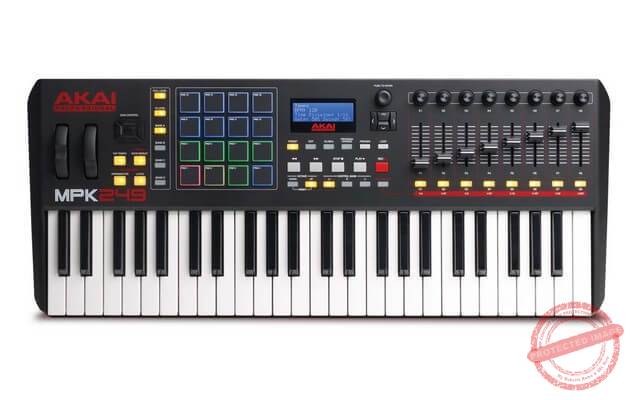
Best Overall: Akai Pro MPK249/261
Key Features:

  • Functioning USB-MIDI Interface
  • High-quality 16 MPC-style pads
  • Stress-free plug-and-play connectivity
  • AU/VST Plugins supportive

Read our review of the Akai MPK249

The Akai MKP261 Midi keyboard is a master controller that works magic with software plugins and MPC workstations. Just like the Akai MPK Mini MK2, this Midi keyboard offers all-in-one control of multiple instruments and virtual effects. However, what makes the MPK261 a bit different is the software package plus. This added feature enables users to alter and customize DAWs, onboard instruments, and sound effect plugins.

Whilse playing the Akai MPK261 for the first time, its hypersensitive keypads gave me the feeling of a digital piano, not just a tacky MIDI keyboard. Staying in charge of the MIDI sequence could be quite a lot to handle on a Midi keyboard with lots of controls. However, this product allows me in charge of the MIDI sequence with the 5-pin Midi input & output. The MPK261 is suitable for both Mac and PC users.

Obviously, what got better in the MKP261 upgrade was the ability to have flexibility with the controls. I could easily navigate around multiple core MPC tools like the Tap Tempo, MPC Note Repeat, Time Division, and Arpeggiator. This Midi keyboard also helped give an all-in-one package experience with the over-the-chart production software.

I had access to SONiVOX Twist 2.0, Hybrid III, and Ableton live-lite all at my fingertips for a wild production experience.

What I Don’t Like

At first, I could not download extra production software to the MIDI keyboard without contacting Akai Pro support. I’d never had expected to need professional help when trying to download a plugin to my keyboard. I wasn’t trying to fly a jet, was I?

Recommended for: Home producers looking for a full-fledged, powerful MIID keyboard for Ableton. The keyboard is fantastic with semi-weighted keys, and there are plenty of control options to keep you happy. It integrates fantastically well with Ableton as well. If there is any concern, it’s with the price. Otherwise, this is easily one of the best MIDI keyboards for Ableton ever made.

Pros

  • Semi-weighted hypersensitive keypads
  • Perfect synchrony with Ableton Live 10
  • Perfect velocity-sensitive pads

Cons

  • Pricey
  • Akai’s customer support remains a hit-or-miss

Budget Alternative: Novation Launchkey 49 MK3

Key Features

  • Ableton Live integration
  • Spitfire Audio LABS
  • Three-chord mode layout
  • 49 Velocity-sensitive action keys
  • Capture MIDI function

The Ableton live integration specifically built-in for immediate modification and input of ideas is a plus on this Novation Launchkey 49 MK3 keyboard. Trying it out for the first few times allowed me to actualize all my ideas and creativity in real-time. The Capture Midi function helps freestyle producers have a series of happy accident sessions to produce. Novation Launchkey 49 MK3 keyboard gives an overall creative performance with its easy-to-use virtual effects and instrument options.

This keyboard totally supports Logic & Reason and allows me to play around with a wide range of effects and plugins. Novation Launchkey 49 MK3 helps me explore my inner creativity production with DAWs like Cubase, via HUI and Studio One. The MIDI output port is compatible with Midi-supportive devices. This section consists of a 5-pin Midi output layout; so it supports multiple Midi devices unlike other brands with fewer pins.

I never stopped sharing with my community of Midi keyboard lovers the free software packages installed in Novation Launchkey 49 MK3. After purchase, I realized the product came with Ableton Live 10, several plugins that allowed me to create immediately, and free virtual instruments. This keyboard offers the perfect synchronization with Ableton Live 10. With the special button for initiating the Capture Midi function, I get all the benefits of Ableton Live 10.

Other additional functions like quantise, plus track arm, and click-and-loop controls help better the Ableton Live 10 experience. The user, fixed and scale modes on the Novation Launchkey 49 MK3 keyboard helped me produce a chord with one finger. This feature of the keyboard was probably the first thing that got me locked in my digital studio space for hours. The upgraded arpeggiator helps creativity with rhythmic tunes, harmonics, and new melodies.

What I Don’t Like

Not the best keyboard with hypersensitive keypads functions. The Novation Launchkey 49 MK3 almost has a similar action feel of a grand piano. It sometimes hurt on my fingertips after playing during a long production session.

Recommended for: If the Akai MPK249 is too expensive for you, the Novation Launchkey is the next best MIDI keyboard for Ableton. Solid integration with Ableton, but you can it with FL Studio and Logic Pro X comfortably as well. Working with session view on this keyboard meant didn’t need my mouse or trackpad to navigate any function.

Pros

  • 3-year warranty
  • Unrestricted access to Ableton Live’s functions
  • Browser-based tool inclusive

Cons

  • Hard action keypads

Best Full-Sized Keyboard: Roland A-88 MK2

Key Features 

  • Compatible with PHA-4 keyboard
  • 8 RGB-lit compatible knobs
  • MIDI 2.0 sequence upgrade
  • USB-C connectivity output

This Midi keyboard comes in 3 user-definable cores that allow me to split and layer multiple sounds and instruments simultaneously. Sometimes I get carried with how I can blend two or more sounds and sway off my project for hours. Also, the Roland A-88 MK2 is an outstanding piece that keeps the users in charge of pitch/mod lever and pads. Anyone could always adjust their pitch of certain voices easily with the RGB-lit knobs.

The Roland MIDI keyboard uses up-to-date technologies that support a wide range of device compatibility. For convenience purposes, this product has a built-in USB-C port that helps macOS and Windows users pair directly with iOS. A plus on this Roland masterpiece is the extensive capabilities of the installed MIDI 2.0. This version offers new and interesting plugins and also makes switching between them a piece of cake.

Before playing on this keyboard, I had to confirm if the studio that had it was spacious enough to allow me to produce freely. Surprisingly, the Roland A-88 MK2 keyboard is specifically designed with space for personal studios in mind. It comes in a shallow and thin build-up while maintaining the ‘Roland’ elegant casing and dynamic playability.

Durability was also another factor considered when manufacturing this piece. Roland A-88 MK2 manufacturer had this casing made from specially crafted wood and premium materials for a long-lasting experience.

The chord memory on this keyboard performs amazingly well for every recording session played on it. This Roland piece has large memory storage of chord patterns ever played on the keyboard. Of course, this is a distinct feature as only a few Midi keyboards come with chord memory in them. Be ready to explore a wide range of creative tools, plugins, and sounds for your musical projects and production on this one.

What I Don’t Like

The Roland A-88 MK2 keyboard sometimes doesn’t support all production software and external plugins. I’m guessing it’s a way for the company to limit the number of plugins on every keyboard, hence, protecting the built-in software program. However, it’d be nice if everyone wasn’t limited to a few software.

Recommended for: This professional midi controller is highly recommended for its hammer-action keys with sensitivity adjustments. With this sensitivity control, I can always regulate how responsive the keyboard picks up my key strikes. Also, the USB-C connectivity allows me to connect devices while I produce on imported files in real-time without conversion.

If you’re looking for the most authentic keyboard action in a MIDI keyboard, this is one of the best MIDI keyboards for Ableton on the market currently.

Pros

  • Control mappings command
  • Snap Shop function for instant recall
  • Fantastic keybed

Cons

  • Supports limited external production software
  • Control options are not as refined as the keybed

Best Mini Keyboard: Akai MPK Mini MK3

Key Features

  • Velocity-sensitive response with after-touch
  • High-quality MPC functionalities
  • Seamless audio/MIDI Environment-friendly
  • Singular MIDI sequence interface
  • Hybrid 3 & SONiVOX Twist

The MK3 is the updated version of our highly recommended MPK Mini Mk2. The new upgrade improves pads, adds an informational screen, and gives the keys a tighter feel.

Read our review of the Akai Mini here.

Experience the perfect virtual instrument and effect synchrony with the MPK Mini MK3 and VIP3.1 plugins. Interestingly, I discovered that this pocket-friendly midi keyboard offers a wide range of virtual effects and numerous instrument options. Finding my way around the Akai MPK Mini MK3 wasn't that much a deal as the user-friendly interface made navigating the features and MIDI sequence so easy.

One exciting feature that got my attention was the velocity-sensitive response offered by the keypads. Another interesting one is the newly upgraded octave up-and-down controls on the instrument. This onboard navigation enables players to switch to wide melodic range options easily. That section of the keyboard makes playing drum solos, piano harmonies, bass lines, and solo lead fun without stressing.

The Akai MPK Mini MK3 was just the up-to-date Midi keyboard I needed to keep me in vogue. It comes with a Hybrid 3.0 virtual synthesizer. Before this, it took a while to locate a keyboard engineered with the next generation in synthesis. The popular SONiVOX twist; integrated with a unique interface and onboard effects is a plugin on this version of the Midi keyboard. Being able to produce sophisticated sounds using simple controls has always been an experience I look forward to. This product offers just that!

Whatever genre of music to be produced, MPC Beats is fully equipped for a creative experience. With this keyboard, I could easily locate drum patterns, mixdown track samples, and edit audio files using the synthetic engines on the MPC's. The MPC Beats function also enables players to record audio using the built-in microphone and noise filter. Akai Professional MPK Mini MK3 comes upgraded with software packages of DAWs and easy-to-use effect plugins.

What I Don't Like

The MPK Mini MK3 seems to have a few interesting features and provides high-quality output. However, the fact that the Midi keyboard cannot be used without an amplifier was a major turn off for me. Also, what Midi keyboard doesn't come with a headphone plugin port these days?

Recommended for: I’d recommend this product for its amazing light-weighted keys, cool pads with hypersensitive functions, and high-quality controllers. It’s a great first keyboard for someone new to Ableton. It’s also a great second keyboard for an experienced producer looking for a space-saving, mobile alternative.

Pros

  • Fully packed Beat-making Essentials
  • Easy-to-use 24 Q-Link Controllers
  • Pro-keyboard performance

Cons

  • 2 octaves is too small a range for serious production
  • Keybed has a plasticky feel

Best for Power Users: Akai Advance 49

Key Features

  • Multi-color LCD screen display
  • Wide-range download options
  • 49-key virtual instruments
  • Multi-core CPU

The Akai Advance 49 midi keyboard comes with a 2GB free storage space for the installation of external software. With this much space, I get to install and try out multiple production software and delete them if they aren't useful. Also, this midi keyboard offers a total of 20GB storage space for whatever installation that may be required like plugins, virtual instruments, storage-consumption effects, and so on.

The multi-color LCD screen on the midi keyboard allows players to see their changes in real-time. I get to alter my MIDI controls while watching the changes on the little LCD screen. Works perfectly on every Windows 7 operating system and other updated OS.

For macOS, this Akai Advance 49 keyboard supports Mac OS from version 10.8 upward. This Akai piece also makes manipulating virtual instruments and sound effects possible with easy-to-use controls. I made this selection among the other 25-key and 61-key sizes. Without a doubt, the keyboard serves every preferred choice.

This piece is known for its pressure-sensitive pads that help musicians and producers create hands-on tempo and beats. The MPC pads on this Akai Advance 49 keyboard gives me the feel of a live-in-concert experience from my studio space. Thanks to the RGB illumination feature, I can always access multiple sounds and virtual instruments on the pads. On this keyboard, there are series of controls including transport control, the pad bank button, performance controls, and octave buttons.

Designed with pitch and modulation functions, this Akai keyboard allows me to work on sound effects. I also get to edit and adjust the pitch and modulation frequencies from imported audio files on the midi keyboard. The tap-tempo buttons on this Akai brand make users create and input their tempo patterns without stress.

Also, the pattern arpeggiator allows me to sync tempo and virtual instruments perfectly without skipping beat counts.

What I Don't Like

I love upgrading my production gadgets from time to time, which is why I go for the best set-up. At the time I was going to make an upgrade, it was difficult to sell my Akai Advance 49 keyboard. Apparently, version 3.0 got outdated before I realized; and no one was willing to purchase such an expensive midi keyboard for the asking price.

Recommended for: Power users and serious producers looking for a complete production studio. It takes all the best features of the bestselling MPK249 and amps everything up to 11. From the excellent keybed to the refined control options, this is easily one of the best MIDI keyboards for Ableton ever made.

Pros

  • Four-directional cursor buttons
  • 8 x 360° assignable decoders
  • Stunning key action

Cons

  • Expensive!
  • Availability is always limnited

Best Keybed (Budget): Roland Go:Keys

Roland GO KEYS has good keys with a lightweight, gorgeous design

Key Features

  • Integrated with Bluetooth speakers
  • Loop Mix function
  • Wireless stream through onboard speakers
  • Extended battery life with external battery
  • Compatible with music production apps

GO:KEYS is by far one of the easy-to-use midi keyboards I've ever laid my hands on. With its Bluetooth connectivity feature, I can play along with songs on another device. I often try this when working on mastering lines from a streamed song online or my smartphone. Also, users get to take advantage of the keyboard's onboard speakers for playing their music. By pairing the smartphone with the Bluetooth user from the keyboard, you can play songs using the speaker.

The battery power on the GO:KEYS allows me to play songs from my device on-the-go. I need not worry about electricity each time I decide to create or play along with online music content. Another interesting feature about the GO:KEYS midi keyboard is the function of using mobile apps which meant I get to learn a new genre of music. For fun, I sometimes use my GO:KEYS midi keyboard during karaoke hangouts with friends.

Without external devices, GO:KEYS has over 500+ installed sounds for users to produce with. These sounds and virtual instruments are products of the popular Roland's pro synthesizers. For easy access to multiple instruments like brass, synths, pianos, and strings, I can always punch the intuitive buttons. GO:KEYS allows musicians and producers to edit and adjust loop mix jams. With this feature, I can always pick up a random song online, recreate and mix the production to my taste.

The GO:KEYS MIDI keyboard uses up-to-date technologies that support a wide range of device compatibility. For convenience purposes, this product has a built-in USB-C port that helps macOS and Windows users pair directly with iOS. This Roland keybed has the extensive capabilities of the installed MIDI 2.0. This version offers new and interesting plugins and also makes connecting with your mobile devices and other gadgets possible.

What I Don't Like

It was never included on their website that the midi keyboard never supports Android devices. This piece of information would have saved lots of users like me the time of ordering and having to request a refund because I don't use an iOS device.

Recommended for: I’d recommend this midi keyboard because of the tender feel on the key action. It makes playing and inputting bass lines easy without so much tension on your fingertips. The built-in speakers, while nothing amazing, are a plus, especially if you want to make music on the go. For the price, this is one of the best MIDI keyboards for Ableton on the market currently.

Pros

  • Stunning design and build quality
  • In-built speakers
  • Fantastic keybed

Cons

  • Some iOS users report Bluetooth connectivity issues
  • Usually out of stock at most retailers

Over to You

Buying the best MIDI keyboards for Ableton isn't easy. With dozens of options to choose from, it can be impossible to pin down the best keyboard for your needs.

Hopefully, this guide will help you figure out what's the best keyboard for your studio.

For more recommendations and advice, don't hesitate to reach out to me here.

Also read:

References:

Changelog
  • January 22, 2021: Article first published

The Best MIDI Keyboards for Ableton 2026 (6 Surprising New Picks) Read More »
6 Best MIDI Keyboard for FL Studio 2026

FL Studio has grown in popularity greatly in the last few years. Far from its original Fruity Loops days, FL Studio today is a powerful, richly-featured DAW that’s particularly popular among EDM producers. To help you produce music even better, we’ll look at the best MIDI keyboard for FL Studio in this article.

Ableton, Logic, and Pro Tools are the “big three” of modern DAWs. Of course, countless studios still use Cubase, Nuendo, and Reaper, but pop into any up-and-coming producer’s studio and you’ll likely see one of these big three in use.

There is yet another DAW, however, and it’s increasingly popular among EDM producers: FL Studio.

If you’re reading this article, you likely either already use FL Studio, or are familiar with it. You might also know that FL Studio was previously called Fruity Loops and had to drop the name to avoid any confusion with the cereal brand. To most new producers today, it’s simply “FL Studio”.

FL Studio has grown in popularity thanks to its ease of use. Avid and Logic and to some extent, even Ableton can be challenging to beginners. But FL Studio feels downright welcoming with familiar green interface. The tons of built-in plugins also make it much easier to jot down ideas.

And of course, the price tag is low enough that anyone can buy it – even rank beginners.

Because of its burgeoning popularity, most modern keyboards integrate with FL Studio out of the box. You can pick any keyboard from our list of the best 25 key, 49 key, 61 key, and 88 key keyboards and it will work well enough with your DAW.

Some keyboards, however, will deliver better results than others. Which is why in this guide, we’ll walk you through our picks for the best MIDI keyboard for FL Studio – by price, performance, and portability.

Here’s a quick recap of our top choices:

  • Best overall: Akai Fire
  • Best value: Akai APC 25
  • Most portable: Korg NanoKey2
  • Best drum pads: Novation Launchpad Pro MK3
  • Best keybed: Novation Launchkey 25
We use rigorous research, reviews, and real-world performance when recommending products. Our reviewers include producers, performers, and active musicians. You can read more about our review process here. Be advised that MIDINation might earn referral commissions on purchases made through this website. This does not affect your final purchase price.
Note: As an Amazon Associate, MIDINation earns commissions for qualifying purchases made through Amazon links on this page.

About your reviewerRyan Harrell is the founder of MIDINation and an experienced producer/DJ. His first experience with electronic music production dates back to Cubase 3.0 in the summer of 1997, and he’s been a fan ever since. He prefers Ableton as his primary DAW these days, though he is still partial to Cubase and Pro Tools. He lives in San Diego and freelances as a producer and part-time DJ.

The 6 Best MIDI Keyboards for FL Studio

We’ve reviewed some of the best MIDI controllers around on this website. After comparing dozens of models available at the moment, the following are our top recommendations for use with FL Studio:

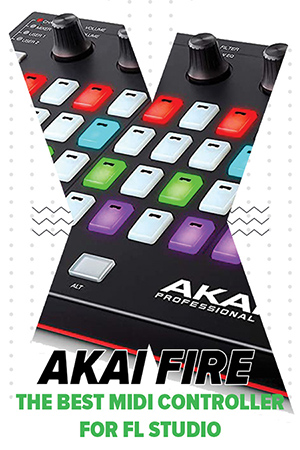
Best MIDI Keyboard: Akai Fire

Akai Fire is the best MIDI keyboard for FL Studio for most buyers and should be your first choice

Key features:

  • 4 x 16 RGB pads
  • DAW controls built-in
  • OLED screen for sound/clip selection
  • 4 banks of touch-capacitive knobs
  • Designed specifically for FL Studio

A few months ago, one of the many offerings from Akai or Novation would have topped this list of FL Studio controllers.

But that all changed when Akai introduced the Fire at NAMM 2019.

Akai Fire is the first MIDI controller designed from scratch for FL Studio. In fact, Akai collaborated closely with Image Line (makers of FL Studio) to create the features and control options that would help producers make best use of the DAW.

And all that effort shows: nothing on the market comes even remotely close to offering the features, flexibility, and power of the Fire when it comes to using FL Studio.

While there is a laundry list of features, some of my favorite are:

  • 4 x 16 RGB pads: Unlike traditional pad controllers, the 64 pads on the Fire are arranged slightly apart. This mimics the visual design of the Step Sequencer in FL Studio. Load up the sequencer with your clips and you can control them intuitively from the Fire. It’s such a delightful, hands-on experience that these pads alone make the Fire worth the price tag.
  • Transport controls: Record, loop, play, pause, and move around the track with the built-in transport controls. This makes it possible to use FL without ever looking at your computer screen or using the computer keyboard/mouse. Coupled with the 64 RGB pads, this makes playing music truly intuitive.
  • Audition/selection tool: A tiny OLED display coupled with a four-way select knob lets you audition and select clips, sounds, and effects right from the controller, no computer screen necessary. Again, this facilitates hands-on, intuitive production.
  • Keyboard mode: Press a button and the Fire transforms from a pad controller to a keyboard (called “Note Mode”). Although it’s not as intuitive as a traditional black-white keys piano, it gives you enough playability to tap out chords and melodies.

Even more, you can string together four Fire controllers to get unprecedented control over your DAW. Just imagine what you could create if you had 256 pads at your disposal.

Not everything is perfect, of course. If you use the keyboard primarily to play notes, you’ll find the Fire’s pad-focused layout inadequate. The Fire also doesn’t integrate as well with other DAWs, so if you switch between DAWs, Fire might not be perfect for you.

But for those who use FL Studio exclusively, the Akai Fire is by far the best MIDI keyboard for FL Studio in the market right now.

Recommended for: Anyone who uses FL Studio exclusively and needs an intuitive controller to launch clips, tap out drum patterns, and get hands on access to their DAW.

Pros

  • Designed specifically for FL Studio
  • 4 x 16 RGB pads work perfectly with the Step Sequencer
  • Audition mode and transport controls offer great hands-on control

Cons

  • Note mode is a poor replacement for traditional piano keys
  • Poor integration with other DAWs

Best Cheap Keyboard for FL Studio: Akai APC Key 25

Akai APC Key 25 is the best keys and pad controller for FL Studio users on a budget

Key features:

  • 25 velocity-sensitive keys
  • 40 tricolor RGB pads
  • Low weight – just 1.7 lbs
  • 8 assignable knobs

Although the Akai APC Key 25 is nominally an Ableton controller, it performs equally well with FL Studio. The 5 x 8 row of RGB pads coupled with the 25 synth-action keys give you a lot of flexibility in how you use the controller. Integration with FL Studio is a breeze – the APC Key 25 installs like any other keyboard. Plus, unlike the Fire, you aren’t limited to FL – you can use this controller with any other DAW.

That’s the big picture. Now let’s dive into the details.

The standout feature of the APC Key 25 is how it combines a large number of pads (40) with a set of keys in a tiny box. The 40 pads work well with FL Studio’s Step Sequencer. It might not be as intuitive as Akai Fire or Novation Launchpad’s 64 pads, but it gives you enough control to create complex beats.

The inclusion of a 25-key keyboard solves the biggest shortcoming of the Akai Fire – the ability to enter notes. You can enter notes just as you normally would in any keyboard, then switch to the Step Sequencer with the pads. It makes for a great workflow if you’re like me and use the controller as more than just a drum pad.

The third great thing about the APC 25 is its low weight and small dimensions. At just 12.3″ long and 7.6:” wide, it has roughly the same dimensions as a 13″ Macbook. Combined with the low weight – just 1.7 lbs – this makes the APC 25 one of the most portable key + pad controllers on the market.

While you don’t get complete transport controls, you can play/pause and record tracks from the controller itself. This makes intuitive, hands-on performance much easier.

If I can point to any downsides, it’s the small size of the pads. Akai had to compromise on both pad size and spacing to accommodate 40 of them into a small chassis. Be prepared for some mishits.

The synth-action keyboard isn’t perfect either. Don’t expect to play Chopin on it; use it just to enter MIDI notes or play simple chords and you’ll be happy.

But apart from these niggles, the Akai APC 25 is one of the most versatile MIDI keyboards on the market right now. Use it as a keyboard only, or use it as a pad controller with the Step Sequencer – the choice is up to you.

Recommended for: Anyone who wants a full-fledged keyboard as well as a large number of pads in a small package. The APC Key 25 works equally well with FL Studio as it does with other DAWs (specifically, Ableton). For the price alone, it’s one of the best MIDI keyboards for FL Studio right now.

Pros

  • 40 RGB pads work great with the step sequencer
  • 25 synth-action keys are great for entering notes and melodies
  • Lightweight and small dimensions improve portability
  • Affordably priced

Cons

  • Limited DAW controls
  • No audition/sound selection option
  • Small pad size increases chances of mishits

Best Mixed-Use MIDI Controller: Novation Launchkey 25

Novation Launchkey 25 is the best mixed use controller for FL Studio

Key features:

  • 25 synth-action keys
  • 16 RGB backlit pads
  • 8 assignable knobs
  • Low weight – 1.55 lbs

Novation’s Launchkey 25 usually jockeys against Akai MPK Mini MK2 for the top spot in our lists of mini/25-key MIDI keyboards. While I usually give the top honors to the Akai (mostly on account of the lower price and nicer pads), for FL Studio, I have to give the top spot to the Launchkey 25.

There are two reasons for this:

  • The 16 pads work really well with FL Studio’s step sequencer. In contrast, Akai MPK Mini’s 8 pads feel inadequate
  • Novation has a better integration with FL Studio, especially for the Launchpad/Launchkey series

Apart from the comparison with Akai MPK Mini, Novation Launchkey 25, on its own, is a very competent, all-around keyboard. The 25 synth-action keys are fast and responsive. While they’re not going to compete against the Yamahas and Rolands, they play really well for a mini keyboard.

Complementing the 25 keys is an array of 16 multicolor pads. Previously, I held the smaller size of the pads against the Launchkey, but in case of FL Studio, the small size works better – it aligns perfectly with 16th notes in the step sequencer.

Apart from the pads, you also get 8 assignable knobs. The size, at just 15″ long, is perfectly suited for portability, and at 1.55 lbs, the weight is next to nothing.

The biggest complaints against the Launchkey 25 are its lack of pitch/mod wheels, and the lack of onboard DAW controls. You will have to juggle the computer keyboard/mouse as you use this controller, which really kills the hands-on feel of dedicated FL Studio controllers like the Fire.

Nonetheless, if you’re on a budget and need an all-around mini keyboard that will let you control the step sequencer and play notes with minimum fuss, the Novation Launchkey 25 is for you.

Recommended for: Electronic music  producers who need an all-around, easy-to-use first MIDI keyboard for creating drum sequences or entering melodies at an affordable price tag. The small size is a boon for space-crunched bedroom producers. And the price is nice enough to fit budget users. Easily the best MIDI keyboard for FL Studio producers who want affordable, mixed use gear.

Pros

  • Fast, responsive keyboard
  • 16 mini pads work well with FL Studio
  • Easy to use; well integrated with FL

Cons

  • No dedicated pitch/mod wheel
  • No onboard DAW controls

Best Mini MIDI Controller: Korg Nanonkey2

Korg Nanokey2 is the best portable controller for FL Studio

Key features:

  • 25 button-like keys
  • Dedicated octave up/down buttons
  • Dedicated sustain buttons
  • Pitch/mod buttons

There isn’t a lot to write about the Korg Nanokey2. It has barely any features save a dedicated arpeggio button. There are no pads, knobs, or other control options.

However, the Korg Nanokey does have two things going for it:

  • It is extremely portable, weighing under 1 lbs with a length smaller than most laptops. You can tuck it into any backpack to make music on the go.
  • It integrates extremely well into FL Studio, given that it is one of FL’s official “preconfigured controllers”. You can plug it in and start producing music right away – no configuration necessary.

So while the Nanonkey clearly lacks a lot of features, it does serve a niche: a tiny, easy to control, easy to use MIDI keyboard to use on the go.

That’s not all – Korg also sells dedicated pad and slider controllers (nanoPad and nanoKontrol respectively). You can combine these with the nanoKey to build a cheap, multi-function modular controller.

There are problems aplenty of course – the button-like keys don’t have the intuitiveness and familiarity of piano keys, and the lack of DAW/transport controls is a bummer (they are available on the nanoKontrol however). But given the small size and the even smaller price tag, this is a great keyboard for anyone who prioritizes affordability and portability.

Recommended for: Beginners to intermediate/advanced musicians who want a cheap, ultra-light MIDI keyboard to make music on the go. It has shortcomings, but the price and portability make it the best MIDI keyboard for FL Studio users who want a versatile, portable production studio.

Pros

  • Extremely portable – weighs under 1 lbs
  • Easy integration with FL Studio

Cons

  • Button-like “keys” are unintuitive
  • No transport controls

Best Keyboard Controller for FL Studio: M-Audio Oxygen 49 MKIV

M-Audio Oxygen 49 is the best keyboard controller for FL Studio

Key features:

  • 49 synth-action keys
  • 8+1 sliders (8 EQ + 1 master)
  • 8 assignable knobs
  • 8 velocity-sensitive backlit pads
  • Dedicated pitch/mod wheels
  • LCD info screen

M-Audio’s keyboards have never been particularly high on our recommendations list. Although they’re always competitively priced, I’ve found that the keys tend to get loose and stuck after repeated use.

When looking for the best MIDI keyboard for FL Studio, however, things are a bit different. Namely, M-Audio’s Oxygen line (including the 25 key and 61 key variants) are officially supported by FL Studio.

In real-world terms, this means that you can plug this keyboard in and start playing immediately, no configuration necessary. All the controls map automatically to the right feature, giving you complete control over FL Studio in seconds.

This ease of use makes up for most of the Oxygen 49’s shortcomings.

Apart from the integration, the Oxygen 49 is a fairly feature-rich MIDI keyboard. You get a lot of control options such as:

  • 49 synth-action, full-size keys
  • 8 + 1 sliders
  • 8 customizable knobs
  • 8 backlit velocity-sensitive pads

You also get dedicated pitch/mod wheels, both of which feel nice and rubbery.

However, the quality of the components is average at best. The keys feel a little plasticky and the knobs have a little resistance than they ideally should.

Furthermore, the 8 pads are, in this reviewer’s opinion, too few for FL Studio. 16 pads give you so much more control over the step sequencer.

With all this said, I would still recommend this keyboard for the easy integration and low price. There aren’t a lot of full-sized 49-key MIDI controllers priced in this range in the first place. The fact that the Oxygen 49 integrates seamlessly with FL Studio makes it one of our 5 most-recommended MIDI keyboards.

Recommended for: Anyone on a budget who wants an easy-to-integrate MIDI keyboard with a large number of control options and full-sized keys. It has a lot of flaws, but the ease of use and low price make up for them.

Pros

  • Lots of control options
  • Affordable price tag
  • Integrates easily with FL Studio

Cons

  • Keys become loose after repeated use
  • 8 pads is too few to take full advantage of FL Studio

Best Pad Controller for FL Studio: Novation Launchpad Pro MK3

Novation Launchpad Pro MK3 is the best MIDI keyboard for FL Studio if you want a sequencer-based pad controller

Key features:

  • 8 x 8 (64) pads
  • Easy integration with FL Studio
  • Brightly lit RGB pads
  • Low weight – under 2 lbs
  • Compact dimensions and shape
  • Built-in sequencer

Update: An earlier version of this article listed the Novation Launchpad MK2 as our favorite pad controller. Since then, Novation has launched the MK3 which, to this reviewer, is an even better option and comes highly recommended.

Like the Novation Launchkey, Novation’s Launchpad line of MIDI controllers (which includes the Launchpad Pro and Launchpad Mini) are designed to be used with Ableton Live.

However, these controllers also feature in FL Studio’s list of official “preconfigured controllers”, i.e. they work equally well with FL Studio right out of the box.

It’s easy to see why: the 8 x 8 square grid is perfect for controlling the step sequencer. Quick integration means that you can load up your clips and start making music immediately. The pads are brightly lit which not only looks great but also helps you visually distinguish between clips and instruments.

The quality of the pads has been improved greatly compared to the MK2 model. The pads are highly responsive, large, and have excellent sensitivity. In my last review of the MK2, I mentioned how they can’t compete against Akai’s MPC pads, but with the MK3 version, the difference is less and less noticeable.

A key new feature is the built-in 32-track sequencer. You can now create entire tracks without even using a DAW. For production on the fly, this is practically some of the best you can get.

This is dedicated pad controller so there are no other control options – sliders, knobs, etc. You do get DAW controls via dedicated buttons aranged around the controller, including buttons to control sends and solo/mute tracks. This makes it possible to make patterns completely from the controller without even looking at the computer screen.

Another plus is the small size. The entire unit is roughly 9.5″ square and weighs under 2 lbs. Not only does this take low space on a desktop, it is also easy to carry around.

As a caveat, you’ll want to buy another keyboard controller apart from the Launchkey. Unlike the Akai Fire, there is no “Note Mode” on the Launchkey; you can’t use it to play melodies or chords. Factor this into your purchase decision. Even with an additional cheap keyboard, you’ll effectively end up paying nearly $200+.

That said, if you want to use FL Studio primarily to create sequences or launch clips, you’ll love the intuitiveness that Novation Launchpad brings to the table. It integrates easily, feels good, and looks stunning.

Recommended for: Musicians who want an affordable but powerful pad controller to trigger clips and create sequences. Buy this if you already have a keyboard and need something to tap out drum loops.

Pros

  • Pads feel great and look good
  • 8 x 8 grid gives lots of input options
  • Great new sequencer

Cons

  • Can’t play melodies/chords; you’ll need a separate keyboard
  • Expensive when compared to FL-only gear like Akai Fire

Guide to Buying a MIDI Keyboard for FL Studio

Before we do a deep dive into the top MIDI controllers for FL Studio, I want to make sure you understand what you should look for in your keyboard of choice, and whether you even need a keyboard in the first place.

If you’d rather skip this, scroll down to see our list of the 7 best MID keyboards for FL Studio.

Do you need a special controller for FL Studio?

The short answer? No.

All MIDI controllers, from a $35 midiplus to a $500 Roland use the MIDI protocol. This is a universal protocol that’s supported by every DAW and nearly every synthesizer (analog or digital) and audio interface.

As long as your controller supports MIDI, you can plug it into your computer and it will work with FL Studio.

In other words, you don’t have to buy a special MIDI keyboard for FL Studio; whatever you have lying around the studio will work.

Now for the long answer:

Some keyboards work better with FL Studio than others.

This can mostly be attributed to two things:

  • Integrations: Some keyboards and controllers are designed specifically to be used with specific DAWs. Think of Ableton Push or the Akai APC Key 25, both of which were designed to integrate with Ableton. The close integration means that buttons, pads, and other controls are mapped automatically. Instead of dealing with custom configuration files, you can plug-in and start playing.
  • Hardware choices and control options: Although most keyboards have the familiar design – 25 to 88 piano keys, a handful of control options, an array of pads – certain control options work better with different DAWs. Case in point: Ableton Push. The array of 64 pads work seamlessly with Ableton’s Session view and make music production faster and more intuitive.

So while technically you can use any keyboard with FL Studio, you will see significantly better results if you buy something that a) integrates seamlessly with FL, and b) has control options that take advantage of FL Studio.

I’ll cover some such keyboards in this guide.


Size, budget, and features: What to look for?

If you’re using FL Studio as your primary DAW, there are a few assumptions I can safely make about you:

  • You work primarily in genres that use clips and loops, such as hip-hop and EDM
  • You use FL Studio’s powerful step sequencer extensively
  • Although it’s not always true, there is a chance you’re working with a smaller budget

Although you can technically use it that way, FL Studio isn’t really designed to work with a huge number of audio tracks. You won’t find a lot of professional studios using it t record hundreds of takes of dozens of audio tracks to say, record a rock band. Most professional electronic music producers prefer Pro Tools for it, simply because of how dominant it is in studios.

Given these constraints, what should you look for in a FL Studio? What features would work best with your workflow?

Here are some answers:

  • Lots of pads: FL Studio’s best and easily the most widely used feature is the Step Sequencer. To take advantage of the step sequencer, you need a controller that has enough pads to give you control over 16+ clips at the same time. Unless you’re using FL as just an arranger, avoid controllers that don’t have any pads.
  • DAW controls: Given that FL is often used to produce beats, you want a keyboard that gives you intuitive, hands-on control over the DAW. Nothing kills the beat-making process faster than switching between the computer and the controller. So you want a keyboard that lets you control the DAW (play, pause, record, transport, etc.) right from the keyboard itself.
  • Support and integration: It goes without saying that you’ll have a better time with a keyboard that is supported officially by FL Studio. You can see a list of FL’s “prefigured controllers” here (or scroll down for a detailed list). These are controllers that have custom integrations for FL.
  • Portability: Portability depends on three things: size, weight, and shape (i.e. whether it is too long/wide). While portability isn’t important for everyone, I’m yet to meet a FL Studio user who didn’t want to use his DAW on the go at least sometimes. A smaller, lightweight keyboard complements FL’s beginner-friendly production approach as well.
  • Multi-device support: FL allows you to connect up to 16 MIDI controllers to the same DAW. It’s common for EDM producers to hook up several controllers at the same time to get quick access to different drum kits. Try to look for keyboards that can be connected together to create an “array” for controlling FL.


FL Studio preconfigured MIDI keyboards

Before we look at the best MIDI keyboards for FL Studio, I do want to mention some of the keyboards that are officially supported by FL. These keyboards feature special integrations to help you use FL’s features right out of the box, no custom configurations necessary:

  • M-Audio Oxygen 25, 49, 61
  • Korg Nanokey2
  • Alesis Photon X25
  • Korg MS-20
  • CME UF Omnipotent
  • Korg KONTROL49
  • Novation SL MKII
  • Korg microKONTROL
  • Akai MPC series
  • Novation Launchpad

There are a handful of more options that you can see here.

Does this mean that you should pick only from these controllers?

Of course not. For one, this list is outdated (it doesn’t even feature Akai FL Fire – designed by Image Line itself). And two, most manufacturers have their own custom integrations for FL Studio.

Nektar, for example, has a custom integration for its LX line of keyboards.

In other words, take the above list of preconfigured controllers as a guide, not a rule of thumb. As you will see below, there are far better keyboards on the market that integrate seamlessly with FL Studio.


Don’t buy FL Studio-only keyboards if you plan to switch DAWs

This is my number one piece of advice to anyone looking to buy a keyboard for FL Studio. If you’re not sure of which DAW you will stick with, I would highly recommend not buying something that works well only with FL Studio, like Akai Fire.

FL Studio is often the first DAW producers start with but for most – including yours truly – it is hardly the last. They usually graduate to a more “professional” DAW like Pro Tools or Logic Pro. That’s not to say that FL can’t be used to create studio-tier tracks – it can and has been used for that purpose. Blame it on industry standards, but most electronic music producers feel the need to upgrade as soon as they start hitting pro-tier production standards.

So while a keyboard like Novation Launchpad will work equally well with FL Studio and Ableton, an FL-specific controller like Akai Fire might not fare quite as well.

Final Words

This brings our guide to buying the best MIDI keyboard for FL Studio to a close. I highly recommend our top choice – Akai Fire – for most customers. As the only dedicated FL Studio controller, the Fire is a revelation and really changes how you use your DAW.

Just to recap, here’s the complete list of out most recommended FL Studio MIDI controllers:

  1. Akai Fire
  2. Akai APC 25
  3. Novation Launchkey 25
  4. Korg Nanokey2
  5. M-Audio Oxygen 49
  6. Novation Launchpad MK3

Questions, suggestions, or doubts? Send us an email!

Also read:

References:

Changelog
  • March 30, 2019: Article first published
  • May 28, 2020: Article updated with one new product
  • September 18, 2020: Article updated
  • January 7, 2021: Video and images updated

6 Best MIDI Keyboard for FL Studio 2026 Read More »

The Best MIDI Keyboard for Budget Users in 2026

As a budget user, you have to walk a fine line between performance and price when it comes to buying MIDI keyboards. What’s the best MIDI keyboard for budget users? This guide will share some answers.

There’s never been a better time to be a bedroom producer. From equipment and samples to VSTs and DAWs, making music is cheaper and faster than ever. There is a wealth of tutorials on virtually every topic you can imagine, and it’s never been easier to get your music heard.

It is also a good time to be in the market for a budget MIDI keyboard. Prices have come down even as quality and capabilities have improved. The average budget MIDI keyboard in 2019 can run circles around budget keyboards a decade back.

But all this equipment also means that buying the best budget MIDI keyboard has become harder than ever. You have way too many options and far too many brands to choose from.

Which is why we put together this handy guide to the best MIDI keyboard for budget users. Read on to see our most recommended budget-friendly MIDI keyboard you can buy right now, regardless of your needs or chosen DAW.

We use rigorous research, reviews, and real-world performance when recommending products. Our reviewers include producers, performers, and active musicians. You can read more about our review process here. Be advised that MIDINation might earn referral commissions on purchases made through this website. This does not affect your final purchase price.
Note: As an Amazon Associate, MIDINation earns commissions for qualifying purchases made through Amazon links on this page.

About your reviewerRyan Harrell is the founder of MIDINation and an experienced producer/DJ. His first experience with electronic music production dates back to Cubase 3.0 in the summer of 1997, and he’s been a fan ever since. He prefers Ableton as his primary DAW these days, though he is still partial to Cubase and Pro Tools. He lives in San Diego and freelances as a producer and part-time DJ.

Best Overall

Akai Pro Mini MK2

We’ve consistently ranked the Akai Pro Mini MK2 as one our pick of budget keyboards. It blends a decent keyboard with plenty of control options without compromising on cross-DAW compatibility and ease of use. The build quality is above par and while there are a few durability concerns, the price more than makes up for it. Get it in red or white and it even looks like its worth a million bucks.

Truly the best MIDI keyboard for budget users. You can read our full review of this keyboard here.

The Akai Pro Mini MK2 is without a doubt the best MIDI keyboard for budget buyers. It has so many advanced features and actually, it is a keyboard-drum combination. This is a small MIDI controller, something that will fit into your laptop bag without any problem. The build and the design of this MIDI controller keyboard makes it stand out since everything is so well put together.

Performance

It not only has great features for a music lover, but every feature performs as it is supposed to. The drum pad is incredible, it gives you access to different drumbeats. The performance is further enhanced by the red joystick that controls the pitch. You do not need the pitch wheel!

The arpeggiator feature comes with six buttons that control different functions, thus giving you a fully-fledged musical experience such as you cannot get anywhere else. The keys are a bit springy and squeezed together, so you may feel a bit of a cramp when playing for long. But that is what you get when the keyboard is this small for portability.

What I like:

  • 25 keys that are velocity sensitive
  • Has MPC Essentials software for incredible sampling and workflow
  • 8 drum pads that are velocity sensitive
  • 8 knobs that you can assign different functions
  • Comes with a software suite comprising of Hybrid 3, SONiVOX Wobble and MPC Essentials
  • Powered via USB – no power adapters or cables
  • 4-dimensional joystick takes the place of the MOD wheel and pitch
  • A jack for the sustain pedal

What I don’t:

The keys are squeezed too close together and they are small. They can be a bit a troublesome for people with fat fingers to play for long on this keyboard.

Recommended for: This is a good entry level MIDI keyboard to serve the needs of beginners as well as advanced users. You can use it in the studio or at home, but it would not be recommended for live performances.

Pros

  • Pad is of high quality
  • 4 dimensional joystick works like a marvel
  • High quality, sturdy and compact build
  • Portability is not an issue – it is so small and light in weight

Cons

  • Knobs are small, actually everything is small
  • Plastic build all around

Alternative to Akai Mini MK2: Novation Launchkey Mini 25

If for some reason, you don’t like the Akai Pro Mini MK2, then the Novation Launchkey Mini 25 would be the perfect alternative.

Bonus: it is priced lower than the Akai.

The Novation Launchkey is a 25-key MIDI keyboard that allows you to explore your talent in music creation without requiring too many items on the desk. It has sixteen drum pads and it is truly plug and play since you do not require a power source for it. Just plug it into your computer and turn it on and you will be ready to make music.

Performance

This is one of the smallest and the most lightweight MIDI keyboards in the market. When you are feeling too lazy to go to the studio, just plug it into your computer and start producing your music. It works as advertised, and for a beginner, everything is so well laid out thus making the learning curve much shorter.

The 16 drum pads are velocity and pressure sensitive. You will be able to tweak different instruments using the 8 durable knobs. When you are done with making music, just wrap it up and toss it in your backpack. It is the size of a laptop so it should be easy to travel with.

What I like:

  • 25 keys
  • 16 backlit drum pads that are also pressure sensitive
  • Programmable knobs that you can assign any mixing element to enhance your music experience
  • Plug and play for Mac and Windows operating systems
  • Comes with Ableton Lite, Novation Bass Station and XLN Audio Addictive Keys
  • Has many sample loops that you can play and create your beats

What I don’t:

The keys are plastic but the issue is that they feel too stiff. If you are used to the piano, you will find these keys too stiff and sticky.

Recommended for: We would recommend the Novation Launchkey for any beginner who would like to practice how to produce music even when they are on the move. Advanced users prefer a 32-key MIDI keyboard, but even 25-key ones are not too simplistic.

Pros

  • Easy to pack and take with you
  • Durable knobs for controlling different mix aspects
  • Plug and play – no special drivers needed
  • No need for power cable – just plug into your laptop

Cons

  • Pad quality is not up to scratch
  • Keys do not feel realistic

Best Entry-Level: M-Audio Keystation Mini 32

The best MIDI keyboard for budget buyers does not come any better than the M-Audio Keystation Mini 32. First, it has 32 keys, which you will find more useful than the 25 keys of the other MIDI keyboards that we have reviewed in this article. Everything in this keyboard works as it should and to make it even better, the keyboard is small, compact and light in weight.You do not even require a power source for this keyboard, which makes it one of the most flexible music monsters for people that love to make music when they are traveling.

Performance

While this is a speaker-less sound controller, it is very flexible and it has many performance enhancing features. First, there is the volume control knob for just that – controlling volume data that is sent to the sequencer.

The keys are velocity-sensitive, which means that the harder you press a key, the louder the note and vice versa. When entering your notation, the keyboard has the Sibelius First, which is a beginner package made by Avid. You can perform live with this MIDI keyboard or you can record music by entering notes one by one.

What I like: 

  • 32 keys that are velocity-sensitive
  • No need to install drivers or find power – plug into your laptop and use it
  • Has Octave Up and Down button for enhancing your melodic range
  • Has a sustain button and a volume knob
  • Professional software bundle comprising of First M-Audio, Xpand!2 workstation and Pro Tools
  • MIDI controller USB cable
  • Mappable buttons that you can assign different functions

What we don’t like

While we say that this is a plug and play MIDI controller keyboard you still have to plug it into a powered USB hub. It will not work when you plug it into your laptop’s USB port.

Recommended for: Any entry level MIDI controller user can use the M-Audio Keystation Mini 32 fairly well. It does have a learning curve but it is short. Professionals can also use the versatility that this MIDI controller brings.

Pros

  • Light, small, good for traveling with
  • Same price as the 25-key MIDI keyboards
  • Sold with good entry level software

Cons

  • Does not work directly when plugged in as advertised
  • The keys feel too spongy thus they are not very responsive

Best for Portability: Akai LPK25

If you are looking for the best MIDI keyboard for budget buyers that you can travel with or to extend your studio work at home in the evening, the Akai LPK25 is great for both. It is cable-free, since it does not need to be powered. It is small and nimble, packs in your small backpack easily when traveling.

Performance

When it comes to performance, the Arpeggiator button is the real deal and it was very thoughtful of Akai to include it here. Just press and hold the Arp toggle button and then you can change different Arp settings. You get a very effective sustain button, which means that you do not have to carry a sustain pedal with you. For hobbyist or semi-pro musicians, this MIDI keyboard works perfectly.

The keys are mid-sized, that is, they are not as big as the regular piano keys nor are they too small such that you do not get the feeling of playing a real piano. Even if you have fat fingers, you should be able to punch this thing without pressing any key accidentally.

What I like:

  • 25 velocity-sensitive keys
  • Uses a USB connection to plug in to any Windows or Mac laptop
  • Arpeggiator button lets you access different settings such as Arp mode, Arp time division and Arp Octave
  • Has a Sustain button instead of a pedal
  • Light in weight, laptop size MIDI keyboard
  • Has 4 other buttons apart from the Arpeggiator and Sustain button. They are for tempo tap, calling the preset functions and shifting octaves

What we don’t like

We don’t like the lack of a modulation wheel or pitch bend. There is no feature included that you could use in place of these two so it can be a bit hard to work with plug-ins or software that require a modulation wheel.

Recommended for: The Akai LPK25 is good for beginners as well as pro users who like to take their music work with them wherever they go. As a plug and play MIDI device, it is light in weight since there are no cables or power adapters to add to the weight. It is good for travelers too.

Pros

  • Light in weight – good for traveling
  • Sturdy and well built to last a long time
  • The sustain and Arpeggiator buttons are a nice touch

Cons

  • Lack of a modulation wheel is a big blow
  • Keys have a tendency to become hard/tacky with use

Alternative to Akai LPK25: Acorn Masterkey 25

If you’re on a budget and want an alternative to the Akai LPK25, then this is the best budget keyboard for you.

The Acorn Masterkey 25 is the best MIDI keyboard for budget buyers. It allows you to enjoy practicing your music skills even when you are on the go. It is small enough to fit in your suitcase. Apart from being handy for traveling, when you are using it in your home studio, you will find it effective as well. It has a jack for the sustain pedal too.

Performance

This is a plug-and-play kind of MIDI keyboard. It requires no driver installation; just make sure that you have the right operating system. To use it, just plug it in to your computer and then switch it on. The 25 keys are also set in such a way that they are slightly touch-sensitive such that when you press them hard, they produce a louder piano sound and vice versa. Some users say that they use the keyboard with a different software version apart from the one it comes with (Studio One) and that the performance is just as good.

What I like:

  • Has 25 keys
  • Light in weight and portable to make music while on the move
  • Persona Studio One Artist software
  • Does not require you to install any drivers – just plug it in and use
  • The modulation and pitch bend wheels are of professional quality
  • Has fade and knobs that you can use for controlling various aspects of music as you play

What I don’t:

The keys feel too light because they are not weighted. The entire plastic build also looks as if it cannot take abuse and may crack if it drops.

Recommended for: Iwould recommend the Acorn Masterkey 25 for any music enthusiast that is looking for a lowly priced MIDI keyboard that they can practice on and then perhaps later upgrade to a bigger one.

Pros

  • Plug and play MIDI keyboard – no drivers needed
  • Sold at an affordable price
  • Effortless connection with laptop through the USB

Cons

  • The keys feel a bit short especially if you have played the piano before
  • Mediocre key quality; spongy action

Best Pad Controller: Akai APC Key 25

This MIDI keyboard comes preset for Windows and Mac laptops, such that you just have to plug it in and play. It does not require to be powered, so there is no need for power adapter or batteries. It is also lightweight. With the 8 knobs, you can assign different functions such as volume control, effects and much more for a great music making experience. The front panel of this MIDI keyboard has an appealing array of clip launch with 40 pads in 5 rows of 8 pads. These are for loops and samples and they are very helpful in virtual synthesizer uses.

Performance

The performance of this MIDI keyboard is quite impressive. To dive right into it, first, there is the Octave Up and Down button. This enables you to explore the melodic range of this keyboard, at the press of a button so to speak. This keyboard integrates so seamlessly with Ableton Live software, which gives you the power to perform live so easily. Remember also that it comes with the VIP 3.0 software, which gives you total access and control over all the virtual instruments that you need to make your jam incredible.

What I like:

  • Comes with Ableton Live Lite software free of charge
  • Hybrid 3.0 virtual synthesizer and Sonovix Twist
  • Has 25 mini keys that are velocity sensitive
  • Octave Up and Down Button helps to enhance the range of melody
  • Has a multi-colored clip launch grid on the front panel
  • There are 8 knobs that you can customize by assigning them various functions

What we don’t like

There are no mod or pitch wheels mostly because of the small size of this MIDI keyboard. However, we feel that the lack of a mod wheel locks you out of using software that requires a mod wheel.

Recommended for: The Akai APC Key 25 is a good investment for professional and hobbyist music enthusiasts that like to take their work home with them. We would also recommend it for musicians who travel a lot.

Pros

  • Small enough to fit in a laptop backpack
  • The Ableton Live integration really helps a lot
  • Enough buttons and knobs to give you full control

Cons

  • The keys feel a bit light and they are not pressure sensitive
  • Pads don’t have the responsiveness expected from Akai APC gear

Over to You

It’s a great time to be a music producer on a budget. Choose from any of these MIDI keyboards listed above to find the perfect controller for your home studio.

For more recommendations and advice, don’t hesitate to reach out to me here.

Also read:

References:

Changelog
  • November 3, 2019: Article published with 6 reviewed MIDI keyboards.
  • September 17, 2020: Minor updates to the article structure

The Best MIDI Keyboard for Budget Users in 2026 Read More »

The Best MIDI Controller Keybed 2026: 6 Featherlight Options

The quality of the keybed has a massive impact on the performance of a MIDI keyboard. We look at the best MIDI controller keybed in the market right now for producers, pianists and musicians who want featherlight, effortless performance.

Of all the things that matter in a MIDI controller, the keybed is easily the most important.

We’ve reviewed keyboards that have horrible pads, clunky sliders, and cheap plasticky knobs, but we’ve stilled rated them positively because of the quality of the keybed.

After all, how often do you even use the pads and sliders compared to the actual keys?

Incidentally, getting the keybed right is also the toughest part of building a MIDI controller, at least from an engineering perspective. Cheaper keyboard brands haven’t been able to catch up to the quality of the keybed in a proper Yamaha digital piano for years, and it’s not for a lack of trying. Finding a balance between playability and authenticity is tough, especially in the context of a MIDI keyboard where user requirements aren’t always clear (unlike that for a digital piano).

So in this guide, we’ll look at the best MIDI controller keybed around and what you should buy right now.

We use rigorous research, reviews, and real-world performance when recommending products. Our reviewers include producers, performers, and active musicians. You can read more about our review process here. Be advised that MIDINation might earn referral commissions on purchases made through this website. This does not affect your final purchase price.
Note: As an Amazon Associate, MIDINation earns commissions for qualifying purchases made through Amazon links on this page.

About your reviewerRyan Harrell is the founder of MIDINation and an experienced producer/DJ. His first experience with electronic music production dates back to Cubase 3.0 in the summer of 1997, and he’s been a fan ever since. He prefers Ableton as his primary DAW these days, though he is still partial to Cubase and Pro Tools. He lives in San Diego and freelances as a producer and part-time DJ.

Best MIDI Controller Keybed (Overall)

Roland A-500 Pro is the best MIDI controller keybed overall

Roland A-500 Pro-R

Roland, unlike a lot of brands on this list, is primarily a maker of digital pianos and synthesizers, not MIDI controllers. This shows in the pedigree of its MIDI controllers as well, such as our favorite A-500 Pro-R. Instead of countless bells and whistles, Roland focuses on what it does best: create fantastic keybeds.

While it might not have the quality of pads and sliders on an Akai Pro, this Roland keyboard is easily the best MIDI controller keybed right now for its price. There are better keybeds (as we’ll show below), but for a sub $500 product, you can’t get better than the A-500.

There is no shortage of USB controller keyboards on the market, and the Rolan A-500 Pro-R is another one of these. However, this particular controller keyboard offers more than mere output functions.

The design looks good with the keyboard meant for mobile use. It is lightweight and can be carried around without any hassle. It comes with a narrow profile.

This controller comes with sliders, dials that seamlessly assist you with the DAW of your choosing. Furthermore, it comes with pads for alternative note inputs.

The A-500 comes with a keyboard whose keys is responsive and reacts superbly to the player’s touch. If you are a serious player, you are bound to enjoy the decent performance on this keyboard. The 49 keys are velocity-sensitive, and during testing, I found them super comfortable and responsive. They feel fluid and have a nice bounce to them. The keys are also full-sized despite the portable size of the keyboard.

The keyboard comes with 45 assignable controls that allow you expand the range of your proficiency. As a controller keyboard, it has 8 dynamic pads that I found satisfactory. I could easily finger drum on these pads, and it was a breeze triggering the MIDI function. It allows you control synth parameters and DAW.

Unlike other keyboard controllers, it is compatible with different platforms and software. It easily connects to your PC, whether Windows or Mac OS.

What we don’t like

The instruction manual that comes with the keyboard is next to useless. If you want to set up the keyboard, simply go to YouTube as I did. Save yourself the stress of trying to make sense of the manual.

Recommended for: For music enthusiasts looking for a MIDI controller that offers remarkable value for its price.

Pros

  • Performance of the keyboard is fantastic
  • Durable and very portable
  • The buttons are very customizable

Cons

  • It is a tad difficult to set up; definitely not plug and play

Best Performance Keybed: Roland Juno DS-61

Roland Juno DS-61 is the best MIDI controller keybed for performance buyers

Key features:

  • 61 unweighted keys
  • Plastic housing
  • Microphone connector

The appearance of the Roland Juno DS-61 looks like the company put a lot of thought into the whole design process. It comes with 61-keys, and during testing, it seems that the essence of the keyboard is geared towards beginners and those just learning the instrument. It comes in a light and plastic housing, which makes it quite portable. You can even operate it with batteries.

The interface of the keyboard is honestly great. It is very well-organized. The keys are easy to identify, and beginners easily locate even advanced functions. The learning curve on this keyboard is not steep and compared to many keyboard geared at beginners; it is very easy to master. On the far left of the keyboard lies the versatile joystick. With the aid of this, I could set off different effects. Despite the fact that the main function of the joystick is for pitch-bending, the versatility is a great step forward.

The joystick is cradled by a set of knobs that are arguably the most important parts of the keyboard. With these knobs, you can quite easily control functions such as resonance, release, and cutoff. Why does this make a difference? Well, of all the keyboards I have tested, very rarely have I encountered one that ensures that editing a patch is a breeze. Furthermore, the knobs are completely customizable.

The keyboard comes with many sounds, which is surprising considering the price of the keyboard. It has about 4 instrument sounds: organ, string, acoustic piano, and synth. All of these, with the exception of synth, sound great.

The LCD screen is very helpful, although it is nothing special. I would have loved the screen to be brighter and crisper, but alas, we cannot always get what we want.

The keyboard comes with quite a number of connectors, and you won’t find anything you won’t see on other keyboards. It comes with I/O for the pedals, stereo, and MIDI connection. Of all the connectors, the one that exists here that took me by surprise is the microphone jack input. A useful connector and something you won’t find in other more expensive models like the Roland Jupiter 80.

The keys of this keyboard are unweighted and lack aftertouch. As a beginner, this is great. But for someone looking to get familiar with an actual piano, this is a bummer.

This cable doesn’t fit perfectly on some sound gears. It has high-quality components but poorly assembled. AmazonBasics XLR cable is not as sturdy as other microphone cables and requires extra care when plugging it in or out.

What we don’t like

As pointed out earlier, the keyboards are unweighted. Therefore as I wanted something I could use as a digital piano, this didn’t sit well with me. Furthermore, the LCD screen is dull and lacks a touchscreen.

Recommended for: If you are a beginner learning the keyboard, the interface and portability of this keyboard will appeal to you.

Pros

  • The instrument sounds are good
  • Fantastic keys
  • Has a microphone connector

Cons

  • The unweighted keys might put off professionals
  • The LCD screen is not a touchscreen

Best Budget Pick: Nektar Impact LX61+

Nektar Impact LK61+ is the best MIDI controller keybed for budget buyers

Key features:

  • Compatible with nearly every DAW
  • 8 velocity-sensitive pads
  • 9 x 30 mm faders

The Nektar Impact LX61 comes with a bunch of features, knobs, buttons, and controls that deliver quite great performance. It comes with responsive knobs, faders, and buttons. It is very portable and durable.

During use, I found myself relying more on the knobs, faders, and overall controls than I did the mouse and keyboard of my MacBook. It is very easy to set up. It is also very compatible with a host of DAW Software.

The synth style and the almost embarrassing riches of controls offered by this keyboard controller ensure that you will find it giving you more value for money than you expect. It comes with 9 x 30mm faders that I found great to use. It was easy mixing tracks and adjusting the levels right from the keyboard controller.

The keyboard is a MIDI keyboard and works with Sonar, Bitwig Studio, Cubase, and a host of other DAW software.

I thoroughly enjoyed using the 8 velocity-sensitive pads. I found using these pads for playing instrument sounds and triggering samples was simple.Furthermore, the sound quality from the keyboard is impressive, considering the size and price.

What we don’t like

I did not particularly appreciate the lightness of the actions from the keys. As a “proper” player, it took some time for me to adjust to it.

Recommended for: Anyone interested in a portable controller as a backup will enjoy using this keyboard controller.

Pros

  • Excellent value for money
  • Portable and durable
  • Compatible with DAW software

Cons

  • The action on the keys is quite light and requires an adjustment

Best for Home Studios: Komplete Kontrol A49

Komplete Kontrol is the best MIDI controller keybed for home studios

Key features:

  • USB 2.0 compatible keyboard
  • 1 TRS pedal input
  • Full VST support

For the price, I believe the Komplete Kontrol A49 is a wonderful keyboard controller. It might not be as robust feature-wise as the “S” series from the manufacturer, but it makes up for this with excellent performance.

It comes with an LCD that is at the top left of the layout. Since you can play any beats you desire straight from the keyboard; the A49 lacks dedicated drum pads. The keys on the keyboard are semi-weighted. Unlike most of the keyboards on this list, the keys are not aftertouch. It is quite clear that Native Instruments want to cut down costs as much as possible with this controller.

Nevertheless, it still offers satisfactory performance. It is compatible with all the major DAWs.

What we don’t like

The lack of an aftertouch on the otherwise good keyboard is a bummer.

Recommended for: It is ideal for anyone looking for a controller that, while it skips on bells and whistles, is cheap and delivers satisfactory performance.

Pros

  • Responsive keyboard
  • Compatible with major DAWs
  • Aggressively priced

Best for Professional Studios: Novation 49 SL MKIII

Novation 49 SL MK3 is the best MIDI controller keybed for pro studios

Key features:

  • 61-note controller keyboard
  • 8 x 8 polyphonic patterns
  • Semi-weighted keys with aftertouch
  • 16 Velocity and pressure-sensitive pads

When I opened the box, I was immediately struck by the solidity of the controller keyboard. It has an amazing layout, a lot of buttons, knobs, and faders for maximum functionality. It is a keyboard that will definitely appeal to beginners. The overall appearance of the keyboard is one of a powerful machine with a point to prove. It has a semi-weighted keyboard which appeals to professionals.

However, although most folks will find the keys comfortable, I don’t particularly like the way they feel.

That aside, a feature of the keyboard I thoroughly enjoy, and if I could, recommend to every keyboard manufacturer is the rubber padding just under the keyboard. A lot of times, I had been left annoyed by the way keyboards scratch my working surface. But with this feature in the Novation 49 SL MKII, there is no such thing.

During use, I enjoy the way the keyboard worked. As the keyboard is USB-connected, I connected my DAW to the keyboard and was thoroughly impressed by the seamless integration with the keyboard. With the “In Control” button on the keyboard, I could easily switch from the DAW to the keyboard hardware.

Aside from this, the built-in sequencer found in the keyboard is another seamless function that works impressively. It is made of a total of 8 polyphonic pads, has 16 velocity-sensitive pads, and each of the pads has up to 8 notes.

The SL MKII controls and sequences external hardware smoothly. Although this controller keyboard primarily controls through MIDI and CV, it also has a Template system that carries out the same function, and arguably more intuitively and smoothly. You can use this to control important parts of the gear. The device grants you 8 Template parts at the same time. That is simply stunning. You have the opportunity of sequencing up to eight different destinations at the same time and add any functions say, for example, arpeggiation to numerous synths. Incredible!

What we don’t like

The acute lack of iOS support is a bummer.

Recommended for: If you need to control different hardware at a time, this controller is great for you.

Pros

  • Seamless DAW Integration
  • Nice semi-weighted keys
  • It can control much hardware at a time

Cons

  • No iOS support impacts its portability; can’t use it with your iPad in live gigs

Best Entry-Level: Alesis Q49

Alesis Q49 is the best MIDI controller keybed for entry level users

Key features:

  • 49 keys
  • Square front keybed
  • 8 pads, 4 rotary knobs

Want the best MIDI controller keybed but on a strict budget? Then you’ll love the Alesis Q49.

This modest keyboard is a cheap keyboard that offers basic features. It is a USB-powered keyboard controller with an efficient design. It has a solid build, although I personally think a steep drop or two might end its life.

It is compatible with a number of DAWs, but I won’t rely too much on that. It has just 2 modes: play or control. The keys are light but manageably responsive.

What does set it apart, however, is the price-to-performance ratio. For its given price, you’ll have a hard time finding a controller with a more responsive keybed. Sure, the sharp front keys are an annoyance, but the keys are responsive enough to compete against keyboards $100 more expensive.

For this reason, we dub this the best MIDI controller keybed for entry-level users.

What we don’t like

The build quality is cheap.

Recommended for: If you are looking to get into MIDI controllers but want to spend as little as possible while getting decent performance, then this controller is for you.

Pros

  • Great price-to-performance ratio
  • Portable design

Cons

  • Cheap build quality

Over to You

There you have it – our list of the best MIDI controller keybeds. Make key quality a priority when you’re buying a MIDI controller and you won’t be disappointed.

For more recommendations and advice, don’t hesitate to reach out to me here.

Also read:

References:

Changelog
  • October 21, 2019: Article published with 6 reviewed MIDI controllers
  • February 12, 2020: Article revised and updated
  • September 17,2020: Minor article changes and revisions

The Best MIDI Controller Keybed 2026: 6 Featherlight Options Read More »

The Best MIDI Controller for Live Performance 2026

In a live performance, you can’t afford to make any mistakes. You need reliability, instantaneous response, and most of all, equipment you’re comfortable with. Anything that doesn’t truly fit will show up in your performance. This is why we put together this guide to help you buy the best MIDI controller for live performance. Use this to find the right MIDI keyboard or pad controller to take on the most demanding of live gigs without breaking a sweat.

Best Overall

Akai APC40 MK2

  • Solid integration
  • Tons of control options
  • Reliable live performance
Best for Pros

Akai Pro Advance 49

  • Excellent build quality
  • Great semi-weighted keys
  • Lots of control options
Best for Beginners

Roland Go-61k

  • Bluetooth enabled
  • Built-in sounds
  • Integrates easily with iPad

Live gigs are tough work. One mistake can throw you – and your audience – completely off its groove.

A MIDI controller in a live setting fulfills a very different role than a controller in a studio. For starters, you don’t have the freedom to carry every gear you want. In a studio, you might have one controller for its keybed, another for its pads.

But in a live setting, you’re limited by what you – and the venue – can carry.

Reliability – that quality so often ignored in studios – becomes a top priority in a live gig. You don’t want to hook up the controller to the laptop only to find that the driver has crashed or the knobs aren’t responding.

But most importantly, live performance comes down to comfort. If you’re not comfortable and happy with the equipment, it will show in your performance.

This is why it’s never a good idea to compromise on live performance gear. Buy the best you can afford and maintain it well.

To help you out, we put together this guide to the best MIDI controller for live performance.

We use rigorous research, reviews, and real-world performance when recommending products. Our reviewers include producers, performers, and active musicians. You can read more about our review process here. Be advised that MIDINation might earn referral commissions on purchases made through this website. This does not affect your final purchase price.
Note: As an Amazon Associate, MIDINation earns commissions for qualifying purchases made through Amazon links on this page.

About your reviewer
Ryan Harrell is the founder of MIDINation and an experienced producer/DJ. His first experience with electronic music production dates back to Cubase 3.0 in the summer of 1997, and he’s been a fan ever since. He prefers Ableton as his primary DAW these days, though he is still partial to Cubase and Pro Tools. He lives in San Diego and freelances as a producer and part-time DJ.

Our Selection Process

The term “MIDI controller”, as we’ve discussed in the past, is a little tricky. Different people think of different things when they think of it.

Categorically speaking, a “MIDI controller” is any equipment with a MIDI interface that lets you control other gear. This “other gear” can be hardware (such as a hardware synth) or software (such as a DAW/software synth).

But when we talk about music production and performance, “MIDI controllers”, colloquially, have come to mean one of three things:

  • keyboard-only MIDI controller without any pads, knobs, or faders. This is useful for controlling hardware or software synths
  • pad-only MIDI controller without any keyboard. This is useful for controlling a DAW
  • hybrid MIDI controller with both a keyboard and a set of control options (pads, knobs, faders). This allows you to control some parameters of hardware/software synths and DAWs and play melodies/chords right from the synth.

For most live performances, we recommend choosing hybrid controllers. They give you the best of both worlds in live settings. You can play chords and melodies. You can also control different parameters, trigger clips, or control EQ with the built-in control options.

There is another class of MIDI controllers that we’ve considered for this list. This includes stage pianos and synths with MIDI-out options. While you’d likely not use them with your DAW, they offer the kind of plug-and-play performance that’s great for live settings.

For instance, the popular Yamaha MX49 synth has MIDI-out options. You can create sounds from scratch with the MX49’s built-in synthesizer. Or you can hook it up to the computer and use the software synth. This gives you a great deal of versatility.

Since we’re looking at the best MIDI controller for live performance, we also prioritized a large number of keys and control options. Portability might be a virtue, but you don’t want to be limited by key count or size in a live gig.


3 Things to Consider Before Buying

Playing live is very different than producing in your home studio. There is no trial and error live; once the show starts, the audience expects you to be professional and polished. If you spend half the show tinkering with your gear, your audience will be out the door before you can even launch your DAW.

The more central the gear is to your performance, the more money and time you should spend on buying the right option. If you’re a guitarist, buy the best guitar you can afford. If you’re a producer or DJ, buy the best MIDI controller for live performance.

So before you start the buying process, here are the top three things to consider:

1. Build Quality and Reliability

Performing live means carrying gear to gigs. It means touring. It means checking in expensive gear on flights.

None of these are kind to your gear.

Build quality, therefore, becomes paramount. If your MIDI controller can’t take the abuse of touring, it’s not a controller that will perform well in a live setting.

Another facet of build quality is reliability. There are two aspects to it:

  • Hardware reliability: Hardware reliability describes two things – the build quality, and whether the hardware performs its expected function reliably. While the latter is influenced by build quality, it’s not completely tied to it. A badly built piece of equipment can be “reliable” if it produces the expected output every time without fail.
  • Software reliability: Your MIDI controller will interface with your computer. Faulty drivers, poor compatibility – these can all be major bottlenecks in a live performance.

Here are some key considerations to keep in mind when optimizing for reliability:

  • Pick a MIDI controller that is well-optimized with your software stack. Fixes and workarounds might work in a studio, but in a live setting, you want out of the box compatibility
  • While badly built controllers can be “reliable”, they are less likely to take the rigors of touring. Optimize for build quality if the price permits
  • Look for controllers with high repairability. If a rubber pad comes loose or a key starts wobbling, you should be able to fix it on your own quickly


2. Portability

It goes without saying that portability should be a factor when choosing the best MIDI controller for live performance. Touring is tough; you don’t want to lug around 150lbs of gear everywhere you go.

Portability can be a tough metric to optimize for. You obviously want the performance freedom larger controllers offer – bigger keys, full-size 88-key keyboards. But you also want to keep things light enough for traveling.

What sort of compromise you choose will depend on your performance style and priority. If you play complex piano solos in your performances, I would never recommend getting any controller with fewer than 61 keys. But if you mostly play two octave melodies and tap out some drum patterns, a smaller controller might do the trick.

One aspect of portability that a lot of performers ignore is compatibility. Every “hack” you have to find to connect your hardware/software together adds to your portability problems. Every extra cable, interface, clip takes up space in your touring luggage.

Thus, opt for a MIDI controller that works with as few extra cables and hacks as possible with your hardware and software stacks.


3. Ease of Use and Comfort

The most important consideration in your decision should be ease of use. You want a MIDI controller that a) works seamlessly with your software/hardware stack, and b) you’re comfortable playing.

The second reason is why I always recommend performers to pick a poorer quality MIDI controller that they’re comfortable with over a better controller they’ve never used before.

For instance, if you’ve been using Akai controllers all your life, it would be better to stick to the same brand instead of buying a better offering from, say, Nektar.

As I like to tell people who email me – find your poison, then stick with it.

The Best MIDI Controller for Live Performance

Given the three factors we discussed above, let’s take a closer look at our top picks for the best MIDI controllers for live gigs:

Akai APC40 MK2 is the best MIDI and DAW controller

Akai APC40 MK2

The APC40 is one of the tightest live performance MIDI controllers on the market. Impeccably designed with some of the best-feeling faders, knobs and pads, this controller is perfect for live gigs. It integrates easily with nearly every popular DAW and gives you complete control over your performance without fiddling with the computer screen. Tons and tons of control options – 5×8 pad grid, 9 faders, 16 knobs, to count a few – make it ideal for any serious performer.

Akai APC40 MK2 is designed to work seamlessly with  most DAWs, though it is particularly good when used with Ableton Live. This midi controller has 40 buttons organized in five scenes depth by eight tracks wide. The new version has RGB-enabled pads, which are an update from the previous versions, and it reflects the same colors on live tracks displaying three clip status which indicate playing, loaded, and recording.

Other features that make Akai APC40 MK2 special include eight control knobs, nine-channel faders, and eight device controls. Under every eight tracks, there is a devoted crossfade assign, track activator, Record and solo buttons.

This device features a new layout of buttons and knobs, which is an upgrade from the previous model. Another additions that make APC40 MK2 the best midi controller for live performance is the RGB-colored pads which enhance better visual organization, reduces the need for looking at the PC screen, and also makes Ableton Live a lively and thrilling controller.

What we don’t like:

The Akai APC40 MK2doesn’t have the robustness of some other live DAW controllers. Iits knobs and faders glitch out fast and affect the other controller components.

Recommended for: Any serious musician looking for a versatile, high-performance DAW MIDI controller. Ableton users will appreciate it in particular.

Pros

  • Runs on USB power
  • Quality performance
  • Easy to use

Cons

  • Build quality is dissatisfactory
Best for Beginners

Roland GO-61k

Roland Go-61k is the best MIDI controller for live performance for beginners

Key features:

  • Pro-Quality Keyboard Sounds
  • Bluetooth Streaming
  • Smartphone support
  • 61 Ivory feel and box-shape keys with velocity
  • Performance Pad
  • Built-in recorder

Roland GO-61k is a digital, easy to use, and fun keyboard designed for creating good music. It features a 61-key keyboard ivory feel, box-shaped with velocity-sensitive keys which are suitable for people who know how to play a keyboard well. Nonetheless, the in-built loop mix function allows newbies to trigger the loop phrases related to the notes you hit.

Through the on-board performance pads, you can change parameters like the pitch and also use filters if needed. Additionally, it is packed with 500 sounds beginners as well as pro players can and will enjoy.

Why do I list Roland GO-61k as the best midi controller for live performance? All the 500 sounds are sourced from much-admired Roland’s pro synthesizers, thus giving you a wide range of world-class sounds at the fingertips.

It also features Bluetooth streaming function that enables music streaming or tracks backing using a tablet or smartphone. This musical instrument can be used anywhere anytime, thanks to the 6 x AA batteries-powered keyboard.

What we don’t like

It comes with plastic bubble buttons used for selecting sounds, but these buttons wear out quick.

Recommended for: This keyboard is ideal, fun, and inspiring for beginning musicians.

Pros

  • 500 pro sounds to explore
  • Easy-to-use recorder
  • Lightweight and easy to carry around
  • Battery-powered GO: KEYS

Cons

  • Poor sound quality
  • Bluetooth streaming is unreliable
  • Wears out quick
Best Keyboard Controller

Akai Professional Advance 49

Akai Pro Advance 49 is the best MIDI controller for live performance for serious musicians

Key features:

  • Over 16 Gigs Of Software Included
  • Sophisticated But Easy To Use
  • 49 premium, semi-weighted velocity-sensitive keybed with Aftertouch
  • Expression pedal and footswitch inputs
  • Rubberized Pitch and Modulation wheels
  • Virtual Instrument Player software

Akai Pro Advance 61 has made it to the best midi controller for live performance for one reason. It offers exceptional playability as well as limitless manipulation of the virtual instruments using unique interactive, full-color display, accompanied by hardware controls with high performance.

Advance Keyboards convert the PC-based plugins to complete practical playing experience. It comes with a unified high-resolution full-color 4.3-inch display surface that provides real-time feedback and control of the virtual gadgets. The display screen adapts to the chosen plugin control instantly, thus providing instantaneous access not only to the instruments but numerous editable functions.

Nonetheless, the Advance Keyboards is compatible with any VSTi virtual instrument. When using the Virtual Instrument Player (VIP) software program customized for the advance keyboard, you can control the whole of VSTi library from one application. The Virtual Instrument Player runs as a plugin in any stand-alone application or primary digital audio workstation (DAW), and both Windows and Mac devices support it.

What we don’t like

VIP software is flaky, and there seem to be a lot of bugs as well as incompatibility issues with various audio interfaces needs fixing. The keyboard has no option for full velocity.

Recommended for: The Akai Pro Advance 61 is designed to offer direct control of all the VST instruments from one place. Great for professionals and serious producers.

Pros

  • Fantastic UI for browsing sounds
  • Solid build quality
  • Reliable performance

Cons

  • Included VIP software has compatibility issues
  • Not easily available at most stores
Best Synthesizer

Yamaha MX49

Yamaha MX49 is the best entry-level synthesizer for live performance

Key features:

  • Split /Layer Performance
  • Analog & Digital Connectivity
  • Cubase AI and Cubase LE included
  • Controls for VSTs and DAWs
  • Over 1000 MOTIF Voices

Yamaha MX49 is a music synthesizer in the MX BK/BU series. It features more than 1000 voices from the renowned Motif series in addition to the deep integration of computer and iOS in a new blue color, compacted, and lightweight keyboard.

As the best midi controller for live performance, it comes with a powerful sonic palette package accessible in 49- and 61-note versions and perfectly fits in the present-day lifestyle. Nevertheless, this MX BK/BU series is more than just synthesizers. They feature a unique design that aid in bridging the gap between software and hardware.

With the extras of MIDI USB connectivity, extensive audio, cutting-edge DAW and VST controller options and the most powerful music production software suite, Yamaha MX49 and the entire MX BK/BU incorporate controller flexibility and hardware reliability to provide fantastic trustworthiness and affordability.

What we don’t like

This midi controller comes with keys that are typical synth action. They are not weighted keys, like many people would prefer them to be.

Recommended for: Best for stage performances, studio recording and everywhere in between.

Pros

Cons

  • Compatibility issues with mobile devices
  • Doesn’t have a suitable rock organ
Best Stage Piano

Nord Electro 6D 61

Nord Electro 6D 61 is the best stage piano for live performance on the market

Key features:

  • Seamless Transitions
  • Three-part multi-timbral
  • Split and layer all three sections with optional Split Point Crossfades
  • OLED Display for an excellent overview
  • More Advanced and Organize Program Section

Nord is famous for producing the best electronic pianos, synthesizers, and organs universally. Nord Electro 6D 61 comes with a 61-note half-weighted waterfall keybed with physical drawbars which sets this high-quality vintage electro mechanical and audio instruments apart from the rest and makes it ultraportable package.

With a new restructured and simplified user interface, three independent sound sections, and overall seamless transitions, Nord proudly presents not only the most flexible and powerful midi controller but also the best midi controller for live performance to the world. Its panel includes three independent sound sections, which are the organ, piano, and the sample synth. These can be used concurrently as a split or layer.

Other features of Nord Electro 6D 61 is the six split points and a new split point crossfade options designed to enhance smooth transitions between the two split zones. The modernized program sector has a conveniently organized mode with a copy, paste, and move functions to help with quick assembly of programs in the desired order.

What we don’t like

The latest Nord Electro 6D 61 could be too advanced for newbies. The cost is also prohibitively high.

Recommended for: Best for professional and more advanced midi control needs.

Pros

  • Fantastic keys
  • Reliable performance in live settings
  • Terrific build quality – will last you years

Cons

  • Too complex for newbies
  • Expensive
Most Versatile

Arturia KeyLab MkII 61

Arturia Keylab MK2 61 is one of the most versatile MIDI controllers you can buy right now

Key features:

  • 61 Hammer-Action Keys
  • On-Stage KSP100 Keyboard Sustain Pedal
  • 16 Drum Pads
  • Aftertouch keys
  • Analog Lab Software for Mac and Windows
  • 13 Encoders

This controller is perfect for modern producers, pianists, and the demanding stage entertainers. The weighted keys feature set’s this midi controller apart from the rest although it not so necessary. As the best midi controller for live performance, I recommend the Arturia Keylab 61 for musicians who play live or composes with a lot of different sounds that they would wish to incorporate.

Something exciting about this keyboard, it allows for easy splitting of the keys and using multiple VST sounds in each split. It comes with very responsive pads that are also easy to program. Typically, most 61-key MIDI controllers don’t house any internal sounds, but Arturia’s KeyLab 88 feels not only dense but also durable.

KeyLab 61 is designed to take the standards of professional controller keyboards to another level. Besides, it features a complete piano-style pedal which is suitable for getting responsive and sturdy control for sustenance.

What we don’t like

While it is well built and has the right technology on the MIDI, Arturia Keylab 61 is a little dated and needs a model refresh.

Recommended for: It is ideal for professional producers, present pianists, keyboard players, as well as arduous stage acts because it does not compromise on quality.

Pros

  • Easy to use controllers
  • Study and durable
  • Ultra-light and very portable

Cons

  • Slightly overpriced for what it offers

Over to You

Buying live performance gear is always a challenge. Juggling performance, reliability, and portability is never easy.

Hopefully, this list will help you select the best MIDI controller for live performance.

For more recommendations and advice, don’t hesitate to reach out to me here.

Also read:

References:

Changelog
  • March 6, 2020: Article first published
  • September 18, 2020: Minor updates to article structure

The Best MIDI Controller for Live Performance 2026 Read More »

The Best MIDI Controller for Cubase You Can Buy 2026

Steinberg’s Cubase might not have the millions of videos on YouTube like Ableton or the sheer polish of Logic Pro, but it remains one of the more popular DAWs on the market. This lack of popular public appeal also means that finding the right controller for can be a challenge. Which is why we wrote this guide to help you find the best MIDI controller for Cubase, regardless of budget or need.

Fun fact: The first DAW I ever used was Cubase. This was back in the wild, wild days when FL Studio was still called “Fruity Loops” and finding tutorials online meant reading 10,000 word articles written in Comic Sans on Geocities hosted pages (you can probably still find some of them here).

Which is to say: Cubase has been around for a long, long time.

Because of its age, Cubase is still strongly favored in recording studios. There is an entire generation of pros who grew up using Cubase/Nuendo still prefer it over Pro Tools/Logic Pro/Ableton (not that you’ll find Ableton in any professional studio).

However, because its popularity is largely localized to either older musicians or recording studios, there isn’t a massive selection of MIDI keyboards/controllers designed specifically for Cubase. Manufacturers, after all, chase profits. It is far easier to sell a beginner keyboard to someone starting his first four bar loop on Ableton than to create something that meets the exact requirements of a small number of professional users.

That said, there are a few makers that still proudly display the Cubase logo on their products.

We’ll look at some of these best MIDI controllers for Cubase in the section below.

We use rigorous research, reviews, and real-world performance when recommending products. Our reviewers include producers, performers, and active musicians. You can read more about our review process here. Be advised that MIDINation might earn referral commissions on purchases made through this website. This does not affect your final purchase price.
Note: As an Amazon Associate, MIDINation earns commissions for qualifying purchases made through Amazon links on this page.

About your reviewer
Ryan Harrell is the founder of MIDINation and an experienced producer/DJ. His first experience with electronic music production dates back to Cubase 3.0 in the summer of 1997, and he’s been a fan ever since. He prefers Ableton as his primary DAW these days, though he is still partial to Cubase and Pro Tools. He lives in San Diego and freelances as a producer and part-time DJ.

The Best MIDI Controller for Cubase: Our Top Choices

You saw our picks for the best MIDI keyboard for Cubase above.

In this section, we’ll do a deep dive into our top picks, why we chose them, and what’s the right option for you.

Brief note on controllers and Cubase integrations

Before we can start our detailed analysis, there are a few things you should know about Cubase and its controllers.

First off, understand that Cubase has fallen sharply out of favor with producers in this decade. There is a sharp line dividing DAW use in 2019:

  • Casual users, beginners, and intermediate producers tend to prefer Ableton Live and FL Studio
  • Logic Pro, Pro Tools, Nuendo, Cubase, Reason, etc. remain popular with more professionally oriented users

While Cubase owned a big chunk of the DAW market in the early part of the 21st century, it has fallen sharply in favor of Ableton and Logic Pro, especiallly since 2009 after Ableton released Live 8 that revolutionized music production (especially dance music production).

Nothing shows this development better than this Google Trends chart:

[img]

Because of this sharp change in usage patterns, two things have happened:

  • Most manufacturers have started making Ableton-focused MIDI controllers. The best example of this is Ableton Push which is actually made by Akai.
  • Manufacturers who make Cubase-friendly MIDI controllers tend to focus on the pro end of the market.

Essentially, this means that if you want a MIDI keyboard that integrates as neatly as, say, Ableton Push does with Ableton, you’ll have to pay good money. You’ll see this reflected in our picks for the best MIDI controller for Cubase as well.

Keep this in mind when you evaluate your options in this category.

Best Overall: Nektar Panorama P4

Nektar Panorama P4 is the best MIDI controller for Cubase thanks to robust integration and performance

Key features:

  • Built-in support for Cubase
  • 49 semi-weighted keys with Aftertouch
  • 1x motorized fader
  • 4 keyboard zones
  • 12 velocity + pressure sensitive pads
  • 16 encoders and 9 x 45mm faders
  • 10 assignable LED buttons

As the only mainstream MIDI keyboard that natively supports Cubase, the Nektar Panorama P4-P6 was always going to be one of our top picks.

That it not only integrates well but also offers fantastic features, a great keybed, and tons of control options makes it our favorite pick for the best MIDI controller for Cubase.

Let’s start with the most important consideration: integration. While technically you can use any MIDI controller or keyboard with Cubase (or any other DAW for that matter), you will have to sit through an agonizingly long and boring process to map each key and button to the right function. Some pros might prefer this – it gives you a lot of control over your usage style – but most would much rather make music than spend a week dealing with controls.

Which is why the Nektar Panorama P4 (the 61 key variant is called ‘P6’) is such a game changer. The P4 integrates directly with Cubase, Nuendo, Reason, Reaper, and Logic Pro. There is even a dedicated page for the Nektar-Cubase integration on Nektar’s website.

This in-depth integration means that using the Panorama P4 (or P6 – should you get the 61 key variant) is as effortlessly easy as possible. You can literally plug this MIDI controller into your computer via USB, install the necessary drivers (if Cubase doesn’t recognize it), and start using it as a DAW controller immediately. No lengthy configuration process to sit through.

Integrations, of course, are only one part of the experience. But you’ll be pleased to know that the Panorama passes muster as a MIDI controller as well. Chief among the many reasons why we love it are:

  • Fantastic keybed with velocity-sensitive, semi-weighted keys and Aftertouch
  • A massive number of control options, including 20 buttons, 12 pads, 9 faders, and 16 encoders
  • Very useful motorized fader for automations

And although looks are subjective, I daresay the Panorama P4 is one of the best looking MIDI keyboards on the market. The black-white combo looks absolutely stunning when you see it in flesh.

What we don’t like

Some important issues that we’d like to get addressed:

  • The build quality is mediocre. You’ll feel it the most in the toughness of the aftertouch keys and the jittery feel of the rubberized pitch/mod wheels.
  • The tiny 3″ x 4″ display is too low resolution and offers very little in the way of useful information. At a time when Akai and Native Instruments are offering multiple high-res screens, this is a little disappointing.
  • The pads, while nice, aren’t exactly in the same ballpark as some of the better quality pads like on Ableton Push or Akai MPC

Recommended for: Anyone who wants a feature rich, easy to use MIDI controller that maps perfectly to Cubase with minimal effort. 

Pros

  • Tons of control options
  • Seamless integration with Cubase
  • Beautiful design

Cons

  • Average build quality for the price
  • Poor screen quality

Best Performance: NI Komplete Kontrol S49 MK2

NI Komplete Kontrol S49 MK2 has great keys and tons of features making it a great pick for Cubase users

Key features:

  • 49 semi-weighted keys with aftertouch
  • Large pitch/mod wheels
  • Innovative touch strip for expression control
  • 2x high-resolution screens to browse/preview sounds
  • Integrates with most popular DAWs
  • Smart backlit function keys

As we wrote in our guide to the best MIDI keyboards for Pro Tools, the Native Instruments Komplete Kontrol S49 often goes under the radar in online discussions. Blame its price tag, but this keyboard is usually limited to only the most serious of pros.

And for good reason. As a pro-grade MIDI keyboard, few can offer the incredible performance of the S49. It has not one but two gorgeous screens that make it a breeze to browse through sounds, monitor key parameters, or make changes on the fly. If you’re a hands-on kind of producer, you’ll love the monitor-free production it allows you.

The keybed is fantastic as well. The semi-weighted keys are at par with some mid-range Yamaha pianos. The aftertouch is particularly responsive and not at all tough like the Panorama P4 or Akai MPK249.

Moreover, the keybed on the S49 is backlit. This allows you to easily create different “zones” on the keybed based on your playing style. It’s also a great visual aid when you’re playing your melodies.

Lastly, every component used on the Komplete Kontrol S49 feel truly superior in quality. Little things such as the rubber on the pitch/mod wheels feel smoother, sturdier, and in general, better quality. It’s hard to describe it in words – you know it when you see it.

What we don’t like

Price aside, our biggest complaint with the S49 is the Cubase integration – or the lack thereof. Although there is some limited integration baked in (see the list of controls here), you can’t really perform any advanced actions without spending hours, even weeks fiddling around with the configuration settings. When compared to the Panorama’s P4 ease of use, it’s a serious con.

There are some other issues you should know about as well:

  • Huge footprint. You’ll need a large desk to accommodate it
  • Loooong key travel can be a problem for producers used to shallower keys
  • Only 8 pads is too few to get much use out of
  • Lots of complaints about Native Instruments’ customer support

Recommended for: Professional producers who want a long-lasting, powerful MIDI controller for their studio.

Pros

  • Great build quality
  • 2x bright useful screens add a ton of utility
  • Fantastic feeling keys

Cons

  • Limited Cubase support
  • Pricey
  • Huge dimensions make storing it a pain

Best Multipurpose Controller: Akai MPK249

Akai MPK249 is the best MIDI controller for Cubase if you want something that works with every DAW

Key features:

  • 49 semi-weighted, aftertouch keys
  • 16 RGB MPC pads
  • 24 Q-link controllers (faders, switches, knobs)
  • Backlit LCD screen
  • MPC-style note repeat, swing, etc. for rhythmic manipulation

It’s hard to unseat Akai from any list of the best MIDI controllers. And this one is no different.

There’s no denying it: the Akai MPK249 (or the 61-key variant – MPK261) is a workhorse. It offers everything you’d want from a MIDI controller – good keys, tons of control options, fantastic pads, robust build quality, and reasonable price. Barring the odd lemon, we’re yet to see anyone truly regret buying the MPK249, which is why we’ve heavily recommended it in the past (see our review here).

Integration with Cubase is far better than expected. You have to first change your preset settings on the MPK device to ‘Cubase’, then select MPK249 from Cubase’s device setting. It’s not as instantaneous as Panorama P4 and some controls aren’t mapped automatically, but you can get about 80% of utility without ever fiddling around with the configuration screen.

Even better, the MPK249 integrates equally well with most other DAWs. Should you switch over to Ableton or Logic, you’ll find that this MIDI controller works equally well with your new DAW.

What we don’t like

Some of our chief complaints about the MPK249 are:

  • While MPC pads feel great, their small size limits their utility. We would have preferred larger pads, just like on Akai’s MPC units
  • The TFT screen feels like a major downgrade after you use the hi-res color screen on the Komplete Kontrol S49
  • Semi-weighted keys don’t feel quite as nice as on the S49
  • Not the best looking of MIDI keyboards on the market

Recommended for: Musicians who want a robust, all-around MIDI controller that works with any DAW, has good build quality, and will last for years. 

Pros

  • Good build quality
  • Tons of control options
  • Easy to use; integrates well with Cubase

Cons

  • Small pad size
  • Semi-weighted keys are a little tough; aftertouch isn’t sensitive enough
  • Poor quality screen

Best for Budget Buyers: Alesis VI25

Alesis VI25 is the best budget MIDI keyboard

Key features:

  • 25 semi-weighted keys with aftertouch
  • 16 RBF pads
  • 24 assignable buttons
  • 8 assignable knobs

The baby Alesis VI is one of the best performance MIDI keyboards you can buy under $200 as long as you are comfortable with just 25 keys. From semi-weighted keys to 16 pads and tons of control options, this little keyboard offers everything a producer could want.

But first, let’s talk about Cubase integration.

Alesis VI25 doesn’t integrate neatly with Cubase. You can control some basic options out of the box, but for anything more complex or intuitive, you will have to work on the configuration files. Fortunately for you, plenty of people have done this for you. You just have to download these configuration files and you’re ready to start producing (download a configuration file here).

So integration, out of the box, is a negative. What about the keyboard itself?

You’ll be pleased to know that as the “pro” version of the popular Alesis V25 (read our review of the 49 key variant here), the VI25 has a better keybed, more pads, more knobs, and more buttons. It is, in every sense of the word, an upgrade over the V25.

The keys on the VI25 are semi-weighted and come with aftertouch. Granted, this doesn’t feel nearly as good as the S49, but for the price, you’ll be hard pressed to find a better keyboard in this category.

You also get a full array of 16 pads, 24 assignable buttons, and 8 knobs. That’s enough for any producer to get complete control over the DAW in a studio setting.

On the whole, while the Alesis VI25 might not have the best integration, the largest number of keys, or the most control options, it offers everything you’d want in a very compact and affordable box. For producers on a budget, it’s a fantastic buy.

What we don’t like

Of course, there are negatives too.

Chief among the dislikes is the poor integration with Cubase. As good as this controller might be, this is an article on the best MIDI controller for Cubase. The lack of a plug-and-play integration means that you will have to fiddle around with the configuration file extensively.

The aftertouch on the keys also feels tough and unresponsive. If you’ve used a mid-range Yamaha, you’ll be disappointed by how unintuitive it feels.

We also missed a good screen on this unit. The tiny screen built into it offers very little utility.

Finally, we’re not huge fans of the square-edge keys. Although it’s a space saving design choice, the keys drop abruptly which makes it difficult to use them as a proper piano. Your fingers will likely get tired over an hour or so of use.

Recommended for: Producers who want a small, affordable MIDI controller for Cubase that offers decent all-around performance – capable keyboard, lots of pads/buttons, and an attractive price.

Pros

  • Well-priced for the features you get
  • Lots and lots of control options
  • Compact, portable design and dimensions

Cons

  • Square-edged keys can get uncomfortable
  • No out of the box integration with Cubase
  • Mediocre keybed, even with aftertouch

Final Words

It’s not easy buying MIDI controllers for Cubase. Few keyboards integrate neatly into Cubase. And among that do, there are hardly any good controllers at the beginner or intermediate level.

If you’re looking for buying advice, pick any one of the controllers we recommended above and you won’e be disappointed.

Just to recap, here is our list of the best MIDI controller for Cubase sorted by category:

Questions, suggestions, or doubts?

Send us an email here!

References:

The Best MIDI Controller for Cubase You Can Buy 2026 Read More »

The Best Digital Piano for Learning How to Play 2026

If you want to learn how to play the piano, not just any keyboard will do. You want something that finds a balance between ease of use and authenticity. Which is why we put together this guide to the best digital piano for learning.

Learning to play the piano is one of the hardest and one of the most rewarding things you can do.

But to learn the piano, you also need, well, a piano. And not just any piano – you need something that offers a mix of affordability and authenticity.

Most digital pianos for experienced players tend to be too expensive for new learners. While a $1,000+ Yamaha YDP will sound fantastic, it makes little sense to spend that much money on something you aren’t even sure of pursuing.

Which is why we put together this list of the best digital pianos for learning. Unlike our other roundups of digital pianos, we focused entirely on learning features and playability in this guide. Authentic key action, learning modes, and a natural sound were our top priorities, as was ease of use and affordable pricing.

Based on this criteria, here’s our pick of the best digital piano for learning:

We use rigorous research, reviews, and real-world performance when recommending products. Our reviewers include producers, performers, and active musicians. You can read more about our review process here. Be advised that MIDINation might earn referral commissions on purchases made through this website. This does not affect your final purchase price.
Note: As an Amazon Associate, MIDINation earns commissions for qualifying purchases made through Amazon links on this page.

About your reviewer
Ryan Harrell is the founder of MIDINation and an experienced producer/DJ. His first experience with electronic music production dates back to Cubase 3.0 in the summer of 1997, and he’s been a fan ever since. He prefers Ableton as his primary DAW these days, though he is still partial to Cubase and Pro Tools. He lives in San Diego and freelances as a producer and part-time DJ.

Best Digital Piano for Learning: Overall

The Yamaha P71 isn't learning focused but a truly top of the line piano that will serve you right from beginner to expert level

Yamaha P71

Yamaha topping any list of the “best digital pianos” is almost a given at this point. Their keyboards are so far ahead of most competitors that you can virtually pick any Yamaha keyboard off the shelf and be happy about it.

The P71, in particular, stands out because of its great key action, authentic sounds, ease of use, and affordable pricing. While it misses some of the learning modes found on entry-level Casio keyboards, it out-performs others in sheer sound quality and maturity. This isn’t a toy; it will serve you well right from the time you learn your first note to the time you play an entire Chopin piece.

For its maturity, performance, and price, I’ve ranked it the best digital piano for learning.

When learning to play the piano, you just want to feel the weight and the tone of an acoustic grand piano, but since you do not have one, you can take the next thing closest to it. They do not come any better than the Yamaha P71. You need the best digital piano for learning.

Built with a Yamaha sound engine, this is a perfect option for people that love good sound. It will help with your rehearsing skills at home, thanks to the full piano size as well as the 88 fully weighted keys.

Performance

This digital piano is very good for beginners as well as advanced users, thanks to its simplistic and advanced sound features. First, almost every tenet of its operation can be changed with just one press of a button.

The sound is deep and rich, thanks to the Advanced Wave Memory, an advanced digital sound technology that captures the tones of an acoustic piano. It uses a pair of waveforms, which are captured by the two microphones integrated into the piano. The result is that the AWM technology can play one key at a time. This gives different timbre and volume.

What I like:

  • You can use dual mode to combine voices such as strings and piano to enrich your sound experience when playing
  • It is easy to move around since it only weighs 25 lbs
  • Slim design makes it a space saver when pushed against the wall
  • Comes with 10 unique voices and some of them are tones from the acoustic grand pianos made by Yamaha
  • The weighted keys – 88 of them give you the feeling of playing an acoustic piano
  • Sold with a sustain pedal and a power adapter

What I don’t:

If you plug in the sustain pedal before tuning the piano, it is going to do the opposite of what it is supposed to do. It cuts off the sound when you press it rather than sustain it.

Recommended for: The Yamaha P71 is a good investment for students. The sound is great but soft. It is so good such that it competes with highly priced pianos when it comes to the richness of the sound.

Pros

  • Fully weighted keys make it feel like an acoustic piano
  • You just need to long press the piano button to make any changes to sound settings
  • Can be used in small apartments thanks to small size
  • Very good for students and amateur creators

Cons

  • No MIDI connection but it has a USB port so you can connect to computer
  • Takes some time to figure out how to get the sustain pedal to work

Best Budget Pick: Alesis Recital

The Alesis Recital is a great beginner keyboard that has been manufactured with the needs of a student at heart. This is why it makes learning such fun and it is easy to see why it attracts rave reviews online. The split and layer functions enable you to customize the five inbuilt voices to suit your needs. You cannot exhaust the fun that the features of this keyboard bring.

Performance

The performance is incredible. First, start by using the split feature that allows you to play one voice on one half of the keyboard while you get another voice on the other side. This allows you to increase the number of sounds that you can get from this piano. There is a stereo RCA feature behind the keyboard so that you can plug-in a good speaker to enjoy higher quality sound. It also has a headphone jack if you prefer such.

What I like:

  • 88 half-weighted keys and touch response that can be adjusted
  • Has 5 voices – Synth, Electric Piano, Bass, Organ and Acoustic Piano
  • Good learning features like split, layer, lesson and standard modes
  • Powerful integrated speakers for good sound quality
  • The USB to MIDI connectivity allows you to expand your playing world
  • Use dry cells to power the keyboard when you do not have grid power connectivity, or when camping

What I don’t:

We do not like that the Alesis Recital comes with semi-weighted keys. Everyone knows that fully weighted keys are best for beginners, children and students. However, even at semi-weight, this keyboard is still a good performer.

Recommended for: Beginners and aspiring DJs working on a tight budget who need a full-fledged DJ controller.

Pros

  • Price is very affordable
  • Many connectivity features
  • The organ voice is just great
  • You can use batteries on this keyboard

Cons

  • The keys feel too light, you might think they are not even semi-weighted
  • A bit complicated so the learning curve is a bit longer

Best Performance: Yamaha DGX660

As an improvement of the preceding Yamaha DGX650, this is the best digital piano for learning. It has many special effects such as 44 chorus types, 237 DSP types, 5 Master EQ types and 41 Reverb Types. At 46 pounds of weight minus the stand, it weighs more than most beginner piano models. The features compensate for this weight. With sounds such as 15 drum kits, 100 songs, 151 Panel and others, your piano lessons should be as exhilarating as the real thing.

Performance

Instead of the AWM sound engine that the P45 and P71 digital pianos from Yamaha come with, the Yamaha DGX660 comes with the Pure CF sound engine which produces awesome sound. The sound samples that it comes with have been captured from the CFIII Concert – a grand piano made by Yamaha.

Every aspect of this piano is performance-oriented. Take for example, the keys. They are touch sensitive and so as you bend a note every now and then, you will achieve fantastic sound effects. You also get a whole range of sounds such as 12 electric pianos, 10 pianos, 14 organs, 5 accordions, 14 guitars, 9 bass guitars and so many more. This digital piano is the real deal if you love some excitement.

What I like: 

  • 88 fully weighted keys
  • It displays the lyrics and score on the on-built LCD display screen
  • Comes with Yamaha Education Suite for lessons
  • Has all of 554 different sounds
  • Lots of connectivity options such as auxiliary jack in, headphone, sustain jack and microphone in
  • The keys are touch sensitive with some being hard, soft, fixed or medium
  • Record up to 5 songs with the MIDI recorder
  • Has quite a lot to offer in the effects department

What we don’t like

The user interface can be quite something to figure out, as you would expect from the flurry of features and sound effects that this digital piano comes with. It has quite a learning curve.

Recommended for: Looking at the features and the multitude of sound effects among other things, I am convinced this piano would be great for beginners with some experience, if there is anything like that. Children and total newbies would find the learning curve a bit long. However, if they do learn on it, it will be easy for them to play the grand piano and the organ in future. This makes it the best digital piano for learning.

Pros

  • Incredible collection of sounds
  • Lots of exciting sound effects
  • 192 note polyphony allows you to use backup sounds, layers and different styles as much as you like
  • Split features makes it possible to split the keyboard into two

Cons

  • Headphone jack is installed at the back of the piano – really!
  • Quite bulky without the stand, bulkier with one

Best Entry-Level: Casio CTK-3500

This Casio is the best digital piano for learning thanks to its robust performance, good keys, learning features, and affordable price tag

The Casio CTK-3500 is one of the best beginner digital pianos we have. It has many basic and some advanced features too. You will enjoy a dynamic playing experience that is within your control, engaging the effects that you want as well as controlling the sound output. As a lightweight instrument, you can even take it with you when traveling. The touch sensitive keys are a nice touch and many people love the way that they enhance their playing experience.

Performance

The 400 sounds from different instruments in combination with the 48 note polyphony makes the Casio CTK-3500 a really versatile tool, allowing you to create your own unique playing style as you learn. The backing tracks (built-in songs) are a lot of fun as you create your own music. You may also download the Chordana Play app from Google Play Store or App Store and then connect the smartphone to this piano through an audio cable to help you learn faster how to play.

What I like:

  • 61 touch-sensitive keys
  • Has 60 built-in songs
  • More than 400 instrument sounds
  • 48 note polyphony
  • Comes with power adapter or it can use batteries
  • You can store songs with the app
  • Has equalizer, reverb, chorus and other effects

What we don’t like

The keys are not weighted. Although that does not affect your learning experience a lot, semi or fully weighted keys are always better.

Recommended for: Absolute beginners or students buying their first digital piano and working within a strict budget.

Pros

  • Nice inbuilt speakers
  • USB port allows you to connect to your laptop for a better experience
  • Chordana App can help you learn how to position your fingers
  • Affordable price

Cons

  • There is no layering and no split keyboard
  • The main features are hard to access
  • 61 keys only

Other Options

There is a great variety of digital pianos on the market from brands big and small. If you want more options apart from the ones I shared above, you’ll love these:

1. Casio Privia PX-160

Casio Privia series packs in a ton of quality learning features and solid performance at a decent price

This high quality piano is built with durability in mind. The plastic casing is almost one piece, which makes it quite compact and sturdy. You will love how everything is so well laid out to make learning to play the piano for beginners easier. All the controls that you need are clearly laid out, making this a great beginner piano.

Performance

The Casio Privia PX160 combines the best of everything to deliver a great learning experience for anyone. In this class of beginner pianos, it is almost hard to find something that comes with a bass sound that can fill the room without the need to connect any external speaker, but this Casio delivers such. Another thing that you will love about it is that is the split feature. You can split the keyboard sounds to two instruments. This piano is also not lacking in the effects segment because it offers hall reverb, brilliance adjuster as well as a chorus effect.

What I like:

  • 88 fully weighted keys
  • Modes like Dual, Split and Duo
  • Has piano songs built into it
  • Has sustain, Bluetooth and headphone connectivity feature
  • Has a lesson function which enables one to use each hand separately
  • 17 types of temperaments
  • Has many instrument sounds, up to 18

What we don’t like

It would have been better if this model came with more built-in sounds. Right now, it has only 18, which is much lower as compared to what competitors in the same price range come with.

Recommended for: I would recommend the Privia PX160 for children even as young as 9 years old. It is also a good tool for beginners looking forward to learning how to play the piano. The price is not too prohibitive and the size and weight are good, even for a person who likes to pop their instrument into the trunk when going some place.

Pros

  • Affordable keyboard for piano enthusiasts
  • Great bass sound to fill a room
  • Such a simplistic design makes it a good instrument for beginners

Cons

  • The sheet music stand could be better
  • The sustain pedal feels weak

2. Yamaha P45

Yamaha P45 is one of the best digital pianos for learning as far as key quality is concerned

The build of the Yamaha P45 is such that it collects minimal dust even when in storage,thanks to how the keys are attached. As a result, it does not need as much cleaning as other digital pianos. The Graded Hammer Standard keybed was specifically designed by Yamaha for beginners. This digital piano has 10 voices only, not enough, but certainly not the fewest in the market.

Performance

When it comes to sound, Yamaha really gets it right and it is little wonder that the P45 is the best digital piano for learning. The weight of the keys, and the ivorite touch make you feel as if you are playing a grand piano. There are no thuds or clicks from the keys, and this puts Yamaha miles ahead of the competition. The power cord of the adapter is also quite long, so you do not have to place the piano so close to the outlet. The compact design and good casing ensures the piano can take some abuse from your kids, without falling apart on you.

What I like:

  • 88 keys are actually weighted with a hammer making them heavier than many beginner models
  • Has dual mode for combining two voices to enrich your playing experience
  • One button operation is very simple for beginners
  • AWM technology helps you record the sounds of an acoustic piano
  • Has a music stand, foot pedal and power adapter

What we don’t like

You have to tape or glue the sustain pedal to the floor. The reason for this is that the pedal is not solid or heavy enough.

Recommended for: Like many other digital pianos in this caliber, this one is recommended for students and children. The GHS keybed makes it quite good for learners.

Pros

  • Has good grand piano sound
  • Nice choice for beginners and kids
  • Good construction, compact and durable
  • USB port to connect your laptop and expand your music lessons

Cons

  • You have to buy things like stand and bench
  • Speaker quality could be better

3. Roland GO-61K

Choose the Roland Go-61 if you want the best piano for learning that focuses on key quality

According to many users, the Roland GO-61K is more than just the best digital piano for learning. Many say that it is an entertainment system in its own right. The reason for this is that you can stream your own music and play it from the speakers using Bluetooth audio.The Loop Mix features makes it easy for players of all levels to create something fantastic. Even if you have never played a piano before, this feature makes you feel like a pro. It generates a loop and then you can just add instruments as you play along.

Performance

The Roland GO-61K is a creators dream-come-true. First, there are the more than 500 sounds that have been captured from some of the best Roland synthesizers in the market. Then there is the Bluetooth MIDI, which allows you to control all of your MIDI devices blissfully. You will stream your favorite music from your smartphone or other Bluetooth enabled device and jam along with it on the keyboard, creating something special with your best music.

What I like:

  • Bluetooth connectivity for tablet or smartphone
  • More than 500 instrument sounds incorporated into the piano
  • The built-in recorder will record your practice sessions for future reference
  • Has 61 keys
  • Audio in and out, headphone and USB port enhance connectivity
  • Has 128 note polyphony
  • Light in weight for portability and can also use batteries for when you are off the grid

What we don’t like

There is no split function, which as we have seen in other pianos, allows you to play one voice on one half and another on the second half, creating an awesome combination of voices.

Recommended for: Beginners who want an affordable but versatile digital piano/MIDI controller/entertainment unit with great keys and even better design.

Pros

  • Built-in Bluetooth for wider connectivity
  • Easy portability, light in weight
  • Can use batteries when you are traveling

Cons

  • Keys are not weighted
  • Sustain pedal lacks weight

4. Yamaha PSR-EW300

The Yamaha PSR-E343 is one of the best learning focused digital pianos around

The touch sensitive keys of the Yamaha PSR-EW300 will give the user a feel of an acoustic piano. This means that when you really punch the keys, they will give off a loud sound and vice versa. This piano packs many basic features for beginners. You also get 154 preset songs that will help you create a robust music experience.

Performance

With its 12 inch speakers (two of them), the preset songs and more than 400 other sounds to help your music lessons along, this is the best digital piano for learning. The two 2.5W amplifiers are also incredible and so you do not need external speakers when you are playing to a room. Effects such as Harmony, Reverb and Chorus enhance the sound, and we all know that sound is the most important feature in any piano.

What I like:

  • Has a backlit display –LCD
  • 76 keys, all touch sensitive
  • Has many voices and sound effects – 574 instrument sounds
  • Has split mode, Duo mode and Dual mode
  • Has YES – Yamaha Education Suite for piano lessons
  • Has 154 inbuilt songs
  • Scoring feature, which shows you how good your progress is
  • Function buttons help you adjust things like tempo and volume easily
  • Tuning feature allows you to tune the pitch and volume to your liking

What we don’t like

Yamaha customer service could be better than they are. They take a long time to respond if you have an issue and this is not a good thing considering that they have many products targeted at beginners.

Recommended for: We would recommend this piano for beginners because it is so rich yet simplistic at the same time. One of the features that makes it so good for beginners is the Yamaha Education Suite, which is specifically designed for learners.

Pros

  • USB port can help you get good jams from your laptop
  • Compact design makes the piano portable
  • YES resource is very helpful for beginners
  • Hundreds of instrument sounds

Cons

  • Keys are just 76 so you never get to play the full range
  • The keys are not weighted

Over to You

Buying the best digital piano for learning isn’t a decision you should take lightly. Hopefully, this list will help you decide which is the right digital piano for your needs.

For more recommendations and advice, don’t hesitate to reach out to me here.

Also read:

References:

Changelog
  • November 2, 2019: Article published with 8 reviewed digital pianos
  • February 7, 2020: Article reviewed and updated

The Best Digital Piano for Learning How to Play 2026 Read More »

The Best Digital Piano for an Advanced Pianist 2026

As an advanced pianist, you demand a lot from your equipment. You want – nay, need – the best quality keybeds and the most authentic piano sounds possible. Your goal is to get as close to an approximation of a real piano as possible. So to help you out, we combed through our tests to find the best digital piano for an advanced pianist.

It’s tough being a pianist.

Acoustic pianos feel incredible and sound better than anything Yamaha and Casio can come up with. But good acoustic pianos also cost more than heart surgery and need more maintenance than a Chevy with a million miles on it.

So as an advanced pianist, you have to resort to digital pianos.

Modern digital pianos have come a long, long way from their ’80s cousins. At the top of the market, they boast keys that feel as good as on any serious acoustic piano. Their sound engines have become sophisticated enough to compete against concert pianos. And they manage all this without all the maintenance issues that plague acoustic pianos.

The problem? Finding the best digital piano for an advanced pianist can be hard. There are literally hundreds of options on the market and if you go by their marketing, they’re all the best thing since sliced bread.

Which is why we wrote this article to separate fact from fiction. We’ll look at the key factors to consider before buying. And then we’ll share our pick of the best digital pianos for advanced pianists.

We use rigorous research, reviews, and real-world performance when recommending products. Our reviewers include producers, performers, and active musicians. You can read more about our review process here. Be advised that MIDINation might earn referral commissions on purchases made through this website. This does not affect your final purchase price.
Note: As an Amazon Associate, MIDINation earns commissions for qualifying purchases made through Amazon links on this page.

About your reviewer
Ryan Harrell is the founder of MIDINation and an experienced producer/DJ. His first experience with electronic music production dates back to Cubase 3.0 in the summer of 1997, and he’s been a fan ever since. He prefers Ableton as his primary DAW these days, though he is still partial to Cubase and Pro Tools. He lives in San Diego and freelances as a producer and part-time DJ.

Our Selection Process

As an advanced pianist, your needs are substantially different from intermediate and beginner level pianists. The features that clutter the bottom and middle tier of the market would hardly interest you.

For instance, at the bottom-end, digital pianos advertise their “sound banks” and “built-in rhythms”. These might be great for beginners but no advanced pianist will choose a keyboard because of these features.

Most beginner and intermediate-focused digital pianos include additional sounds and learning features

Even at the mid-end, where 128-note polyphony and graded hammer action are advertised, you’d want something more.

So what do advanced pianists need?

Mostly, two things:

  • Good keybeds
  • Accurate piano sounds

Essentially, you want to get as close to an acoustic piano as possible.

This was precisely our criteria for selecting the digital pianos for this list.

Features were secondary. Nay, they were not even a 10% factor in deciding the best digital piano for advanced pianists.

Rather, we focused almost exclusively on:

  • Build quality
  • Sound engine, especially in its ability to reproduce piano sounds accurately
  • Key action
  • Key feel

And to a lesser extent, we also considered the design. No advanced pianist I know wants some cheap plastic toy-like thing in his living room; classic designs and acoustic piano approximations made the cut.

Price was less of a consideration given the target demographic. Sure, we don’t want you to spend $3,000 on a digital piano, but if you’re a self-confessed advanced pianist, it is reasonable to expect to pay $500-$1500. Anything below that is usually not good enough for a serious pianist.

Based on this process, let’s look at our picks for the best digital piano for an advanced pianist.

The Best Digital Piano for an Advanced Pianist

Based on the factors listed above, here are our picks for the best advanced pianos:

The Yamaha YDP-S54 is the best overall digital piano for an advanced pianist

Yamaha YDP-S54

The YDP-S54 mirrors a standard upright piano in everything from build quality and design to sound reproduction and key feel. It’s expensive, but not unusually so for a serious pianist. It also boasts a sound engine modeled on Yamaha’s legendary CFX concert piano. And the standard kit includes a tasteful furniture bench for an authentic piano experience.

It’s everything a serious pianist could ask for.

While we may say that the Yamaha YDP-S54 is the best digital piano for advanced pianist, it is still a good instrument for beginners as it has many simple features. It is stylish in design and it will enhance the interior décor of your music room a lot. If you have been yearning to develop your piano skills, you need this instrument. The weighted keys will give you an acoustic piano experience.

Performance

One of the indicators of performance in a digital piano, or any piano for that matter is the sound. The YDP-S54 does not disappoint because its tone and sound has been replicated from the CFX – a 9-foot grand piano for concerts. On the side of sound, you can consider all of your needs met. Even the onboard speakers of 20 Watts are quite powerful and unless you are giving a live performance on stage, you will not need external speakers.

Hand in hand with sound, another indicator of performance is the keys. The S-54 comes with GH3 key action that is exclusive to Yamaha where the keys use actual hammers for a more realistic hammering experience. The hammers are also graded which means that tremble is light while bass is heavy and so on.

Even the pedals contribute a lot to the performance. For example, the half-damper pedal wil cut the sustain time. You may download the Smart Pianist app for your iOS or android devices so that you can create jams with the music stored there.

One of the things that you will love so much about this digital piano is the ease of use. For example, to change voices, just click the button indicated with the instrument that you want. You may also connect the piano to your computer through USB to learn and play to songs stored inside.

What we don’t like:

While the Smart Pianist app is great, we do not like that you still have to use a USB dongle to connect the piano to your tablet, smartphone or laptop.

Recommended for: The S-54 is a good choice for beginners, intermediaries as well as advanced users who want a simple digital piano that focuses exclusively on key feel and authentic sound reproduction.

Pros

  • Has dual mode – to play two instrument sounds at the same time
  • DUO mode that allows one to split the keyboard into two halves
  • You can choose key sensitivity that you want

Cons

  • Has few voices built-in

Best Entry-Level: Yamaha P71

If you're on a budget and want the best digital piano for an advanced pianist, look no further than the Yamaha P71

Key features:

  • 88 touch sensitive keys
  • Has graded hammer standard key for weighting
  • 64-note polyphony
  • Has 10 voices
  • 4 reverb effects
  • Has 5 different functions
  • Automatic power off

This Yamaha P71 has some good features that make it the best digital piano for advanced pianist. This specific model is made as an Amazon exclusive meaning that is the only place where you can find it. A smallish piano weighing 25 lbs, there is nothing small about its performance, but it is good for traveling with if you love making music on the road.

Performance

This is a plug and play kind of electric digital piano. It is performance-enhanced in many aspects. For example, the weighted keys can give you a professional feeling, just as if you are playing a real piano and they will inspire you to play some more.

You will agree that the keyboard is the most important aspect of any piano because you are in direct contact with it. These keys are touch-sensitive and weight resistant. If you plan to play an acoustic piano in future, buy the digital Yamaha P71 for an easier transition.

Second in importance to the keyboard is the sound. You get ten voices put together from the Yamaha Grand Piano. These acoustic voices are then backed by high quality resonance and sounds. It also has dual mode, which allows you to combine two voices for a richer playing time.

What we don’t like

There is one thing that we do not like about the Yamaha P71 – the lack of feature. While I understand that advanced pianists aren’t looking for features, if you are looking at the entry-level market, you’d want something more than plain piano sounds and features, which are not available on this one. We also wish it came with more voices than just ten.

Recommended for: Because of its small weight and slim design, this is a good investment for a pianist who is always on the move. It is easy to pack. The keys also pack some punch so you can also use the P71 if you plan to move to acoustic piano in future.

Pros

  • The sound is good and warm
  • Fully weighted keys in this price range is a plus
  • The price is OK

Cons

  • Comes with just a few controls and functions
  • You have to buy a stand for it separately

Best Budget Piano: Casio PX860

Casio PX860 is a great digital piano for budget-conscious buyers

Key features:

  • Has 88 keys with hammer action
  • 18 voices
  • Two 20-Watt speakers with amplifiers
  • 60 preloaded songs and the user can add 10
  • Three pedals – sostenuto, soft pedal and damper
  • 256-note polyphony
  • Has split and layer functions

You will be able to create a great sound with the Casio PX-860 digital piano. There are more features than you would find in its peers. The inbuilt features are great enough to enable you to create a great sound experience. For example, the layer and split functions, in combination with the 18 voices that have been digitally adapted from acoustic pianos will give you a rich playing experience. In addition, the reverb, brilliance and chorus settings all come in to give you a rich sound.

Performance

From the most important part of any piano, whether digital or acoustic, that is, the keyboard, you get 88 fully weighted keys. You will have almost the same experience that you would have if you were playing an acoustic piano.

The AIR sound source makes the sounds produced by this instrument richer and intensity, and more realistic. The sounds of various instruments such as string sound really authentic.

You also get other thoughtful features such as hall simulation. With this one, you will feel as if you are playing inside a concert hall. Long story short about the effects; let us just say that whatever you desire to play, it comes off as the real, authentic thing.

What we don’t like

This digital piano is quite feature-rich. However, we feel that the omission of an LCD screen was a mistake.

Recommended for: The CasioPX-860 is recommended for a person looking for almost the same experience, as you would get on an acoustic piano. If you are looking for a digital piano that you will not outgrow in a long time, buy this one.

Pros

  • The keys have great response
  • The design and build quality is very good
  • The sound feels as great as what you would get from an acoustic piano

Cons

  • It is quite heavy at 78 lbs

Best Premium Piano: Casio AP-700 Celviano

Casio AP700 is the best overall digital piano for advanced pianists who want performance

Key features:

  • Has voices from three grand pianos
  • Has 88 weighted keys with hammer action
  • Has 256-note polyphony
  • Has 26 voices
  • Has two headphone outputs
  • Has a clear LCD display
  • The hammer action is scaled and has three sensors
  • 60 built-in tracks for practice

If you want to fully develop your piano playing skills, this is a good investment. But that is not all because the Casio AP-700 Celviano is the best digital piano for advanced pianist because of its features. It has three sounds from three of the greatest grand pianos ever built. When you learn how to play on this piano, your transition from digital piano to acoustic piano will be totally effortless.

Performance

The performance of the hammer action weighted keys is incredible, no question about that. You will feel the resistance, just as you would when playing an acoustic piano. However, it is in the sound that this piano excels itself. After all, the Casio AP-700 Celviano brings you tonal values adapted from three of the best grand pianos from Hamburg, Vienna and Berlin.

You will get audio and MIDI recording, a feature that helps you record a moment of inspiration. Take the opportunity to record two MIDI tracks and if you fancy direct audio recording, you can connect a USB drive for that.

You can use the Hall Simulator feature to bring about an effect of playing in a concert hall. This piano will reproduce the effects that you would feel in a cathedral or opera house.

For the sound, it comes from the AIR Grand Source using the Linear Morphing technique for excellent tonal quality at the gentlest as well as the loudest sounds. You can also split the keyboard into two halves – and have the bass in the left half. If you are practicing with your student, you can engage Duet Mode so that you can play on the keyboard simultaneously.

What we don’t like

Nothing really, apart from the price. The only little thing I can raise a complaint about is the bulk. But then, this isn’t something you’re likely to travel with anyway.

Recommended for: This is the best digital piano for an advanced pianist, period. It brings a wealth of features that is unmatched in any other piano within this price range.

Pros

  • Lid simulator has the same effect as a lid has on an acoustic piano
  • Powers off automatically when left idle
  • Two people can play on it at the same time using Duet Mode

Cons

  • Really expensive

Best Keybed: Roland FP-60

Roland FP-60 digital piano in black

Key features:

  • 88 keys with hammer action/PHA-4 graded weight
  • 288 note polyphony
  • 351 voices with 15 pianos
  • Bluetooth 4.0 connectivity
  • 10 built-in songs for practice
  • Split and Dual Modes
  • Has Master Tuning, Metronome and Transpose
  • Audio recorder and MIDI recorder

Roland is one of the most well known names for synthesizers and therefore it is little wonder that one of their digital pianos makes it to this list. This is a feature-rich piano that you can use for practice, stage performances as well as for studio work. Designed in a cabinet-style, this is not only a very efficient piano for students, teachers, home and even studio practice but it is also very stylish.

Performance

The 88 keys give an excellent performance. It has a PHA-4 keyboard whose keys have a fantastic ivory touch that gives you the feel of a grand piano. The sound is quite rich; it comes from the SuperNATURAL sound engine that has 288-note polyphony that gives a rich sound.

You can play along to your favorite jams from your smartphone or tablet through the 4.0 Bluetooth. If you are not going to use your own music, you can use the 10 built-in songs that the Roland FP-60 comes with. The built-in speaker system is powerful and so if you intend to play live performances with the piano, you will have a great time.

To juggle between different settings fast, there is a small LCD screen. It is not much but it is better than no screen at all. Other performance enhancing features include the three pedals, the escapement feature that allows the hammer to strike and clear the string.

With a 70000-note storage capacity, you can make longer recordings. To enjoy using the synth sounds built into this piano, you can set the keys to fixed sensitivity.

What we don’t like

We do not like the fact that this digital piano lacks a mod wheel. Thus, you cannot use software that requires Mod wheel, and there is feature designed to take the place of a mod wheel or pitch bend.

Recommended for: It cuts across board. You can buy the Roland FP-60 if you are a stage performer, if you need a piano for your home use or one for studio work. Both beginners and advanced pianists can use this digital piano.

Pros

  • Crisp clean and clear sounds all the time
  • Nicely packaged for delivery
  • Built to last a long time

Cons

  • Assemblage is a bit complex

Best Stage Piano: Kawai ES84Pre

Kawai ES84 Pre digital piano

Key features:

  • 88 keys
  • Harmonic Imaging XL sound engine
  • Dual Mode has been included – you can play two sounds at the same time
  • Four hand mode to split it into two halves for students and teacher
  • Headphones jack, MIDI input and output, pedal and USB to host/device
  • Onboard speakers with 15W
  • 256 note polyphony and 34 unique instrument sounds

Whatever kind of performance you might need the best digital piano for advanced pianist for, get the Kawai ES8. It is categorized in the same class as the Roland FP-60 and is indeed a good choice for an advanced user who wants the feel of an acoustic piano. It is sold with the important accessories so that as soon as you put everything together, you can start playing immedia

Performance

You will get a professional performance from this piano. The speakers are installed on each side facing upwards. Whether you play in church, in school or at home, you will enjoy a great time. The sound is rich, clear and deep. It has been carefully programmed to sound as close to an acoustic piano as possible. Therefore, short of playing in a concert hall, you will find the built-in speakers quite enough.

You get all of 34 instrument sounds. These include jazz piano, rock piano, 4 bass, 4 strings, 6 Grand Pianos, upright piano, pipe organs and many others. Explore all of these sounds to see which can help you create your favorite jams easily especially when using the MIDI feature.

You can play two sounds on the piano at the same time. You may also engage the four hand mode which splits the keyboard into two equal halves. Two people can play at the same time. This is a very useful feature for a teacher who is helping a student learn how to play.

You will love the weighted keys of this piano. In fact, the keys are programmed to give sound commensurate to their functions. That is why tremble keys give a lighter sound while the bass keys give a heavy tone as befits a bass.

When you buy, you get a power cable, a sustain pedal and a music rest.

What we don’t like

This is a great digital piano for stage performances. However, we wish it was lighter than the 50 lbs so that we can travel with it. At such weight, we would need a wheeled backpack to take it with us.

Recommended for: This is one of the best digital pianos for advanced pianists who want to perform live. Great stage-friendly features, robust build quality, and fantastic keys make it a suitable alternative to acoustic pianos in live settings.

Pros

  • Sound is so rich, very close to that of an acoustic piano
  • You can record and mix music
  • Onboard speakers are quite powerful

Cons

  • It is pricey
  • LCD screen is very small

Over to You

Picking the best digital piano for an advanced pianist can be tough. Keys and sound quality are supremely important, both of which are subjective. This makes it difficult to narrow down and pick the right option.

Hopefully, this article would have helped you choose the perfect digital piano for your needs.

For more recommendations and advice, don’t hesitate to reach out to me here.

Also read:

References:

Changelog
  • March 3, 2020: Article first published
  • September 18, 2020: Minor article updates

The Best Digital Piano for an Advanced Pianist 2026 Read More »

The Best 61 Key MIDI Controller in 2026 for PC, Mac, and iPad

After covering the best 88-key and 49-key keyboards on the market, it is only natural that we write about the best 61 key MIDI controller as well. Internally, we call this the “Goldilocks Controller – it’s not as large and unwieldy as the 88-key variant, nor is it too small and unplayable like the 49-key controller. In other words, the best 61 key MIDI keyboard is  just right. And in this guide, we’ll show you which is the best one you can buy for your money in 2020.

25, 32, 37, 49, 61, 76, 88.

No, that’s not some cryptic Lost-like sequence of numbers; that’s the number of keys MIDI controllers are commonly available in.

And among these, 32, 49, 61, and 88 key configurations remain the most popular.

So much changes as you shift from one size to another. 32 keyboards are small and thus, emphasize portability in their features. 88 key keyboards are full-sized so focus a lot on replicating the piano experience. 49 and 61 key controllers fall somewhere in between.

The size of the keyboard doesn’t just impact how many octaves you have access to. It also impacts how much real estate the manufacturers have to add features and controls. A 32 key keyboard simply doesn’t have enough room to pack in more than 8 sets of pads and faders. On the best 61 key MIDI controller, however, you can pack in 16+ pads, 9 faders, dozens of buttons, and still have room to spare.

Keyboard size also impacts the kind of buyers they attract. Beginners stay away from 88-key keyboards (and they should). Tiny 25 or 32 key keyboards are either for rank beginners, or pros looking for a cheap portable controller.

61 key MIDI controllers tend to attract intermediate level players – perfectly aligned with the mid-range status of these keyboards. And the manufacturers know this as well – you won’t find pro-level piano keys on them, but you’ll get reasonable playability and enough features to satiate experienced players.

We’ve already shown you the best 49 key and 88 key MIDI controllers on the market. The question now is: what’s the best 61 key MIDI controller you can buy in 2019? What kind of features you should look for when choosing them?

I’ll answer all these questions and more in this in-depth guide.

We use rigorous research, reviews, and real-world performance when recommending products. Our reviewers include producers, performers, and active musicians. You can read more about our review process here. Be advised that MIDINation might earn referral commissions on purchases made through this website. This does not affect your final purchase price.
Note: As an Amazon Associate, MIDINation earns commissions for qualifying purchases made through Amazon links on this page.

About your reviewer
Ryan Harrell is the founder of MIDINation and an experienced producer/DJ. His first experience with electronic music production dates back to Cubase 3.0 in the summer of 1997, and he’s been a fan ever since. He prefers Ableton as his primary DAW these days, though he is still partial to Cubase and Pro Tools. He lives in San Diego and freelances as a producer and part-time DJ.

2020 Update and MIDI 2.0 (2021 Update Coming Soon)

If you’re familiar with music gear launch cycles, you would know that most major manufacturers launch their annual lineups and refreshments at NAMM. NAMM happens in the beginning of the year in January. This gives bloggers and reviewers such – such as yours truly – enough time to play around with the gear and recommend the top picks for the year.

When we compiled this article in 2019, we’d come off the NAMM 2019 and already had a full line-up for the year. We were expecting more refreshments at NAMM 2020, especially for our two favorite picks – Novation Launchkey MK2 and Akai MPK261 – but neither were announced at NAMM 2020.

In fact, the MIDI keyboard lineup at NAMM 2020 was a little underwhelming. Only a few standout keyboards were announced, such as the show favorite Arturia KeyStep Pro and Roland A-88 MK3 keyboard.

However, neither of these are 61-key keyboards, and hence, were not under consideration in this updated review. Because of this, our lineup for 2020 is exactly the same as 2019. This shouldn’t be surprising since MIDI keyboards are built to last for years, even decades. If you bought a MIDI keyboard in 2010, it will keep playing well with DAWs in 2020 as well.

2020 will be a slow year for new developments in music gear because of the COVID-19 crisis. However, moving forward, you should keep an eye out for new gear that uses the newly introduced MIDI 2.0 specification. MIDI 2.0 is the first substantial change to the MIDI spec in 30 years. It promises a whole new range of interoperability across devices and could revolutionize music production.

While MIDI 2.0 is completely backwards compatible with MIDI 1.0 – your MIDI keyboard from 2005 will work just as well as a keyboard from 2020 – some newer keyboards can use MIDI 2.0 in innovative ways.

Watch this space for such developments.

The 7 Best 61 Key MIDI Controllers in 2020

If you’re reading this, there are a few things I can guess about you:

  • You’re at least an intermediate level musician – beginners don’t spring for 61-key keyboards
  • You have some piano playing experience – enough to want an intimidatingly large 61-key controller
  • You know your way around a DAW
  • You own (or owned) a smaller, beginner-friendly keyboard, likely with 25 or 32 keys.

Of course, I might be wrong on a few counts. But I’ve worked with enough musicians to know that 61-key keyboards represent a special use case. They’re not for beginners. And they’re almost never anyone’s first keyboard.

Simply put, if you’re in this market, you know your music and you’re looking to upgrade your playing experience.

Please note that if you’re looking for MIDI keyboards for specific DAW, you can find our best picks in these articles:

Keeping this in mind, I’ve picked the following as my top choices for the best 61 key MIDI controller on the market:

Best 61 Key MIDI Controller Overall: Novation Launchkey 61 MK2

The Novation Launchkey 61 MK2 - The best 61-key MIDI keyboard for all buyers.

Key features:

  • 61 synth-style keys
  • 16 RGB pads, 8 knobs, 8+1 faders
  • Powered by USB
  • Includes Addictive Keys 2
  • 2-year warranty
  • Compatible with Novation InControl

2020 Update: Novation launched the MK3 version of the Launchpad Pro pad controller at NAMM 2020. The MK3 version of the Launchkey, however, has no set launch date. As things stand, the Novation Launchkey MK2 remains the best 61 key MIDI keyboard controller you can buy right now.

I ranked the 49-key version of the Novation Launchkey at #4 in my earlier guide to the best 49 key MIDI controllers.

The 61 key version, however, finds its place at the top of this list.

Part of the reason for this jump is more extensive testing with Novation’s target DAW, Ableton Live.

I’ve started making more of my music in Ableton over the last year. The Launchkey MK2 integrates with it wonderfully well, giving immediate control over loops, mixing, and beats. I never fully appreciated this keyboard until I started using it with Live.

That’s not to say that the keyboard underperforms with other DAWs. It has all the raw ingredients you’d want from a MIDI controller in this range – 61 synth-style keys, 16 RGB pads, 8 knobs, and 8 faders with 1 master. A tiny screen shows track information. Another set of buttons let you control the DAW.

You get two large, rubbery wheels to control pitch and modulation. Two tiny buttons on top of the wheels change the octave. All standard fare from controllers in this range.

Where the Novation Launchkey MK2 shines is in its build quality and close integration with Ableton Live.

61 key controllers present a tricky segment for manufacturers. They’re not large enough to attract high-end buyers (like 88 key controllers). And they’re not small enough to attract beginners who ignore low-quality components.

This is why so many manufacturers either inflate the prices of their 61 key keyboards (I’m looking at you, Akai) or skimp on the quality.

Not so much with the Launchkey MK2. Novation has packed in remarkable durability and build quality into this keyboard. And it has done that without inflating the price.

There are issues, of course. Integration with other DAWs isn’t nearly as good. And the pads are a little smaller than they should be – there is plenty of real estate leftover for more or larger pads.

But given the price, this is a great buy, especially if you use Ableton.

Recommended for: The Novation Launchkey 61 MK2 is the best 61 key MIDI controller on the market if you want a mix of price and performance. There are better performing keyboards on the market and there are cheaper keyboards on the market. But none get the right mix of price and performance as this one.

Pros

  • Well-priced
  • Good build quality
  • Integrates exceptionally well with Ableton Live

Cons

  • Integration with other DAWs isn’t as good
  • Small pads, knobs don’t have satisfying clickiness

Best Performing 61 Key MIDI Keyboard: Akai MPK261

Akai MPK261 - The Best Performing 61 Key MIDI Keyboard in 2020

Key features:

  • Semi-weighted keys
  • 64 pads (16 x 4 sound banks)
  • 24 buttons/switches (8 x 3 sound banks)
  • 8 + 8 faders and knobs
  • Compatible with Akai VIP

Any MIDI keyboard list is always going to have that 800lbs gorilla right up front: Akai Pro.

This “best 61 key MIDI controller” list is no different. The Akai MPK261 finds its way here as well. Like our 49 key controller list, the MPK261 would have been at the very top here as well if it wasn’t for the price.

This is about as feature-rich as a MIDI controller can get. The keys are semi-weighted. Not as light and springy as synth-style keys but way closer to the experience of playing a real piano. Intermediate and advanced users will prefer it in particular.

The pads are slightly larger than Novation Launchkey’s and have the famed MPC-style touch quality. They also look better thanks to the edge lighting (instead of the full color lighting on the Launchkey’s). Plus, with four sound banks, you theoretically have access to 64 pads.

The faders and knobs sit on the right side of the instrument. This layout is far more accessible. You can tap out loops with the left hand and control their volume/mix with the right hand.
The faders and knobs are also better built. The only word I can think of for them is “delightful” – you like using them.

The pitch/mod wheels are located on top of the keys. While this reduces the device footprint, the location is awkward. I much prefer the wheels to be located alongside the keyboard so I can access the left-most keys.

Rounding up the feature list is an info screena dn DAW controls. Plus, you get a bunch of programmable buttons for launching clips or effects.

One of the better features is its compatibility with Akai VIP. This little tool gives you access to all your VSTs and effects from a single platform. Great for advanced players who can’t keep track of their virtual instruments.

On the whole, this is the keyboard you want if you have money to spare and care about the build quality of your equipment. Akai’s MPK line are an industry benchmark and will last you for a long, long time. If you can buy only one keyboard, make it this one.

Recommended for: Serious producers who want uncompromising control and performance. It has the best keyboard of all the competitors on this list. And its DAW integration is second to none. Choose it if you want the best 61 key keyboard and are willing to spend the money for it.

Pros

  • Semi-weighted keys feel great to play
  • Huge range of control options via expandable soundbanks
  • User-friendly layout
  • Great MPC-quality pads

Cons

  • Keys are slightly narrow
  • Awkwardly located pitch/mod wheels
  • Slightly expensive

Best Budget 61 Key MIDI Controller: midiplus i61

midiplus i61- The Best Budget 61 Key MIDI Controller

Key features:

  • 61 velocity sensitive keys
  • USB powered
  • Dedicated pitch/mod wheels
  • 2x MIDI out ports, sustain pedal support

Just started and want to jump straight to a full-size keyboard? On a budget and need the full-size experience without burning a hole in your pocket? Just want a keyboard without all the frills?

In that case, the midiplus i61 would be the perfect choice for you.

The i61 doesn’t have much to offer. There are no pads, faders, knobs or buttons. You don’t get an info screen, nor do you get dedicated DAW controls.

What you do get, however, are 61 velocity sensitive synth-style keys.

These keys are a surprise to use. You wouldn’t expect such a cheap keyboard to have anything decent on offer, but the i61 is a revelation.

The keyboard also integrates well with most DAWs. Not that there is much to the integration – without control options, this is just a keyboard.

As a negative, the keys are narrowed than full-sized piano keys. While this makes the i61 highly portable, it also makes for slightly awkward playing. Especially if you’re like me and are used to piano keyboards.

On the whole, the midiplus i61 remains one of the cheapest 61-key MIDI controllers you can buy. It’s not perfect by any means, nor does it offer a ton of control options. But it is cheap, works well out of the box, and offers just enough for budget conscious buyers.

Recommended for: Beginners looking for a cheap and lightweight MIDI keyboard to get started. It lacks features and finesse, but it more than makes up for it in affordability.

Pros

  • Great price – one of the cheapest 61 key controllers around
  • Works well out of the box
  • No-nonsense performance

Cons

  • No control options
  • Narrow keys limit playability
  • Included USB cable is too narrow

Best Beginner 61 Key MIDI Keyboard: Alesis V61

Alesis V61 - Best Beginner 61 Key MIDI Keyboard

Key features:

  • 61 velocity sensitive keys
  • Square-edged keyboard
  • 8 velocity and pressure-sensitive backlit pads
  • 4+4 assignable knobs and buttons

Alesis V61 is the perfect beginner-friendly MIDI controller. Despite 61 keys, it is small enough to not be intimidating. It has a handful of control options – enough for beginners to launch a few loops, but not enough to confuse anyone. And it comes at a price point that is perfect for newbies who are just exploring music production.

That’s the broad picture. Now lets’ dig into the details.

The first thing you’ll notice about the V61 is its hard edges. While most keyboards have waterfall style keys, the V61 has a square-edged keyboard. Combined with the hard edges of the chassis, this gives the V61 a chunky appearance. As a negative, the hard edges can dig into your wrists while playing.

Nonetheless, the keyboard itself is quite portable, clocking in at under 45″ in width and 10″ in height. It also weighs just a tad bit over 9lbs. You might not be able to pack it into your backpack, but you won’t have any trouble lugging it around gigs.

The small size also means that your control options are limited. Alesis packed 8 pads and 4 knobs in the tiny real estate that was still available. I personally would have preferred if the keyboard was taller had more control options on top of the keys, but this configuration works well too – especially for beginners.

As for the pads, they’re backlit and pressure-sensitive. Nothing close to Akai’s MPC-quality, but good enough to load up a basic drumset.

Also read: Our guide on buying the best drum machine in 2019.

This is far from the best 61 key MIDI controller, especially for advanced users. But if you’re new and want a larger keyboard, the Alesis V61 does everything right. It’s small, has decent quality keys, and most importantly, is priced low enough for newbies.

Recommended for: Beginners who want a cheap keyboard but don’t want to compromise on quality. It has all the basic features you’d want from a MIDI keyboard and comes at a price that’s affordable for nearly everyone.

Pros

  • Small footprint and low weight
  • Low price

Cons

  • Sharp keyboard edges dig into wrists
  • Limited control options

Best Wireless 61-Key Controller: Korg microKEY air 61

Korg microKEY air 61 - Best Wireless 61-Key Controller

Key features:

  • Velocity sensitive narrow keys
  • Bluetooth + USB connectivity
  • Powered by AA batteries
  • Dedicated pitch/mod wheels
  • Low weight – just 5 lbs

Ask a musician what they hate the most in the world and the answer will usually be the same: wires.

When you’re producing music, dealing with wires and cables becomes second nature. You have XLR inputs running from your mics to your audio interface, line inputs from the guitar to the amp, and MIDI cables from the controller to the computer.

The more instruments you have, the bigger the mess.

But if you buy the Korg microKey air 61, there will be one less cable you’ll have to worry about. Because the air 61 works on Bluetooth.

The air 61 is one of the few wireless products in this category. It offers nearly the same performance as traditional cable-powered controllers, but without the clutter. It’s primarily meant to be used with your phone or tablet, but it works equally well with the PC as well.

Pop in a couple of AA batteries and the keyboard springs to life. Korg says that it requires about a “month” between charges, but in real-world performance, you’ll barely get more than 20 hours. Pair up the Bluetooth with your device and you’re off.

Sure, the latency is lower than what it would be with a MIDI cable, but at about 33ms, it’s not noticeable enough to register.

The key quality itself is decent. It’s comparable to a mid-range Casio, though nowhere close to a Yamaha. The keys are velocity sensitive, but have synth-style action.

As for controls, you don’t get any. This is all about portability, after all.

On the whole, the Korg air 61 presents a niche use case. It is tiny for a 61-key keyboard. And it works wirelessly. Works great with Garageband on iPad. Just make sure to carry spare batteries.

Recommended for: Electronic music producers who want a truly wireless experience and are willing to put up with minor latency issues. It’s not perfect, but it’s still the best wireless experience you can buy right now.

Pros

  • Lightweight and tiny in size for easy portability
  • Bluetooth connectivity is a gamechanger
  • Decent key quality

Cons

  • Small keyboard can be difficult to use
  • Slight latency issues with Bluetooth
  • Goes through AA batteries quickly

Best Ableton 61 Key Controller: Arturia KeyLab 61 MKII

Arturia KeyLab 61 MKII - Best Ableton 61 Key Controller

Key features:

  • 16 pads
  • 9 faders
  • 9 fully-rotating encoders
  • LCD screen + jog wheel for intuitive control
  • 61 velocity and pressure-sensitive keys
  • Multiple I/O options

Note: Arturia has launched an Arturia Pro MIDI keyboard at NAMM 2020. However, this is a 37 key keyboard and we haven’t been able to get our hands on one yet. 

Astute readers would know that Ableton is my DAW of choice, especially for its ability to combine a loop-focused “Sessions” view with the traditional composition-focused Arrangement view.

And if you’re looking for a keyboard that works seamlessly well with Ableton, you can’t go wrong with the Arturia KeyLab 61 MKII.

Right out of the box, everything about the KeyLab feels premium. The white chassis with wood inserts in the side feels both retro and modern and far better than anything else on the market. The subtle pastel hues of the pads is a throwback to vintage ’80s synths. Even the layout is thoughtful – pads and transport controls to the left, encoders and faders to the right.

Build quality is rock solid. The chassis uses aluminum which gives it strength without adding to the weight. Arturia calls it “tour ready”. At just over 7lbs, it is also one of the lighter 61 key keyboards you can buy.

While the faders could be sturdier, the encoders are a delight to use. These aren’t knobs – you get full 360 degree rotation. Their chunkiness feels good to touch. Close integration with Ableton also means that they’re functional right out of the box.

The pads, meanwhile, look good but don’t have the responsiveness of Akai’s MPC pads. On the plus side, you get more than just transport controls – you can also toggle the metronome, record, undo, and save configurations from the keyboard itself.

The real star of the show is the central LED screen. Unlike the screns on Akai or Novation’s keyboards, KeyLab’s screen shows more than just the MIDI information, especially when paired up with Ableton. You’ll see patch information and mappings, and you can control things with the big rubber jog wheel in the center of the keyboard.

Speaking of Ableton, this keyboard ships with a copy of Live Lite. As such, integration with the DAW is fantastic. Plug it in via USB, start Live, and you’ll find that the first four encoders are already mapped to filter cutoff, resonance, and LFO rates and amounts. This creates a seamless user-experience.

Integration with other DAWs isn’t as robust. It works well out of the box with Logic Pro X, but it’s not nearly as well thought out as Ableton.

A plus is the included software – Arturia Analog Lab. This VST has over 6,500 sounds from vintage synths. You can even program it to split the keyboard into two halves so you play two sounds at the same time.

If I have any complaints, its about the quality of the keys. These aren’t semi-weighted like the Akai. While they are sensitive enough and have dynamic range to keep anyone happy, I miss the tightness of Akai MPK261’s keys.

Recommended for: Electronic music producers who want complete control over their DAW and want to hook up analog/digital synths. It’s powerful, versatile, and works well with nearly every DAW around. Easily one of the best 61 key keyboards on the market right now.

Pros

  • Excellent integration with Ableton
  • Looks great with good build quality
  • Helpful LED screen

Cons

  • Light and flimsy faders
  • Key quality isn’t as good as Akai’s
  • Expensive

Best for Intermediate Users: Nektar Impact LX61+

Nektar Impact LX61+ - Best for Intermediate Users

Key features:

  • Velocity sensitive narrow keys
  • Bluetooth + USB connectivity
  • Powered by AA batteries
  • Dedicated pitch/mod wheels
  • Low weight – just 5 lbs

Everything about the LX61+ says “ideal for intermediate users”. It’s not as expensive as a top-end Akai. Nor is it cheap and flimsy like a low-end midiplus. It has all the bells and whistles you’d want, but it also leaves you thinking that it could be a bit more.

In other words, users with moderate expectations and experience will love it.

Now as a brand, Nektar has traditionally been known for its high-end keyboards and their close integration with Reason. Nektar’s Panorama series – P4 and P6 – constantly rank among my top 3 picks for serious players.

In the last few years, Nektar has expanded the offering substantially to include cheaper offerings, especially with the LX line.

The LX61+, like its 88-key cousin, offers a taste of the Nektar premiumness at a budget price. You get 61 keys, 8 pads, 8 knobs, and 8+1 faders. You also get transport controls and 9 programmable buttons. Nothing extraordinary – you’d expect this much from any of the best 61 key MIDI controllers.

The keys are better than you’d expect. They’re semi-weighted, but don’t have the heftiness you generally associate with semi-weighted keys. There is a springiness that isn’t unpleasant. The dynamic range and feedback are impressive enough – you won’t feel stymied by the lack of responsiveness.

You can see the budget-conscious design decisions everywhere. Unlike the Panorama P6, you don’t get 360 degree encoders. Instead, you get rubbery knobs. The faders are flimsy. The soft rubber buttons, while not bad by any means, don’t have the satisfying clickiness of their counterparts on the Panorama line. And the screen displays only three characters as opposed to the full-fledged information powerhouse on, say, Arturia KeyLab.

This is expected, of course. You can’t get Panorama-tier quality at M-Audio tier prices.

Where the Nektar Impact LX61+ really stands out is its integrations. The way it works is you go to Nektar’s website, select your DAW, and download the installation files for your DAW of choice.

Nektar offers out-of-the-box integration installation files for Logic, Garageband, Cubase, Nuendo, Reason, FL Sutio, Sonar, Reaper, Studio One. Curiously, both Pro Tools and Ableton are missing from this integration list. Thankfully, Ableton users can download a script from Nektar’s website to setup the integration manually. Pro Tools users aren’t as lucky; you’ll have to setup integrations yourself.

The close integration means that you can get up and running within minutes on nearly any DAW (except Pro Tools).

Throw in the budget-friendly price, good build quality, and decent keys, and you can see why it ranks among my list of the best 61 key keyboards on the market right now.

Recommended for: Mid-range buyers looking for a healthy mix of price and performance. The LX61+ doesn’t stand out in any department, but it doesn’t disappoint either.

Pros

  • Great price
  • Familiar Nektar build quality
  • Has custom integrations for nearly every DAW

Cons

  • No out-of-the-box integration for Pro Tools
  • Cost cutting evident in quality of pads, knobs, and faders
  • Semi-weighted keys don’t have the necessary heft

So that covers our picks for the best 61 key MIDI controllers you can buy. There were a handful of other options on our original shortlist, including M-Audio Oxygen 61 and Novation Impulse 61. But apart from a few differentiating features, we don’t feel the need to recommend them over the ones on this list.

That still leaves us with a question – what should you look for in a MIDI controller?

We’re currently working on detailed buying guides for MIDI keyboards and controllers. But if you’re looking for quick answers, we’ll share some insight in the next section.

Questions to Ask Before Buying

Music production isn’t a particularly beginner friendly exercise. I remember the first time I fired up Cubase – it was a near-nightmare of complex jargon, menus, and scary-looking VST interfaces.

Buying MIDI controllers is no different. When you first enter the market, you’ll get hit with so many jargon-loaded terms that you won’t be able to figure out what you want and how to zero-down on it.

So to help you out, I’ve compiled a couple of questions you should have answers to before you go about buying the best 61 key MIDI controller for your needs.

Do you understand the basic jargon?

One of the first questions you’ll want to answer is you comfort level with different technical terms and jargon.

Any listing for a MIDI controller will have tons of terms like “DAW integration”, “velocity sensitive keyboard”, “octave controls”, etc.

You don’t have to know all of them, but at the very least, you should understand the following:

  • DAW integration: MIDI controllers don’t make any sound of their own. You need to connect them to either a synthesizer, or load up a software sound in your DAW – Digital Audio Workstation (such as Ableton Live or Logic Pro). While technically you can use any MIDI controller with any DAW, the “DAW integration” defines what it works best with out-of-the-box. Ideally, you should choose a controller that integrates with your current DAW.
  • Velocity/pressure sensitivity: Keys that are “velocity sensitive” respond to how fast you tap them. Those that are “pressure sensitive” will respond to how heavily you press them. Both these features allow you to play with more expression and responsiveness. It also makes you sound more natural as individual notes sound different based on how hard and fast you pressed the keys.
  • Touch-sensitive pads: Just like keyboard keys, the pads on a MIDI controller can also be responsive to velocity and pressure. A touch-sensitive pad will respond differently based on how you touch it – hard or fast, soft or slow. This is a must-have feature if you want to use the controller as a drum pad and recreate the natural variation of real drums.
  • Semi-weighted keys: Keys can be either “fully-weighted”, “semi-weighted”, or “synth-style” – in broad terms. Fully-weighted means they have built-in weights that mimic the action of a piano keyboard. Synth-style means they don’t have internal weights and thus, spring back into position when you press them. Semi-weighted keys are somewhere between the two. Usually, premium keyboards offer this feature.
  • CV/gate: CV/gate is one of the more common input/output options you’ll see on MIDI controllers, particularly those at the top-end o the market. This is essentially a two port (CV and Gate) system of controlling analog synthesizers and drum machines. It was superseded by the MIDI protocol. Though rarely used today, most vintage synths still use the CV/gate protocol. Hence, if you want to use your controller with older equipment, you’ll want these ports.
  • DAW controls: These are easy enough – DAW controls let you control start/stop, record, etc. options for your DAW. I consider these a must-have since they let you play/record without turning to your computer keyboard.
  • Pitch/mod wheels: Ever heard your favorite musician “bend” a note? They’re using the pitch/modulation wheels. These allow you to detune a note by turning thick, rubbery wheels while playing a note. You won’t always use them, but when you do, you’ll be grateful with the wheels are easily accessible and have good responsiveness.
  • Octave controls: Though you’ll rarely need them on large 61-key keyboards, these buttons essentially help you move up/down an octave. Consider them a must-have on smaller keyboards. This is what enables you to play low bass notes as well as high-treble notes, turning a little 32-keyboard into a full-fledged piano.
  • Knobs vs encoders: A “knob” is exactly what you think it is – a little dial to control options such as volume, filter, etc. An “encoder” is the same, but has full 360 degree movement. That is, you can turn it all the way around to reach its original position. Encoders tend to be more functional and thus, are mostly found in premium controllers.

There is a lot more jargon to know – we’ll cover it in our soon-to-be-released keyboard buying guide.


How well do you understand your requirements?

The biggest reason for buyer regret in this category is usually a poor controller-requirement match. People either rush into buying a controller that’s too expensive and powerful before they need it. Or they underestimate their own skill and end up buying a cheap keyboard that doesn’t give them the flexibility and performance they need.

Thus, before you make a decision, ask yourself: what do I really want? What is my skill-level? How will my requirements change in the near future?

There are several parts to this question. Start by figuring out the following:

How good is your piano-playing?

Buying a 61-key MIDI controller just so you can tap out some notes or bang out a few drum patterns is a bad investment. You can do that with a cheap 32-key MIDI controller and pay under $100.

The right way to use a 61-key keyboard is to use it like an actual piano or synth. You should have enough skill and experience to take advantage of the full 5 octaves of range accessible to you. Or you should be taking enough lessons to do that in the future.


How do you intend to use the controller?

61 key MIDI controllers are unique in that they give you access to both a full-sized keyboard and lots of control options (pads, faders, knobs).

However, to justify the purchase, you should know how to put both these options to good use.

If you’re going to simply play piano notes, you’ll do better by buying a digital piano. Or if you’re on a budget, a key-only controller (i.e. with no control options).

On the other hand, if you want to just hammer out a few drum patterns and change mix volume on the fly, you’ll do better with a controller that focuses exclusively on pads, knobs, and faders (such as Akai APC).

Match your controller with your intention and you’ll always be happy with your purchase.


How are your requirements likely to change in the future?

Want to be happy with your controller purchase?

Then always buy for 12 months from now, not for today.

This means that your purchase should match your progress. If you’re taking piano lessons every week and are serious about improving your skill, buy a controller with a high-quality keyboard. If you’re using FL Studio right now but want to switch to the more “professional” Pro Tools, pick a controller that integrates with it. If you’re improving your production skills rapidly, then buy a more powerful controller that will serve you well in 12 months.

On the other hand, if your skills, interest, and equipment are likely to stay static, buy gear that matches your requirements today, not 12 months down the line.

Be honest with yourself. If you aren’t actively learning, taking classes, or improving your skills, don’t delude yourself into buying an expensive controller.

Evaluate your learning trajectory and match your purchase with it.

Are 61 keys good enough?

This is one of the most frequent questions I get asked over email.

Yes, 61 keys is good enough.

At 61 keys, you get 5 octaves of range. For most casual to intermediate users, this is more than enough. Unless you’re playing Chopin (in which case, get a digital piano instead), you can play practically every melody you want – with keys to spare.

Let’s not forget that before its current 7-octave avatar, the piano and its predecessors such as the harpsichord, had 5 or 6 octaves. This means that a lot of classical music actually uses just 5-6 octaves, not 7.

So while you can buy an 88-key keyboard (see our top picks for this category here), you won’t really get much utility from it unless you’re specifically training to be a pianist. Moreover, 88 key keyboards are far too large to fit onto a regular desk. A 61-key keyboard, on the other hand, has a much smaller footprint and is easier to use in a real-world setting.

For my money, 61-keys is not just enough, it’s the perfect size for a serious producer.

49 vs 61 keys

Yet another question I get asked a lot is choosing between 49 and 61 key keyboards.

I’m honestly divided on this front. 49 keys is more than enough for most people. It’s also a tad smaller so it’s easier to fit on a desk.

But there are times when you want to play bass notes as well as lead melodies. At 49 keys, you get 4 octaves (say, C0 to C3). This isn’t always enough to play bass and lead simultaneously.

A 61-key keyboard gives you much more flexibility. It’s rare to find a melody where you’ll go beyond 5 octaves.

Essentially, here’s my opinion on this topic:

  • Choose 49 keys if you have limited desk space and don’t plan to play complex melodies
  • Choose 61 keys if you have the room and budget to spare

They’re both good, but what you decide to go with will depend largely on how much space you have.

Final Words

With that, we come to a close in this extended guide to buying the best 61 key MIDI controller. We’ve covered everything from the factors that should impact your purchase decision to a comprehensive list of technical terms you should know.

Just to recap, here is our list of the best 61 key keyboards, sorted by category:

Questions, suggestions, or doubts? Send us an email!

Also read:

References:

Changelog
  • February 8, 2019: Article first published
  • January 30, 2020: Article updated with new information
  • May 29, 2020: Article updated
  • September 19, 2020: Minor updates to article structure
  • January 7, 2021: Video added

The Best 61 Key MIDI Controller in 2026 for PC, Mac, and iPad Read More »

The Best 61 Key Keyboards 2026: What Are Your Top Options?

61 keys is one of our favorite sizes for a keyboard – large enough for advanced users, yet not so large as to not fit on a desk. Given the huge number of options in this category, choosing the best 61 key keyboard can be a problem. This guide will help you zero-in on the perfect keyboard for your needs.

Best Overall

Yamaha PSR E463

  • Tons of quality sounds
  • Great natural key feel
  • Damage-friendly build quality
Best Budget

Casio CTK-2550

  • Affordable price tag
  • Reliable Casio keybed
  • Great learning features
Best Performance

Casio CT-X5000

  • Powerful DSP effects
  • Built-in sequencer
  • Great responsive keys

The first thing we need to clarify is that by “keyboard”, we essentially mean “digital piano”. That is, an instrument capable of producing sound by itself.

This is different from a MIDI keyboard which typically don’t have any sound synthesis or production capabilities (i.e. they don’t have onboard sound or speakers). Rather, they can produce sound only when connected to an external synthesizer or DAW. Because of this, such keyboards are often also called “controllers”.

We covered 61-key MIDI keyboards in a previous article. You can check that out here in case you’re looking specifically for MIDI instruments.

In this guide, we’ll focus strictly on digital pianos with 61 keys. All the instruments covered in this review have built-in speakers and onboard sounds. While the range of onboard sounds varies (from electric organs to guitars), all of them at least have grand piano sounds.

Essentially, choose keyboards from this range if you’re looking for digital pianos to play or produce music. These are great for starting pianists, amateur producers, and anyone looking to tinker with a keyboard.

Read on to see our picks for the best 61 key keyboards in the market right now.

A note about prices: While the best 61-key keyboard can range from under $100 to $2,000, we’ve focused on more accessible keyboards. That is, keyboards priced below the $500 mark. At this price point, you get a good mix of performance and affordability – ideal for beginners and intermediate users. Advanced pianists can check out our guide to the best advanced digital pianos here.

We use rigorous research, reviews, and real-world performance when recommending products. Our reviewers include producers, performers, and active musicians. You can read more about our review process here. Be advised that MIDINation might earn referral commissions on purchases made through this website. This does not affect your final purchase price.
Note: As an Amazon Associate, MIDINation earns commissions for qualifying purchases made through Amazon links on this page.

About your reviewer
Ryan Harrell is the founder of MIDINation and an experienced producer/DJ. His first experience with electronic music production dates back to Cubase 3.0 in the summer of 1997, and he’s been a fan ever since. He prefers Ableton as his primary DAW these days, though he is still partial to Cubase and Pro Tools. He lives in San Diego and freelances as a producer and part-time DJ.

The Best 61 Key Keyboard

We’ll start this list with our choice of the best 61 key keyboard that would be a good fit for most users. We’ll then dive into different categories based on price and/or requirements such as keyboards for beginners, kids, and advanced users.

With that out of the way, here’s a closer look at the best 61 key keyboard you can buy right now:

Yamaha's E463 from the PSR line is the best 61 key keyboard on the market right now for all beginners and intermediate users

Yamaha PSR-E463

Yamaha created the first digital piano and still dominates the industry (along with Casio). The PSR line is its flagship starting keyboard range, packing in its signature Graded Hammer Action keybed with portable grand piano sounds. While the cheaper E263 is a great beginner keyboard, we feel that the E463 is a much better all-around instrument for only a little more money.

If you can spring for it, we highly recommend the PSR-E463 as your first “serious” 61 key keyboard.

If you are looking for a beginner level 61-key keyboard, then look closely at this model. It is one of the most versatile options that we tested, coming with several impressive features that make it stand out from the crowd.

This keyboard has 758 sounds which is the highest that we have reviewed so far. It comes with a Quick Sampling system that serves the function of helping the player to create a wide plethora of sounds, store them and use them by mixing.

The keyboard has the ability to record up to 80 minutes in.WAV format.

It features a 6W amplification system with Bass Reflex speakers. Therefore, it is a loud option that offers the user rich, clear sounds.

It comes with a relatively compact and lightweight size which is a good thing for beginners on the go. With its DSP effects and assignable controls, many of the parameters can be customized to the preference of the user.

Connections are decent, as it comes with audio input that can be connected with external players.

This excellent product comes with 235 rhythms, which is quite impressive. It is even more impressive that the rhythms can be expanded via USBAs, and by using the Groove Creator function, even more rhythms can be created.

What we don’t like:

Yamaha did a really good job making an excellent product at this price. However, it isn’t perfect. I found the recording function to be somewhat rigid. It is also somewhat expensive, considering that it is a beginner option.

Recommended for: Beginners looking for a serious “grown-up” keyboard with classic sounds, acoustic-piano like performance, and unbeatable build quality.

Pros

  • Packed with advanced features (quick sampling, XG Lite library, etc.)
  • Powerful speakers even at the low end
  • Fantastic keybed and onboard audio

Cons

  • Expensive for a beginner keyboard
  • Recording function is clumsily implemented

Best 61 Key Keyboard (Budget): Casio CTK-2550

Casio CTK2500 is a great starting keyboard for beginners on a budget

Key features:

  • 400 built-in tones
  • 61 piano style keys
  • Battery and AC adapter powered

Next is this excellent keyboard from Casio. It is an awesome workstation for music lovers and producers with an eye for fun. It comes with several features that make it possible to make music on the go.

I found it to be very compact and portable. You can carry it as you move around, which makes it great for producers that are often on the road. Despite the relatively small size, though, it comes packs quite a punch when it comes to features and capabilities.

If this is your first time using a keyboard, then you will find this 61-key keyboard to be just right for your needs.

The instrument features several teaching tools and lessons that will help you advance in your learning. It comes in a 3-step learning system which I found to be straightforward and will help most beginners master the ropes quickly.

It features up to 400 sounds that you can play with, which is rather impressive when you think about the other options on the market.

One nice feature we like is the Dance Music Mode. This mode can be used to make fun sounds that you can use, even at a party. Casio has made this instrument compatible with Chordana Play app. Once downloaded, this app links your phone to the keyboard and allows you to download the sounds that you produce.

This instrument works with a power adapter and batteries. Hence, you don’t always have to look for a socket before you can make your music; you can produce music wherever the fancy catches you!

What we don’t like

The 61-key keyboard is a good instrument; however, I wasn’t wowed by the responsiveness of the keys. They feel shoddy and do not deliver touch response; unlike acoustic pianos. While the lack of weighted keys makes the instrument lightweight, if you are looking for a fully functional instrument that gives you acoustic piano “vibes”, then look away from this option.

Recommended for: I believe that those with their first foray into the world of keyboard will like the ease of use offered by this model. If you are looking for the best 61-key keyboard on a budget, then you will likely love this option as well.

Pros

  • Compact and lightweight
  • App integration for better learning
  • Affordably priced

Cons

  • The keys lack touch response
  • NOT MIDI capable; can’t plug it into a DAW

Best for Beginners: Yamaha PSR-E263

Yamaha PSR E263 is one of the best beginner keyboards around

Key features:

  • 61 full-sized keys
  • 32-note polyphony
  • Duo mode
  • Auto power off

Our first pick is the Yamaha PST-E263. It comes with several features which I believe makes it one of the best 61-key keyboards on the market today. In my opinion, and from testing and various reviews, it is an ideal keyboard for folks that are starting out learning how to play the keyboard.

It comes in a compact and portable design that lets you carry it around with ease. Despite the compact size, it comes with several powerful features that make it a good choice.

The 61-note keyboard delivers up to 400 instrument sounds which are crisp and clear. It also features up to 130 accompaniment styles from several genres from around the globe.

For beginners, the Yamaha Education Lesson Function comes in very handy. This function is a teacher that makes it easy for starters to master the instrument; with several modes that mean that a physical teacher isn’t required.

Something else that makes this instrument stand out is the Phrase recorder. This feature lets the player quickly record their performance without any issues.

The Duo mode is an excellent feature for folks that still require the presence of a physical teacher as it allows two players to play at the same time.

Although this product is an entry-level instrument, it doesn’t come with the poor quality sound associated with similar products in its range. I love the sound quality of this keyboard. It is greatly enhanced by its ultra-wide stereo which delivers clear sound even when played at the highest volume.

If you are looking to get creative, you might especially love the reverb and chorus functions.

Connectivity is another strength of this product. The back panel of the Yamaha features an AUX line input that allows the user to play the instrument with songs.

Playing in the dead of the night might disturb the neighbours, fortunately, though, Yamaha has provided headphone ports that you can use.

What we don’t like

Overall, this product is an excellent choice; however, it comes with certain limitations. First, it doesn’t come with the ability to share or mix music. It also doesn’t come with a power adapter. For the price, I expected it to have all of these.

Recommended for: As this is an entry-level product, it is highly recommended for those who are just learning how to play the keyboard. The ease of use, affordable price tag, and reliable performance make it one of the best 61 key keyboards for beginners.

Pros

  • Excellent Yamaha grand piano sounds
  • Great for beginners
  • Onboard lessons

Cons

  • PSR E363 and E463 offer more value for the money
  • Music can’t be shared or mixed

Best Performance 61 Key Keyboard: Casio CT-X5000

If you're an advanced user and want some sequencing features, you'll love the Casio CT-X5000

Key features:

  • Standard I/O ports
  • 7.28 pounds
  • Learning system
  • 110 pre-installed songs

The last, but definitely not the least option on this roundup is the Casio CT-X5000. This option is the flagship model of Casio’s CTX line of keyboards. As such, it delivers some of the best sounds and comes with impressive features that make it an awesome 61-key keyboard.

One of the best things about this model is that the keys are all velocity sensitive. Therefore, they feel great to press, with a solid twang and overall performance. It is a portable option, although the 15 pound weight is somewhat heavier than other options.

Another nice feature is the accompaniment patterns. Using this feature, you can use rhythm tracks to form your rhythm section and can produce your own music in real-time. Furthermore, it lets you control your performance as you play.

It comes with a phrase pad; with this feature, you can customize your playing; adding some complexity to your performance.

The huge range of sounds allows you to enjoy several types of music and have a good type. Sound quality is awesome with this product too. With the AiR sound engine, the sound is bumped up to a nice level which I really enjoyed.

Ease of use is one more impressive feature of this model. The control panel on the Casio keyboard is quite impressive and is one of the easiest to use that I’ve come across.

The Casio CT X5000 has several inbuilt songs and allows you to add even more songs. It has record and playback functions. There is also a memory bank where inbuilt sounds, as well as recorded songs, are stored.

Connectivity is another strong point of this keyboard. The audio-in port lets you connect other devices, for instance, your computer, to the keyboard so you can play music. You can load music on this device as it is.WAV compatible. There is a microphone port too which you will likely find as handy as I did.

With over 90 DSP effects, there is almost no cap to your creativity when playing on this model.

What we don’t like

There’s almost nothing to dislike about this product. One issue I had, though, is that the speakers are quite soft. Other than that, it is an excellent choice.

Recommended for: It is an affordable workstation that I believe that any music composer or producer will enjoy using. While there are better sequencers and arrangers, I feel that you’re better off using a DAW once prices exceed $500. Within that budget, this is one of the best 61 key keyboards you can buy.

Pros

  • Highly capable sequencer built-in
  • Fun to use
  • Can be connected to other devices

Cons

  • Speakers are soft and underpowered
  • Can’t replace a full-fledged workstation or DAW

Keyboard with the Best Keybed: Roland GO:KEYS

Roland GO KEYS has good keys with a lightweight, gorgeous design

Key features:

  • More than 500 sounds
  • Weighs 4 KG
  • Bluetooth Audio
  • Bluetooth Connectivity

The Roland GO 61-key keyboard is one of the best 61-key keyboards for the money. There are several reasons why this option is so rated highly. I especially love the intuitive design that makes it quite clear that it is mainly for beginners.

It is a compact and lightweight option; weighing just 4Kg. Its portability is further enhanced by the several input and output ports on the body of the instrument. This makes it even more versatile than your average option. Make music on the go wherever you are, as this keyboard, runs not only on electricity but is powered by regular AA batteries as well.

Aside from the portability, this product comes with Bluetooth capabilities. Therefore, after you create music with the keyboard, you can play the music on entertainment systems that have Bluetooth functions.

This excellent option comes with 500 inbuilt sounds. Therefore, there is a wide variety of music that you can produce on it.

The instrument produces some truly excellent sounds from the Juno DS synthesizers that it features. It delivers crisp, clear sound from the speakers.

Beginners will likely enjoy using the Loop Mix function. This feature allows the user to, as the name implies, add sounds that are played on a loop.

Beginners can use Skove, which comes with the instrument, to further their learning of the instrument. As a bonus, the instrument comes with a 3-month subscription which is quite helpful in learning the ropes.

What we don’t like

If you are an expert player, chances are high that, just like me, you will find the instrument too basic and simple to use. If music production isn’t a hobby, you might not enjoy the over simplicity of the instrument. 

Recommended for: As an entry-level 61-key keyboard, this instrument is great for folks learning how to play the instrument. Learning is especially great since its interface and features are excellent to master. Additionally, while it might not be the most feature packed keyboard around, it is one of the best looking and among the most approachable. If ease of use is your jam, you’ll find that this is the best 61 key keyboard right now.

Pros

  • 500 pre-installed sounds
  • Features Bluetooth connectivity
  • 3-month free Skoove subscription

Cons

  • Too simple for serious players
  • Lacks a holder for holding music sheet

Best 61 Key Keyboard for Kids: RockJam 61

Rockjam 61 is an ultra cheap keyboard that's great for kids

Key features:

  • 61 keys
  • 200 rhythms and tones
  • MP3 playback via USB or AUX
  • 40 demo songs
  • Headphone output
  • Sheet music stand and Adapter

If you have kids looking to start learning how to play the keyboard, or you are a learner yourself, the RockJam 61 is an excellent place to start.

Although it is geared at beginners, it has an ability to grow on you and comes with the features that make it an excellent instrument to use; even for live performances.

One of the things that I love about this product is that you can record and play recorded music on it whenever you want to. It comes with several sounds installed, so you can play what you want. With the ability to record and sample various sounds, you will be able to produce impressive music with this option. The playback and record option comes in especially handy if you compose music or are a music producer.

It is quite easy and straightforward to use. It comes with a big LCD screen that provides information on what is happening with the instrument. You can play, see what is happening, and make adjustments that you deem to be necessary.

I love the control panel, which comes with several, easy-to-access buttons and options. For beginners, they will live the simple instructions that can make them play better. Children will love the demo songs that can be copied and played since the keys to press, appear on the screen.

Another reason why this entry-level keyboard is highly rated is that it comes with beats and sounds from different types of instruments.

Despite the relatively low price, this product comes with several accessories. Some of the things you will find in the package include an X stand, pair of headphones, and piano bench.
You will also find that it comes with an app; Music Maestro App, that will help you learn quicker.

What we don’t like

While it is an excellent product, there are some things that I don’t like.

Unlike other options, it doesn’t come with a USB connection. It is also not compatible with android devices.

One irritating flaw is that it is always at full volume when you turn it on. There is no provision to adjust that setting, hence you will always be greeted with a full blast of sound whenever you start to play; unless you turn it down before playing.

Recommended for: I recommend the Rockjam for anyone who wants to learn how to play the keyboard and for folks that just like to play. It comes with all the features that make it a great option even for kids. The 61 full size keys are easy to use, feel solid, and will last for a long time. For absolute beginners and casual users, this is one of the best 61 key keyboards to buy.

Pros

  • Features several sounds
  • Large, clear LCD screen
  • Playback and record function

Cons

  • No USB connection
  • Not compatible with android devices

Over to You

As with most digital pianos, you can’t really go wrong with the two heavyweights in this category – Casio and Yamaha. Both have fantastic offerings for beginners, intermediate and even advanced users below the $500 mark. Yamaha’s PSR and Casio’s CTK lines come highly recommended and you can pick any based on your budget and will likely be happy with it.

For more specific recommendations, hopefully this guide was of some help.

For more recommendations and advice, don’t hesitate to reach out to me here.

Also read:

References:

Changelog
  • April 15, 2020: Article first published
  • September 18, 2020: Article updated

The Best 61 Key Keyboards 2026: What Are Your Top Options? Read More »