Ryan is a part-time DJ and full-time producer with over 15 years of experience. His interests span genres and includes everything from Classic Rock to EDM and Bollywood. He primarily works in Ableton, though he is also well-versed in Logic.
As a cyclist, you have very specific requirements from your earphones. You want them to have long battery life, sweat-proof design, and of course, good sound quality. To help you find the perfect earphones for your use, we put together this list of the best earphones for cycling you can buy right now.
It’s a good time to be a cyclist who likes to listen to music on the go.
Wired earphones, the bane of so many cyclists, are on their way out. Wireless earphones, once cumbersome and clunky, now finally have the battery life and sound quality to meet your tough requirements.
Moreover, the prices for wireless earphones have dropped drastically in the last few years. What was once a luxury reserved for the Apple-toting, Starbucks-drinking crowd is now affordable for everyone. Some of the best earphones for cyclists are available for as little as the cost of a lunch for two.
With all these options, the question now is: what are the best earphones for cyclists?
We use rigorous research, reviews, and real-world performance when recommending products. Our reviewers include producers, performers, and active musicians. You can read more about our review process here. Be advised that MIDINation might earn referral commissions on purchases made through this website. This does not affect your final purchase price.
Note: As an Amazon Associate, MIDINation earns commissions for qualifying purchases made through Amazon links on this page.
About your reviewer Ryan Harrell is the founder of MIDINation and an experienced producer/DJ. His first experience with electronic music production dates back to Cubase 3.0 in the summer of 1997, and he’s been a fan ever since. He prefers Ableton as his primary DAW these days, though he is still partial to Cubase and Pro Tools. He lives in San Diego and freelances as a producer and part-time DJ.
Best Earphones for Cycling: Overall
Bose SoundSport
It’s no secret that Bose makes some of the most beloved consumer audio gear this side of the audiophile category. The company’s entry into the wireless earbuds market is a smashing success. While not as small as the SoundSport Free (which we find to be disadvantageous for cycling), the SoundSport marries great audio quality with everything you’d want from cycling earbuds: decent battery life, waterproofing, and best of all, a price that won’t make you blush.
For this reason, we’ve chosen this as the best earphones for cycling you can buy right now.
The Bose SoundSport earphones make it to the list of the best earphones for cycling and it is easy to see why. First, they are more affordable, come in a variety of colors and they are so comfortable on the ears. The new generation of SoundSport earphones are compatible with both Apple and Android, so that’s good news as well.
Performance
Definitely, the most important aspect of these earphones is the comfort. They are big, no doubt about that but they are also very comfortable, thanks to the StayHear+eartips. The eartips will not press right inside your ear so the noise cancelling ability is a bit hampered, but you will still be able to hear well and talk in your normal voice when taking a call.
You should also love the inline remote and microphone because it is so effective for pausing music, picking a call and even changing tracks. The StayHear tips are also ergonomic in design, which means they conform to the shape of your ear. That way, you do not feel unduly fatigued when using them for long.
What I like:
Ear tips are ergonomic – they adopt the form of the ear to keep you comfortable
Weather resistant, sweat resistant as well
Configured to walk with Apple devices mostly
Inline remote and microphone allows you to change tasks
Battery life is good at maximum 6 hours
Slightly sweat and water resistant
What I don’t:
Noise isolation is iffy. Which is actually nice when you’re cycling, but if you want to use them for casual listening, you’ll be disappointed by the outside noise interference.
Recommended for: These are for anyone who is just looking for a set of the best earphones for cycling to listen to favorite jams when running, cycling, climbing and so on without compromising on audio quality.
Just because you don’t have $100+ to spare doesn’t mean that you shouldn’t get access to the best earphones for cycling for your trips.
That’s why we like these Anker earphones so much.
When looking for the best earphones for rigorous sports such as cycling, jogging and others, you want a pair that stays securely on the ears. The Anker Soundcore Spirit Sports is made for this and more. Being sweat resistant, the quality of the earphones stays intact for a long time and you can wear them to the gym when you want. The essential parts of the interior are protected by a film that guards against sweat or moisture of any nature.
Performance
Sound clarity and quality are everything when it comes to the performance of earphones. The bass is incredibly gentle and the highs are audible and safe for your ears. They are also quite comfortable to the ears such that with time, you do not feel as if you are wearing earphones at all. You may also customize your fit using the small rubber tip that allows you to shorten the wire and lock the desired length in place.
The Lithium polymer battery is rated for 8 hours of listening on one charge. When the battery gets low, the music will stop and you will here a beep, and then it will carry on. This is an alert that you should soon charge the battery.
What I like:
Advanced sweat guard technology – IPX7 for protecting interior and exterior against sweat-corrosion
Zero latency Bluetooth 5.0 connectivity
Premium drivers deliver high quality and crystal-clear sound
8 hours of playtime all the time
Complete package with 2 cable clips, shirt clip, microUSB cable, pouch, small/medium/large or X Large ear tip, small/medium/Large earwigs
Cable clip to hold the neckband from the neck
What I don’t:
What is not to like about such incredible earphones for cycling? Battery life should be longer for those days that you will mountain-bike for an entire 12 hours.
Recommended for: We would recommend the Novation Launchkey for any beginner who would like to practice how to produce music even when they are on the move. Advanced users prefer a 32-key MIDI keyboard, but even 25-key ones are not too simplistic.
There are so many good things to say about this earphones for cycling and sports. However, to sum it up, we can say the earphones deliver as they should, just as it is advertised. Definitely, the standout feature is the bone conduction ability. Bone conduction is the technology of sound conduction through the skull bones to the inner ear. This is why the earphones are made in an open design so that they do not cover your ears. With good battery life, we can confidently say this is one of the best earphones for cycling.
Performance
Apart from the bone conduction technology, which we have discussed briefly above, the Aftershokz Titanium Open-Ear also packs many more performance enhancing features. You can make and receive calls and the noise cancelling microphones (it has two) are very effective. If you are hard of hearing, these earphones are going to help you in a big way since they send sound direct to the inner ear. Battery life is good enough at six hours and it comes with a rechargeable Lithium ion battery.
What I like:
OpenFit design that keeps your ears open so that you can be aware of what is happening around
Stable connectivity through the Bluetooth v4.1
Designed with Titanium wraparound for sweat and water protection and for longevity
Battery life is up to 6 hours of continuous listening
PremiumPitch technology that enhances the sound quality
Has reflective strips for better visibility when you are cycling or jogging in low light
What we don’t like
Bone conduction technology is good, but then it still leaves you open to interrupting noises from the surroundings.
Recommended for: Buy these earphones if you are a sport, cycling or outdoor enthusiast who loves to take their music along but still wants to stay aware of what is happening in the surroundings. You can use them in the city too where there is plenty of noise but you still want to catch some tracks.
Pros
Innovative bone conducting design leaves your ears free
You can wear them comfortably with your cycling helmet
Great connectivity to your android or iOS device
Cons
Sound quality is average to mediocre, especially bass and highs
The adjustability of these earhooks is out of this world. It allows you to find your most comfortable position when you are engaging in a vigorous sport or when cycling. Since the TaoTronics Sport Headphones are sweat and waterproof, you do not need to remove them even when caught riding your mountain bike in the rain.
Performance
Thanks to the APTX Lossless sound technology, you will hear every beat, every note in the track that you are listening to. The CVC 6.0 microphone cancels all the noise out such that when you make or receive calls, there is no static at all. Bluetooth connectivity ensures no dropouts at all whether you are listening to music or talking to someone on the phone.
What I like:
The ear hooks can be adjusted all round to find the most comfortable spot
They are sweatproof and waterproof with IPX6 rating
Bluetooth 4.1 connectivity
Offers 8 hours of listening time from the battery on one charge
Lossless quality ensures none of your music escapes
Noise cancelling technology ensures there is no static when receiving calls
What I don’t:
These are no doubt the best budget earphones for cycling. However, we do not like the battery time of 4 hours, 5 maximum. We feel that it should come with more, 7 or 8 hours like most of its peers.
Recommended for: Cyclists on a budget looking for a pair of comfortable wireless earphones for their weekly rides.
The Powerbeats Pro By Beats is a good set of earphones that you can get for any vigorous activity where sweat will be involved. They are good for running, working out in the gym, cycling, hiking and any other outdoor activity. With battery time longer than the 8 hours we are used to from many earphones in the market, 9 hours is indeed a plus.
Performance
Some of the complaints in the market are that the earphones lack mid-range, but then the treble is higher, which more than compensates for that. You will love that the earphones have controls for volume and track controls. Thus, you do not need to get your device out to change tracks or volume. Just do it from the earphones. If you like wearing just one earbud, you will adjust volume, pause or play your tracks on the controls.
Under duress, you will sweat and some of that will get onto your earphones. They have a protective coating against that, so no worries there. The charging case is light in weight and small and it will increase your listening time a great deal.
What I like:
Excellent bass performance
Get 9 hours of battery listening time
Nice earhooks
Water and sweat proof for the hefty workouts
Controls for various aspects on each earbud
What I don’t:
The ears feel a bit strained where the earhook rests, especially in the first few weeks of using these earphones. Some people outgrow it and some do not.
Recommended for: If you are a music enthusiast that loves to carry their music along but you do not lik to keep removing your phone from the pocket to adjust tracks, volume and other things, you can buy the Powerbeats Pro By Beats earphones.
Pros
Small enough not to look too uncomely on your ears
High quality sound
Nice for all types of exercises or activities on land
By being wireless, this means that these are just earbuds, without any cable to tussle with. One problem people have had with such earbuds is audio dropping, but that does not apply when it comes to these earbuds. When you do make a call, you can talk the way you naturally talk without having to raise your voice. The earbuds are protected against dust and sweat, so you should immerse yourself fully into your sport without worrying about sweat corrosion.
Performance
As long as you keep your device within range, you will be able to listen to music, make and receive calls without any audio dropouts, a big feat indeed. You can boost the bass as well as the treble as you like, on the app. It also has noise cancelling ability, which means that you can hear your tracks even when you are jogging on a busy street.
The battery time for the earbuds without the charging case is five hours. However, you can bump this to 15 hours when you have the charging case, which is small and nimble and fits well in your pocket. Another thing you will be happy with is the in-built accelerometer that enables this earphones to be used as fitness trackers.
What I like:
Wireless earbuds with good stability
Appra sound app allow you to personalize your listening experience
You can get 15 hours of listening time from the charging case
Android and Apple compatible
Great wireless stability that ensures no audio dropouts when receiving calls
Smart assistant for Siri, Alexa and Google
Built-in accelerometer
What we don’t like
The noise isolation fit is not comfortable for everyone and some people might find it too tight. Besides, the HearThrough feature also makes you hear yourself quite a lot when running or cycling.
Recommended for: Anyone that needs earbuds that are easy to wear, deliver high sound quality and still withstand a splash and resist sweat. That is why they are highly rated as exercise earbuds.
Pros
High quality sound delivery, good mid ranges, treble and bass
If you’re a cyclist, now is the perfect time to grab a pair of wireless earphones for cycling. The quality and range of selection has improved drastically and there’s something that will please everyone.
Be a DJ without a laptop with our pick of the best DJ controller for iPad
Our Top Picks
Best overall: Pioneer DDJ-WeGO4-K “Portable size, excellent Pioneer build-quality, and great iPad compatibility makes this a mobile winner”
Best for Traktor: NI Traktor Kontrol S2 Mk3
“Built from the ground up for Traktor and perfectly compatible with iPad (including the Traktor app)”
Best performance: Reloop MIXON 4
“It’s not cheap but if performance is a top priority, the Mixon 4 is an excellent controller”
Best iPad compatibility: Reloop Beatpad-2
“More than most controllers, the Beatpad 2 is perfectly tuned to work with iPad”
I remember the first time I tried to DJ with an iPad.
It was…awkward. This was way back when the iPad 2 was just released. The hardware was still slow and the apps were still clunky. I remember thinking: no way this thing could ever make it to a club.
Fast forward to now and a brand new iPad Pro has more power than most laptops. The quality of apps has increased so much that you can do nearly everything on iPad as you can on a laptop. The iOS versions of Traktor and Serato are as full-featured as their laptop counterparts.
The one missing link is the DJ controller.
Blame it on the resistance of club performers or the slowness of controller manufacturers, but out of the box support for iPad is still limited in the world of DJ controllers. There are only a few models across brands that offer a plug-and-play performance experience.
In this guide, we’ll look at a few of these models. I’ll cover six controllers and tell you which is the best DJ controller for iPad right now.
We use rigorous research, reviews, and real-world performance when recommending products. Our reviewers include producers, performers, and active musicians. You can read more about our review process here. Be advised that MIDINation might earn referral commissions on purchases made through this website. This does not affect your final purchase price.
Note: As an Amazon Associate, MIDINation earns commissions for qualifying purchases made through Amazon links on this page.
The Best DJ Controller for iPad
Here’s a closer look at our favorite DJ controllers for iPad across budgets:
Pioneer DDJ-WeGO4-K
There can’t be a “best DJ controller” list without a Pioneer near the top. The WeGO4 is one of the very few iPad compatible controllers from Pioneer. And while it has its shortcomings, the excellent hardware, great Pioneer build quality, and mature features make it the best DJ controller for iPad for budget users.
Pioneer’s dual-deck DJ controller DDJ WeGo4 can mix music from rekordbox, Traktor, Virtual DJ, Djay, or the WeDJ app. It gets along with other MIDI-learning programs such as Mixvibes Cross or Mixxx. The compact command center with VDJ LE and rekordbox DJ is delivered at an under 400 price. Not a snap, but maybe just the right tool for the ambitious hobby DJ.
A look inside the box: you have the controller, power supply, USB cable, serial cards for VDJ LE, and rekordbox DJ. The most obvious innovation: Pioneer has dispensed with the proprietary iOS connection and does not include a cable set for mobile devices. Instead, there is a USB type A and type B socket, to which you can dock your tablet/smartphone using the manufacturer’s cable.
Thus, the WeGo4 is basically compatible with Android devices, according to the website. The WeG04 also runs with rekordbox DJ, Algoriddim vjay as well as Atomix VirtualDJ and tractor. Serato, which was still listed on the DDJ-WEGO3, is no longer listed on the Pioneer homepage.
The compact device weighs just under two kilograms. It cuts a fine figure on closer inspection of the hardware in terms of processing quality and space. The plastic housing is elegant, free of burrs, and stable, thanks to the rubber feet. You have faders with pleasant resistance, central locking knobs for frequency bands, and filters.
Also, there is a battalion of predominantly illuminated click-clack buttons. Only the level pots for Mike and Master, which, unlike their brothers, sit on metal axes instead of plastic in the channels, are a bit fiddly.
Headphone connections in mini and standard jack are on the side. The microphone socket and the master output can be seen at the back. There is also a Kensington cut-out, the USB sockets, and the power adapter connection. You can’t go wrong here.
Of course, the DDJ does not deviate from the market-dominant deck mixer deck layout. But what is remarkable here is that the function keys nestle in a circle around the jog wheel. Looks good and saves space.
What I don’t like
There are no gain controls and level meters. Also, Serato DJ is no longer supported. Several audio glitches have been reported in certain Android setups.
Recommended for: The WeGo4-K is perfect for all levels. It is suitable for advanced DJs who wish to go mobile and perfect for beginners who are looking to learn the ropes.
The Native Instruments Traktor Kontrol S2 MK3 is the entry-level controller for the in-house Traktor DJ software. In terms of design, the Traktor Kontrol S2 MK3 is a classic 2-channel all-in-one controller. And, above all, it looks like a stripped-down Kontrol S4Mk3.
Since the jog wheels are externally identical to those of the larger sister model (but the controller is a lot smaller), the search wheels dominate the look of the small model. It looks pretty chic in my opinion. As always, the mixer section is in the middle between the channel strips. There is no separate master area with a separate level meter.
As with the MK1 and MK2 versions, the device only has two full mixer channels. But it can control the volume of decks C and D via a common potentiometer. The decks are no longer mirrored on the S2 Mk2 either. The club-style layout is now also preferred by the inexpensive machines, regardless of the manufacturer. I like this.
Less surprising than with the effect banks, the connectivity of the Traktor Kontrol S2 MK3 is greatly reduced compared to its big sister. It goes without saying that external inputs or even stand-alone mixer functionality are not required. Only a microphone can be connected to the device.
You will also look in vain for a monitor output in this device class. The master signal can be picked up via a cinch and a stereo jack socket. The fact that the headphones can only be connected to the device via mini-jack fits into the rest of the picture.
It’s an excellent entry-level controller at an attractive price. No question about it! The buttons, the encoders for loops or browsing and the jog wheels come across as professional and very valuable. However, the faders and rotary controls convey the feeling of having toys in hand.
Apart from that, the device is an excellent introduction to DJing. And, in my opinion, it’s the perfect second controller for hand luggage or the emergency setup at a very attractive price.
What I don’t like
The faders and rotary controls convey the feeling of having toys in hand. They feel wobbly.
Recommended for: The device is an excellent starter device for beginning DJs. And, in my opinion, it is the perfect second controller for an emergency setup. If you use Traktor, this is the best DJ controller for iPad for you.
There’s room in the smallest hut. At least that could be the motto of the Numark DJ2Go2, a MIDI controller and USB audio interface certified for Serato DJ. Many controllers want to display the tools they need in a compact space to enable digital DJ beginners to have a mix session on the laptop and to manage their DJ software without a mouse or keyboard. If the device is not needed or if you are on the go, it can be easily stowed in a bag, desk drawer, or flight luggage. Which is great.
Numark DJ2Go2 draws its power supply via the USB port. It can easily be set up on or in front of the laptop and you’re ready to go.
The packaging in which it is delivered is hardly larger than the tool itself. It measures 314 x 86 x 16 millimeters, weighs just 350 grams. In terms of design, it looks a lot more appealing to me than its predecessor.
The package includes a USB cable, a mini-jack to RCA cable, a package insert, a download card, and a set of stickers. The most important innovation compared to the original model is the integrated four-channel USB audio interface.
The mini-jack socket for (desktop) speakers, amplifiers, or mixers is located on the left-hand side at the rear. Meanwhile, the USB socket is located on the rear-right, and the headphone output is moved a little to the front.
In detail, the small Numark controller has three flat track controls, 19 partly backlit buttons, and two “jog wheels.” You also have four rotary controls for the channel volume and the master and cue levels. In between, there is a browser encoder with a push function. Channel faders are not on board, nor are tone controls.
But it can be navigated, listened to, pitched, synced, played back, and faded over using a crossfader. That should be enough for some interested casual DJs or traveling Serato track preppers. As a special treat, Numark equips the DJGO2 with four multifunctional pads per deck. So, there’s a bit more to it than “Play, Sync & Fade”.
What I don’t like
Lack of hardware access to subdirectories. There’s a small space between the jog wheel and potentiometer/pitch fader. There is also no EQ/FX control.
Recommended for: The Numark DJ2Go2 is an entry-level DJ controller for Serato, tractor, and co. It allows digital DJ beginners to have a mix session using an iPad. Choose it if you want a portable, affordable DJ controller for use on the go.
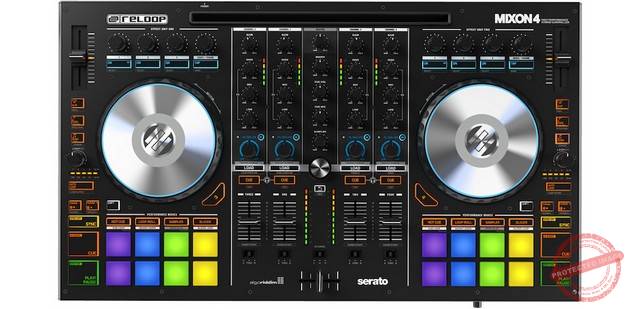
With the Mixon 4, the people of Reloop from Münster are once again entering the hotly contested battlefield of DJ controllers. The Mixon brings with it ingredients such as effects sections, loop displays, and trigger pads for creative performance.
For mixing the Serato or Algoriddim decks, Reloop Mixon 4 offers a total of four channels. Each is equipped with three controls for the software-internal equalizer as well as a gain potentiometer with an associated level display that determines the volume in the mix. In the layout, an FX/filter controller stands out. Here, a high or low pass filter can be dosed and additionally combined with an effect of the software. Below that there is a cue button that activates the preview function, as well as a track load button to load songs into the individual decks. Once loaded, the channel fader allows you to control the volume in a targeted manner. A crossfader with three different adjustable course curves rounds off the mixing section. The individual channels A or B can be assigned here or channeled directly into the sum.
The two decks of the Mixon 4 are constructed identically. First of all, the 15.5cm aluminum jog wheels lie flat on the device. They are surrounded by a plastic ring with notches. The virtual needle lighting in the form of an LED ring helps you keep your bearings when beat matching and scratching. Above the “turntable” is the FX group with parameter controls and tempo control. This is set automatically synchronously using an encoder or manually using a tap button.
An interesting feature is the harmonic mixing section. The normal keylock keeps the pitch of the audio material played in the same tone even when the tempo is pitched. It can also be used to synchronize a track with the key of the other decks.
Last but not least, Mixon 4 provides eight large performance pads (3×3 cm) per deck. With these, for example, eight Cuepoints can be placed on the controller, which can also be set in RGB colors. In addition, there are various modes, some of which can be reached using the shift function. In cue loop mode, the noted position and the set loop are fired. Saved Loop allows a loop to be recorded and played. The sampler mode enables individual audio snippets to be played back, optionally also with velocity sensitivity.
The front houses the output for headphones. Mini and standard jacks are installed here. Further to the right, there is the possibility to feed in a microphone or instrument via the jack. The signal is leveled using the gain control.
What I don’t like
It’s a shame that the Reloops controller has no audio input. The level meter sometimes freezes when using an iPhone.
Recommended for: The controller is built for live performances in the club. It has all the features you’d want from a full-fledged club DJ controller, except it’s also compatible with iPad. If performance is a key criteria, this is the best DJ controller for iPad right now.
Numark iDJ3 is a complete DJ system that works both in a computer network and with the iPod. Connected to a computer, tracks can be mixed very easily on the computer. The dock for iPod or iPhone also allows you to play back songs directly from popular music players or record complete mixes on it.
iDJ3 consists of two decks. Everything feels like working on a classic turntable. The two decks are complemented by an easy-to-use audio mixer that not only experienced DJs will get along with straight away. Since skills can be transferred to any other DJ system, iDJ3 is also perfect for DJ beginners.
As a professional DJ, you can use it to create loops and set hot cues. iDJ3 is not only a powerful software controller, it also offers a fully equipped audio interface that offers high-quality inputs and outputs. Regardless of whether you want to use it with a computer, a sound system, or for recording purposes.
You can also use it for listening purposes with headphones or for use with a microphone. It doesn’t matter which iPod or iPhone is used. All can be played, mixed, and used for recording with the iDJ3.
What I don’t like
First, it is only partially scratch-compatible. Also, its midi mappings only possible with a chargeable software upgrade.
Recommended for: The two decks of the controller are complemented by an easy-to-use audio mixer. Not only will experienced DJs get along with it straight away, it is also perfect for beginners who want to use their iPhones instead of iPads.
Performance meets streaming with the Reloop Beatpad 2! It is a DJ controller for tablets, smartphones, and computers. It’s equipped with numerous interesting functions and designed for Algoriddim Djay 2 and Djay Pro. Its integrated USB sound card offers two headphone connections, professional XLR outputs, microphone, and aux inputs. The innovations include touch-sensitive RGB pads for samplers, slicers, etc., as well as touch and jog FX. In addition to extended track management, the bundle also relies on Spotify integration, regardless of whether you work with Djay on a Mac, PC, or iOS or Android.
Reloop Beatpad 2 looks compact and solid. The device is made of metal and plastic. It measures 46 x 32.5 x 4.2 centimeters and weighs 4 kilograms. The performance pads that are now often found on modern DJ controllers come into their own on the black. It has a very clearly designed user interface. The flat XXL jog wheels with a diameter of 15.5 centimeters are also illuminated in multiple colors. This helps to display different modes and functions more clearly.
There’s the possibility of controlling smartphones via various adapters and the computer via USB. But at the same time feeding in a further signal via an additional analog input or via a microphone, is appealing. USB, Lightning, Android OTG cables, and power supply are included.
On the back, I find the USB port for the internal four-channel sound card. The DIN-to-iOS adapter also included in the package has an additional connection (for iPhone or iPad). The master signal can be routed to the PA either via XLR or cinch cables. Simultaneous connection to both outputs is possible, but with a slight loss of volume.
What I don’t like
First, there’s no separately adjustable booth output. Also, I think the headphone output could be louder.
Recommended for: The BeatPad is a pretty well-rounded DJ controller that works as well for beginners as it does for small parties and club gigs. What stands out is its exceptional compatibility with iPad. If it fits your budget, this is a top contender for the best DJ controller for iPad.
What we haven’t talked about is the best DJ controller for beginners.
Let’s fix that in this guide.
As a beginner, you have decidedly different requirements than a pro DJ. While a pro buying and Allen & Heath will consider latency, compatibility, and features, a beginner should focus on three things:
Ease of use
Affordability
“Fun”
Most reviewers tend to focus on the first two qualities, but I believe the third one – “fun” – is particularly important. Above everything else, DJing is about having fun. There are far too many DJ controllers on the market that are entirely capable and efficient, but they’re too dry and boring to use. One reason why, unlike most lists, a Pioneer doesn’t top this review.
You want a DJ controller that helps you ease into the DJing experience. Quick setup, fun features (such as the light show on the PartyMix) are just add-ons that ease the initiation. Even though they might not objectively improve the DJing exprience, they make it much more fun. And the more fun you’re having as a beginner DJ, the more likely you are to learn more.
So with this focus on fun, ease of use, and affordability, what are the best beginner DJ controllers on the market right now?
I’ll share my top seven options below.
We use rigorous research, reviews, and real-world performance when recommending products. Our reviewers include producers, performers, and active musicians. You can read more about our review process here. Be advised that MIDINation might earn referral commissions on purchases made through this website. This does not affect your final purchase price.
Note: As an Amazon Associate, MIDINation earns commissions for qualifying purchases made through Amazon links on this page.
The 7 Best Beginner DJ Controllers
Here are our seven favorite beginner-friendly DJ controllers.
Numark Mixtrack Pro 3
The Mixtrack Pro competes against some fantastic entry-level offerings from Pioneer, but wins out because of its ease of use and better Serato support. More importantly for a beginner DJ, it doesn’t abstract too many functions. This helps create a stronger foundation for building your DJing skills, which is why I rank it as among the best beginner DJ controllers.
The Numark Mixtrack Pro 3 is my overall best model among the series of the beginner DJ controllers I have here. Loading the decks via browse encoder and deck buttons is almost self-explanatory. Also, it works quickly and easily. Using the touch bar in conjunction with the shift key, I can quickly jump back and forth in the song.
This doesn’t work with pinpoint accuracy. But an approximate landing in the target area is already possible. The readjustment are then done using the precisely working 10-centimeter jog wheels with the aluminum top. We can either “scratch” them or drive around in the song or change the playback speed – but only as long as we crank it up. If we stop doing that, the starting pace is automatically set.
The volume control via the five-part level display (3x green, 1x yellow, 1x red) provides approximate information about the actual volume ratios. But it is still too short to be able to control the levels more precisely.
The three-band EQ works cautiously; it detests extremes. Overall, the sound makes a decent impression.
The line and crossfaders are a little wobbly, but they work without interference. The crossfader’s fader curve can only be adjusted using software. Hardware control is missing, but it is not to be expected in this price segment. Also, the headphone output is loud enough for home use. There is hardly more to it than that with USB-powered controllers.
Small downside: the microphone is adjustable, but has no power button. So turn it down when you have nothing to say.
What I don’t like
There is no visual control – DJ Intro does not change its bpm display here. The pitch faders work extremely precisely. Nevertheless, I would have liked to have a middle grid here so that I could go back to zero blindly. Also, the microphone is adjustable but has no power button.
Recommended for: The Numark Mixtrack Pro 3 is a good choice for ambitious amateurs who do not want to go into debt for a DJ controller. It’s also for those who can do without more professional features such as booth-out or adjustable crossfader. For the price, it’s one of the best beginner DJ controllers out there right now.
A first look at the Pioneer DDJ-SB3 shows it is a slim and inexpensive controller for the Serato DJ software. And it can control four decks. Its predecessor, the DDJ-SB2 also offers this, but not the first model.
The Pioneer DDJ-SB3 is an alternative to the Mixtrack Pro and the Pioneer DDJ-SB2. From the outside, it is noticeable that the connections that the DDJ-SB2 offered on the sides have moved to the front and back. The headphone output is now at the front and is only available as a 3.5 mm socket. The microphone input is now in the form of a 6.3 mm jack socket with a very small level potentiometer. At the back, there is also the master-out (cinch), USB port, and a possibility to fix the controller with a Kensington lock.
The DDJ-SB3 is USB-powered, has an internal interface, and cannot be used as a standalone device. The controller is not designed for this either, unlike larger and more expensive models.
There are also 40 mm line faders, as well as a slightly smoother crossfader. At the top of the mixer is a small push encoder for scrolling through playlists and opening lists, while small load buttons allow tracks to be loaded into the decks.
First of all, it’s quiet. Serato DJ Intro is included, a version reduced in terms of the number of functions: a lite version. Not all functions can be used here. So, an upgrade to Serato DJ Pro is definitely recommended at times.
The Pioneer DDJ-SB3 is an attractively-priced MIDI controller with an interface and license for the Serato Intro software. To fully use all functions such as slip mode or all performance pad functions, an update to the full version of Serato DJ should be made. But this is not a must for sufficient use of the controller.
What I don’t like
The device cannot be used as a standalone device, unlike larger and more expensive models.
Recommended for: The DDJ-SB3 is the perfect device for starters who need to hone their skills. This is thanks to the simple-to-navigate controller which features a professional-grade layout, found in the top-of-the-line DDJ-S products. If you’re serious about becoming a DJ, this one of the best beginner DJ controllers to start with.
The Party Mix from Numark is a very inexpensive all-in-one DJ controller for beginners. With a built-in audio interface and the built-in light organ, it stands out from the competition within its market segment.
The controller is delivered in a bundle with Virtual DJ LE as DJ software. On the haptics and quality, first of all, the dimensions, controls, and feel of the device are very reminiscent of the Hercules DJControl Instinct. The layout is also very similar. So it can be assumed that both devices are based on the same hardware. There is space for a small 2-channel mixer and two deck controls on the surface of a DIN A4 sheet of paper.
The jog wheels are sufficient for pitch bending and scrolling through the tracks. Because of the small diameter, scratching would not be a pleasure anyway, but it is also made impossible by the technical limitations of the scroll wheel. Since they are neither capacitive nor mechanically sensed when they are touched, you can only stop the playback of a track as long as the wheels are in motion. If you stop turning, the software goes back to PLAY mode after a short delay.
The delay is far too great for scratching, but well, that’s not what the toy is made for either.
What I don’t like
Unfortunately, the browser of the included LE version of Virtual DJ is so limited that it significantly reduces the fun with the machine. An upgrade costs around 50% of the original price, which I find too expensive.
Recommended for: For an under 100 price, the Numark Party Mix is an inexpensive way to get a taste of DJing. It’s a lot of fun to use and abstracts away a lot of features so even a complete newbie can create a decent mix. One of the best beginner DJ controllers for casual amateurs to spice up parties or just play around with.
The term, “minimalist,” describes the construction of the IDJ3 MIDI controller from Numark very well. There’s a clear user interface, paired with essential controls that a MIDI controller can enjoy. The built-in sound card and compact design are an advantage if you want to use the device in a club. This is because as a DJ, you won’t find enough space in every club to set up your equipment. The “squeezing” of the equipment is not necessary due to these two attributes.
The structure of the controller is accordingly simple. So also is the installation of the supplied DJ software (Virtual DJ). It recognizes the IDJ3 directly and provides it with an existing mapping.
The IDJ3 is packed securely in a cardboard box and encased in styrofoam. The scope of delivery consists of a USB cable for connection to a PC/MAC, a 6V transformer as well as assembly instructions. It includes an LE version of Virtual DJ, which can be upgraded as required.
The IDJ3 is more of a lower-middle-class level controller. This is due to its simple design and the few buttons for operating the functions in Virtual DJ or another program such as Traktor. However, the arrangement of the equalizer takes getting used to.
The entire controller is made of plastic, which makes it look rather cheap and fragile. However, this construction makes it extremely light with a weight of 2.95 kg. The power is supplied either via the supplied 6V adapter or via the USB cable, which draws power directly from the laptop. This can be an advantage if you no longer have a free power plug in the DJ booth.
What I don’t like
It seems rather unsuitable for professionals because it does not offer enough functions. The price is justified in connection with the included functions. Unfortunately, the latest generation from Apple does not fit properly into the IDJ3’s dock – you will have to find workarounds.
Recommended for: All in all, the IDJ3 is more of a controller for beginners who want to learn the craft of DJing without investing in more expensive hardware or even being tied to their laptops. It also works great as a portable DJ controller.
Pioneer does not leave an inch of the field to competitors with the DDJ-WeGO4. Innovative in the layout and arrangement of the controls, it is a good portable option for those who prefer to work with iPad.
The Pioneer DDJ-WeGO4 has all the needed touch controls if you need to seamlessly learn to mix. It includes buttons for Play/Cue, EQ, a tempo fader, a crossfader, jog wheels, and more. Sampler, Hot Cues, and FX Pad are inherited from the professional range, giving you more creative possibilities in sessions.
Setting it up is also a breeze, just plug in the supplied USB cable or a USB charging cable, and it’s ready to go. If you have an iPad, it fits snugly into the dock, giving you a good viewing angle.
A license key for Rekordbox DJ’s professional Mac/PC Performance DJ application is included with the Pioneer DDJ-WeGO4. The controller is compatible with WeDJ, the new intuitive iPad DJ app. The latter lets you mix tracks from your iTunes library. And you can also use the Pioneer DDJ-WeGO4 with the popular djay app for iOS and Android.
What I don’t like
What I don’t like about the DDJ-WEGO4 is that the slot to place your device is only compatible with the iPad up to 9.7″. If you have an iPad that is up to 12.9″, it will not fit. Probably consider it in another future version, but not in this one.
Recommended for: The Pioneer DDJ-WeGO4 is a good choice for DJs just starting out in the world of mixing. You can use it to control tracks you have on your laptop. Because of its ease of use, features and portability, I rank it as one of the best beginner DJ controllers on the market currently.
The Pioneer DDJ-400 follows the clear line of Pioneer DJ controllers. In the middle is the mixer, left and right, are the control decks. The controller is designed on two decks in terms of mixer and control deck. The mixer is equipped with two-channel strips including gain/trim, 3-band EQ, and line fader.
Where the big DJMs have the controller for the SoundColor FX, there is a controller for a filter, highpass, and lowpass filter in each channel strip on the DDJ-400. Thus, as expected, the controller is bipolar with a center notch. A crossfader rounds off the mixer section at the bottom. At the top, the avid user will find an encoder for scrolling through playlists as well as two load buttons left and right, made for instant doubles at the same time.
On the left and right of the channel strip, you can continue with mixer functions. As expected, there are controls for the headphone output on the left, but very minimized to the cue/mix control and level control. It gets a little more interesting on the right. There is generally an effects section here. Beat FX can be found here including a level controller and on/off switch.
The control decks are dominated by the large jog wheels on each side. In terms of appearance, they are similar to those on the large CDJs, even if they don’t come close in size.
What I don’t like
There is only a 3.5mm jack socket as a headphone output. Also, the software requires a good computer to have optimal performance.
Recommended for: The included Rekordbox DJ software makes the Pioneer DDJ-400 an inexpensive controller and software for entry-level use. If you prefer Rekordbox over VirtualDJ or Serato or Traktor, then this is easily the best beginner DJ controller currently.
The French manufacturer Hercules offers the compact DJControl Starlight for a small budget. The bundle of the controller and Serato DJ Lite software changes hands for an affordable under 100 price. With the device and the software, the start of the mixing should be smooth.
Compact controllers are available from numerous DJ equipment manufacturers such as Numark with the DJ2GO2, Behringer with the CMD-Studio-2A, or Native Instruments with their Traktor Kontrol X1MK2. Due to the size of the housing, these devices always have to live with limitations in terms of ease of use. The components are very small, and there is no space for a complete range of control elements. However, the Hercules does it better in this regard.
The DJControl Starlight measures just 34 x 9.8 x 4 centimeters and weighs a feather-light 480 grams. The processing of the device, which is made entirely of plastic, is neat, and the material quality is solidly entry-level.
The Hercules device is equipped with two decks. It has illuminated transport buttons and mini jog wheels with a diameter of just under five centimeters. The wheels are pressure-sensitive and allow you to execute pitch bends for mix corrections, but also to scratch songs. Pitch faders with a short control path of four centimeters are available to change the tempo. But you have to operate them with great sensitivity in order to obtain exact values. Four buttons per deck with a clearly audible and palpable pressure point allow the control of HotCue points, loops, effects, and samples.
A license for Serato DJ Lite is included – the software can be downloaded for Mac or Windows computers and installed with a few clicks of the mouse. If you want, you can download additional ASIO/AU sound card drivers from the Hercules website. But these are not absolutely necessary for operation.
What I don’t like
Unfortunately, the controller does not offer any controls for navigating the song collection or for loading songs. So, a computer mouse is required for this.
Recommended for: At its price and built-in functions, it is primarily intended to appeal to price-conscious beginners. It’s great if you want a tiny controller you can pop into your backpack and whip out anywhere. If you have very limited space – such as a dorm room – this would make a great choice.
As a beginner, you have a touch choice to make. You want abstraction, but not too much of it. You also want to make sure that your DJ controller works with software you actually like using.
Hopefully, this list will help you find the best beginner DJ controllers for your needs.
A DAC (Digital-to-Analog Converter) can greatly improve the quality of any audio system. Even in its most basic form, it will add clarity, volume, and crispness to any digital audio signal. We’ll take a closer look at the top options on the market right now and help you choose the best USB DAC for your needs.
What’s the easiest way to add oomph, panache and crispness to your audio?
A DAC (Digital-to-Audio Converter), of course!
A better DAC adds much needed clarity, firmness, and crispness to your audio output. An external DAC bypasses your computer’s onboard audio conversion process, rendering the signal with much greater accuracy. As a result, the sound that you hear through a DAC is sharper and clearer than whatever your computer (or mobile device) onboard audio can throw up.
While DACs can use a number of input formats, we prefer – and recommend – USB DACs for tons of reasons. For one, USB mitigates the need for external power – a USB DAC can draw power from the computer itself. And two, USB, by default, is a high bandwidth protocol. This is perfect when you’re processing tons of information, such as a large audio file.
USB DACs are ideal for desktop/laptop computers. Depending on the size, they’re also a good option for smartphones and other mobile devices.
This guide will help you find the best USB DAC for your needs. We’ll look at some of the top options on the market and help you buy the one that suits your budget, needs, and existing hardware.
We use rigorous research, reviews, and real-world performance when recommending products. Our reviewers include producers, performers, and active musicians. You can read more about our review process here. Be advised that MIDINation might earn referral commissions on purchases made through this website. This does not affect your final purchase price.
Note: As an Amazon Associate, MIDINation earns commissions for qualifying purchases made through Amazon links on this page.
About your reviewer Ryan Harrell is the founder of MIDINation and an experienced producer/DJ. His first experience with electronic music production dates back to Cubase 3.0 in the summer of 1997, and he’s been a fan ever since. He prefers Ableton as his primary DAW these days, though he is still partial to Cubase and Pro Tools. He lives in San Diego and freelances as a producer and part-time DJ.
A Quick Overview of Digital-to-Analog Converters
As much as I didn’t want to cover the basics here (we’ve done that in our budget DAC buying guide), I get a lot of questions from readers trying to understand how DACs work. And since we’re exclusively covering USB DACs in this guide, I figure this is as good a place as any to talk about the basics.
Everything that happens on a computer is digital. When you have a sound file on your computer, you essentially have a digital file – a collection of 1’s and 0’s (i.e. binary).
Human ears, of course, can’t hear digital files. To transform these digital collection of 1’s and 0’s into something you can hear, you first need to convert the digital file to analog, i.e. a sound wave.
The process of converting digital files to analog is handled by your computer’s onboard chip. It turns digital audio to audible-to-human analog files and sends it to an amplifier which boosts the strength of the signal. The amplifier then sends it to a listening device – such as speakers or headphones – and you get to hear that magical thing – sound!
In a computer, the onboard audio chip (sound card) handles all audio conversion and amplification
Now every modern computer is entirely capable of handling this entire conversion-to-amplification process by itself. But this onboard hardware is “generalist” in nature. It is meant to handle various computing tasks, not just digital-to-analog conversion or amplification.
The more you delegate all these tasks to external hardware, the better your eventual sound quality. Add an external DAC – with hardware dedicated to audio conversion – and your resulting audio will be cleaner and brighter. Throw in an external amplifier and the signal will be stronger than whatever your computer’s onboard chip can pull off.
Think of it as a bunch of specialists doing what they’re designed to do vs. a generalist (i.e. your computer) doing what it has to do.
In general, the more you delegate the entire audio signal chain to specialist hardware (external DAC, external amplifier, specialized headphones/speakers), the better the eventual audio quality.
So when you buy a DAC, you’re essentially buying hardware that is built specifically to convert digital audio to analog formats. Consequently, the conversion process is tighter and more accurate, resulting in better audio quality.
The better the DAC’s onboard chip and conversion algorithm, the better the final audio quality.
Keeping that in mind, let’s take a closer look at the best USB DACs you can buy right now.
The Best USB DAC in 2020
Based on their price and real-world performance, these are the best USB DACs to buy right now:
AudioQuest – DragonFly Red
AudioQuest’s entire range regularly tops most consumer DAC rankings – including ours. The DragonFly Red is easily one of the best mid-budget offerings with some of the tightest, crispest conversion outside of true audiophile gear. It’s tiny – barely the size of a USB stick – and works perfectly with smartphones as well as desktops/laptops.
For this reason, we think the AudioQuest DragonFly Red is the best USB DAC you can buy right now for the money.
The Audio Quest Dragon Fly is often mentioned in reviews and discussions among users as arguably the best USB DAC that money can buy on the market. It is very portable and comes with several excellent features that make it a wonderful value buy.
Most sound devices on the market today come with low quality and underpowered sound cards that do not bring out the best from your music files. If you have a computer, smartphone, or tablet and you use these in playing music, you will need a digital to analogue converter. Hence, your best bet is USB DACs.
The earliest versions of this product were quite bulky and not very easy to take around. However, with the world’s focus on creating smaller and smaller devices, it is not surprising that the latest model from Audio Quest is a portable product. Due to its size and the new technologies it uses, this product is not as power-hungry as the former versions. Instead of consuming plenty of power, it is a compatible DAC that is as efficient as possible.
The design is quite appealing, as it features a USB extender cable. I found this cable to be especially handy since the DAC itself prevents you from connecting anything to adjoining USB ports.
It is portable and lightweight, weighing just 0.77 ounces. To aid in safekeeping and portability, it features a carry case.
Performance is the main appeal of this product. From my testing, I observed that the sound produced is rich, clear and excellent when paired with your tablets, phones, computers, and even TVs.
The main reason why it sounds so good is the 32-bit ESS Sabre DAC chip. This chip comes in very handy and ensures that you will receive any software updates as soon as they are available.
It might be small, but it is quite powerful. You will have a good time powering your devices, from desktop speakers to headphones and high impedance headphones.
While at first glance, it might seem underpowered, you will be surprised by the impressive sound you will get from this convenient and portable device.
What I don’t like:
Well, performance-wise, there is almost no single issue with this unit. One issue, however, is that you will require an adapter for handheld devices. The minor problem is that the red finish is not durable and chips quite easily.
Recommended for: Frankly, I recommend this product for everyone looking to enjoy the best sound performance. The audio quality is simply superb and unbeatable. For most users, this will be the best USB DAC you can buy without spending audiophile-tier money ($500+).
This excellent DAC is designed with features that can give even more expensive options on the market a run for their money. In the box, you will find the ESS ES9018K2M, which delivers more than decent performance. ESS chips, particularly those in the K2M line, are mainly designed to be used with mobile devices.
Therefore, this unit is great for mobile devices but is expected to struggle with high powered options. However, this particular chip used in the AD10 offers better performance than several other options in the same line of products.
In fact, you can use it as your desktop DAC. While it can be used as such, it comes in a small size that I found quite appealing. It isn’t as small as our top pick above, but it comes in a size small enough to fit in the hand. Therefore, you will discover that it can be used in a small space without taking up needed space. You can place it anywhere on your table without any hassles.
A budget option, you will be forgiven for thinking that this product has poor mechanical processing. During my testing, however, I found the processing to be rather efficient. Despite the relatively low price, it is built to last. It has the whole case made of quality aluminium. Therefore, it will last for a relatively long time. Its appearance is sturdy and looks good on any surface you choose to place it on.
The front panel of this unit comes with a screen that shows the sampling rate of your music. I found the display to be quite large and clear. The rear panel consists of a single mini USB input signal. You will also find an Optical port, Coaxial port and a pair of RCA ports.
Internally, this budget product is quite powerful, coming with some really impressive decoding hardware. As earlier mentioned, the ESS ES9018K2M chip enhances the overall performance.
One really impressive feature that I discovered while using this product is that it does not require a separate source before you can use it. The power comes, not from batteries either, but from the USB port at the rear.
Performance-wise, it is quite decent. It reproduces sine waves that are very clear and rounded. I did not discover any distortion even at low volume. It is a really good DAC that makes me wonder how the manufacturer managed to produce such a product at a low price.
Installation is straightforward, especially for folks with new Windows versions.
What I don’t like
I would love to say I loved everything about this unit. It is really almost as close as you can get to a high performance option without spending plenty of money. If I were to nitpick, I’d say that I wished it has a better display.
Recommended for: If you are looking for a budget DAC and want a USB to SPDIF converter as well, then you will love using this unit. It might not be the best USB DAC you can buy in the world, but for the price, it offers rock solid performance.
It can be a hard task choosing the best desktop DAC since there are quite a number of good options on the market right now, but the Audioengine D1 is definitely up there among the best options that you can find right now.
During my testing, I found it to be nearly perfect, especially when using it with a computer. Although it is a top quality desktop DAC, it can also be used for other products, ranging from TVs, phones, consoles, and similar gadgets. From my experience, it is mainly great as a desktop DAC because of the impressive build and design.
Like most Audioengine products on the market, this unit comes in a plain, black design that is simple, yet classy. The compact design means that it can be used on a small table without taking up plenty of space.
It provides connections that you would only find on some high-end devices too.
Furthermore, it is especially suited to act as a desktop DAC because it works excellently with PCs and Macs without any extra drivers required on the computer. What is more, it features a 2m USB cable.
Sound quality is truly amazing with this product. The optical input here makes your music sound so refined and clear. When it receives high resolution sounds, the quality it delivers is balanced and very informative.
I can describe it by saying it delivers a refined sound and very little hardness.
What I don’t like
Well, as impressive as this product is, it comes with downsides that knock it down a peg or two. It doesn’t have a rhythmic fluidity that I like, and it suffers from a degree of imprecision.
Recommended for: If you are beginning to love playing music as you work on your computers, this product will probably be right for you. At this low price, it is an absolute bargain. I highly recommend that every beginner audiophile should get it for their desktop setups.
I would never recommend Bluetooth as a format for any DAC – despite advancements in Bluetooth 5.0, the bandwidth is still too low for accurate sound information.
But the lure of going wireless is too strong for some. If you fall into this camp, this unit from Topping is the best you can get – wireless audio that’s far better than your computer/smartphone’s stock sound.
The MX3 DAC is a small, compact and very affordable USB DAC and desktop amp with Bluetooth connectivity and other nice features.
Although the packaging isn’t really appealing, especially when compared to other options, it comes with several accessories that you will not find in other rivals. Some of the accessories in the package include an AC adapter, one AC and USB cable, an IR Blaster, Bluetooth antenna, batteries, NFC tag, and several connector caps.
The unit itself comes in a better looking design than what I am used to from Topping. It feels compact and will take up very little space on your table. It is well built and feels durable and lightweight. It features a big screen that provides plenty of information.
Operation and control is relatively straightforward. You get a knob that controls all the main operations of the unit. It can be used in different settings and can turn the unit off and on, switch modes, control volume, and more.
The IR blaster provides more operation options. The IR remote can control many things, ranging from skipping songs to controlling bass and brightness. It isn’t a bus-powered option but is powered via the PSU that provides 24V and 3.75A.
Due to the USB connection, this unit is compatible with different operating systems and devices.
Sound is my main concern, and while the specifications make it seem like just an average unit, real-life testing reveals that it is so much better than other Bluetooth DACs out there. It doesn’t distort sound, and it shows an impressive flat frequency response. The bass and treble control is well implemented on this unit and delivers great sound.
What I don’t like
I noticed that this unit does not offer as much I/O ports as other options on the market. That should not be a problem in most cases, however, since you’ll use it as a wireless device anyway.
Additionally, the sound quality isn’t quite as good as you’d get from a wired device. But that has more to do with the limitations of the Bluetooth interface than the device itself.
Recommended for: Anyone looking for a DAC with Bluetooth capabilities will feel at home using this budget unit. It’s not the best USB DAC around, but if you absolutely must go wireless, it’s the best option you can find right now.
The latest DAC from Creative is an excellent unit that gives you different sound options. Creative Labs is a popular manufacturer of sound cards. The company specializes in good quality products that customize audio for everyone.
The design of this unit is admittedly simple. However, it allows you to do plenty of stuff. For example, the large knob on the front panel can control different things depending on how you set it up. Aside from the knob, you will also find different buttons that carry out different functions.
The rear panel is where the ports are. There are up to seven ports at the back, with 6 of them offering audio variety.
It comes in a box-like shape that is perfect for a small table. It is built to last and comes with a quartet of feet to ensure stability and prevent falling.
The technology used in this product claims to use intensive methods and complex algorithms to create the best sound experience. While I am no expert in such technical details, I must say that the sound quality that this unit produces is mighty impressive.
It comes with a plethora of features that make it a truly impressive unit. For instance, it comes as a USB DAC that produces virtual 7.1 surround sound that can be customized to elevate your listening experience. It can be used with several types of devices as it is compatible with IOS, game consoles, Windows, and Android devices. Furthermore, the SXFI technology creates 3D sound when paired with your headphones.
While this unit can be controlled via Bluetooth devices, it does not support Bluetooth for streaming purposes.
For power, you should note that it is the connected device that will power the unit.
Setup is easy and straightforward as long as you keep in mind the different settings and configuration options. For the best performance, you will need to install the Command app on your smartphone. If you are using your computer, you will also find a suitable software that will help you get the most from all the features.
Performance is where this unit shines. It can handle up to 32-bit at 192 kHz, making it a wonderful choice for headphone lovers.
What I don’t like
First, I would have loved more integration between the desktop and mobile app versions. The Super X-Fi feature is cool, but it would have been even better if I could customize it.
Recommended for: If your device comes with middling or even terrible audio systems that deliver similar quality, then I recommend that you buy this product. It delivers a better sound for a low amount of money.
The Massdrop Liquid Carbon X is one of the best looking DACs you will ever come across. It comes in a simple yet classy design. The body of the unit is covered in rubberized paint that feels really nice to the touch and is so easy to clean.
The front and rear panel of the unit comes with balanced and unbalanced connections. Overall, in terms of appearance, there is almost nothing to fault.
The 30V output power is one of the most powerful on the market and definitely the most powerful on this roundup.
The best USB DAC is built to last for a long time while giving excellent sound performance. This is one of the best options you can buy right now.
Sound performance is top-notch. Using the solid-state bridged amp, it delivers a clear, warm, and rich sound.
What I don’t like
I observed during my tests that the TRS connector doesn’t deliver as good a sound as the 4-pin XLR connector. It simply doesn’t sound as good or detailed.
Recommended for: This unit is recommended for audiophiles looking to get the best sound from their devices. By all measures, it’s the best USB DAC on this list – if money is no concern.
Finding the best USB DAC given the highly technical nature – and often limited availability – of this audiophile gear. Hopefully, this article will help you make the right decision.
When you’re starting your journey as an audiophile, the first piece of equipment you’ll want to buy is a turntable. A good turntable opens up the wonderful world of vinyl and all its rich, analog goodness. But buying your first turntable can be a challenge. Unlike off-the-shelf hi-fi gear, turntables require a great deal of care – preamps, cartridges, and a good stylus. To help you out, we’ve put together this guide to the best turntable for beginners.
On paper, vinyl should have no place in an audiophile’s library. From a purely technical perspective, vinyl’s audio quality is lower than CDs and many digital formats such as FLAC. Then there are the vagaries of the physical medium itself – notches or scratches impact playback, as well as reduced HF near the inner radius. You also have to be super careful about storing vinyl – something you don’t have to even think about with digital mediums.
Yet, there is something incredibly satisfying about pulling a record from its sleeve, placing it on a turntable, and docking in the stylus. And while the sound on a CD might be cleaner, vinyl has a characteristic analog warmth that’s hard to replicate.
Plus, if you’re like me, you accept the pops and scratches as “battle scars” of the vinyl’s physical history.
Vinyl has, of course, enjoyed a resurgence ever since hipsters rediscovered it in the 2010s. Thanks to this renewed interest, turntables have become cheaper and more accessible. I remember hunting for cartridges and styluses on eBay (even the UK version) in the 2000s. Now, you can buy them on any retail store, including Amazon.
Because of this new-found accessibility, more and more beginners are turning to vinyl, and, by proxy, to turntables.
As a beginner, buying a turntable can be challenging. There are far too many technical terms to deal and all the standard audio brands that you know of rarely have any offerings in this category.
Which is why we put together this guide to help you buy the best turntable for beginners. Read on to find our top picks for turntables as well as get a short guide to buying the right turntable for your needs.
We use rigorous research, reviews, and real-world performance when recommending products. Our reviewers include producers, performers, and active musicians. You can read more about our review process here. Be advised that MIDINation might earn referral commissions on purchases made through this website. This does not affect your final purchase price.
Note: As an Amazon Associate, MIDINation earns commissions for qualifying purchases made through Amazon links on this page.
About your reviewer Ryan Harrell is the founder of MIDINation and an experienced producer/DJ. His first experience with electronic music production dates back to Cubase 3.0 in the summer of 1997, and he’s been a fan ever since. He prefers Ableton as his primary DAW these days, though he is still partial to Cubase and Pro Tools. He lives in San Diego and freelances as a producer and part-time DJ.
Pro-Ject is one of the best known brands in this category and the Debut Carbon is one of its best yet most affordable offerings. It regularly tops most list of beginner to intermediate turntables (including ours). It’s easy to see why: it has a wonderfully balanced tonearm, Ortofon 2M red cartridges, great damping, and excellent build quality. Get it with the cover and it should last you for decades.
Pro-Ject Debut Carbon is not only the best turntable for beginners, but also the best one ever made by Pro-Ject. This DC plug and play turntable comes with a pre-installed Ortofon 2M Red Cartridge, DC Power Supply, and Carbon-Fiber Tonearm. Honestly speaking the Pro-Ject Debut Carbon beats a variety of turntables in quality, value, and performance.
The Pro-Ject Debut Carbon DC features an incredible carbon-fiber Tonearm that ensures its stiffness and sturdiness. It also has an updated DC power supply to offer definite speed stability, and the highly praised Ortofon 2M Red moving-magnet cartridge that enhances excellent retrieval of detail.
If you decrease the unwanted resonances, the 8.6 inches carbon-fiber Tonearm produces a higher fidelity straightaway by playing any LP. Along with the already installed 2M Red, this combination of arm and cartridge yields incomparable recovery and tracking of musical nuances found within grooves of vinyl.
What we don’t like:
Although we love its build quality, some users report humming noises. You also have to change speed manually – there is no option to do it automatically.
Recommended for: Beginners looking for an excellent audiophile grade turntable to start their vinyl journey.
Pros
Great build quality; looks like a proper “grown-up” turntable
Excellent 8.6″ tonearm and great Ortofon cartridge
As we wrote in an earlier article, in a direct drive turntable, the motor sits directly below the turntable. That is, the turntable is driven by the motor. This is different from a belt drive turntable (such as the Pro-Ject Debut Carbon above) where the motor drives a belt which, in turn, drives the turntable.
While this direct operation is easier, cheaper, and more reliable, it is also more prone to vibrations. Audiophiles don’t like it, but for a beginner, a direct drive turntable offers serious value for money. I recommend every beginner to start out with a direct drive turntable before graduating to a belt driven turntable.
In the world of direct drive turntables, you can’t really do better than Audio Technica. Some of you might already be familiar with this storied Japanese brand – they make some of our favorite headphones, including the industry-defining ATH-M50x. Their turntables are very reasonably priced and have that Japanese precision engineering that makes them so popular.
Coming to the Audio Technica AT LP120, it can play 33, 45 and 78 rpm records and also has a reverse playback capability as well as pitch adjustment function. The Audio-Technica is a high-quality turntable designed to provide accurate digital conversion of the LPs. It also features superior components that enhance accurate playback of records.
Some of the features that make it the best turntable for beginners include inbuilt switchable phono preamp connectivity options which include RCA output cables as well as US cable used to connect the turntable to an audio system, PC or powered speakers. It also comes with Windows and Mac Audacity software, stroboscopic platter with speed indicator for playback operation. The ½ inch standard mount AT95E phonograph cartridge provides unresolved sound clarity and detail.
The Audio-Technica AT LP120 has a well-adjusted S-shaped Tonearm with a lockable rest and hydraulically damped lift control. This player comes with a 45 rpm adapter alongside a storage receptacle which is sold separately. When it is connected to a powered speaker, sound card, or AUX -type inputs, the selector should be set to LINE, as this will activate the internal pre-amp of the turntable.
What we don’t like
Direct drive motor noise is a common flaw in the Audio-Technica AT LP120 turntable. It’s not enough of a dealbreaker, but if you want audiophile-grade pristine clarity, you might be disappointed (in which case, it’s better to spring for a belt driven turntable).
Recommended for: Beginners who want an easy to use and reliable turntable to start their vinyl journey.
Pros
Solid aluminum platter reduces vibrations
Beginner-friendly operation
Reliable direct drive performance
Cons
Some humming noise – common to all direct drive turntables
Lots of plastic used in construction – feels cheap
Integral switchable phono preamp connectivity options
Easy Operation
Let’s face it: turntables are expensive. Vinyl is expensive. Amplifiers are expensive. Even bookshelf speakers are expensive.
In other words, being an audiophile and buying turntables is an expensive hobby. You’ll have to splurge on multiple pieces of equipment. For a beginner, this can mean serious dough.
Which is why we love the Audio Technica LP60. It’s one of the best turntable for beginners around, not only for its ease of use and reliable operation, but also for its low, low price. You’re going to end up spending hundreds of dollars on vinyl and amps and speakers anyway; if you can cut costs on the turntable, it’s great for newbies.
That’s not to say that the LP60 isn’t a good turntable. Far from it – it checks all the boxes for what you might need in an entry level turntable – reliable performance, recognizable brand name, automated operation, switchable preamp, etc.
When you have the Audio-Technica AT LP60, you can hook up to a computer easily using USB cable, and be able to convert album tracks into digital files and burn them to a CD/DVD, load to phone or other supported devices. The AT LP60 is a fully automatic belt-driven turntable with the same drive system as used in most audiophile turntables. It is somewhat compact than most turntables.
Other features of this turntable include a rear panel with a small switch that allows you to select the integral phono preamp for line-level output which is entirely compatible with the audio-in jacks or choose a high-quality external preamp that can be added later.
The output of the AT LP60 turntable is limited to a hardwired 24-inch cable terminated to stereo RCA plugs set. However, there is a cheaper RCA-to-3.5 mm adapter that enables you to plug into almost any portable speaker, boom box, or stereo system or anything that comes with a port for line-in.
What we don’t like
Although it’s a minor quibble, this turntable is belt-driven which means that the platter spins via motor pulleys with a rubber belt, and this is not suitable for use by DJs because the regularly may need to fast start and back-cue. Also, the build quality is cheap and platicky, but that’s expected at this price.
Recommended for: Budget buyers looking for an audio interface at near throwaway prices.
Let me preface this review by saying that we are not entirely convinced by the idea of Bluetooth turntables.
Yes, Bluetooth quality and bandwidth have both improved, especially with Bluetooth 5.0 protocol. But even then, it remains far behind traditional wires in performance. You simply can’t get the same sound quality over Bluetooth as you would get through wires.
Which makes the idea of Bluetooth turntables a bit strange. When you buy a turntable, you essentially buy it for the sound quality. Yet, by buying a Bluetooth turntable, you limit the sound quality you can get.
That said, we understand that casual users want Bluetooth. We also agree that Bluetooth is far easier to use than managing a bunch of cables.
But if you want great audiophile-grade audio quality, we suggest staying away from Bluetooth turntables altogether.
However, if you’re looking for the best Bluetooth turntable for beginners, you can’t go wrong with the Sony PS-LX310BT. It has a great price tag, reliable operation, solid Bluetooth integration, and a respected brand name behind it.
The Bluetooth feature sets it apart from the rest, with the ability to connect to a wireless speaker, headphones or soundbar. This record player is made with convenience and accessibility in mind, best for newcomers in the world of vinyl.
With the PS-LX310BT, you get to enjoy a highly reliable vinyl from a state-of-art wireless turntable. It features easy wireless connectivity to any Bluetooth Devices, with simple controls designed to provide high-level listening experience. This turntable also features a one-step auto playback that allows you to spin all your favorite tracks with the touch of a button, as well as a newly engineered Tonearm that helps to deliver a clearer playback of songs.
As with the best turntable for beginners, Sony PS-LX310BT has a dense dust cover to ensure pitch-perfect play. This cover is removable and designed to suppress the acoustic pressure from the speakers to provide better stability as well as less distortion.
What we don’t like
The interface is made of plastic and isn’t the most durable, which belies its portable credentials.
Recommended for: Best for people who are mobile and want something lightweight and easily portable to record their voices.
We’ll be honest: we’re no big fans of turntables with built-in speakers. You’re completely limited by your choice of amp and speakers, and there is absolutely no way any built-in speakers can match the power and clarity of a pair of good bookshelf speakers.
Additionally, we haven’t seen any decent turntable offer built-in speakers. All serious brands understand that their users would invest in bookshelf speakers at least. Whatever offerings you do get with built-in speakers tend to also be inferior turntables.
Having said that, we agree that for beginners and casual users, built-in speaker turntables are a good starting point. They’re super easy to get into and require minimal investment. They also act great as gifts for older, less tech-savvy customers who just want a modern equivalent of a phonograph. We’ve seen customers buy these for their grandparents who have a pile of old records they want to listen to without worrying about amps and speakers and cables.
A neat benefit of turntables with built-in speakers is portability. You can’t really lug a turntable anywhere – you’ll have to carry the amp and speakers as well. But if you have built-in speakers, you only need a portable power supply to use the turntable anywhere.
If you’re one of these customers, we highly recommend the Jensen JTA-230. This belt-driven turntable can play at three different speeds – perfect for 33, 45, and 78RPM records. The key feature is, of course, the built-in speakers. They are nothing special as far as speakers go – we’d compare them to cheap $25 computer speakers you’d find at Walmart. They do, however, get the job done.
Additionally, there is an auxiliary input jack with RCA Line-out Jacks and Stereo Headphone Jack that helps to connects the turntables to MP3, iPod, or any other Digital Audio Players. It also has a USB Port and Cable used to convert the Vinyl Records into a digital format via software designed for recording, editing and converting your recorded audio.
With a sturdy and portable design, Jensen JTA-230 record player allows for pitch adjustment and tone control, which is not common with the ordinary turntables within this range.
What we don’t like
The speakers are tinny and perform poorly in the lower frequencies. Anything with a lot of bass sounds very muddy and distorted. The build quality is also poor, but expected in this price range.
Two additional issues which we’d like to point out:
While older records play fine, new, heavier vinyl records are too heavy for the motor and cause speed issues.
The internal speakers don’t turn off – even if you have other outputs connected. This is a serious design flaw in case you want to connect the unit to your own speakers or headphones.
Recommended for: Beginners who want an ultra-affordable, easy to use turntable for casual use. Works great as a gift for less tech savvy people who want to play old records. Get it for your grandpa as a birthday gift and they’ll love it.
Pros
Extremely easy to use
Super cheap, especially when you factor in the speakers
Portable – only needs power supply
Cons
Poor performance with new heavier records
Poor build quality – lots of cheap plastic everywhere
The Audio Technica LP120 is one of the best turntables for beginners around.
But what if it wasn’t for you? What if you’ve been burned by the Audio Technica brand and wanted something different? Or what if you just wanted to spend a little less?
In that case, you’ll love the Crosley C200.
The Crosley C200 is nearly identical to the AT LP120, even down to the design. What sets it apart is a slighter lower price and slightly lower build quality.
The Crosley C200 comes with a direct-drive power to help you get up to speed. With the direct drive, high-torque motor record player mechanism, this turntable can play 2 speeds at 33 1/3 and 45 RPM records. It also features start and stops control buttons with fully manual operation. The Tonearm of this turntable is S-shaped with a hydraulic lift control, height adjustment, anti-skate, as well as a lockable rest.
Crosley C200 has unrivaled control over the speed of your turntable discs. It also features a sharp Audio-Technica magnetic cartridge that stabilizes the s-shaped Tonearm sweet curves.
What we don’t like
Cartridge adjustment isn’t as easy as we’d like (especially when compared to the LP120). The anti-skate mechanism also doesn’t always work as advertised. There is some skipping, especially on older records.
Recommended for: A great mid-range alternative for beginners who want something affordable yet effective.
As with most analog technology, buying a turntable isn’t easy. Minor differences in build quality and parts selection can result in grossly different performance. With the lack of reliable household brands in this space, your choice only becomes harder.
Hopefully, this guide should help you buy the best turntable for beginners.
What’s the best turntable for audiophiles on the market right now? How do these turntables differ from entry-level options? Our latest guide looks at all the best options on the market right now for answers.
An “audiophile” turntable is something of a misnomer. For one, turntable users, by virtue of their niche nature, are audiophiles by default. You won’t find a lot of Bieber-listening, $10 earpod popping users browsing through classic turntable classifieds.
Then there are the serious audiophiles who scour eBay for refurbished Thorens turntables and obsess over Apheta and Exact cartridges.
This article is meant for this latter crowd.
Below, we’ll look at some of the best turntables for audiophiles on the market and what makes them so good.
We use rigorous research, reviews, and real-world performance when recommending products. Our reviewers include producers, performers, and active musicians. You can read more about our review process here. Be advised that MIDINation might earn referral commissions on purchases made through this website. This does not affect your final purchase price.
Note: As an Amazon Associate, MIDINation earns commissions for qualifying purchases made through Amazon links on this page.
About your reviewer Ryan Harrell is the founder of MIDINation and an experienced producer/DJ. His first experience with electronic music production dates back to Cubase 3.0 in the summer of 1997, and he’s been a fan ever since. He prefers Ableton as his primary DAW these days, though he is still partial to Cubase and Pro Tools. He lives in San Diego and freelances as a producer and part-time DJ.
The Best Turntables for Audiophiles in 2020
We looked at some of our top picks for audiophile turntables earlier.
Rega is one of the first names you think of when you think of “audiophile turntables”. The brand has a storied history and a loyal following among serious musicians and music purists.
So when there’s Rega on the market for under $1,000, you can bet it’s going to feature right at the top of our list.
Although the Rega Planar 2 is an entry-level turntable, it has a glass platter and a surprisingly complex tonearm. Let’s look at it in more detail.
Design
This turntable features a rectangular plinth that is available in black, red, or white laminated finishes.
It also features a removable dust cover, a main brass bearing, an off/on switch on the underside, and a 24v motor.
The platter is made of 10m thick glass that gives it a premium appearance. It has a RB220 tonearm which is 9” in length and is made of aluminum.
The Cartridge is fitted to the tonearm and is from Rega’s line of Rega Carbon cartridges.
Performance
During testing, we found this turntable to produce quite an impressive sound quality. The sound is rich and delivers snappy timing as is expected from Rega. For testing, we used Yamaha HS10 studio monitors and Pink Floyd’s Animals.
We found that the is quite good, and the bass is tight.
What we don’t like
You cannot upgrade to push-button speed changing, which is quite a bummer. Aside from this minor blip, this is a very solid turntable.
We observed noticeable motor noise.
Recommended for: Entry-level audiophiles who want a bass-friendly, high resolution turntable and can live with a bit of motor noise.
Pro-ject is known for the high-quality of its turntables, and this turntable does not disappoint. This high-end turntable ticks almost all the boxes when it comes to delivering incredible audio performance. For the price, it is one of the best turntables any audiophile can grab.
Design & Features
Pro-ject delivers a turntable with a clean and very appealing design. The tested model comes in a Piano black hue that makes it look incredible.
It is built to last as high-quality materials are used all-round. It comes with an acrylic platter and an Ortofon 2M silver cartridge attached to the arm.
The overall design and build make it look worth more than its price.
It comes with an advanced belt drive system to make for an incredible turntable.
Sound Quality & Performance
During testing, this turntable shattered expectations. Although listed as an entry-level model, it delivers quite impressive performance.
It delivers a high level of detail and fast, controlled sound.
What we don’t like
It is not easy to set up. The instructions manual is rubbish, and we had to revert to YouTube to find how to assemble it. We also didn’t like the counterweight calibration and anti-skate mechanism.
Recommended for: Anyone looking for a premium looking turntable at a terrific price.
Music Hall employs the trademark triple plinth construction in this turntable. It has a good design that isolates and amplifies the sound quality. A two-speed belt driven turntable, it is one of the best turntables we have tested at this price range.
Design
It comes with a triple plinth design. The 3 levels of the plinth are demarcated by 4 Sorbothane hemispheres. These hemispheres suspend and isolate the plinths.
The belt is wrapped around the 25mm acrylic platter. A Goldridge Eroica cartridge is pre-mounted and aligned, which makes it very convenient to install.
It comes with a Plexiglass dust cover that will stay upright when you want to place a disk on the platter.
Sound Quality & Performance
The turntable provides sound with a low detail level, deeper sound stage, and relatively low background noise.
The isolation of the plinths obviously contributes to the great sound it produces. The sound is more neutral than other turntables at this price, and the transients are fast.
What we don’t like
We observed that the factory setup doesn’t really bring out the best in this turntable. It requires some fine tuning and extra alignment.
Recommended for:If you are an audiophile looking for a turntable with an amazing level of isolation, this turntable is for you.
This is the second turntable from Pro-Ject featured on this list. It features Pro-Ject’s popular 2Xperience belt-drive concept. This concept has been around for close to 20 years and sparked a revolution of sorts in turntable performance.
Design
The turntable comes in a heavy, compact design that jettisons unwanted vibrations. It comes with a 9cc Evolution carbon-fiber tone arm that greatly improves its sound quality compared to the Pro-Ject 1XPression Carbon Classic.
It also comes with a Sumiko Blue Point MC Phono Cartridge. Coupled with a moving coil design, an alloy cantilever, and standard ½” mounting, this turntable delivers quite stunning performance.
You can choose 3 finishes in either a matte finish or high-gloss finish.
Sound Quality
The turntable offers smooth, rich, and less aggressive highs compared with its closest rivals. Overall, the sound is rich and impressive.
What we don’t like
Compared to higher-end turntables, we observed that the sound is not as pure, focused, and refined.
However, considering the disparity in price, this is not surprising.
Recommended for: Audiophiles that want a luscious midrange will find this turntable quite endearing.
The Swiss manufacturer Thorens has a sterling reputation among audiophiles. Part of this can be attributed to history – Throens has been around as a company in some shape since the late 19th century. But mostly, it’s because of the sheer quality of their turntables.
And if you’re looking for your first “grown-up” audiophile turntable, you can’t go wrong with the Thorens TD203.
Design & Build
The TD203 has a solid build and design. The turntable is made of high-quality materials that make it look and feel premium. For example, the main bearing is made from 100% real bronze.
Nevertheless, it looks good, and it features a TP-82 arm and a Thorens TAS 257 cartridge. It comes in 3 different colors: red, black, and white high-gloss lacquer.
You can rest assures you will use the turntable for a long time.
Unlike other turntables, like the Music Hall MMF 9.1 for example, it does not have much going for it in terms of suspension.
Since it lacks active protocols against resonance, it might be smart, placing it away from the speakers and on a surface with low resonance. The innovative uni-pivot design gives this turntable a unique competitive advantage and contributes to durability.
Sound Quality & Performance
The sound quality is decent. We won’t say it is great because it delivers better in some aspects than others.
For example, the highs are not especially memorable. Overall, the sound seems a tad flat and does not deliver the punch we’d expect. With regards to sound quality, it does not sound different from most other turntables.
What we don’t like
As stated above, the sound quality falls a tad flat.
Recommended for: The reliability and durability of the build make it great for those looking for a turntable that will last through the ages while not burning a hole in their pockets.
The Rega RP8 is one of the best and most intriguing turntables we have tested. It is a high-end offering from Rega. It looks and sounds expensive too.
Design & Build
It comes with a light-weight plinth made of closed cell polyolefin foam. The plinth is actually 2 pieces. Despite the appearance, it’s actually 2 decoupled pieces. The inner plinth has the bearing, tonearm mount, and the motor.
Phenolic resin skins are designed for the top and bottom surfaces to deliver a glossy black coating that looks simply stunning.
The skeletal design of this turntable enhances the premium look and helps to reduce the natural resonance of the turntable.
Sound Quality & Performance
Just as most Rega turntables, this turntable deliver wonderful performance.
The treble is snappy, the bass is joyfully bouncy, and the mid-range is simply incredible. Get ready to be as blown away as we were. Sound is tight and controlled, and you’d be hard pressed to find a flaw.
What we don’t like
The single problem we have with this turntable is that, for the price, the soundstage sounds a tad muffled. It isn’t as expansive as we hoped it’d be.
Recommended for:For audiophiles who don’t mind a skeletal looking turntable but want a great sounding turntable. And of course, you need to have the budget to afford one.
As the very first company to commercially produce CDs, Denon has always been big on digital. With the Denon DP-450USB HiFi turntable, they incorporate a digital option into a turntable – a true game changer, especially for casual users.
Design
The Denon DP-450 features a modern looking turntable. The shape is quite appealing with its rounded corners and a gloss finish.
It is a semi-automatic turntable. After a record is done playing, the tone-arm lifts up just like a normal turntable. However, it is possible to switch off this feature. The tone arm is “S-Shaped.”
Overall, the design is simple yet appealing. The dust cover can be used as a stand for album covers.
Performance
We love the fine details of this turntable. It combines sound admirably to give a great sound. The sound is clear, vocals stand out, and the bass plays out with enthusiasm.
Despite the sleek appearance, the turntable is solid and heavy, which helps mitigate vibration. Considering the price, the sound is decent.
With the USB option, you can digitize your vinyl records.
What we don’t like
There is obviously room for the sound to get better.
Recommended for: It is great for anyone who wants to digitize vinyl tracks and whoever wants a modern design turntable.
Audio Technica is easily the best known brand on this list. It’s also a brand that dominates the low-end of the turntable market.
Despite its popularity, Audio Technica isn’t really the first name you think of when you think of ‘best turntable for audiophile’. And that’s true – as good as AT’s turntables are, they don’t pass the test for “audiophile” gear (high-finesse performance).
But what if you wanted a turntable that just…works? That doesn’t require audiophile knowledge to get 95% of audiophile performance?
Then this AT-LP5 turntable is for you.
Design
The AT-LP5 has a simple but elegant appearance. At first glance, it appears worth more than its actual price. The platter is aluminum cast, and the tone arm is perfectly weighted.
It is a modern looking turntable. Although bigger and bulkier than other turntables, for example, the Rega Planar 2, it looks solid and durable.
Sound Quality
This turntable works well with almost any song you throw at it.
The treble is clear, the bass is solid, and it overall sounds great. It delivers a punch that will leave you tapping your toes.
Considering the price, it offers better sound than expected.
What we don’t like
Despite the great overall sound, we found the tone to be a tad too bright at times. Another bother is the lack of a dust cover.
Recommended for: Audiophiles searching for a sober looking turntable that delivers good sound without any fuss. The price is also a massive plus.
Pros
Powerful sound
Durable build
Can be upgraded
Cons
The design doesn’t have a “wow” factor – looks “affordable”, not “audiophile”
This brings our list of the best turntable for audiophiles to a close. Based on your requirements, pick any of the models above and you won’t be disappointed.
What’s the best DAC under $100 right now? Answering this question is tough – the low end of the market has tremendous competition with little to choose between options. We’ll help you zero in on the perfect choice with this roundup of the best DAC under $100.
I blame the iPod.
No, seriously. Before the iPod, and later, the iPhone, DACs (Digital Audio Converters) used to be clunky, ginormous monstrosities that would take up entire shelves and would cost an arm and two legs. You’d sit down in your best chair with a pair of $600 headphones with coiled cables to use them. And you’d probably sip cognac while doing it.
The entire audiophile culture changed with the iPod. Suddenly, everyone was listening to music all the time. And eventually, they started demanding better sound quality than what Apple could offer.
So a bunch of manufacturers came up with portable DACs that could fit inside your pocket and draw power from your phone’s USB port. They used cheaper components but the audio quality was still miles better than stock.
The result is a thriving market for DACs all available at budget prices. From desktop DACs the size of a small paperback to tiny mobile-friendly DACs you can plop into your pocket, there is a unit that fits every need.
In this article, I’ll look at the best DAC under $100 you can buy right now. If you want a sneak peak, these are our top picks:
Best overall: AudioQuest DragonFly Black v1.5
Best entry-level: Neoteck Headphone Amplifier
Best desktop: SMSL M100
Best for phones: HIDIZS portable amplifier
Best for iPhone: FiiO i1
We use rigorous research, reviews, and real-world performance when recommending products. Our reviewers include producers, performers, and active musicians. You can read more about our review process here. Be advised that MIDINation might earn referral commissions on purchases made through this website. This does not affect your final purchase price.
Note: As an Amazon Associate, MIDINation earns commissions for qualifying purchases made through Amazon links on this page.
About your reviewer Ryan Harrell is the founder of MIDINation and an experienced producer/DJ. His first experience with electronic music production dates back to Cubase 3.0 in the summer of 1997, and he’s been a fan ever since. He prefers Ableton as his primary DAW these days, though he is still partial to Cubase and Pro Tools. He lives in San Diego and freelances as a producer and part-time DJ.
Best DAC Under $100 (Overall)
AudioQuest DragonFly Black v1.5
AudioQuest’s DACs regularly top our charts (including our roundup of the best budget DACs) on account of their supreme portability and superior audio quality. The DragonFly Black sits at the lower end of the company’s DACs but offers stupendously good sound quality at a distinctly lower price than AudioQuest’s higher-tier options. It’s tiny yet effortlessly powerful and adds clarity to your tracks you didn’t know even existed.
Because of its portability, pricing, and sound quality, I’ve rated the DragonFly Black as the best DAC under $100 you can buy right now.
The AudioQuest DragonFly is a DAC and headphone amp that comes in a simple design and goes at a very cheap price.
The AudioQuest DragonFly Black is quite different from the DragonFly Red. The DragonFly Black works quite superbly with easier-to-drive headphones. It suits headphones that do not require a lot of power since it has “just” a 1.2 V output.
It comes in a black metal casing. There are no buttons or switches on the device. Rather, on one end of the DAC is a gold-plated USB port, and on the other end, there is a 3.5 mm headphone jack. There is an LED indicator that shows the sampling rate of the DAC.
The metal housing features a rubber-like paint. Although this doesn’t impinge on the sound quality form the DAC, I was disappointed that the paint applied, chips quite easily. For extra protection and portability, it comes with a protective sleeve.
It comes with a USB extender cable. I found this useful, especially when using it on my laptop. It ensured that the DAC does not block any extra USB ports on the laptop.
When I paired this DAC with my iPhone, it provided pristine, clear sound. The output was simply great. I am usually picky with my sound quality, and with this DAC, I am pleased to announce that it works just as advertised by the manufacturer.
I preferred it greatly to my iPhone’s Lightning Adapter. When I used the DAC with more powerful headphones like my Sennheisers, it sounded incredible. However, this causes a drain on your battery.
What we don’t like
Although an excellent DAC, it comes with its fair share of flaws. For one, since it isn’t an MFi device, I observed that there is no way to control tracks via the device. I also noticed that unplugging my headphones cut out the audio and I had to remove and re-insert the device before I could resume my music.
This DAC comes at a very cheap price, which makes it attractive for those on a budget. The design, however, gives little indication of the price. It looks really good. It has a metal housing that feels really nice. It is also quite portable as it can be slipped into your back pocket or that little pocket in the front of your jeans.
Noise cancellation on this amp is quite good, although if you use it while charging, you are liable to hear some static.
It is relatively powerful and can be used for a number of powerful headphones without any issues. It gives you 6 powers of runtime, which is paltry compared with the FiiO A3 Portable, but it charges in about an hour.
What we don’t like
The 3.5 mm cable that is attached with this device is quite poor. I had to use another cable and dispose of the garbage the manufacturer provided.
Recommended for: As it comes for a ridiculously low price, it is ideal for anyone looking for a budget DAC.
The SMSL M100 has a quite exceptional build. The design is quite fresh. You can get the DAC in black or blue hues. The one I tested came in black and looked really sleek. It is arguably the best-looking of the DACs I tested. It comes with a display that shows information about sample rate and the quality of the file being played.
Input noise is quite low on this device. I loved the audio output. The sound is balanced, although I feel it is partial towards high frequency. The Soundstage is wide and good. Instrument sounds did not sound muddled but clean and crisp.
While the size and dimensions make it unsuitable for carrying around anywhere, it’s a great option for desktop users. You also get multiple ports, including coaxial ports. Perfect if you want to listen through speakers and not just your headphones.
What we don’t like
It doesn’t have a power adapter included which is honestly baffling. I also found the sound too analytical for my tastes.
Recommended for: If you are on a really tight budget and need a desktop unit, this is the best DAC under $100 you can buy right now.
Although wireless headphones and Airpods are all the rage now, for many of us, the headphones we have all end in a 3.5 mm connector. If you are looking to improve the sound quality from your headphones, the DAC from a rather obscure company is an impressive and cheap solution.
The HIDIZS Portable Headphone Amplifier has a metal exterior. The metal construction is coupled with a braided cord that delivers overall durability. It is very tiny and can fit into your pocket very easily. For safekeeping, it comes with a case. Although it is a Type-C dongle, it comes with a USB-C-to-USB-A adapter. Therefore you can use it with computers and phones that haven’t upgraded to the latest USB connections.
During use, I tested it with my iPhone and my Samsung phone. It connected seamlessly with the different OS. I also used it on my MacBook without issues. The manufacturer claims it is compatible with Windows laptops, and I expect this to be true.
The HIDIZS Portable Headphone Amplifier does its job of amplifying sound very well. It does not modify or mess with your music. All the frequencies here are accurately transmitted. I observed that a modification it made is increased volume, which for me is a good thing. Using this DAC made my music louder, and with a pair of quality headphones, even the most critical of audiophiles will be left impressed.
All of these features and capabilities come at a pretty cheap price. It is so good; it feels too good to be true. Even high sample-rate digital file are rendered perfectly on this DAC.
What we don’t like
You can set the HIDIZS Portable Headphone Amplifier to run in different modes. However, if you want to switch modes, you have to download from the HIDIZS website and delete the previous mode. This is quite unnecessary, in my opinion.
Recommended for: If you don’t have a DAC and you want full volume from your smartphone, then you should get this cheap device
Unlike some of the other DACs on this list, the FiiO i1 is mainly for Apple devices. As a result, it has a MFi Apple class-compliant lightning plug. The cable is 80 cm in length. The body of the DAC itself is about 45mm. I love the compact design of this DAC. It fit seamlessly with my phone, and I didn’t have any connection issues even with my phone case.
The DAC comes in a metal alloy casing. This casing is lightweight and feels durable. And it should! It is where the microphone, volume, 3.5 mm connector are located.
During testing, I observed that the controls are easy to use. They are not hard to operate. It is somewhat similar to that found on Apple earphones. It has a rocker switch by which you can control the volume, control playback, and even activate the Virtual Assistant on your device.
I found this DAC a much better alternative to the dongle provided by Apple. It allows you to keep your favorite headphones despite the new trend of smartphones without earphone connectors.
It is plug and play. Therefore, there is no need to install any applications or software before using it on your device. As the device uses your phone’s battery, it is nice to know that it has a power management system.
It can put itself in a low power mode whenever it is not in use.
The sound is quite decent, although it doesn’t sound a great deal better than the dongles sold by Apple. The low output impedance on the i1 makes it great for low impedance earphones. I didn’t hear any hiss on my headphones while using this DAC.
The DAC has quite aggressive detailing, and the Soundstage is wider and more separated than the stock Apple dongle.
What we don’t like
Cable management and the amplification stage could be better than what it offers.
Recommended for: If you are looking for the best DAC under $100 for your Apple device with low output impedance, then you should opt for this.
The TOPPING D10 is compatible with quite a wide variety of devices. It has a display, which is a very welcome addition, although it adds to the size. The display shows the type of file playing and its qualities.
I like the fact that it comes with a replaceable op-amps socket. Thus, if you want to change the sound signature, all you have to do is replace it with a different op-amp.
It significantly improved the sound from my phone. The linearity on this baby is superb, and the frequency response is flat.
What we don’t like
There are popping and cracking sounds. I also noticed that the Soundstage is a tad small.
Recommended for: Audiophiles on a budget will find it to be one of the best DAC under $100.
The FiiO A3 is the second DAC from FiiO on our list of the best DAC under $100, and it is arguably the sleekest and best looking of the bunch. It comes in an attractive and portable design. It can slip into your pockets and other small places with ease.
When I got this out of the box, I fell in love with the build quality. It has an aluminum-alloy casing that makes it look very stylish. It looks nothing like most DACs in its price range and even looks better than some other more expensive models.
It comes with controls on the casing. There is a volume control dial, gain adjustment switch, bass, and boost function switch.
Connectivity is also provided for. You have the USB jack at the rear and a pair of 3.5 mm audio jacks.
Battery life is great on this bad boy. No matter the device you pair it with, you can rest assured that you will get more than 15 hours of use. Therefore, you can use it throughout the day (except you have your headphones plugged in for more than 16hours, which would be concerning).
As for sound quality, I loved it! The output from this DAC is so clean and crisp. You do not have to worry about any modification to the sound by the amp. Your music retains its tone and essential features.
Some assume the bass boost simply increases the volume of the music, but do not be fooled, using the bass boost simply takes your music to a whole other level.
What we don’t like
There is almost no flaw to be found here. From the design to the sound, everything is really great. If I were to nit-pick, however, I’d say the length of charging to 100% is too long.
Recommended for: If you are an audiophile looking for something that delivers excellent performance for less than $100, then this is ideal for you.
There you have it – our picks for the best DAC under $100 you can buy right now. Not all of these will be suitable for every user, but if you go by the categories above, you’ll find something that fits your needs.
Drastically improve your listening experience with our pick of the best DAC for different budgets and needs.
Our Top Picks
Best budget: Schiit Modi 3 “Great audio quality at a reasonable price tag makes the Modi 3 a great beginner DAC”
Best for laptops: FiiO K3
“Small size, handy controls and markedly improved audio quality over default laptop sound”
Best for gaming: Schiit Hel
“A handy microphone input and large control knob make this Schitt ideal for gamers”
Most portable: AudioQuest – DragonFly Red
“This pocket-sized beast makes $500 phones feel like full-fledged audiophile setups”
Best sound quality: Topping DX7 Pro
“Pricey, but if sheer sound quality is your top priority, you’ll love the DX7”
Before we dive into our detailed reviews of the best DACs, we need to answer a very important question: do you really need a DAC?
If you had asked me this question 10 years ago, I would have emphatically said “yes”.
You see, a decade back, the both the internal audio components in most motherboards and the algorithms used for decoding and converting digital audio used to be poor quality. Windows computers were particularly notorious for this. If you bought a budget laptop (say under $500), it was practically guaranteed that your default audio would have high latency and inaccurate digital-to-audio conversion.
But that has changed in the last few years. Windows has become increasingly better at decoding digital audio. The quality of components, especially on higher-end laptops (especially ultrabooks) is increasingly better. So much so that more and more DJs and producers are now switching to Windows from Mac.
Given the increasingly better quality of components and conversion algorithms, it is safe to say that a majority of listeners won’t find any use for a DAC.
If all you want to do is listen to a few songs casually at low volumes, a DAC would be a waste of money for you.
However, if you care about audio quality, need stronger clarity and amplification, and own headphones/speakers that can do a DAC justice, then you will see a definite improvement in your listening experience with a DAC. The difference is particularly marked on phones and older/cheaper laptops.
With that disclaimer out of the way, let’s do a deep dive into the world of DACs and find the best DAC for your specific budget and needs.
We use rigorous research, reviews, and real-world performance when recommending products. Our reviewers include producers, performers, and active musicians. You can read more about our review process here. Be advised that MIDINation might earn referral commissions on purchases made through this website. This does not affect your final purchase price.
Note: As an Amazon Associate, MIDINation earns commissions for qualifying purchases made through Amazon links on this page.
The Best DAC for Every Budget
Let’s take a closer look at our favorite DACs for different budgets and needs in 2020.
Schiit Modi 3
The Modi 3 is not the best DAC as far as audio quality is concerned. Neither is the most portable unit on this list. What it has going in its favor, however, is a great price tag, acceptably robust sound quality, and durable internals that will last for years, if not decades. For the price, this is arguably the best value DAC on the market currently.
The Schiit Audio Modi 3 is a great converter made in the USA at the cost of a dinner for two. Asides from its exceptional quality/price ratio, the DAC outperforms its competition. Modi 3 has the classic set of three inputs: Coax, Toslink, and USB port.
Its beating heart is the AK4490 converter used in very expensive DACs. It’s in good company with a firmware and a set of filters written by Schiit Audio for the occasion.
The Schiit Audio Modi 3 has no section dedicated to headphone amplification and therefore no volume knob; if you need this functionality, you just have to go for something like the Magni headphone amp, which is the same price as the converter.
The Modi has been designed by Schiit with the same idea they had in mind when they produced their amplifier, to offer an extremely good product at a competitive price.
The Modi was presented together with the Magni amplifier to offer a good all-round pair. But they are affordable for all budgets. It is based on the AKM4396 conversion chip and an asynchronous USB input with a C-Media CM663 chip. It can work with 24-bit and 96 kHz files (including 88.2 kHz), although the chip could work up to 192 kHz natively. But it has been limited to allow driverless operation on any PC.
The construction of the Modi, while being economical, is of a very high standard. The case is made up of two parts, one in satin aluminum with the 4 visible fixing screws and the lower part is dark gray sheet metal. The whole is very solid to the touch without any creaking, and it is very pleasing to the eye.
The case is really tiny and measures 12.7 × 3.2 × 8.9 cm (WxHxD) despite weighing 0.5 Kg. A white LED on the front indicates the connection and operation of the DAC.
The Modi is very minimalistic in design. On the back, you can find only the USB input also used for the power supply.
One feature surprises me, given the price. The USB power supply is galvanically isolated and leads to the elimination of any disturbances coming from poor quality PC power supplies. This is a problem that also afflicts more expensive DACs, such as the V DAC II.
Modi is totally plug & play. It works with any operating system without the need for any driver. In the package, you will find the DAC, 4 rubber feet to glue under the DAC, and the manual.
What I don’t like
The Schiit Modi 3 has no section dedicated to headphone amplification and therefore no volume knob.
Recommended for: If you need a DAC for your desktop/laptop and are working with a fixed budget, look no further than the Modi 3. It lacks a few crucial features – notably a volume knob – but the robust build quality and acceptably strong audio performance make this one of the best value-for-money deals right now.
The term gaming DAC/amp paints a certain type of picture but don’t let that fool you. Now retailing for a bit over 200 price, the Hel is built tough. It has a great aesthetic and some serious power output. We’re looking at a frequency response of 20 Hertz to 20 kilohertz with 1000 watts of power.
The unit has the ability to control powered speakers using the volume knob. It has separate inputs for power.
The Hel needs both USB connections in place. It is not going to run just off bus power. It requires two USBs all the time because it needs a constant power supply. The DAC also has a quarter-inch out on the front panel as well as a low gain/high gain switch for headphones. Low gain is there to give you a really quiet operation. You’ve also got a switch for input select to toggle between the USB and a 3.5-millimeter aux input on the rear. Also on the front panel is a 3.5 millimeter Jack.
Something I rarely see and absolutely love is the possibility of a physical mic level adjustment with a nice smooth pot. This means if you’re coming in a little hot or low, you don’t have to go back to your system settings in Windows to experiment with an ideal mic level. This is locked at 24-bit 48 kilohertz which I also rarely see. I love the physical implementation of the dial just on the front of the Hel.
What I don’t like
The Hel sounds pretty clear and detailed, maybe not as full as I would like it. And there is some noise on the input. It’s weird when you plug this thing in for the first time as it defaults the Windows microphone level to 54.
Recommended for: While the Schiit Hel would work well for most users, I particularly recommend it for gamers since it has a mic input built in. If you plan to play online or stream on Twitch, you’ll love the audio quality and robust set of features on the Hel.
The FiiO K3 is FiiO’s new miniature DAC and amplifier, with very compact dimensions and gigantic performance. This K3 is designed to get the most out of the sound of the PC and increase the power of your music, considerably. Thus, you can experience every detail of your favorite music without compromise.
With this, the new FiiO lands on the market to be the most portable, compact, and high-performance DAC/Amp in its range. Your sound will never be the same.
The FiiO K3 includes an XMOS USB receiver chip which can decode 384kHz/32-bit PCM as well as native DSD, components typical of higher-end devices. Meanwhile, the K3 has two crystal oscillators. Each of these ensures that all digital audio signal you feed on the DAC is very accurate for better, sharper sound quality.
To be able to take advantage of all the benefits of this DAC, you will only have to connect the K3 to your PC via USB. You’ll be able to enjoy the music as it was conceived by the artist during the recording. The internal design of the FiiO K3 consists of two main layers that operate together in perfect harmony. Digital processing is done through its high-performance AKM AK4452 DAC, with 32-bit Velvet Sound technology. This FiiO K3 integrates an OPA926 that features low distortion and noise and high performance. Thus, the K3 offers effortless high-resolution sound, delivering up to 320W of power at 16 Ohms per balanced output.
With the K3 and its USB type-C, you will achieve the most stable connection. This USB port is surge protected and incorporates a double filter circuit to ensure the stability of the power supply. Thus, all the signal transmissions that occur in the FiiO K3 will become a true symphony for your ears.
The specs are advanced enough to let you hear the difference in sound quality. And the price tag is low enough that you don’t have to ruin your wallet.
The FiiO K3 digital audio converter is equipped with a USB Type C input, to be connected to the computer. If you are used to the sound of your PC’s internal sound card, you will hear the difference.
It includes a 3.5mm mini-jack output, 2.5mm balanced output, and optical and coaxial digital outputs. There’s a volume pot on the front. The design is very modern and clean, with the portability factor playing to its advantage.
What I don’t like
The blue LED is unbelievably bright and can hurt your eyes when you look into it. It’s, even more, worse knowing that it’s a desktop DAC with the LED designed to stare at you. The design doesn’t even really allow it to be blocked by a tape.
Recommended for: If you are looking for yourfirst budget USB DAC with a headphone amplifier for your laptop, this is the model for you. Through its coaxial and optical digital outputs, you can connect the FiiO K3 to laptops, speaker systems, home theater, stationary amplifiers, etc. For laptop users, this is the best DAC around given the price tag.
Are you the kind of person that fancies yourself as an audiophile? Have you recently bought yourself a pair of headphones that just don’t really seem to be cutting it? Well, if you’re hooking up those headphones to something like an iPhone or an iPad or even maybe the headphone jack on your computer, chances are you just may not be getting nice clean power to those headphones.
So, what do you do to get that nice, crisp, clean sound? Well, you should consider taking a look at the Mayflower Objective 2 ODAC.
The amplifier is actually built by hand by the manufacturer. It has a volume knob that is made of aluminum. The power plug is on the back instead of the front. You have a power switch. If you have your output, you can also choose to use an analog input instead of the USB if you want. It is 12 to 20 volts AC input and it does come with the power brick.
Included are a heavy-duty USB cable and very heavy-duty sticky rubber feet. The DAC does not slide on the desk. Rather, it’s very stuck. The DAC is suitable for 150-ohm headphones which have very high resistance and are power-hungry.
The sound quality is amazing because it has a built-in ODAC. The noise floor on this is really really low. The quality of this “really” made me enjoy gaming and playing music again. It will make you want to listen to music every time because of the beautifully clean sound it creates. The DAC recreates all of the frequency ranges of the input coming in. It amplifies the sound beautifully – no static, no distortion.
What I don’t like
For the level of users, it is directed at, I think it is a bit too expensive.
Recommended for: If you are a starting audiophile and you need the best DAC or even a headphone amplifier, consider this unit from Mayflower. It significantly cleans up the audio signal and gives you a real taste of what true audiophile-tier gear is capable of.
With this stick, we are facing an incredible miniaturization. The DragonFly Red from AudioQuest is a digital/analog converter, plus a high-performance computer and an amplifier. The area of application is stately. When we remove the capsule at the front, the familiar USB connector smiles at us.
The DragonFly fits with an adapter on a smartphone or directly on the laptop or fixed computer. A cable from USB-C to a mini socket is included in the package. Android and iPhone users would have to get an adapter for little money.
Audioquest has not only invested years in development but has also bought the best chips. This DAC incorporates an ESS ES9038Q2M chip. It’s quite new and almost limitless.
The overall architecture was designed to be highly audiophile. This means there is no target for nasty interference signals such as Bluetooth or WLAN. Cell phone rays are also blocked.
The initial installation will cost you neither sweat nor time. Simply plug it in, possibly select the sound target in the software and listen. Then plug it into the iPhone. It is efficient, smart, and effective.
How does the sound impression last? The bass suddenly had pressure and contour. Very tidy, but never tough.
The price is fair, almost too low for profit. It costs less than the Mayflower Objective2. Audioquest stows it in half a gum box. This alone is worth all honors. In addition to the sound output, everything becomes more concrete, stronger in the panorama, and in the colors.
With a red finished in gold lettering, with a protective endcap, and a leatherette pouch, it is never aggressive, but audiophile-class. This is one of the most beautiful miniaturizations we have seen in years.
What I don’t like
There is a variety of this series. When you make a comparison, you’ll see that the red is more expensive, unjustifiably.
Recommended for: The AudioQuest Dragonfly Red is very portable and suitable for on-the-job use. The included travel pouch makes this even easier. If you want a small DAC that works well with both Android and Apple phones, the Dragonfly Red is the best DAC on the market currently.
The Topping DX7 version is currently one of the latest and most expensive converters from Topping. It uses a CSR8675 chipset which supports Bluetooth 5.0.
A silver infrared remote control is optionally available. At this point, I will spare myself the need to provide further technical data, which all read fantastic, but are hardly relevant for the listening experience.
The signal-to-noise ratio of around 130 dB and the distortion factor far surpasses the values of a conventional CD player. In addition to the XLR connections on the back, the device even has an S-EBU input, to which an external clock can also be connected.
The box is phenomenal and comparatively huge. It is pitch black and protects the device with a foam lining. The power cord and instructions are included; the cinch sockets have two plastic plugs. An IEC cable is also included, as well as an operating manual and a USB cable.
The front side houses a 6.35-millimeter jack socket. An adapter to a small jack is included, and a 4-pin XLR socket for balanced headphone cables. With closed headphones, the result of the channel separation should work better anyway due to the partitioning. Jack sockets are rather unsuitable anyway.
A white OLED display is embedded in the center, the luminosity of which could have been a bit stronger in the brightest setting. Operation is via a gridded aluminum rotary wheel, which is roughly reminiscent of the VFO of an amateur radio transceiver.
There is a mechanical on/off switch next to the mains connection socket. The housing consists of solid aluminum plates, which is why the silver color variant looks more elegant.
The optional remote control offers various operating options such as source selection and volume control. Depending on the area of application, for example, as a hi-fi pre-stage, there is the option of regulating the analog outputs on the rear.
The Topping DX7 provides an unbelievably great potential for a comparatively manageable purchase price without any surprises. Fully symmetrical structure, corresponding outputs, several digital interfaces, easy handling, and all of this packaged in an elegant, neatly processed aluminum housing.
What I don’t like
If you use it as a preamp, you have to be careful. Press the wrong button and the sound will suddenly come out of the speakers with full force.
Recommended for: The DAC/amp is a feature-rich and high-end product that produces great sound quality. It is best recommended for demanding listeners who want the best DAC with zero compromises. It’s expensive, but the performance is worth it.
Picking the best DAC isn’t easy – you have to factor in price, performance, and portability. Hopefully, this list will help you zero-in on the best gear for your needs.
We asked our experts – what’s the best budget DAC to buy right now? What’s the best USB, audiophile, and portable DAC you should get? We dissected this confusing audiophile segment and discovered that the best digital-to-analog converters have a few things in common. Read on to find our pick of the best budget DAC on the market, and read our detailed buying guide – from the perspective of sound engineers and musicians.
Our Best Budget DACs
Best budget DAC overall:FiiO BTR5-384K “High performance sound at an affordable price, rated top by us and reviewers”
Premium choice:AudioQuest DragonFly Red “Instantly bumps up sound quality in a box that’s barely the size of a flash drive”
Best mobile amplifier: FiiO A3 “This little amp is tiny enough and powerful enough to take with you anywhere”
Best for desktops: Audioengine D1 “Big beefy sound from a dedicated desktop unit – great for serious enthusiasts”
There’s a revolution a-brewin’ among rookie audiophiles, and this revolution is being led by a new wave of budget DACs.
Far from the cumbersome, clunky crap that used to flood the market years ago, the best budget DAC today is a tiny, affordable beast that can add serious punch, panache, and clarity to your listening experience.
As a relatively new product category, however, digital to analog converters (DACs) need some explanation before you can buy them. How DACs work, what factors affect their performance, and what to look for when buying them – these are all important considerations, especially for budget buyers who can’t splurge on a $2,500 Benchmark DAC.
So in this article, I’ll do exactly that. I will:
Share a list of my 5 best budget DACs you can buy right now
Share a detailed guide to buying the best budget DACs
For quick navigation, use the table of contents below to jump to the section of your choice. Otherwise, read on.
We use rigorous research, reviews, and real-world performance when recommending products. Our reviewers include producers, performers, and active musicians. You can read more about our review process here. Be advised that MIDINation might earn referral commissions on purchases made through this website. This does not affect your final purchase price.
About your reviewer Ryan Harrell is the founder of MIDINation and an experienced producer/DJ. His first experience with electronic music production dates back to Cubase 3.0 in the summer of 1997, and he’s been a fan ever since. He prefers Ableton as his primary DAW these days, though he is still partial to Cubase and Pro Tools. He lives in San Diego and freelances as a producer and part-time DJ.
Results and Review Process
While there are a number of elements that go into making a competent DAC, we essentially think it all boils down to two elements: value for money (i.e. price) and performance.
Price is the limiting factor in most purchase decisions. If you had an infinite budget to work with, you could buy any bespoke gear (and audiophile gear can be extraordinarily expensive). But since we don’t live in that perfect world, your choice – and ours – depends heavily on price.
Performance, of course, is a top criteria. Affordable gear that doesn’t sound good isn’t worth any amount of money.
Based on these two factors, here are our the six best budget DACs right now:
After using dozens of the best USB DACs, I have zero qualms making this claim:
The AudioQuest DragonFly Red is the best budget DAC on the market.
Audiophiles swear by the DragonFly Red. It’s absolutely tiny, doesn’t cost the earth, and packs a massive punch.
It’s for no reason that What Hi-Fi calls it “near-flawless”.
The DragonFly Red (not to be confused with the cheaper DragonFly Black – which is also good but not as much) is a portable USB DAC. This means that it plugs straight into a USB port and outputs the digital audio via a headphone jack. There’s a small built-in headphone amp as well.
As far as bells and whistles go, it has none. You don’t get half a dozen ports, nor do you get dedicated volume controls.
What you get, however, is absolutely fantastic digital audio quality. It will seriously blow away your expectations, especially if you’ve never used a DAC before.
Let’s look at some of the details:
Build quality and design: The DragonFly Red is as small as DACs come. It weighs under 100g and is just 2.4″ long. Plug it in and you won’t be able to distinguish it from a standard thumb drive. It features a shiny red metal casing with a glowing green dragonfly. I must say I’m not a fan of the dragonfly logo. Overall, a tiny, highly portable package.
Sound quality: The sound quality is where the DragonFly Red truly shines. The onboard audio conversion chip adds much needed warmth and balance to overly bright headphones. The highs become more mellow and the mids aren’t as murky. The soundstage becomes wider and details become richer.
Sound quality (cont.): The results are most noticeable with easy and medium to drive headphones. You get astonishing clarity and a much richer, vibrant sound. With hard to drive headphones (especially cheaper cans), the results are good but not as noticeable.
There are a few caveats before you buy this. For one, there are compatibility issues with some Android phones. If you’re going to use it exclusively with Android, check user forums before you buy.
Note: This article was originally written in 2019 and upon subsequent revisions, we found that AudioQuest has solved the compatibility issues with Android devices. Support for older Android devices, however, might be poor.
Two, while the headphone amp is powerful enough, you won’t get the best results with high impedance headphones, like the Sennheiser HD600 (300 Ohms). The sound quality with low to mid impedance headphones, however, is downright stunning. I also found the audio jack on my unit to be a bit loose but others haven’t reported similar problems.
Overall, there are few DACs on the market that offer the combination of sound quality, portability, and value for money. It easily outperforms DACs that cost 3x as much. And it packs all of this into a package you can carry around anywhere.
Truly the best budget DAC on the market.
Pros
Exceptional sound quality
Audio clarity is stunning with low-mid impedance headphones
It’s no exaggeration to say that FiiO revolutionized the audiophile industry when it released its first line of DACs and audio players more than a decade ago.
What used to be an elite hobby that required hundreds of dollars to enter was now suddenly cheap enough for the average consumer.
Among FiiO’s huge lineup of DACs, the FiiO K1 is certainly one of the cheapest. But that doesn’t mean it isn’t capable. In fact, for people on a tiny budget, this is probably the best introduction to the world of DACs.
Here are a few things you should know about it:
Build quality: Like most FiiO devices, the K1 is surprisingly well-built for the price. The brushed metal finish looks good and the entire package is designed to take a beating. The only thing I’m not a fan of is the tiny plastic clip at the front – which you’re going to break off in the first week of use.
Design and dimensions: The K1 is a portable DAC. But unlike its competitors (such as the AudioQuest Dragonfly), the K1 doesn’t include a USB connector. Instead, you have to use a separate USB cable. This keeps the device size smaller, though it also means you have to carry around another cable.
File support: For an entry-level DAC, the K1 supports a huge range of file types. You can play most formats – WAV, Flac, Ogg, etc. The only format it doesn’t support is DSD. But if you’re dealing in DSDs, you deserve a higher end DAC anyway.
Great sound quality: The K1 supports headphones rated between 16 to 100 Ohms. It can also sample at up to 96 kHz. The upper frequencies are sharper and the low-end is more defined. It removes some of the murkiness from the mids as well. The end result is a noticeable improvement in sound quality, especially when compared to the onboard sound in most phones. It’s not as good as a full-fledged desktop DAC chip, but it’s much better than anything you can get at this price range. Audio output is via a headphone jack only, though you can also plug in studio monitors via an aux cable.
One source of complaint is the build quality of the headphone output. The headphone output port sits a little loosely inside the unit. Repeated plugging in and out of the port can damage it.
On the whole, the FiiO K1 is a very capable entry-level DAC. It has its flaws, but for its price, you couldn’t ask for more. If you’re looking for something truly affordable, this is the best budget DAC you can buy right now.
Pros
Tiny size; weighs just 11g
Supports a huge range of file formats
Decent boost in sound clarity and audio resolution
Micro USB support
Cons
Some phone compatibility issues
Flimsy plastic clip is an eyesore (and keeps breaking)
Unsurprisingly, there is yet another FiiO on this list. Except this one isn’t a DAC – it’s just an amplifier.
Keep this in mind – even though this article is about DACs, the A3 is only an amplifier. That is, it will amplify the signal from the source (such as your phone) but won’t clean it up. While this might be less than ideal for some, a portable amplifier remains a great way to get more powerful sound from your phone at an affordable price tag.
The FiiO A3 features a 1400mAh rechargeable battery that charges via USB. Fully charged, FiiO says it gives you 16 hours of juice. In more practical tests, you can eke out around 14 hours of playtime from it. There is a headphone output keeping in line with the phone-friendly nature of the device.
Power supply through the rechargeable battery means that unlike the K1, it won’t drain your phone’s power when plugged in. This makes true portability possible and ranks as my best budget DAC for phone users.
Beyond the battery power supply, let’s look at some other features:
Build quality: The all-aluminum housing for the A3 looks handsome. Because of the battery, there is some heft to it as well (it weighs about 90g). The volume dial is chunky and feels high quality. Rotating it gives you a nice clickiness. Overall, it can take some punishment.
Design and dimensions: The A3 measures ~ 3.6″ long and 2.2″ wide. That’s nearly the same width as a standard phone (iPhone 7 is 2.6″ wide), but about 2″ shorter. You can wrap this around the back of your phone for easy carrying.
Great sound quality: The FiiO A3 has a very neutral DAC chip. It adds clarity to the sound signal without adding any of its own color to it (which is what a DAC should do in the first place). The highs are distinctly sharper and there is less muddiness in the mids when the bass boost is turned off. Audio output is via a headphone jack, though you can also plug in a pair of speakers or studio monitors via an aux cable.
Bass boost: A standout feature is a bass boost toggle switch. Switch it on and it adds roughly 4dB “boost” to the mid-bass range at 50Hz. This somehow makes the entire sound stage more intimate while also improving bass frequencies. On the downside, bass headphones with the bass boost turned on have a noticeable hum.
Volume dial: One of my favorite features of the A3 is the analog dial on the device’s front. It’s a simple feature but it gives so much more intuitive control over the volume than fiddling with your phone.
Accessories: The FiiO A3 comes with two rubber stacking bands to keep it against your phone. It also comes with 6 stick-on feet to avoid damaging the back of your phone. Other accessories include a 3.5 to 3.5mm cable and a USB charging cable.
Overall, this is one of the best USB portable amplifiers you can buy in this price range, regardless of whether you use the battery power supply or not. The sound quality is noticeably better and the bass boost function makes the sound significantly more intimate.
I would recommend it over the FiiO K1 if you can stretch your budget a few dollars and if portability isn’t important to you.
Most of you are familiar with the popular digital audio file formats – MP3, WAV, and FLAC.
But there’s another, far better audio format you might not know about – DSD.
DSD (Direct Stream Digital) was an audio format developed by Sony for their Super Audio CD (SACD). DSD is one of the highest quality audio formats out there. The DSD sample rate is 2.8224 MHz, which is 64 times the sample rate of conventional CD audio (@ 44.1 kHz).
Now most DACs use the PCM method for digital-to-analog conversion. While this method works well enough, it isn’t nearly as accurate as DSD.
PCM vs DSD. The latter is much more “smooth”
The problem is that you need a dedicated player to play DSD files. And you need a dedicated DAC for it as well.
Which is where the Korg DSDAC100M comes into the picture.
Designed as a more portable and affordable “mobile” version of the first generation DSDAC100, this Korg unit has a DAC chip built from the ground up to support DSD files.
It’s a rare offering from Korg – a mainstay in musical instruments.
Here’s what you should know about it:
Build quality and design: The DAC100M is the same size as a standard external hard drive. It also has the same build quality with a hard plastic casing. It’s nothing to write home about but it won’t be an eyesore on your desktop either.
DSD playback: The DAC100M works two ways – it can play native DSD files via the AudioGate3 software. And it can upscale WAV or even MP3 files via real-time DSD conversion. The latter uses the computer’s hardware to perform the conversion.
Sound quality: Playing back native DSD files via the Korg DAC100M is a revelation. You’ll hear details you didn’t even know existed earlier. Real-time conversion (or rather, upscaling) of MP3/WAV files isn’t as good, but it sounds far better than plain audio. You’ll need a good library of DSD audio files to take full-advantage of this DAC.
AudioEngine 3: All playback and conversion happens through Korg’s proprietary AudioEngine 3 software. This is big limitation if you’re used to using iTunes or VLC. Essentially, your audio output is severely constrained by this software. If you’re used to using another audio player, you will have to port your library over.
On the whole, the Korg DSDAC100M isn’t the best budget DAC around, nor is it for everyone. If you don’t have a high quality DSD audio library, it won’t really help you much. Sure, the upscaling of MP3/WAV files improves sound quality. But if that’s how most of your library is organized, you’re better off getting a conventional PCM digital to analog converter.
I recommend this for anyone looking to playback and improve the sound quality of his DSD files. For anyone else, pick one of the other options on this list.
Pros
Exceptional sound quality with DSD files
High quality construction – especially for the price
Small profile and easy to use
Decent upscaling of MP3/WAV/CD-Audio
Cons
You’re limited to using AudioEngine 3
Not much use if you don’t have a DSD audio library
If you thought the FiiO K1 is the smallest DAC possible, think again.
The NextDrive Spectra blows expectations out of the park. And it offers astonishingly good audio quality to go with it.
But let’s back up a second.
The NextDrive Spectra is one of the best USB DACs that’s designed for smartphones and people on the go. It’s delightfully small – the main unit is 3/4th the size of a cigarette. Even with the USB cable attachment, it is so light and tiny that you can fit it inside your wallet. Of course, that means you get just one digital input, but that’s a compromise I’m comfortable making.
Here’s what you should know about it:
Build quality and design: The main unit is less than 3″ long. Combined with the cable, it comes in at about 9″ in length. The DAC unit is cylindrical and housed in a brushed metal casing, which feels robust and looks like it can take a beating. The cylindrical shape also means that carrying it around is easy – ther are no edges or clips to catch on clothes or bags.
Sound quality: The NextDrive Spectra uses the ESS Sabre 9018Q2C DAC. You can get up to 13.3 mW at 300 Ohm, enough to drive even the hardest of DAC headphones like the Sennheiser HD580s. It supports both PCM at up to 384kHz and DSD at 11.2 MHz.
Sound quality (cont.): The bass is fast and precise, especially with mid-fi headphones. The mids sound very “forward” and without any color. The neutral sound is great for catching fine instrumentation. The only downside is the slightly dry treble. Overall sound quality is strong, especially for a package so tiny.
Battery use: One major caveat is the amount of phone power it uses when plugged in (~ 11% per hour of use). Make sure to keep your power bank handy if you’re taking it with you on the road.
The NextDrive Spectra is an exceptional mini DAC. While there are better sounding DACs on the market, nothing can match up to its size and portability. It’s perfect for smartphone users and anyone who wants superior digital audio without having to carry around a bulky DAC.
Pros
Exceptionally tiny and lightweight
Good bass and mids performance
Cons
Trebles are slightly dry
Slightly under-powered for high impedance DAC headphones
At the Audioengine D1 range, things start getting interesting.
As good as the entry level FiiOs might be, they’re still toys that boost the sound quality.
For a “real” transformation of your listening experience, you need to get a “premium” entry-level desktop DAC like the Audioengine D1.
The D1 is a desktop USB DAC, which means that it needs to be plugged into a computer to fully utilize. You can technically pair it with a phone as well (via the USB), but given the lack of portability, it’s not the ideal way to use it.
On that note, let’s look at some of the salient features of the Audioengine D1:
Build quality: As a desktop DAC, you don’t expect the D1 to be subject to much rough and tumble. Nevertheless, the D1’s hard plastic body should be able to take some punishment. There are two huge screws holding everything in place and the entire package feels robust. The volume control knob has a smooth finish.
Design and dimensions: The D1 won’t win any design contests. It’s mostly an inoffensive plastic box that sits on your desktop. Its dimensions are slightly smaller than two cigarette boxes laid side-to-side.
Sound quality: Out of the box, the D1 will add significant richness to your onboard computer sound. There is substantial warmth to the mids and the bass is more emphasized. On most DAC headphones, you will notice that the treble is more laid back and doesn’t jump out as much. On the downside, instrument separation isn’t as good and the sound stage feels smaller.
Input/Output: One good thing about a desktop DAC like the D1 is the plentiful digital input/output options. You can get input via USB (which also powers the D1) and via optical cable. For output port, you have support for both headphones or RCA analog. The latter is great for hooking it up to a TV or dedicated amp (in which case, the D1 acts as a preamp).
As a headphone amp: The D1 works best as a headphone amp if it is paired with high impedance (i.e. ohms) headphones such as the Sennheiser HD580. The DAC chip doesn’t work quite well on low impedance headphones and can produce an unbalanced, jumpy sound.
On the whole, the D1 is a good start if you need an introduction to “serious” DACs. It is a marked improvement on your computer’s onboard sound. Once you’ve had a taste of the D1, you can
So that takes care of my roundup of the best budget DACs on the market. In the next section, I’ll share a quick buying guide to help you make better decisions.
How does one go about buying them? What things go into making the best budget DAC?
Or rather, let’s back up a minute: what exactly is a DAC? What does it to for your music? And most importantly, do you even need one?
I’ll answer all these questions and more in this section.
But first, let’s look at our review process.
How I reviewed DACs for this article
For this review, I looked specifically at budget DACs.
Now budget, for DACs, can be a contentious term. DACs audiophiles swear by – the Chord Electronics and STAXs of the world – will set you back by thousands of dollars. These high resolution units have fantastic internals, but are also prohibitively expensive.
At the other end of the spectrum, you have cheap $50 Chinese import DACs which are nothing more than glorified sound cards.
So for the purpose of this article, I defined “budget” between $50-$200. You get a decent range of DACs within this bracket. At the low-end, you get nice portable DACs that will clean up the signal nicely. At the high-end of this range, you get competent offerings that will give a $5,000 STAX a run for its money.
The budget for these DACs was under $200
Besides the price, I also looked at the following when choosing the best budget DAC:
Sound quality: The number one selection criteria for any audiophile equipment remains sound quality – obviously.
Build quality: Can it take some punishment? Does it look good? Will it fall apart after a year of rigorous use? I looked at build quality and design as fundamental factors in my review.
Value for money: More than raw performance, I looked at the value for money of each DAC. We’re on a budget after all.
Beyerdynamic DT990 Pro, to test performance on a popular “standard” audiophile headphones
Bose QuietComfort 25, to test on a popular noise cancellation headphones
Sennheiser HD600, to test on high impedance headphones
My Sennheiser HD280s and PreSonus Eris 4.5 – two headphones/studio monitors I used while testing
I also used the following records to test each DAC:
Electric Ladyland by Jimi Hendrix (FLAC format)
Dark Side of the Moon by Pink Floyd (WAV format)
Kid A by Radiohead (FLAC)
Awaken, My Love by Childish Gambino (FLAC)
Random Access Memories by Daft Punk (FLAC)
Speakerboxxx/The Love Below by Outkast (WAV)
Kind of Blue by Miles Davis (MP3 @320kbps)
After the Gold Rush by Neil Young (MP3 @128kbps)
Wish You Were Here by Pink Floyd (MP3 @320kbps)
This covered a range of genres. I intentionally chose lossless formats (FLAC), uncompressed audio (WAV), and compressed audio (MP3). This helped me get a good sense of the performance across a wide spectrum.
My testing systems were a 2017 MacBook Pro and a Lenovo Ideapad 510 laptop with i7 and 24GB of RAM.
With that out of the way, let’s look at our buying guide for choosing the right DAC for your needs.
What is a DAC?
To understand what a DAC (digital to analog converter) does, you have to first understand how the human ears work.
The human hearing apparatus consists of three components:
An eardrum membrane inside the ear canal
Three tiny ear bones, called the malleus, stapes, and incus
A cochlea filled with liquid that transmits signals to the brain
You “hear” when sound waves striking the eardrum membrane set it in motion. These vibrations are transferred to the ear bones, which then carry them all the way to the cochlea. Inside the cochlea, the vibrations set the inner liquid into motion, which sends a signal to the brain, allowing you to hear.
It’s a complex series of interactions, and it’s remarkable that our ears are able to hear things 24×7 and catch even the tiniest of noises.
(By the way, speakers make sound with the same principle – a thin membrane vibrates based on the sound signal, producing sound.)
Now the sound waves that cause your eardrum membrane to vibrate are all analog. That is, they have a wave-like pattern, like this:
The height of the crest/trough and the spacing between each crest/trough decides the frequency and volume of each sound. A high pitched sound has less spacing between each wave. If the height of the wave is higher, it means the sound is louder as well.
For instance, here are two kick drum sounds. Which one do you think would be louder?
From the wave alone, you can confidently say that Kick Drum A would be louder and fuller.
Your ears are able to process all this information only when the sound is in the form of a wave, i.e. it is a natural, analog sound.
Now there’s a problem.
All the music you listen today is digital. It is stored in computers and the internet not as analog wave files (not to be confused with the .wav file extension), but as a digital file.
And as you know, a digital file is nothing but a series of 1s and 0s, i.e. binary code.
The drum kick you heard earlier? It would look like this in binary:
Your brain can’t hear binary code. Heck, you can’t even make out what an arrangement of 1s and 0s might sound like. You might be able to tell the difference between two kick drums based on their waveform, but you can’t do the same for two digital files.
So before you can hear a digital file, you need to convert the series of 1s and 0s into something that can be heard by human ears, i.e. an analog file.
And how do you do this?
You guessed it: by using a DAC, i.e. a digital to analog converter.
As the name suggests, a DAC is nothing but a chip that converts computer-readable binary code into human-hearable analog signals. It reads the series of 1s and 0s, and translates them into a format that people can hear, i.e. sound waves.
Every single digital device that you own, and that is capable of playing digital audio has a DAC. Your iPod had one, your phone has one, and your computer has one in its chipset. All this converter does is take the binary code and translate that into a series of analog waves or sounds.
But wait…I already have a DAC?
Yup, that’s right. Every computing device capable of playing audio already has a DAC built into it. Otherwise you wouldn’t be able to play any audio at all.
The DAC might be built into the chipset, or it might be in your computer’s sound card. In either case, this little converter is what makes digital audio possible.
Which might make you wonder why you even need to shell out money for the best budget DAC…
So Why Do I Need an External DAC?
To answer this question, you first have to understand how computers translate binary code into audio, and vice-versa.
In traditional analog mediums, like vinyl or these bad boys…
…sound is recorded literally as an analog signal. A turntable stylus tracing the grooves in a vinyl record is literally playing back the original sound as recorded.
But digital sound doesn’t work the same way.
Instead of analog signals, digital music files are usually in the form of a “Pulse Code Modulation” (PCM).
PCM is a method to digitally represent analog signals. This is done by tracing an analog signal and dividing it into small sections, like this:
At each section, the amplitude of the waveform is measured and represented as a binary number (i.e. a string of 1s and 0s).
Now this is where two important concepts come into the picture:
Bit depth: The length of the binary number at each measurement is called “bit depth”.
Sample rate: The number of times a measurement is taken is called “sample rate”.
As you can imagine, both bit depth and sample rate are correlated to audio quality. If your sample rate is high, you, can take finer measurements. This would help you capture the amplitude of the sound wave at each interval more accurately.
Similarly, the larger the bit depth, the more information you can store in it.
In normal CD-quality audio, the sample rate is 44,100 Hz. That is, a sound signal’s amplitude is sampled and measured at 44,100 times per second. In other words, the sample rate is 44,100 Hz.
CD-quality audio’s bit depth, meanwhile, is 16-bit. This means that each measurement is stored in a 16-digit binary number (i.e. a string of 16 x 1s and 0s).
For those of you doing the math, this is a tremendous amount of computation – 44,100 measurements each second, 16-digits for each measurement (which equals 16 x 441000 = 705,600 digits per second).
And that’s just for CD-quality audio. Even better audio files can be created with a sample rate of up to 192,000 Hz and bit -depth of 24-bit (which would mean 4,608,000 calculations per second).
A production software like Ableton supports a huge range of sample rates
How an External DAC Helps
As you can imagine, all these calculations aren’t easy. The DAC has to accurately estimate the amplitude of each wave and translate it into a binary code (and vice-versa). And it has to do it hundreds of thousands of times each second.
If there are any errors in the estimation or calculation, the resulting sound will not be as accurate as the original analog signal.
Then there is the concept of “jitter”.
Jitter is defined as a digital timing error. To accurately capture an analog signal, the best budget DAC has to estimate the amplitude, play/store it, estimate again, and so on.
If the digital circuitry is poorly designed, there can be minute lapses in this estimate-play process. This is called jitter, which can add extra distortion to a audio signal.
This is where external DACs come into the picture.
External DACs are designed specifically for taking over the digital-to-analog conversion duties. Their circuitry is more efficient. And modern DACs even have internal digital clocks to reduce digital timing errors, aka “jitter”. Which is to say, the audio is “high resolution” – quite like the difference between 480p and 1080p video.
Think of an external DAC vs your computer’s onboard DAC as the difference between a power drill and a hammer & chisel. Both can drill out a hole, but the power drill is going to be faster and more accurate.
An external, standalone DAC will vastly improve the accuracy and “cleanliness” of the sound. Since there is less jitter, you won’t hear as much harmonic distortion. The difference between your computer’s DAC and an external DAC in terms of clarity is mind-blowing the first time you hear it.
What Are the Different Types of DACs?
The first time you’re introduced to the world of DACs, it’s a revelation.
There are so many types of DACs and so many brands that it’s almost shocking you never heard about this product category before.
(But that’s the case with most audiophile equipment – obscure gear, even more obscure brands, and a confused mess of newbies.)
For most users, however, DACs can be classified into the following categories:
1. Desktop DACs
Some of the best budget DACs fall into this category. These DACs are typically small enough to fit on a desk, but not so tiny that you can carry them around in your pocket. Most modern desktop DACs run on USB power, though a few earlier models also use AC power.
Desktop DACs typically have a built-in amplifier and a headphone jack.
Audioengine, Cambridge Audio, AudioQuest are some popular desktop DAC brands.
2. Portable DAC
These are just like their desktop cousins, but smaller. The best portable DAC is slightly bigger than a thumbdrive. Because of their smaller size, portable DACs tend to be cheaper as well.
Most portable DACs have built-in amps and headphone out (mostly 3.5mm minijacks)
If you look at the current options on the market, the best portable DACs almost always run on USB power. Some headphone specific models, however, also use battery power.
AudioQuest and Audioengine make some of the best budget DACs
3. Headphone DACs
These are a subset of portable DACs that are designed specifically for use with headphones on the go. Since you don’t have access to USB power, these DACs are powered by battery.
There are also non-portable versions which are designed to work with specific headphone brands (such as the Klipsch heritage).
Most headphone DACs tend to be bulkier than their portable counterparts. This is to accommodate the battery.
Headphone DACs typically have two ports – a line in and a headphone jack. These DACs are typically charged via USB (like any power bank)
Sony and TEAC make some of the best budget headphone DACs
4. Component DACs
Have a full-fledged home audio system and need a DAC that can give you enough juice to power it up? Then you need a component DAC.
Component DACs are what you think of when you generally think of “DAC”. These are large, expensive and complex devices with high-end circuitry designed to extract the best possible audio quality.
Most component DACs have a number of ports, including RCA, XLR, etc.
Component DACs typically use AC power though a few also take in USB.
Component DACs tend to be expensive; expect to pay upwards of $500 for a competent one.
While most of these DACs have built-in amps, a few very high-end models focus entirely on the audio processing and need external amps.
Questions to Ask Yourself Before Buying a DAC
I’m not going to lie – buying a DAC isn’t easy. Especially if you’re completely new to the world of high-end audio. There are no familiar brands and the list of features is so variable that you can get mighty confused easily.
So before you make a decision, there are a few questions you should be asking yourself:
What kind of audio files will you use?
Here’s a fun fact: CD-quality audio has a bit rate of 1,411 kbit/s.
Standard MP3-quality? Just 128 kbits/s.
This means that CD-quality audio is approximately 11x better than MP3 audio.
And herein lies the problem with DACs – most people simply don’t have the raw files to fully utilize their converters.
If you’re going to stream music from YouTube and Spotify, your raw file quality is simply not good enough to do justice to your DAC.
Don’t get me wrong, a DAC can make any track sound better. But to really use it, you’ll have to feed it high-quality audio files. Spotify, Soundcloud, YouTube just don’t cut it.
So think about this. If you don’t have access to high-quality audio files, don’t spend too much on a DAC. A $3,000 Benchmark DAC will fall flat if you feed it a highly compressed MP3 file.
What system will you connect the DAC to?
Do you plan to use the DAC primarily with your phone? Or do you intend to run it through your home theater system?
This is a fundamental question when buying the best budget DAC, yet something people often overlook.
A phone-specific DAC, for instance, needs a built-in power source (i.e. a batter). Otherwise you’re going to be tethered to a USB power outlet all day.
With a desktop computer, you likely have more space and thus, can afford to plug in a dedicated desktop DAC.
With a laptop, you’re likely going to use the DAC on the move. Yet you’ll have access to USB power. Hence, a thumbdrive-sized portable DAC would be perfect for you.
And finally, if you have a home hi-fi system, you need plenty of power and significant amplification. You also have access to AC power. A component DAC, thus, would be ideal for your needs.
How good are your speakers/headphones?
A $500 DAC would be wasted if you’re going to use your Apple earbuds with them. You need a set of headphones/speakers that can match the quality of your DAC.
At the very minimum, you should have an entry-level audiophile-grade headphones/speakers. A set of Audio Technica M50x or beyerdynamic DT990PRO should be your baseline (~$150).
Otherwise you’re going to have a stellar audio signal, but no way to actually hear it in all its glory.
What About Amplifiers?
In conventional standalone DACs, the signal output from the DAC is not strong enough to be heard over headphones/speakers.
In such cases, you would need to add an amplifier to your mix. The amplifier would take the signal from the DAC, amplify it, and make it audible to you.
Plus, a good amplifier would further improve the “cleanliness” of the audio.
With an amplifier, your audio setup would look like this:
Of course, that’s only for high-end standalone DACs. Most of the best budget DACs often come with a built-in amplifier that can boost signals enough for headphones/speakers.
You’ll need an amplifier only if:
Your standalone DAC does not have an amp
Your headphones aren’t loud enough
Your computer sound card or MP3 player or phone outputs a very high output impedance. This causes your headphones to be voiced differently than they were originally tuned for. An amp, in this case, would “tune” the headphones correctly.
For most budget DACs, you won’t need an external amp. But if you have the spare budget, I always recommend you buy an external amp – it greatly improves audio quality.
Oh and there are preamps as well, which boost the signal before it enters the amp. But that’s a whole other story (and something you don’t need if you’re looking at the best budget DACs).
What kind of cables will you use?
I’m not going to make the Monster Cables pitch and tell you that the latest gold plated, diamond encrusted, sapphire platinum cables are going to magically turn your home audio into studio quality. But I am going to tell you that cables make a difference – a small, but substantial difference.
Good cables facilitate the transfer of audio signals without distortion or outside noise. Your cheap $2 cables are fine if the signal itself is muddy (as it is in most onboard DACs on phones/computers).
But if you’re already spending hundreds of dollars on the best budget DAC to clean up the signal, it makes sense to use better cables as well.
What cables you buy will depend on your DAC, of course. Cambridge Audio’s DacMagic 100, for instance, supports optical and S/P Dif digital input, plus RCA output. Quality cables will make the sound quality through any of these ports better.
The back of the CambridgeAudio dacMagic 100 showing all the input/output options it supports
Don’t splurge on cables (unless you have a $3,000 amp + DAC system), but don’t be cheap about them either.
What’s your budget?
Being an audiophile is the fastest way to go broke.
Trust me, I’ve been there.
You can fall into the trap of thinking that you need every system – a preamp, an amp, a DAC, high-end headphones – to get the most out of your audiophile hobby.
And it’s very easy for this obsession to go out of hand.
Before you consider buying your first DAC, I recommend doing some serious research about what you want vs what you can afford. Set aside a budget. And don’t overshoot it.
This is a seductive world; the latest shiny gear can make you want to splurge. Especially if you hang out around other audiophiles who always like to tote their latest addition.
For a budget audiophile system, you shouldn’t have to spend over $300 ($150 for headphones, $150 for a DAC). Increase the budget a little and you’ll find some fantastically competent DACs in the $200-$300 range (Cambridge dacMagic and Sony PHA-1A come to mind).
If you’re on a small budget, it’s always better to spend extra on headphones than on a DAC.
Adding a tube preamp to your setup is the fastest way to add color, warmth, and richness to your sound. Apart from boosting the signal quality and strength, the gooeyness of analog tubes creates a world of difference to your listening experience. In this guide, we’ll look at the best tube preamps to buy for serious audiophiles.
These are just some of the words you’ll see people use to describe tube preamps.
Modern audio is entirely digital which, while clear and pristine, suffers from a lack of warmth. Even if you have great headphones and amps, the final sound can feel cold and distant – all because of the hard “clarity” of digital audio.
Tube preamps bring in much-needed analog complexity to your audio chain. Throw it onto your setup and the final sound will feel warmer, richer, and more sugary – something only analog equipment can accomplish.
Buying the right tube preamp can be a challenge, simply because of the subjectivity of analog sound. Tube preamps use vacuum tubes which don’t behave as predictably as digital audio signal processing. This means that no two tube preamps will sound precisely the same, and performance can vary greatly across makes and models.
To help you make the right decision, I’ll take a closer look at the best tube preamps on the market right now. I’ve sorted my top choices based on different needs and budgets.
Jump to the section below to see my top choice for tube preamps.
We use rigorous research, reviews, and real-world performance when recommending products. Our reviewers include producers, performers, and active musicians. You can read more about our review process here. Be advised that MIDINation might earn referral commissions on purchases made through this website. This does not affect your final purchase price.
About your reviewer Ryan Harrell is the founder of MIDINation and an experienced producer/DJ. His first experience with electronic music production dates back to Cubase 3.0 in the summer of 1997, and he’s been a fan ever since. He prefers Ableton as his primary DAW these days, though he is still partial to Cubase and Pro Tools. He lives in San Diego and freelances as a producer and part-time DJ.
The Best Tube Preamp
A good tube preamp is often the crowning jewel of any audio setup. Yet picking the right one isn’t easy.
Which is why I’ve done the hard work and selected the five best tube preamps for every need below:
Pro-Ject Tube Box S
The Pro-Ject Tube Box S from Pro-Ject – one of our favorite turntable makers – has a warm, rich, gooey sound that perfectly complements analog media sources. Pair it up with your turntable and you’ll get a deliciously classic sound.
The Pro-Ject Tube Box S is the best overall product on this roundup. It is an excellent product that delivers excellent sound performance. Your regular turntables come with a phono cartridge that will enhance the audio signal. However, this is usually too weak to get a standard sound. That is why you need a tube preamp. A preamp is a good tool that can improve sound.
Furthermore, it comes at a lower price compared to other tools that can help to amplify the sound.
There is not much going for the unit when it comes to the physical appearance and design. It comes in a simple and discrete design that will not particularly draw attention to it. It comes with FET transistors as the input and a pair of ECC83 interchangeable tubes which serve to amplify the sound. The front panel of this unit comes with only one switch which powers the unit On or Off. There are no knobs or dials.
Now, these tubes are made of impressive quality. The rear panel of the unit comes with several adjusters which feel good to hold and use as they come with tiny bridging bars. Additionally, you will find a subsonic filter on the unit. The aim of adding this is to jettison rumble and other frequencies that can affect sound quality.
The performance of this unit is impressive, as well. During my testing, I observed that it delivers a wide soundstage that utilizes stereo imaging and provides incredible detail. Playing on this unit, I loved the open nature of the sound produced. As for the midrange, it is sweet and fluid. The dynamics feel great and delicate, which I really like.
Remember that tube preamps work best with amplifiers, external speakers and the turntable. Therefore the performance will not be too impressive if these parts are of low quality.
Overall, this unit offer great performance and comes with a simple design. Additionally, it doesn’t cost as much as several other options on the market. All the parts work in sync to give you a warm, rich sound.
What I don’t like:
This unit is truly incredible, but it comes with its drawbacks. For one, it might sound great, but it doesn’t ‘wow’ my senses. It is safe but doesn’t blow the mind. Furthermore, setting it up can be a hassle because the instructions on it are not very clear.
Recommended for: The Pro-Ject Tube Box S is highly recommended for folks that want the best audio delivery at a relatively low price. It breezes through every song and sounds warm and rich – easily one of the best tube preamps for the money.
To some audiophiles, vacuum tubes relics of past technology. These tubes came before the modern transistor; however, many audiophiles view them as the best options to create incredible sounds. These tube amps usually come at a high price, and the cheap ones deliver sub-par quality. The Little DotMK2 comes at a low price, and this makes many view it as a low quality option. I got a hold of this unit while compiling this roundup, and the overall performance makes it a worthy contender as one of the best tube preamps on the market right now.
This unit comes with a quartet of vacuum tubes for a relatively low price.
Unboxing this unit was a delight. It comes in a plain package; without any designs whatsoever. This is the first sign that this isn’t your average tube preamp. Instead of spending money on fancy packaging, funds were diverted into producing a top-notch, yet affordable unit. Tubes preamps are notoriously fragile, and I was very pleased to see that the manufacturer carefully packaged the product to prevent any damage.
It comes with several accessories; something not usually found in units in this price range. In the box, you will find the amplifier, a pair of Power tubes, Driver tubes, a trio of Jumper caps, one RCA-RCA audio cable and a 3.5mm-6.3mm adaptor. All of these accessories come in super useful during the course of using the product.
The build of the unit itself is quite impressive. It comes in a durably constructed form with a black frame and white lines. It is not exactly lightweight and has a certain heft. The front panel features one volume knob and a blue LED indicator. It also comes with a 6.3mm port in front. The rear panel comes with I/O RCA ports and the power switch.
When buying the unit, you must ensure that you buy that which will suit your power supply. You can choose between the 110v and 220v versions.
Set up is very easy with this unit. In setting up, you need to note certain things. First of all, the power tubes are probably larger than what you are normally used to. After you plug in the quartet of tubes, all you require is to plug the power cord and switch the unit on.
This tube preamp is primarily designed for headphones, and you will get the best audio performance by pairing it with a headphone. Regardless of the power of the headphones, you can rest assured that they will be compatible with this unit.
During testing, I observed that this unit is much better than my former preamp. The bass sounds much deeper, and the rolling highs are stunning. On my digital amp, sounds sound average, but when paired with this unit, I got sound I never knew my unit could produce. Movies, music, and instrument sounds simply come off better than ever expected.
What I don’t like
Overall, there is no better tube preamp for your headphones than this unit. However, it comes with its fair share of issues. I noticed that during testing, the volume knob made a channel to be muted.
Recommended for: Folks that are looking for a the best tube preamp that doesn’t take up too much space will feel right at home with the Little Dot MK2. It delivers a fair amount of power, is easy to set up and is overall great.
Anyone that is serious about their sound needs a great preamp, and that is what this product brings to the table.
The SUCA-Audio Tube is designed to be used with several appliances and is great for studio work. It comes at a low price, which makes it a very attractive option to interested folks.
It is made from several durable materials, although the quality cannot be compared to more expensive options on this roundup. It is designed to deliver natural sound. It feels so lightweight and is portable. It can be carried around with you without plenty of hassle. Therefore, if you are often on the go, you will find it great to use.
From my testing, this unit gets most of the fundamental things right. It enhances tonal accuracy without exaggerating sounds. I love the soundstage and impressive bandwidth. The rear panel of this model comes with input jacks that let you connect it to devices without any issues.
It is so easy to use. Even users that do not have any prior experience in using preamps will have a swell time using it.
What I don’t like
It is a budget unit. Thus, it doesn’t have the same capabilities as more expensive counterparts. For one, it isn’t as power efficient as the contemporaries. While the sound is decent, it lacks warmth and clarity that is found on more expensive models.
Recommended for: If you are looking to have more control and get the best sound, then you will likely fall in love with this product. Furthermore, stereo enthusiasts will definitely love the user-friendly nature and convenience of this unit. As far as budget users go, this is one of the best tube preamps around right now.
The next option on this roundup is an impressive preamp that comes with internal parts, unlike what is found in other products on this roundup. It is the best preamp for audiophiles, and this is largely down to the push-pull technology that it has.
Yaqin is a relatively new company founded in 1994. It specializes in house products which are some of the best on the market right now.
Push-pull amplifiers are the amalgamation of a pair of bipolar junction transistors. One pushes, while the other pulls. Hence, it delivers impressive efficiency. Also known as a class B amplifier, it offers several advantages. The Yaqin MC-13S comes with all of these advantages.
Aside from the push-pull technology, this unit comes with a quartet of EL34B tubes. Therefore, you get a warm sound that you will be hard pressed to hear using other tube preamps. One advantage of the technology is that it greatly eliminates any distortion in the circuit. It gives really high gains and enhances the overall efficiency of the unit. All these advantages and more are what you get when you use this model.
It costs more than others on this roundup, but the performance it delivers is far more than its price. In fact, the sound it gives rivals even that offered by more expensive options. The unit is sturdily constructed, with its parts made from high quality materials. It weighs 22 Kg, which is heavy, but ensures that it seats solidly with your turntable. All the knobs and parts are made from high quality materials and fit well into the body of the unit.
Internally, the circuit is minimalist. Instead of the fancy features found in more expensive models on the market, it simplifies everything to focus on what is truly important. Therefore, if you are looking for stuff like an auto-mute circuit, remote control, or even a cover, you will have to look at more expensive products. While some might find this disappointing, the high quality sound quality more than makes up for these perceived deficiencies. As I earlier pointed out, it comes with a push-pull circuit which ensures incredible sound. Furthermore, although it doesn’t come in a fancy casing, the high quality of the parts means that it is optimized to deliver the best sound possible.
One of the components that caught my attention is the MC13S. This part is made with high grade iron. Furthermore, the I/O transformers are created with incredible quality, featuring enamelled copper and Japanese steel.
The performance is simply stunning. This unit can comfortably be one of the foundational pieces of your studio setup. The clarity of the sound is unbeatable. With this unit, individual instrument sounds are isolated and mashed together to form an incredible listening experience. Even when at low volume, you will not hear the hiss common with other units on the market.
The SRPP preamp circuit enhances the signals to help the amplification via the tube. Setup is straightforward and easy, and you can get down to listening to sounds as soon as possible.
What I don’t like
Is it possible to have an issue with such an incredible piece of technology? Well, yes. It is incredible, but it isn’t perfect. One major issue I had with this unit is that it doesn’t have an auto bias. Therefore, I had to change y tubes manually. When manually changed, chances are high that an incorrect replacement affects the overall quality of the
Recommended for: If you are looking for the best tube preamp as an audiophile for less than a thousand dollars, then you will find none better than this unit.
I love the AOSHIKE brand for several reasons, chief among them being that many folks, including myself, have used some of the units and have been left with nothing but stunning faces. This particular amp has a high place among the DIY or Build-It-Yourself preamp kits on the market today. The unit, like so many other units from the brand, are made to impact value and come at a very low cost.
The packaging when this kit arrived indicated just how much care and detail the manufacturer put into making the product. Everything is neatly packed and inspires loads of confidence. I noticed that the chassis and boards are made from high quality and feel super durable. The R-core transformer that comes in the package feels sturdy, and all other components look and feel great.
As this is a Build-It-Yourself kit, instructions must be followed to the latter when putting it together. Unfortunately, there are no instructions, and you will need to have prior experience. However, due to my experience, I was able to complete setup in about a week.
Performance is quite pleasing, all things considered. It sounds really good, and I will describe the sound as being balanced. While it doesn’t sound like the other amps on this roundup, for a DIY amp, it is impressive and is arguably the best you can find on the market right now. Soundstage is great, and if you are pressed for cash, the unit can serve as the core of your rig. Although gain is noticeable, it doesn’t sound as bad I thought a Build-It-Yourself preamp would sound. When it is properly set up, operation is quite straightforward and so easy.
Phono quality is unrivalled among DIY preamps of this price.
What I don’t like
While the instructions are quite straight to the point, I have to admit that it wasn’t easy putting everything together. It comes with really small PCB’s which come in a tight package. Furthermore, although the phono board is of high quality construction, there are so many parts on it. Therefore, if you have failing eyesight or you do not have steady hands, you are liable to make mistakes when soldering.
Recommended for: If you have the skills to set up a preamp kit and need a cheap option, then this is a good preamp for you. You can get a fantastically good sounding preamp for a fraction of the price. The joy of knowing you built something yourself is added bonus.
Finding the best tube preamp can be a tough, especially given the subjective nature of tube preamps. Hopefully, this article will help you make the right decision.